You probably saw the update badge appear in Settings, glanced at iOS 26.6, and assumed it was another minor point release that could wait a few days. Normally, that would be a fair assumption. This time, though, it’s worth installing sooner rather than later.
Apple released iOS 26.6, alongside iPadOS 26.6, macOS Tahoe 26.6, watchOS 26.6, tvOS 26.6, and visionOS 26.6. While it looks like a routine maintenance update on the surface, it includes one of Apple’s biggest security patch bundles of the year, along with several under-the-hood improvements that prepare iPhones for iOS 27 later this year.
Think of it less as a fresh coat of paint and more like a mechanic performing a routine service while quietly tightening dozens of critical bolts you never knew had loosened. Here’s everything new in iOS 26.6 and why it deserves your attention.
iOS 26.6 Release Date and Compatible iPhones
Apple officially rolled out iOS 26.6 on July 27, 2026.
The update is available for every iPhone currently running iOS 26, including:
- iPhone 11
- iPhone 11 Pro
- iPhone 11 Pro Max
- iPhone SE (2nd generation) and later
- Every newer iPhone model
However, the complete Apple Intelligence experience remains exclusive to iPhone 15 Pro and newer devices, just as it has throughout the iOS 26 release cycle.
To install the update:
- Open Settings.
- Tap General.
- Select Software Update.
- Download and install iOS 26.6.
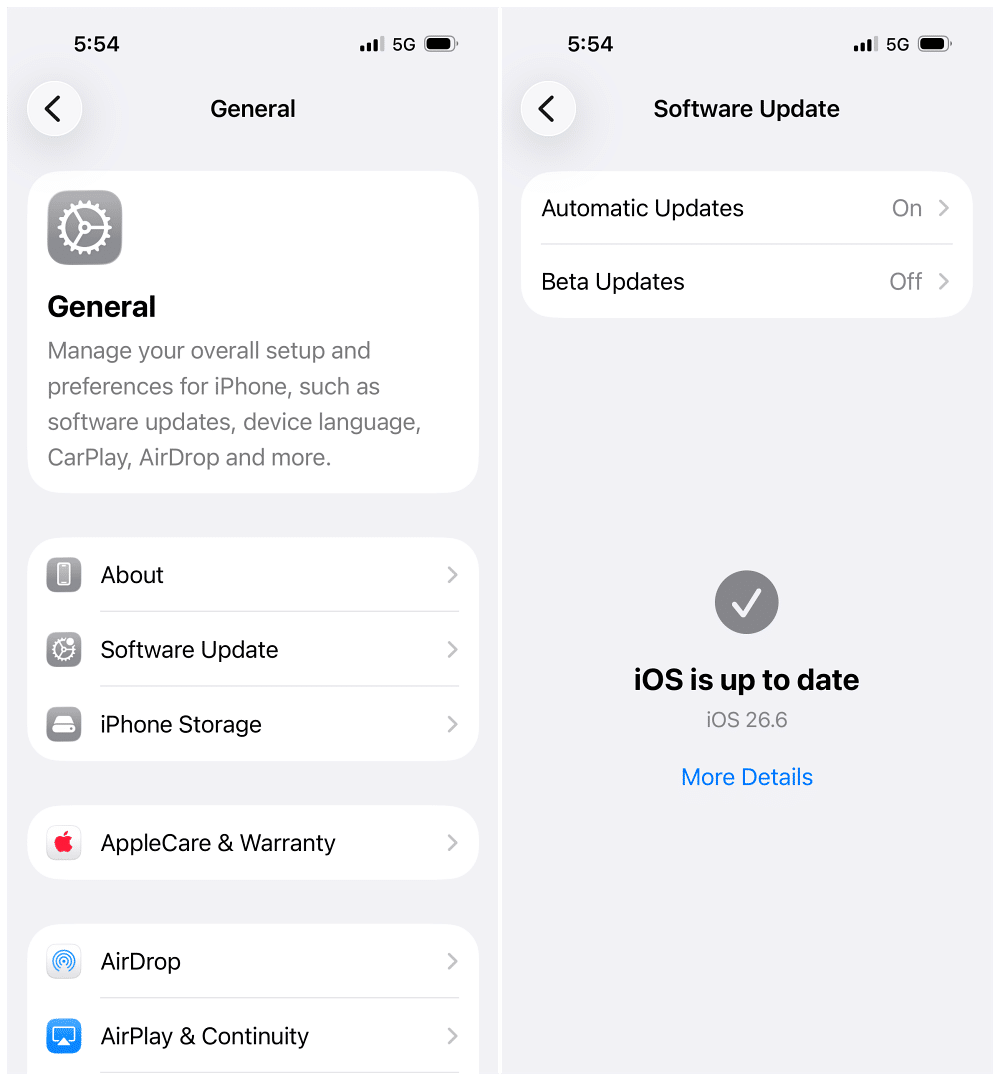
If the update doesn’t appear immediately, don’t worry. Apple distributes software updates in phases, so it may take a little longer to reach every device.
The good news is that this is a stable public release, not a beta, so there’s no need to worry about the risks that typically come with developer or public beta software.
Apple Maps Gets a BlastDoor-Style Security Upgrade
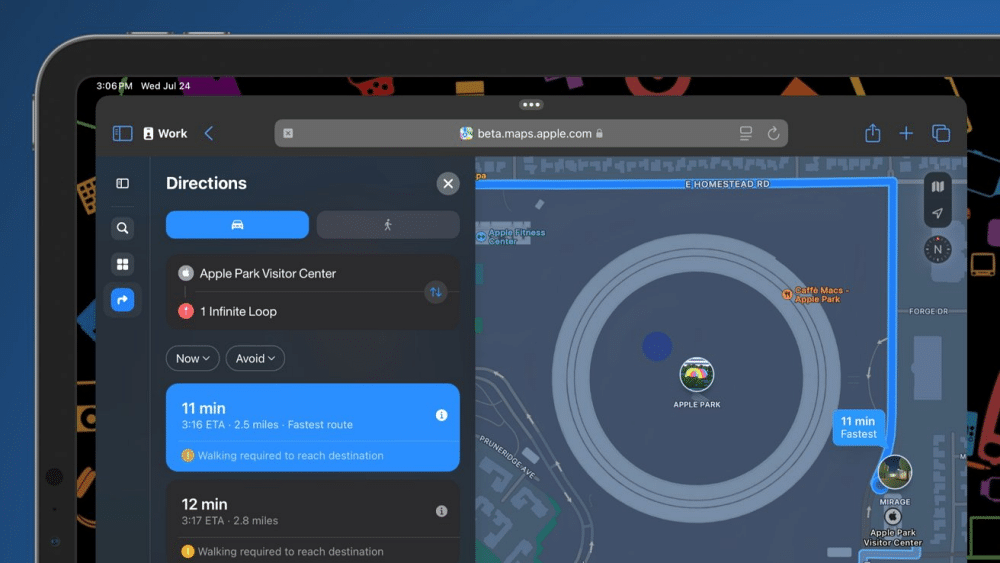
One of the biggest security improvements in iOS 26.6 isn’t something you’ll notice while using your iPhone.
Apple has quietly introduced a new sandboxing system for Apple Maps, inspired by the BlastDoor security architecture that has protected Messages since iOS 14.
Why does Maps need additional protection?
Modern navigation apps constantly process information they didn’t create themselves, including:
- Business listings
- Shared locations
- Route information
- User-submitted updates
- Other online mapping data
With iOS 26.6, Apple now processes that incoming information inside an isolated environment before handing it to the main Maps app.
If malicious data attempts to exploit a vulnerability, the sandbox contains it before it can reach the rest of your system, helping protect your contacts, photos, and personal data.
You won’t see any new buttons or settings related to this feature, and that’s intentional. It’s designed to work silently in the background while making Apple Maps significantly more resilient against future attacks.
Also Check: Tired of the Apple Maps Voice? Here’s an Easy Way to Change It
Apple Finally Explains the Blocked Contacts Limit
If you’ve ever tried blocking another spam number only to find that nothing happened, you’re not alone. Until now, iOS simply stopped adding blocked contacts after reaching its internal limit, without explaining why.
With iOS 26.6, Apple finally fixes that.
Once you reach the 20,000-contact blocking limit, iOS now displays a message explaining that you’ve reached the maximum number of blocked contacts.
It also directs you to: Settings → Apps → Phone → Blocked Contacts
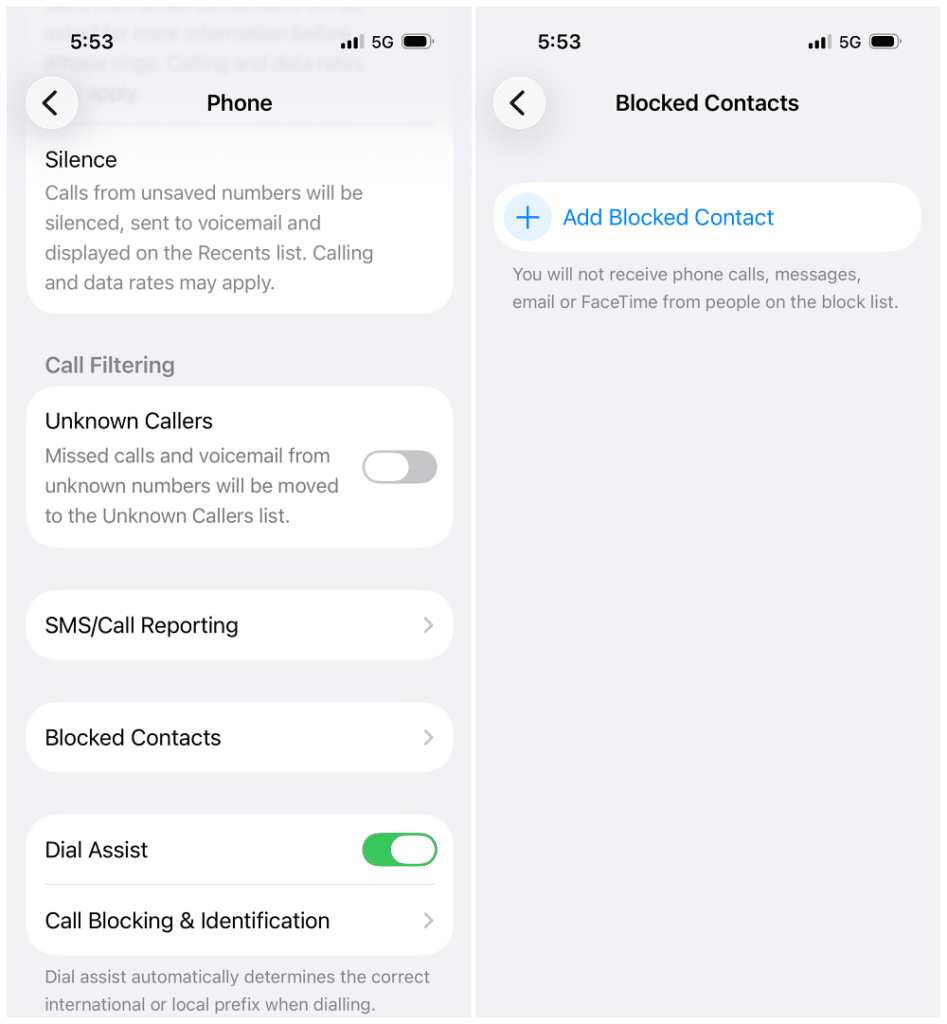
From there, you can remove older blocked numbers before adding new ones.
While most people will never reach 20,000 blocked contacts, the limit is more realistic than it sounds given today’s volume of spam calls and scam text messages.
Interestingly, this improvement first appeared in the iOS 26.6 beta back in June before making its way into the final public release.
Messages Can Better Identify Suspicious Texts
Apple has also improved how the Messages app handles suspicious text messages.
According to testing by BGR, iOS 26.6 is better at recognizing potentially harmful messages and now encourages users to report suspicious texts directly to Apple instead of leaving them to manually document and report the message themselves.
It’s a relatively small addition, but it fits Apple’s broader security strategy throughout the iOS 26 lifecycle: bringing important safety decisions directly into the user experience instead of hiding them deep inside settings.
The Biggest Reason to Update: 78 Security Fixes
The biggest improvement in iOS 26.6 isn’t a new feature; it’s what you don’t see.
According to Apple’s official security release notes, along with independent analysis from TidBITS and 9to5Mac, iOS 26.6 patches 78 security vulnerabilities affecting iPhones and iPads.
The fixes span critical system components, including:
- Kernel
- WebKit
- ImageIO
- SceneKit
- Media frameworks
- System services
- Numerous additional Apple frameworks
Several of the patched vulnerabilities were particularly significant, including flaws that could potentially allow malicious apps to gain elevated privileges, bypass security protections, or execute unauthorized code.
Several High-Risk Vulnerabilities Were Patched
Among the most notable fixes included in iOS 26.6 are:
- AVEVideoEncoder: A vulnerability that could have allowed a malicious app to execute arbitrary code with kernel-level privileges.
- CloudAttestation: A flaw that could have enabled apps to bypass Apple’s code-signing protections.
- Game Center: A sandbox escape vulnerability that could have allowed an app to access resources outside its intended environment.
- MediaRemote: A security issue involving file-path handling that could have resulted in elevated system privileges.
- Siri: A vulnerability that could have exposed user information to apps without proper authorization.
- ImageIO: An integer overflow bug that could have triggered arbitrary code execution simply by processing a specially crafted image.
The encouraging news is that Apple says none of these vulnerabilities were known to have been actively exploited before the update was released. That means iOS 26.6 is largely a preventative security update rather than an emergency response to attacks already happening in the wild.
One particularly interesting detail from Apple’s security bulletin is the list of credited researchers. Alongside independent security researchers, Anthropic’s Claude AI is credited with helping identify one of the vulnerabilities—a notable first for an Apple security release.
Smaller Fixes That Make Everyday Use Better
Beyond security improvements, iOS 26.6 quietly resolves several smaller issues that many users may have encountered over the past few months.
HDR Screenshots Look Correct Again
HDR screenshots shared through Messages no longer appear washed out or corrupted on the recipient’s device.
If you’ve ever sent a screenshot only to discover it looked completely different on someone else’s iPhone, this update addresses that issue.
HealthKit Data Is More Accurate
Apple has fixed a bug that could cause HealthKit to report unusually high resting heart rate readings.
For users who rely on Health and Fitness data to monitor long-term trends, this fix improves the reliability of those measurements.
Sticker Syncing Is More Reliable
Another bug affecting iCloud sticker syncing has been resolved.
Previously, stickers could occasionally become corrupted while syncing between Apple devices or after being shared. iOS 26.6 fixes that issue, making sticker collections more reliable across your devices.
Enterprise Wi-Fi Policies Work Properly
Apple also fixed an issue affecting enterprise deployments.
The DisableAssociationMACRandomization policy now correctly enforces Private Wi-Fi Address restrictions, helping organizations manage network security more consistently.
None of these fixes are headline features, but together they eliminate several small frustrations that improve the overall experience of using an iPhone every day.
Spotlight Is Quietly Preparing for iOS 27
One of the more interesting discoveries in iOS 26.6 isn’t visible at all.
Apple has rebuilt parts of Spotlight’s indexing system, allowing it to more efficiently organize information from:
- Apps
- Messages
- Emails
- Notes
- Phone calls
- Other on-device content
While this doesn’t noticeably change Spotlight today, it’s widely believed to be laying the foundation for the much smarter Siri experience arriving with iOS 27 later this year.
Rather than forcing millions of iPhones to completely rebuild their search index during the major iOS 27 upgrade, Apple appears to be spreading some of that work across iOS 26.6. Most users won’t notice anything different today, but the transition to iOS 27 should feel smoother because of it.
Keep in mind that the complete Apple Intelligence version of Siri will still require compatible hardware, so older iPhones won’t receive every new capability when iOS 27 launches.
Apple Is Quietly Preparing an Anti-Theft Feature
Researchers also uncovered evidence of an unannounced anti-theft system hidden inside iOS 26.6.
Although the feature isn’t enabled yet, the underlying code suggests Apple is developing a smarter form of Stolen Device Protection.
Based on the discovered code, the system could eventually:
- Detect sudden movements consistent with a phone being snatched.
- Monitor data from the accelerometer and gyroscope.
- Check whether a paired Apple Watch unexpectedly disconnects.
- Consider whether you’re connected to a familiar Wi-Fi network or trusted location.
If several of those signals occur together, the iPhone could automatically lock itself before a thief has time to access sensitive information.
Apple hasn’t officially announced the feature, so it’s unclear whether it will arrive in a future iOS 26 update or debut alongside iOS 27.
Should You Install iOS 26.6?
For most people, the answer is yes.
Even if none of the visible improvements matter to you, the 78 security patches alone make this one of the most important iPhone updates Apple has released this year.
The additional Maps protections, Messages improvements, Health fixes, Spotlight optimizations, and reliability updates only strengthen the case for installing it sooner rather than later.
If you’ve been avoiding beta software, this is exactly the type of stable release worth updating to.
Final Thoughts
iOS 26.6 isn’t the kind of update that introduces flashy redesigns or headline-grabbing features. Instead, it focuses on strengthening the parts of your iPhone that matter most: security, reliability, and long-term performance.
By patching 78 vulnerabilities, improving Apple Maps’ security architecture, refining Messages, fixing several everyday bugs, and quietly preparing the groundwork for iOS 27, Apple has delivered a maintenance release that’s far more significant than its version number suggests.
If your iPhone is eligible, there’s little reason to postpone installing iOS 26.6. It may not look exciting, but it’s one of the most worthwhile updates you’ll install this year.
Check out these helpful guides too: