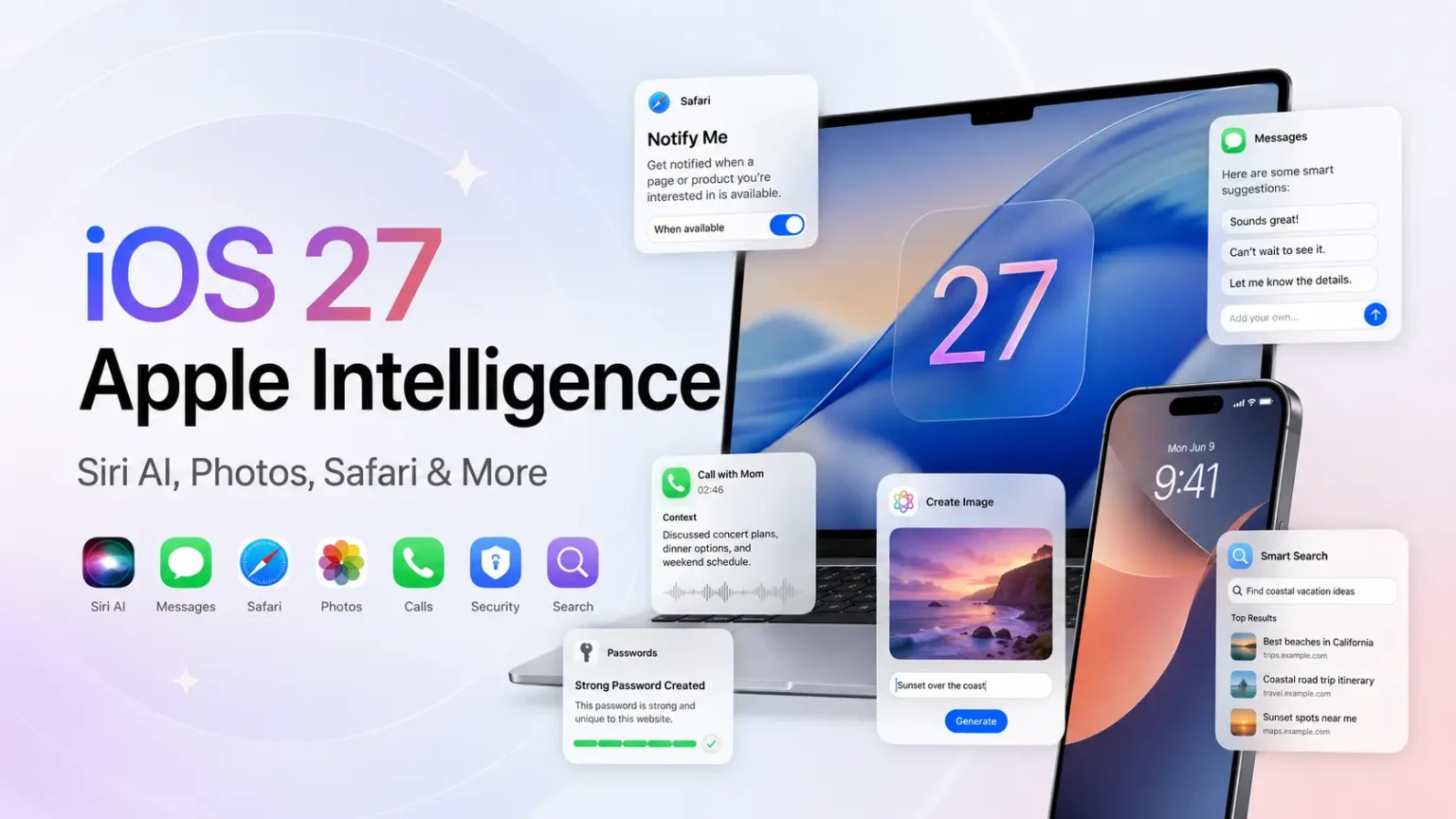
Apple has officially introduced the next generation of Apple Intelligence at WWDC26, and iOS 27 is getting some of the biggest AI upgrades we have seen on the iPhone so far. This year, Apple is not just adding one or two AI tools. Instead, it is bringing Apple Intelligence deeper into Siri, Photos, Safari, Messages, Mail, Calendar, Shortcuts, Passwords, Home, and accessibility features.
The biggest highlight is Siri AI, an entirely new version of Siri powered by Apple Intelligence. Apple says Siri AI is more conversational, more personal, and more capable of understanding what users need across apps, messages, emails, photos, and even what is currently on the screen.
Here are all the major iOS 27 Apple Intelligence features Apple announced.
1. Siri AI Gets a Major Upgrade
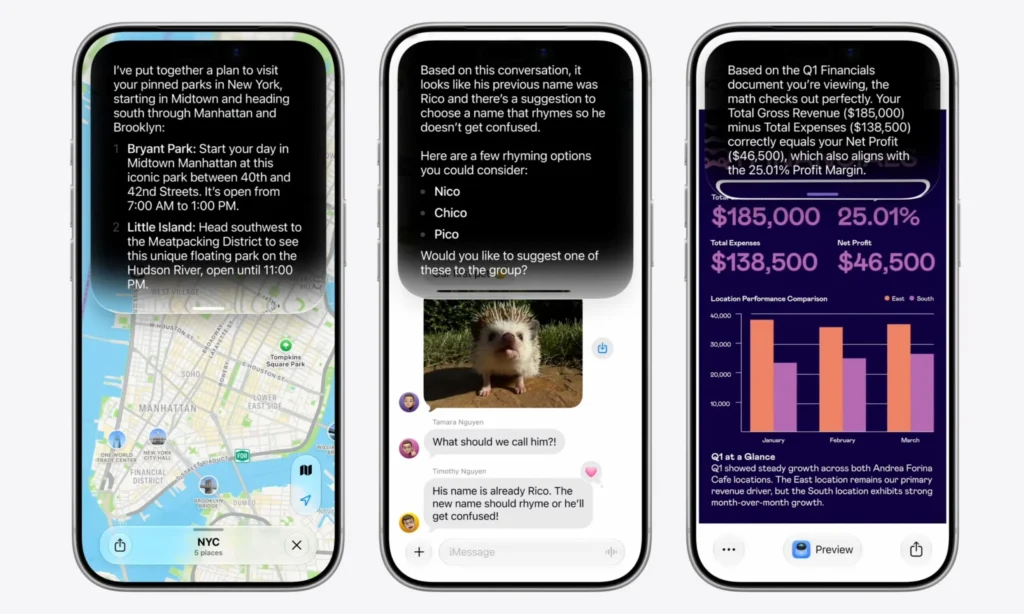
The biggest Apple Intelligence upgrade in iOS 27 is the new Siri AI. Apple says this is an entirely new version of Siri, designed to be more conversational, more personal, and much more useful across everyday tasks.
Unlike the older Siri, Siri AI can understand personal context, answer broader questions, and help users take action across apps. It can also understand what is on the screen, so users can ask follow-up questions or get help based on what they are currently viewing.
For example, you can ask Siri to find a restaurant recommendation from an old message, pull a hotel confirmation number from Mail, search for photos from a recent trip, or answer questions using information from the web.
This makes Siri much more practical in daily use, especially when you do not remember where a message, email, photo, or important detail is saved on your iPhone.
2. New Dedicated Siri App

Apple is also adding a new dedicated Siri app in iOS 27. This app gives users one place to revisit past Siri conversations, start new chats, and continue conversations across Apple devices.
According to Apple, the Siri app uses iCloud to privately sync conversation history across iPhone, iPad, Mac, Apple Watch, and Apple Vision Pro. So, users can start a conversation with Siri on one device and continue it later on another.
This is a major shift for Siri. Instead of being only a quick voice assistant for simple commands, Siri AI now works more like a full AI assistant that users can return to whenever they want to continue a conversation, check previous answers, or ask follow-up questions.
3. Visual Intelligence Comes to the Camera App

Another major iOS 27 AI feature is Visual Intelligence with Siri. On iPhone, Apple is bringing Siri’s visual understanding directly into the Camera app with a new Siri mode.
With this feature, users can point their iPhone camera at something, tap the shutter button, and ask Siri questions about what they are seeing. Apple says Siri mode in Camera can help users get information and take action based on the real world around them.
For example, users can ask Siri for nutritional insights about a plate of food, get details about an object, or even split a bill with friends using Apple Cash. This makes the iPhone camera more than just a tool for taking photos — it becomes a smarter way to understand and interact with what is in front of you.
Apple is also expanding Visual Intelligence with Siri to iPad, Mac, and Apple Vision Pro. However, for iPhone users, the biggest highlight is its direct integration inside the Camera app.
4. Siri Can Write and Edit Text Almost Anywhere
Writing Tools are getting a major upgrade with Siri AI in iOS 27. Users can ask Siri to help generate text, rewrite existing content, adjust the tone, and proofread what they have written.
This can be useful while writing emails, messages, notes, captions, documents, or other text on the iPhone. Instead of manually rewriting a sentence or checking grammar line by line, users can ask Siri to make the text clearer, shorter, more professional, or more friendly.
Siri can also help create replies that better match the conversation. For example, if you want to send a quick work update, Siri can help turn rough points into a polished message. If you are replying to a friend, it can make the response sound more casual.
Apple also says Writing Tools work in many places across the system, including most third-party apps and websites, making Siri AI more useful beyond Apple’s own apps.
5. Better Dictation and More Natural Siri Voice
Siri AI also improves voice interactions in iOS 27. Apple says Siri now sounds more natural and expressive, making conversations with the assistant feel less robotic and more fluid.
Dictation is also getting better across the system. With improved accuracy, iOS 27 can better understand spoken words, punctuation, capitalization, and formatting while users speak. This should make voice typing more useful when writing messages, notes, emails, reminders, or quick updates.
For users who prefer speaking instead of typing, these upgrades can make everyday tasks faster and smoother. Whether you are replying to a message or drafting a longer note, Siri AI and improved dictation should make the experience feel more polished.
6. AI Photo Editing in Photos
The Photos app is getting powerful Apple Intelligence editing tools in iOS 27. Apple has announced three major AI-powered features for Photos: Spatial Reframing, Extend, and an upgraded Clean Up tool.

Key AI Photo Editing Features in iOS 27
- Spatial Reframing
Spatial Reframing lets users adjust the composition of a photo after it has been taken. This means you can slightly change the perspective, framing, or angle of the image to make the shot look better, almost as if the camera position was adjusted while taking the photo. - Extend
The Extend tool helps users expand an image beyond its original frame. It can also help straighten a crooked horizon or change the photo’s aspect ratio without cutting out important parts of the image. This is useful when you want to make a photo fit better for wallpapers, social media posts, or different layouts. - Upgraded Clean Up Tool
The improved Clean Up tool helps remove unwanted objects, people, or distractions from a photo. Apple says the upgraded version can deliver more realistic results, even in complex scenes where the background, lighting, or details are harder to recreate.
7. Image Playground Gets Photorealistic Image Generation
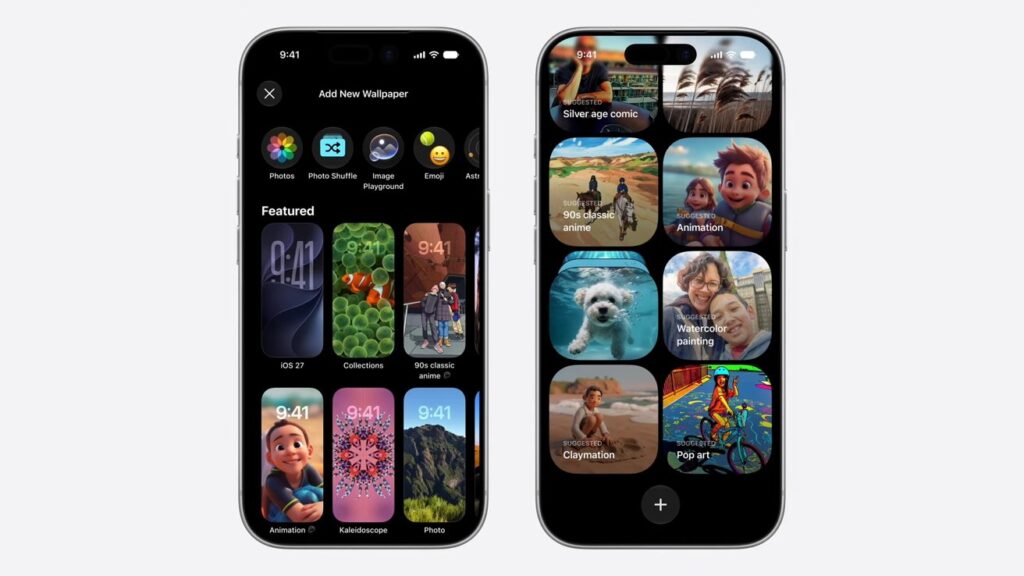
Image Playground is getting a major upgrade in iOS 27. Apple says users can now create photorealistic images, make changes to images by simply describing what they want, and use those AI-generated visuals in more places across the system.
With this update, users can create images for Messages, Lock Screen wallpapers, Contact Posters, and other uses in different formats, including portrait and landscape aspect ratios. This gives users more flexibility when creating custom visuals for personal use.
Apple also says images generated with Image Playground will include a hidden SynthID watermark, which helps identify that they were created using AI.
This is one of the biggest creative Apple Intelligence upgrades in iOS 27, especially for users who want to make custom wallpapers, profile images, or other visuals without relying on a separate app.
8. Safari Gets AI Tab Organization and Notify Me
Safari is also becoming smarter with Apple Intelligence in iOS 27. Apple says Safari can now automatically organize open tabs into relevant topics, making it easier for users to manage multiple tabs at once.
For example, if you are planning a trip and have several pages open for flights, hotels, restaurants, and places to visit, Safari can group those travel-related tabs together. This should make browsing feel cleaner and less overwhelming.
Another useful feature is Notify Me. With this, users can ask Safari to monitor a webpage for important changes, such as product restocks, price drops, ticket availability, or updates on a page. When Safari detects a change, it can send a notification so the user can take action quickly.
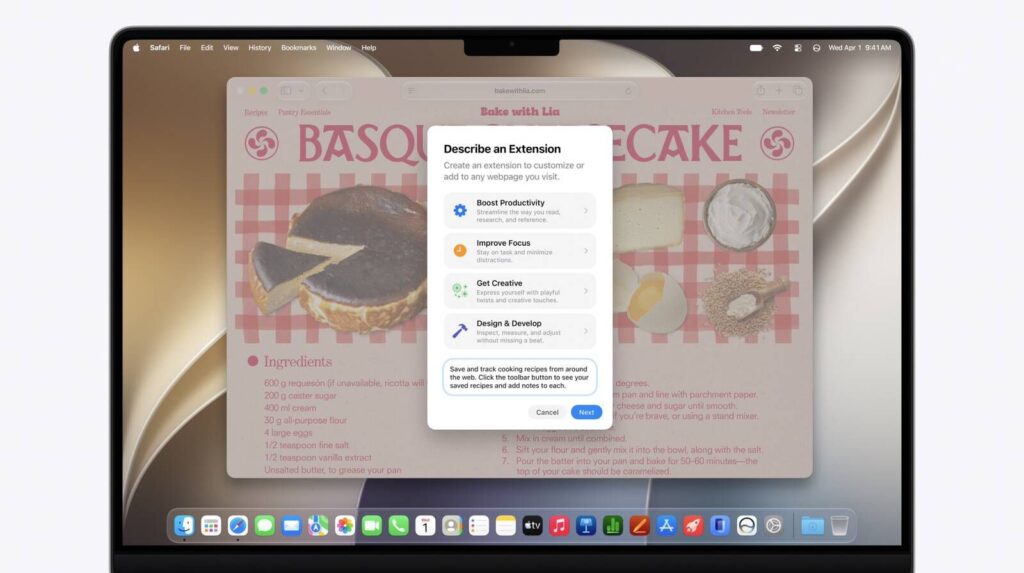
Apple is also adding Describe an Extension, which lets users create custom Safari extensions by simply describing what they want. Safari can then generate the extension directly in the toolbar, making browser customization easier even for users who do not know how to code.
9. Passwords App Can Auto-Fix Weak Passwords
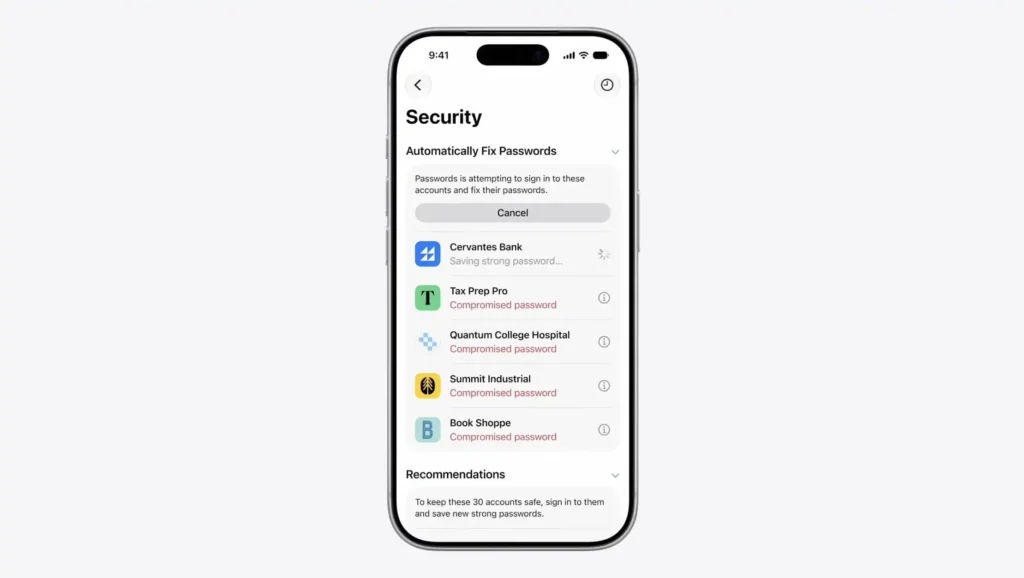
The Passwords app is also getting a useful Apple Intelligence upgrade in iOS 27. Apple says the app can automatically update eligible weak or compromised passwords to stronger passwords with just a tap.
This feature works with Apple Intelligence and Safari to securely navigate supported websites, sign in, and update account passwords on the user’s behalf. Instead of manually visiting each website and changing passwords one by one, users can let the Passwords app handle eligible updates more quickly.
It is a practical security upgrade because it helps users strengthen their accounts with less effort, especially if they have reused, weak, or compromised passwords saved on their iPhone.
10. Smarter Suggestions in Messages and Mail

Messages and Mail are also getting more helpful with Apple Intelligence in iOS 27. In Messages, the system can show one-tap suggestions based on the context of a conversation.
For example, if someone shares a task, plan, or important detail, Messages may suggest creating a reminder, adding a note, or taking another useful action. If someone asks for photos, Messages can also help users find relevant images by recognizing keywords, locations, people, and details from the photo library.
Mail is getting smarter too, with more useful suggestions and support for actions that can work with third-party apps. Smart Reply in Mail and Messages can also create more relevant responses based on the conversation, helping replies feel more natural and less generic.
11. Call Context in the Phone App
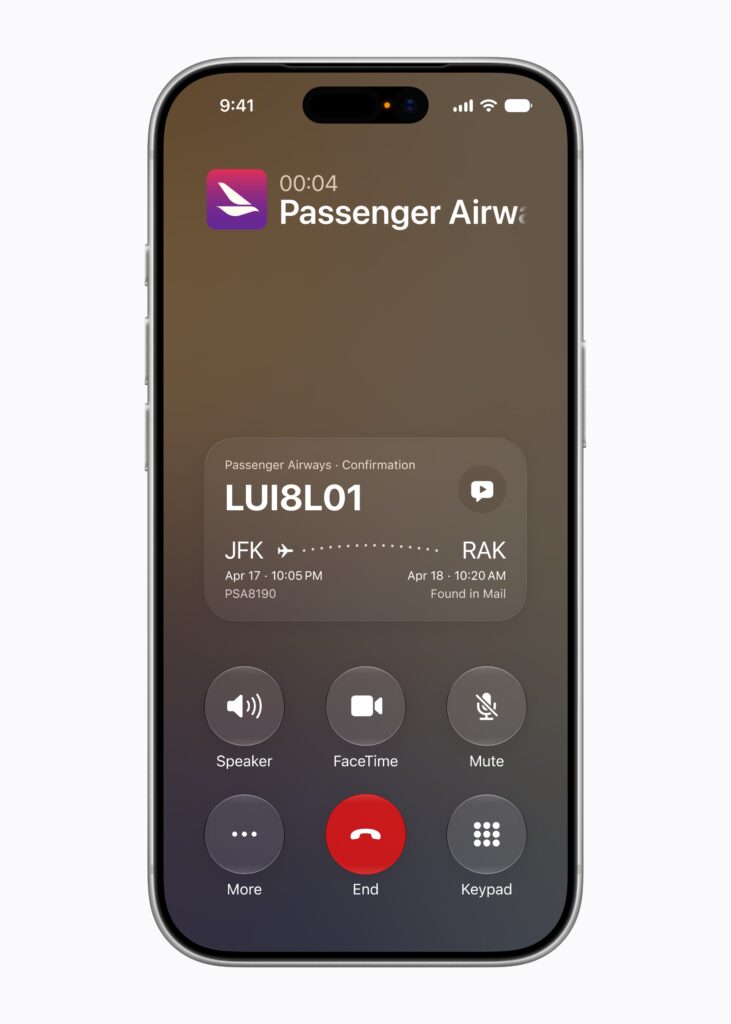
iOS 27 also adds a new Apple Intelligence feature called Call Context in the Phone app. When users call a business, the Phone app can show relevant details that may be useful during the call, such as a confirmation code, reservation number, or booking detail from Mail.
For example, if you are calling an airline to change a flight, Call Context may surface your flight confirmation code on the screen. If you are calling a restaurant or hotel, it may show the related reservation information so you do not have to search through emails manually.
Apple says Call Context looks at who the user is calling, not what they are saying during the call. The feature also runs entirely on device, which helps keep the experience private while still making phone calls more useful.
12. Calendar Supports Natural Language Events
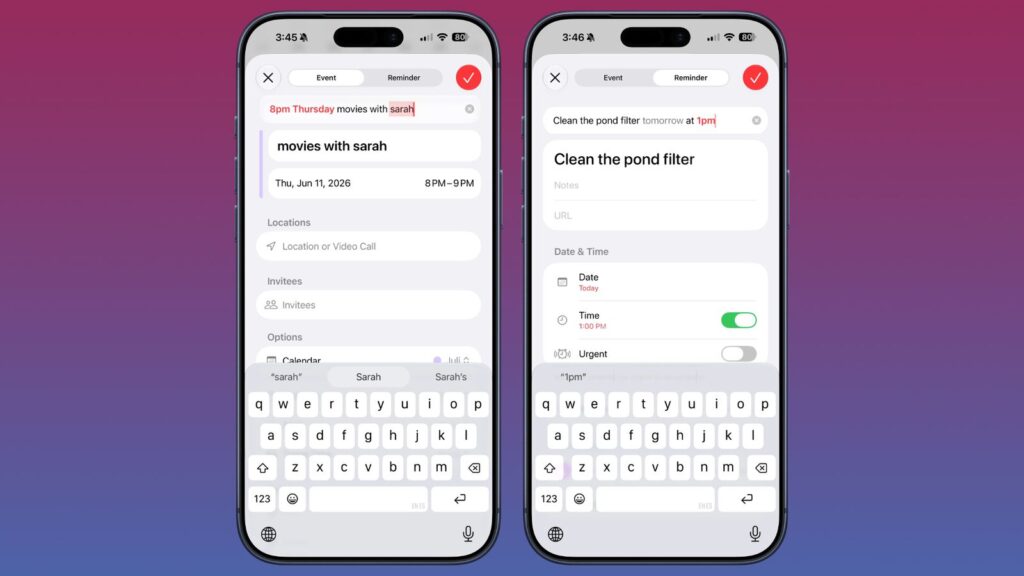
Calendar is also getting smarter with Apple Intelligence in iOS 27. Apple says users can add or modify Calendar events just by describing what they want to schedule.
As users type, Calendar can identify important details like contacts, locations, dates, and times. It can also suggest a suitable event title, making the process faster and more natural.
For example, you could type something like “Dinner with Rahul at 8 PM on Friday,” and Calendar can understand the event details without requiring you to fill every field manually. This should make it easier to add meetings, dinners, travel plans, reminders, and personal events with less effort.
13. Shortcuts Gets “Describe a Shortcut”
Shortcuts has always been one of the most powerful apps on the iPhone, but it can also feel confusing for many users. With iOS 27, Apple is making it easier through a new Apple Intelligence feature called Describe a Shortcut.
Instead of manually building every step, users can simply explain the automation they want. Shortcuts can then understand the request and assemble the required actions automatically.
For example, users could ask Shortcuts to create an automation based on their first Calendar event, open productivity apps when they connect a keyboard, or turn on lights when a delivery notification arrives. Users can also describe changes if they want to adjust the shortcut later.
This makes Shortcuts much easier for everyday users who want automation without learning every action, condition, and setting manually.
14. Home App Gets AI Video Descriptions and Camera Search
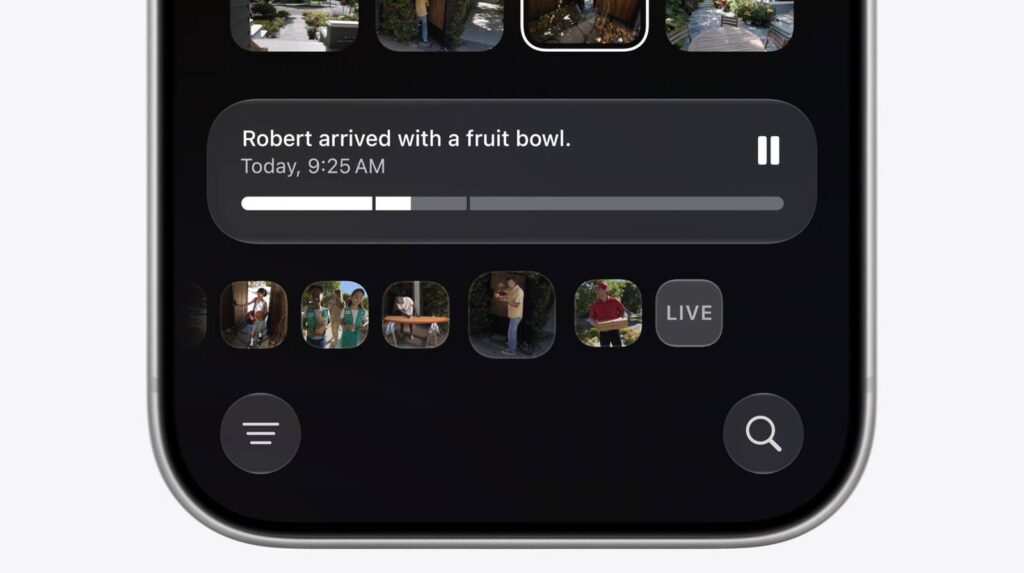
The Home app is also getting useful Apple Intelligence upgrades in iOS 27, especially for users with compatible Home cameras. Apple says the Home app can generate video descriptions, search through camera clips, and highlight important moments more easily.
Instead of watching every camera clip manually, users can quickly understand what happened through AI-generated descriptions. They can also search for specific events, such as a package delivery, a person at the door, or movement near the house.
The Home app can also group related accessory notifications into a single activity. This should help reduce notification clutter and make smart home alerts easier to understand at a glance.
15. Accessibility Features Powered by Apple Intelligence
Apple Intelligence is also improving accessibility features in iOS 27. Apple says features like VoiceOver, Live Recognition, Magnifier, Voice Control, and Accessibility Reader are getting new AI-powered capabilities.
With these upgrades, VoiceOver can provide richer image descriptions, helping users better understand photos, graphics, and visual content. Live Recognition can also let users ask questions about their surroundings, while Magnifier gets similar assistive features in a high-contrast interface.
Voice Control is becoming more intuitive too. Instead of memorizing exact button names or numbers, users can describe the onscreen controls they want to use. Accessibility Reader can also help with complex material by offering summaries and translations on demand.
Overall, these Apple Intelligence upgrades make iOS 27 more helpful for users who rely on accessibility tools every day.
16. File and Folder Name Suggestions
Apple Intelligence can also suggest names for files and folders based on their contents in iOS 27. This is a small but useful upgrade for users who regularly save documents, screenshots, PDFs, notes, or project folders.
Instead of manually thinking of a file name every time, users can get smarter suggestions that better match what is inside the file or folder. This can make it easier to keep files organized and find important documents later.
It may not be the flashiest Apple Intelligence feature, but it can save time for users who manage a lot of files on their iPhone, iPad, or Mac.
17. Genmoji Gets Better
Genmoji is also getting better in iOS 27. Apple says Genmoji quality has improved, and users can now describe the changes they want to make more easily.
This should make custom emoji creation more flexible and accurate. For example, users can create a specific expression, adjust the style, or make a personalized reaction that better matches the conversation.
It is a small but fun Apple Intelligence upgrade, especially for users who like creating custom reactions for Messages, stickers, and everyday chats.
18. Apple Foundation Models and Gemini Collaboration
Apple Intelligence in iOS 27 is powered by the next generation of Apple Foundation Models also Apple says these models are custom-built in collaboration with Google and its Gemini models to support deeper AI experiences across iPhone and other Apple devices.

These models run both on device and on servers using Private Cloud Compute. This allows Apple Intelligence to handle many personal tasks directly on the device, while more complex requests can use Apple’s private cloud architecture.
However, this does not mean users can manually choose Gemini, ChatGPT, or Claude as their default AI model in iOS 27. Apple has only confirmed the Gemini collaboration for powering the next generation of Apple Intelligence. So, unless Apple officially confirms model switching later, it is better to avoid writing that iOS 27 lets users switch between different AI models.
19. Privacy and Private Cloud Compute
Privacy remains one of the biggest parts of Apple Intelligence in iOS 27. Apple says its AI features use a mix of on-device processing and Private Cloud Compute.
Many requests are handled directly on the device, especially when they involve personal information. For more complex tasks, Apple Intelligence can use Private Cloud Compute, which is designed to process requests without storing the user’s personal data or making it accessible to Apple.
This matters because many iOS 27 AI features work with sensitive information, including messages, emails, photos, calendar events, calls, and personal context. By combining on-device intelligence with private cloud processing, Apple is trying to make its AI features useful while keeping user data protected.
20. Supported Devices for iOS 27 Apple Intelligence
Not every iPhone that supports iOS 27 will get the full Apple Intelligence experience. Apple Intelligence requires newer hardware, so many advanced AI features are limited to supported iPhone models.
Apple says Apple Intelligence is available on iPhone 15 Pro, iPhone 15 Pro Max, iPhone 16 models, and later. This means users with older iPhones may still be able to install iOS 27, but they may not receive all Apple Intelligence features.
So, before getting excited about Siri AI, Visual Intelligence, AI photo editing, and other iOS 27 AI tools, users should check whether their iPhone supports Apple Intelligence.
21. Availability, Languages, and Limits
Apple says the new Apple Intelligence features in iOS 27 are available for developer testing now through the Apple Developer Program. A public beta will be available through the Apple Beta Software Program next month, while the stable release is planned for fall 2026 with iOS 27 and other Apple software updates.
Apple Intelligence supports several languages, including English, Danish, Dutch, French, German, Italian, Norwegian, Portuguese, Spanish, Swedish, Turkish, Vietnamese, Chinese simplified, Chinese traditional, Japanese, and Korean. However, Apple notes that some features may not be available in all regions or languages.
Another important thing to know is that some Apple Intelligence features have daily usage limits. This includes image generation and other features that rely on powerful server models. Apple says increased access is available with most iCloud+ subscription plans, which also include Apple Intelligence support for compatible Home cameras.
Should You Be Excited About iOS 27 Apple Intelligence?
Yes, iOS 27 looks like a major step forward for AI on the iPhone. Apple is not only upgrading Siri but also bringing Apple Intelligence deeper into everyday apps like Photos, Safari, Mail, Messages, Phone, Calendar, Shortcuts, Passwords, and Home.
The biggest change is how naturally these AI features are built into the system. Instead of relying on a separate chatbot for every task, iOS 27 lets users ask Siri questions, search personal context, edit photos, create shortcuts, monitor webpages, improve writing, and manage daily tasks directly inside Apple’s own apps.
That said, not every user will get the same experience. Some Apple Intelligence features will depend on the iPhone model, supported language, region, and daily usage limits. So, while iOS 27 is an exciting update for supported devices, users with older iPhones may not receive the full set of AI features.
Conclusion
iOS 27 brings one of Apple’s biggest AI upgrades yet. With Siri AI, Visual Intelligence, AI-powered photo editing, smarter Safari browsing, improved Writing Tools, Image Playground upgrades, Passwords auto-fix, Call Context, natural-language Calendar events, smarter Messages and Mail, and privacy-focused Apple Intelligence architecture, the iPhone is becoming much more intelligent and useful.
For users with supported iPhones, especially iPhone 15 Pro, iPhone 15 Pro Max, iPhone 16 models, and newer, iOS 27 could be one of the most important software updates in years.
The biggest AI feature in iOS 27 is Siri AI, a redesigned version of Siri powered by Apple Intelligence. It can understand personal context, answer web-based questions, understand onscreen content, and help users take action across apps.
Yes, Apple has announced a dedicated Siri app where users can revisit previous conversations and continue chats across Apple devices.
Apple Intelligence in iOS 27 supports iPhone 16 models or later, iPhone 15 Pro, and iPhone 15 Pro Max.
Yes, iOS 27 adds AI-powered editing features in Photos, including Spatial Reframing, Extend, and an upgraded Clean Up tool.
Yes, Image Playground in iOS 27 supports photorealistic image generation and image modification by description. Apple says generated images include a hidden SynthID watermark.
Apple says Apple Intelligence uses on-device processing and Private Cloud Compute. When Private Cloud Compute handles requests, Apple says personal data is not stored or made accessible to Apple.
Apple says developer testing is available now, public beta arrives next month, and the stable release is planned for fall 2026.