If you picked up an iPhone 18 Pro this month and watched it reboot after Face ID failed to recognize you, you weren’t imagining it. Apple has now fixed that.
Apple released iOS 27.0.1 on September 28, 2026, exactly two weeks after iOS 27 launched on September 14. It’s the first update to iOS 27, and it’s a bug-fix release with no new features. Three fixes are listed, and two of them only apply to the iPhone 18 Pro and iPhone 18 Pro Max.
Here’s what changed, who needs it most, and what Apple’s notes leave out.
iOS 27.0.1 at a Glance
- Release date: September 28, 2026
- Build number: 24A446
- Update type: Bug fixes only, no new features
- Published security fixes: None
- Available for: Every iPhone that runs iOS 27 (full iOS 27 compatible devices list)
- Released alongside: iPadOS 27.0.1, macOS 27.0.1, and visionOS 27.0.1
The iPhone 18 Pro Face ID Restart Bug Is Fixed
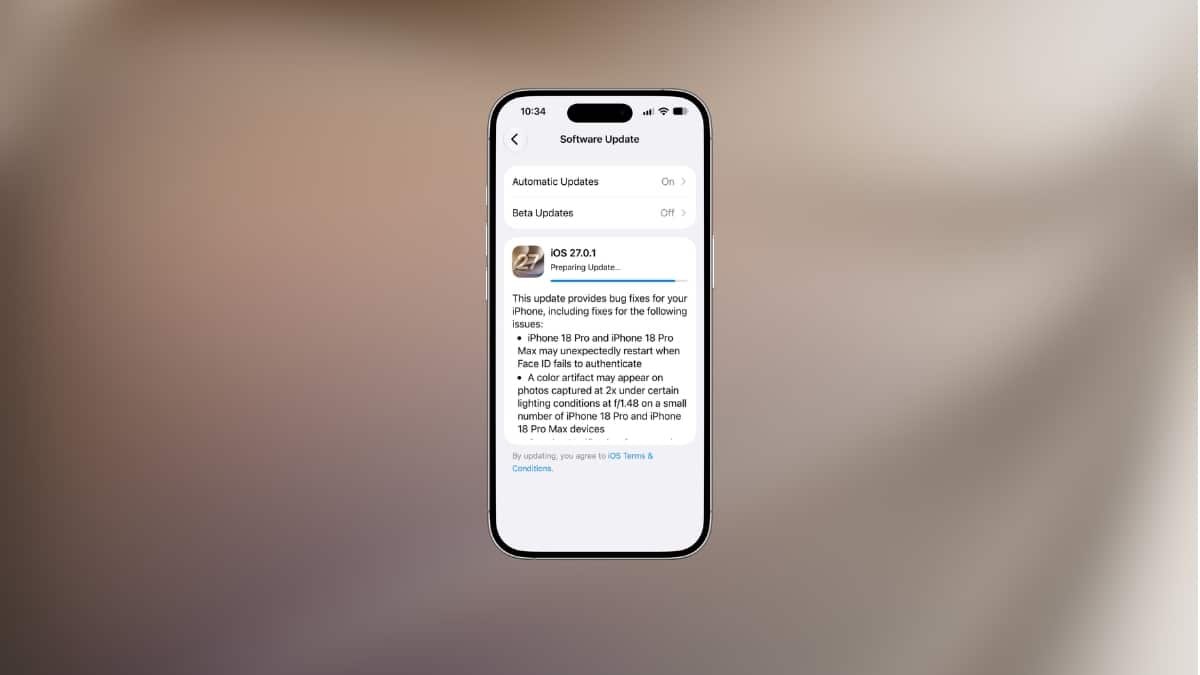
This is the headline fix. Apple’s release notes say iPhone 18 Pro and iPhone 18 Pro Max models “may unexpectedly restart when Face ID fails to authenticate.”
The problem showed up within days of launch. MacRumors reported that affected owners saw more than reboots: some got a “Face ID is Not Available” message during setup, apps refused to unlock with Face ID, and some phones froze outright. A failed face scan is routine. It happens when you’re wearing a mask, holding the phone at a bad angle, or checking it in bright sunlight. On an affected phone, each of those moments could trigger a restart.
A failed Face ID attempt should drop you to the passcode screen. Restarting instead suggests the failure path was crashing at the system level, and AppleInsider’s coverage points to Face ID kernel panics as the cause. Apple hasn’t explained the root cause publicly.
If you own an iPhone 18 Pro or Pro Max, install this update today.
A Camera Color Glitch on Some iPhone 18 Pro Photos
The second fix is also limited to the Pro models, and to a smaller group of them. According to Apple, “a color artifact may appear on photos captured at 2x under certain lighting conditions at f/1.48 on a small number of iPhone 18 Pro and iPhone 18 Pro Max devices.”
The detail worth noticing: the f/1.48 aperture points to the main camera, which means 2x shots here come from a crop of the main sensor rather than the telephoto lens. Many people use 2x for portraits and food shots, so if you’ve seen odd color patches in those photos, this is the likely cause.
Apple says only “a small number” of devices are affected and hasn’t said why. The update fixes new photos. It won’t repair images you’ve already taken, so reshoot anything important.
The Touchscreen Freeze That Hit Every iOS 27 iPhone
This one isn’t Pro-only. Apple says “opening Notification Center and Control Center simultaneously may cause the touchscreen to become unresponsive.”
You’ve probably done this by accident. Both panels open with a downward swipe from the top edge: the left side or center for Notification Center, the right corner for Control Center. Drag down with two fingers across the top, or trigger both in quick succession, and iOS 27 could stop responding to touch entirely. Cult of Mac called it a “nasty” freeze bug, and that fits: a phone that ignores your touch looks broken.
If you’re on any iPhone running iOS 27, this fix alone justifies the update.
What Apple’s Release Notes Don’t Tell You
Apple lists three fixes, but point releases usually include more than the notes admit. 9to5Mac points out that Apple’s official notes are rarely a complete list of changes.
A few things are worth knowing:
- No security patches this time. Apple published no CVE entries for iOS 27.0.1. On the same day, Apple released iOS 26.7.1 to patch a CoreGraphics flaw it says was used in “an extremely sophisticated attack” against specific individuals on older software. MacRumors reports that the flaw doesn’t affect iOS 27. If you’ve stayed on iOS 26, install 26.7.1 now.
- Other bugs may be fixed quietly. AppleInsider mentions reports of Neural Engine timeouts after launch. Apple’s notes don’t list a fix for this, so treat it as unconfirmed until owners report back.
- No new features. Apple Intelligence and Siri AI behave the same as on iOS 27. New features, if any, will likely arrive in iOS 27.1 or later.
For a full record of iOS 27’s launch security fixes, see Apple’s security content page for iOS 27.
Should You Install iOS 27.0.1 Now?
Your answer depends on which iPhone you have and whether you’ve moved to iOS 27 yet.
- iPhone 18 Pro or Pro Max: Update now. It fixes both Pro-only bugs.
- Any other iPhone on iOS 27: Update. The touchscreen freeze affects you, and the risk is low.
- Still on iOS 26: Install iOS 26.7.1 for the security fix. Moving to iOS 27 is a separate decision. If you’ve been waiting for the first bug-fix release before upgrading, this is it.
If you’re thinking about upgrading from last year’s model, our iPhone 18 Pro vs iPhone 17 Pro comparison covers whether the jump is worth it.
How to Download and Install iOS 27.0.1
The update arrives over the air. To install it manually:
- Open Settings on your iPhone.
- Tap General, then Software Update.
- Tap Update Now when iOS 27.0.1 appears.
- Enter your passcode and keep the phone on Wi-Fi with at least 50% battery, or plug it in.
To confirm it installed, go to Settings > General > About and check that the iOS Version shows 27.0.1.
Signing Off
iOS 27.0.1 is small. It fixes a Face ID restart bug that made new iPhone 18 Pro models look defective, a camera color glitch on a handful of units, and a touchscreen freeze that could hit any iPhone on iOS 27.
None of that will show up in an Apple ad, but it’s what makes a new phone feel reliable. Install it, and if your iPhone 18 Pro still restarts after a failed Face ID scan, contact Apple Support.
Make the most of your Apple devices: