You tap your phone, the terminal beeps, and you walk out. Nobody thinks about what happened in that half-second. That half-second is exactly where Apple Pay and Google Wallet differ most.
Both wallets turn your phone into a contactless card and hide your real card number from the store. They just protect it in different places: Apple locks it into a dedicated chip, while Google relies on software and short-lived cloud credentials. Both also shipped major updates in 2026, with Apple’s iOS 27 checkout redesign and Google Wallet’s I/O 2026 overhaul.
Here’s how the two compare on the features you’ll use daily and the security you never see.
Apple Pay vs. Google Wallet at a Glance
| Apple Pay | Google Wallet | |
|---|---|---|
| Works on | iPhone, Apple Watch, iPad, Mac | Android phones, Wear OS watches |
| Where the card lives | Device Account Number in the Secure Element chip | Device token (virtual account number) via Host Card Emulation |
| Card number sent to the store | Never | Never |
| Authentication | Face ID, Touch ID, Optic ID, or passcode for each payment | Screen lock or Class 3 biometrics, valid for about three minutes |
| Transit without unlocking | Yes (Express Transit) | Yes (optional setting) |
| Lost phone | Lost Mode in Find My suspends cards | Find Hub “Mark as lost” locks and signs out the device |
| Purchase data | Apple doesn’t keep card transactions tied to you | Google stores transaction history for in-app features |
| India tap-to-pay | Live since September 30, 2026 (Axis Bank credit cards) | Not available; payments run through the separate Google Pay app |
Where Your Card Actually Lives: Secure Element vs. Cloud Tokens
Neither wallet stores your real card number on the phone. The difference is what sits there instead.
Apple Pay: a dedicated payment chip
When you add a card, your bank creates a unique Device Account Number, encrypts it, and Apple stores it in the Secure Element. That chip runs the Java Card platform and is certified through the EMVCo Security Evaluation process and the Common Criteria standard. The number stays isolated from iOS, never reaches Apple’s servers, and never goes into an iCloud backup.
Each payment sends that Device Account Number plus a one-time dynamic security code. Your bank checks the code to confirm it came from your specific device. Apple’s security guide adds a detail most comparisons skip: the issuer can block the Device Account Number from working on a magnetic stripe, over the phone, or on websites. Even a copied token is close to useless.
Google Wallet: device tokens without a chip
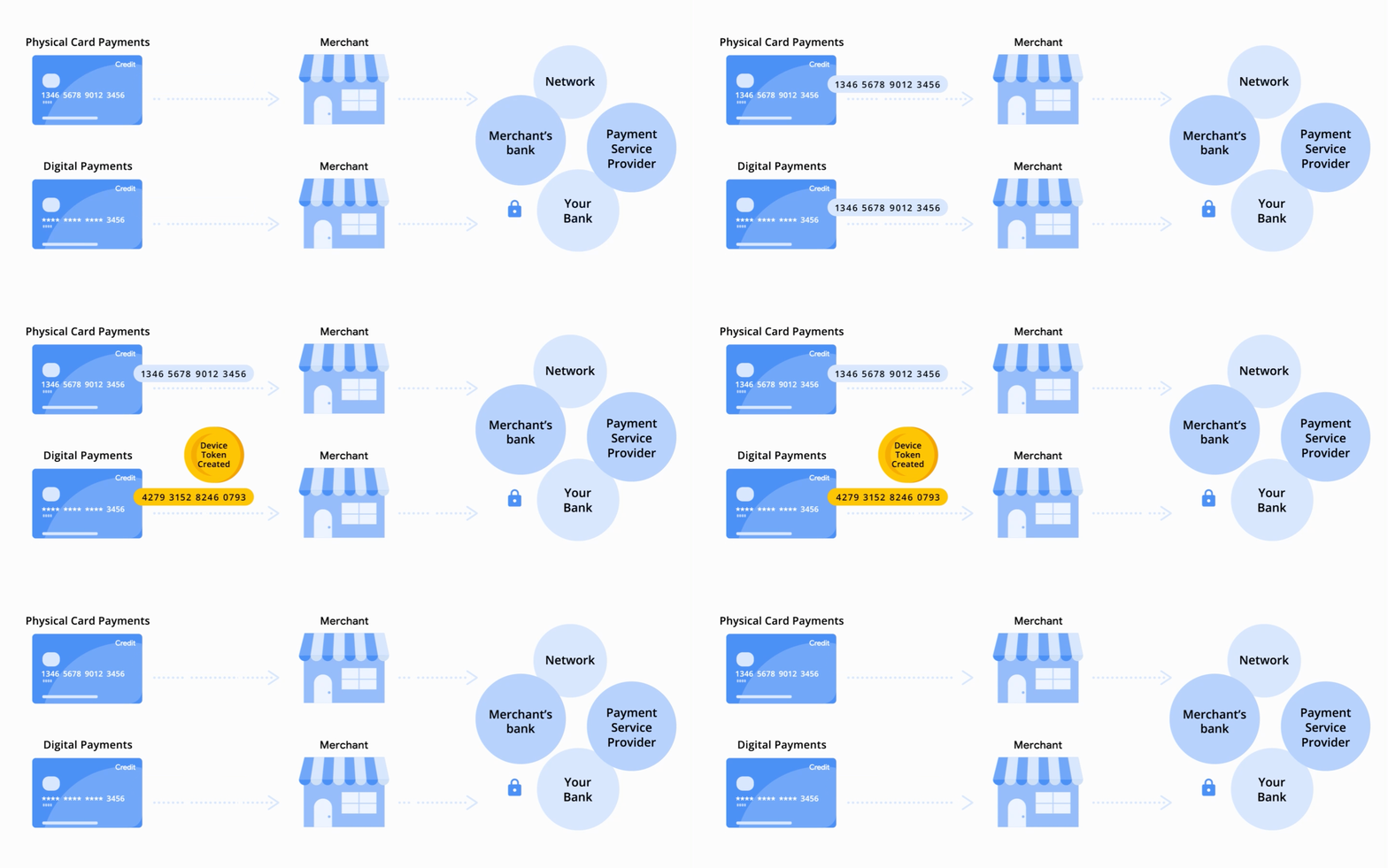
Google Wallet creates a device-specific virtual account number (Google’s developer docs call it a DPAN) for every card you add. Only your bank and the card network ever see your real card number, so a merchant breach can’t leak it.
Wallet emulates the card in software using Host Card Emulation (HCE) rather than a dedicated chip. This choice dates back more than a decade. Google’s original 2011 wallet did use a Secure Element, but carriers wanted that chip tied to their SIM cards. Google switched to HCE with Android 4.4 so Wallet could work on any NFC phone without carrier approval. HCE makes up for the missing chip with tokenization and limited-use keys that expire quickly.
So which is safer? For the threat most people face, a stolen card number from a hacked retailer, both close the same door. Apple’s model adds hardware isolation on top, which is stronger in theory against malware on the phone itself. Google’s model trades some of that isolation for working across hundreds of Android phones from different manufacturers.
Every Tap vs. a Three-Minute Window
You can actually feel the next difference at the counter.
Apple Pay asks you to authenticate every single payment. On a Face ID iPhone, you double-click the side button, glance at the screen, and hold it near the reader. A passcode on the device is mandatory. The only exception is Express Transit, which lets you tap through supported fare gates without Face ID.
Google Wallet works on a time window. Unlock your phone with a PIN, pattern, password, or Class 3 biometric, and you can tap to pay for roughly three minutes. After that, Wallet asks you to “Verify it’s you” again. Google rejects weaker unlock methods outright: Class 1 and Class 2 biometrics, Smart Unlock, and Knock to Unlock don’t count. Pixel 7 and Pixel 7 Pro owners can’t use Face Unlock for tap to pay either.
Picture a thief grabbing your unlocked Android phone right after you checked a message. That person has a short window to pay with it. An iPhone in the same situation still needs your face or passcode before any card works.
Google is testing changes here. Android Authority spotted a new “Tap to pay” entry under Wallet’s Verification settings in version 26.42, reported on October 27, 2026. Google later clarified the option doesn’t skip authentication. It hasn’t announced a release date.
Lost Your Phone? How Each Wallet Shuts Down
Both wallets let you kill payments remotely. Learn the steps before you need them.
On iPhone: Open Find My on another Apple device or go to iCloud.com, select your phone, and turn on Lost Mode. Apple Pay suspends immediately, and several banks confirm this works even when the lost phone is offline. Erasing the device remotely tells the Secure Element to mark every card as terminated.
On Android: Go to Find Hub on any browser, select your phone, and choose Mark as lost. You’ll need your device PIN, pattern, or password. The phone locks and signs out of your Google account. Choose Erase device if you don’t expect to get it back, which removes Wallet entirely.
On either platform, you can also call your bank to suspend the token. Your physical card stays active unless you cancel it separately, which is handy if you still need to pay for a cab home.
What Apple and Google Learn About Your Purchases
Security keeps strangers out. Privacy decides how much the wallet company itself knows.
Apple’s position is narrow by design. For credit, debit, and prepaid cards, Apple says it doesn’t retain transaction information that can be tied to you. The record stays between you, the merchant, and your bank. Apple does collect some signals when you add a card, such as device usage patterns, to help your bank judge eligibility and fraud risk.
Google keeps more. According to Google’s support pages, it uses transaction data to show your purchase history, resolve problems, and power features. Google also flags suspicious payments and can tell merchants whether you have Google Pay set up, which you can turn off in privacy settings. 9to5Google has spotted upcoming settings that offer personalized recommendations based on your purchase and pass history.
Google’s extra data powers features like automatic pass syncing from Gmail. If minimal data sharing is your priority, Apple wins this round.
What’s New in 2026: iOS 27 Apple Pay vs. Google Wallet’s Redesign
The two companies spent 2026 improving different things. Apple focused on checkout. Google focused on travel and passes.
Apple Pay in iOS 27
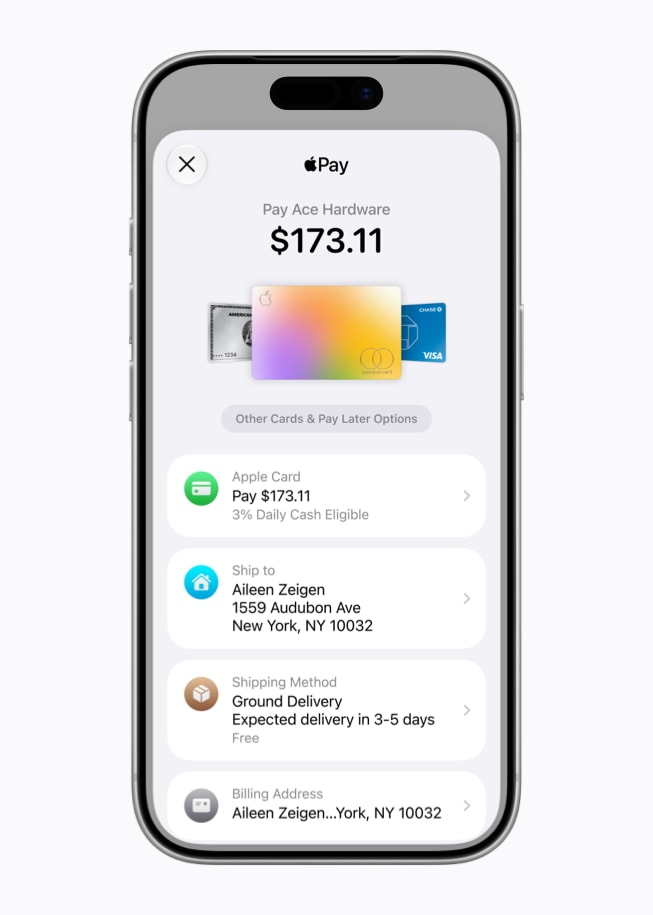
- Redesigned checkout sheet. You swipe between cards during online and in-app checkout, or tap to see a grid of all of them. Eligible cards show rewards balances, debit account balances, and pay-later options before you commit.
- American Express rewards. A “Use Rewards” option lets eligible Amex cardholders apply Membership Rewards points online and in apps. Each point is worth 0.7 cents, so 10,000 points cover $70.
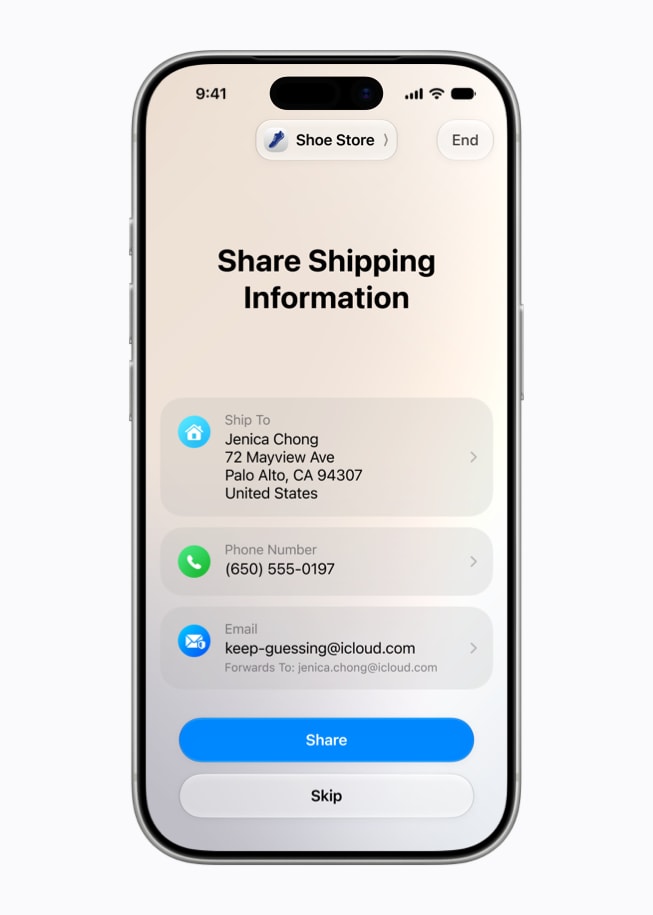
- Tap to Share. In participating stores, you tap your iPhone to a merchant’s iPhone to share contact details, a shipping address, and loyalty info, view your basket live, and then pay.
- Debit card reloads. Customers of select banks can add money to a supported debit card from Wallet or during checkout.
Apple Wallet itself also picked up receipt-based bill splitting through Apple Cash (U.S. only) and custom passes. Our full breakdown of Apple Wallet in iOS 27 covers those. Walmart also started accepting Apple Pay and says all U.S. stores will support it by the end of 2026.
Google Wallet in 2026
- Redesigned home screen. Wallet now surfaces time-sensitive items, like a full-screen boarding pass right before a flight. A “View more” button opens a searchable hub that includes transaction details.
- Live updates. Flight and event passes alert you to gate changes and delays.
- Loyalty sign-up after a tap. If you pay contactless at a store whose rewards program you haven’t joined, Wallet prompts you to enroll.
- Receipts. Retailers can push digital receipts into Wallet through a new API, and Google Play Services v26.40 (October 2026) added receipt scanning.
- Cross-device Payment Verification. When you buy something on a desktop, you approve it on your Android phone with your fingerprint, face, or PIN instead of waiting for an SMS code. Google built it to meet Strong Customer Authentication rules in the EU and UK.
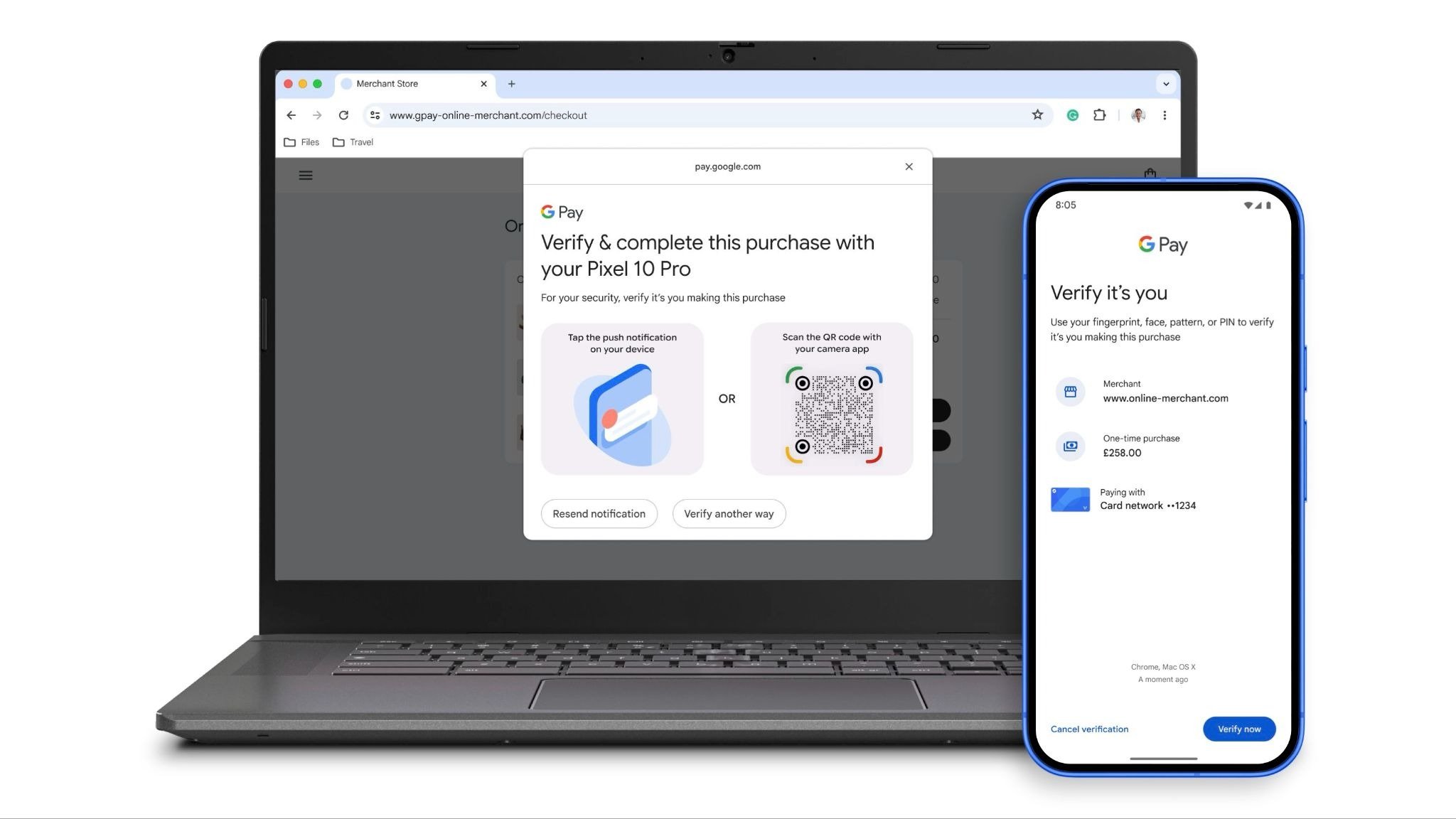
Google announced most of these at I/O 2026; our complete Google I/O 2026 recap has the wider context. Cross-device verification is the most interesting security addition of the year, because it brings tokenized, biometric-approved payments to the desktop browser, where card fraud is most common.
Digital IDs: Passports Now Live in Both Wallets
Apple launched Digital ID on November 12, 2025. You scan your U.S. passport’s photo page and chip, then verify with a selfie. TSA accepts it at more than 250 U.S. airports for domestic flights, but it doesn’t replace a passport for international travel.
Google Wallet supports passport-based ID passes in the U.S., UK, Singapore, Taiwan, and Brazil, plus Aadhaar Verifiable Credentials in India. Google also lets apps request only the specific details they need (it demoed this with Uber and TurboTax) instead of your full ID.
Can You Use Them in India?
This is where the comparison flips, especially if you’re reading from India.
Apple Pay went live in India on September 30, 2026, but only for eligible Axis Bank credit cards on Visa and Mastercard. RuPay, American Express, and debit cards don’t work yet, and HDFC Bank, ICICI Bank, and SBI Card haven’t joined. Our guide to Apple Pay in India lists supported cards and where you can pay.
Google Wallet launched in India in May 2024 for boarding passes, tickets, and loyalty cards only. It doesn’t support tap to pay there. Card and UPI payments run through the separate Google Pay app instead.
Platform lock-in also still applies everywhere. Apple Pay works only on Apple devices, and Google Wallet works only on Android and Wear OS. Apple did open the iPhone’s NFC chip to third-party payment apps with iOS 18.1 in the EU and seven other countries, including the U.S. and UK. Google Wallet’s tap to pay still isn’t available on iPhone.
Final Thoughts
The tap at the counter looks identical, but the protection behind it isn’t. Apple Pay is the stricter wallet: a dedicated chip, authentication on every payment, and less purchase data shared with Apple.
Google Wallet gives a little of that up for convenience and does more with passes, travel, and desktop checkout. Your phone has already made the choice for you, so the practical step is the same on both: set up Find My or Find Hub today, before you need it.