Digging through a bag for a gym membership card, or passing a calculator around a table to split a dinner bill, is the kind of small friction Apple Wallet was supposed to erase years ago. It hasn’t fully gotten there. iOS 27 closes a lot of that gap.
Apple released iOS 27 on September 14, 2026, alongside iPadOS 27, macOS Golden Gate, and watchOS 27, following its unveiling at WWDC on June 8. Siri AI got most of the keynote attention, but Apple Wallet quietly picked up one of its biggest feature sets in years. Here’s what actually changed, what it needs from your iPhone, and who benefits most.
Split Bill With Apple Cash Is the Headline Feature
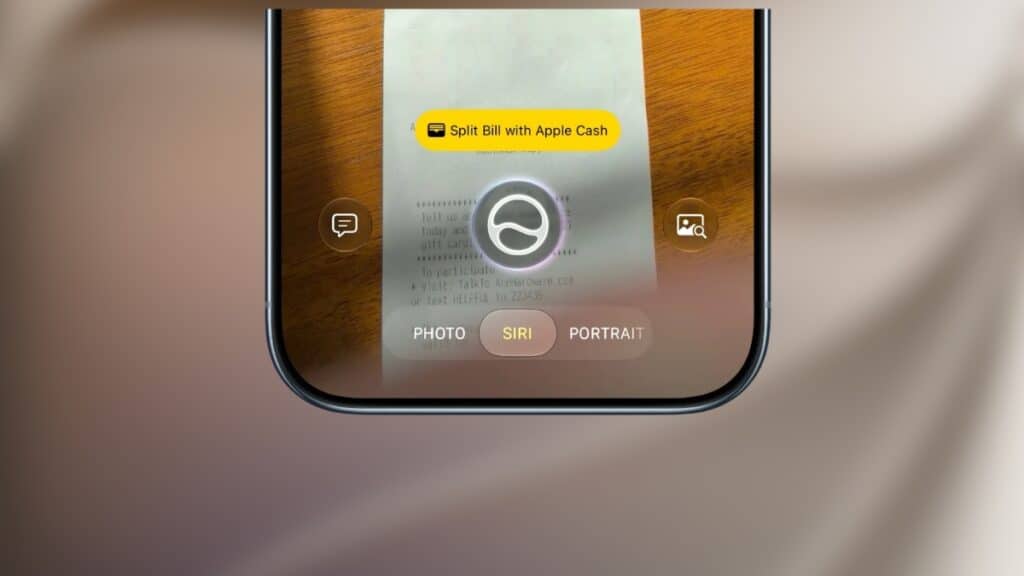
Point your iPhone camera at a restaurant receipt using the new Siri mode in the Camera app, or open the same tool in Messages or Wallet, and Apple Intelligence reads every line item on the bill. Each person at the table selects what they ordered. Wallet calculates individual totals, including a proportional share of tax and tip, then lets you send Apple Cash requests or pay your own share directly.
It’s a genuinely useful mechanism, not just a receipt scanner. Visual Intelligence separates itemized charges from tax and tip automatically, something manual bill-splitting apps still make you do by hand.
Two real limits apply. Apple Cash runs through Green Dot Bank and works only in the United States, so the feature disappears entirely outside the US. It also requires Siri AI on an Apple Intelligence-enabled device: an iPhone 16 or later, iPhone 15 Pro, iPhone 15 Pro Max, or a compatible iPad. If you’re a US-based iPhone 15 Pro or newer owner who splits checks often, this is the most immediately useful Wallet change in years. Everyone else still gets the rest of this list.
Create a Pass Turns Any Card Into a Digital One
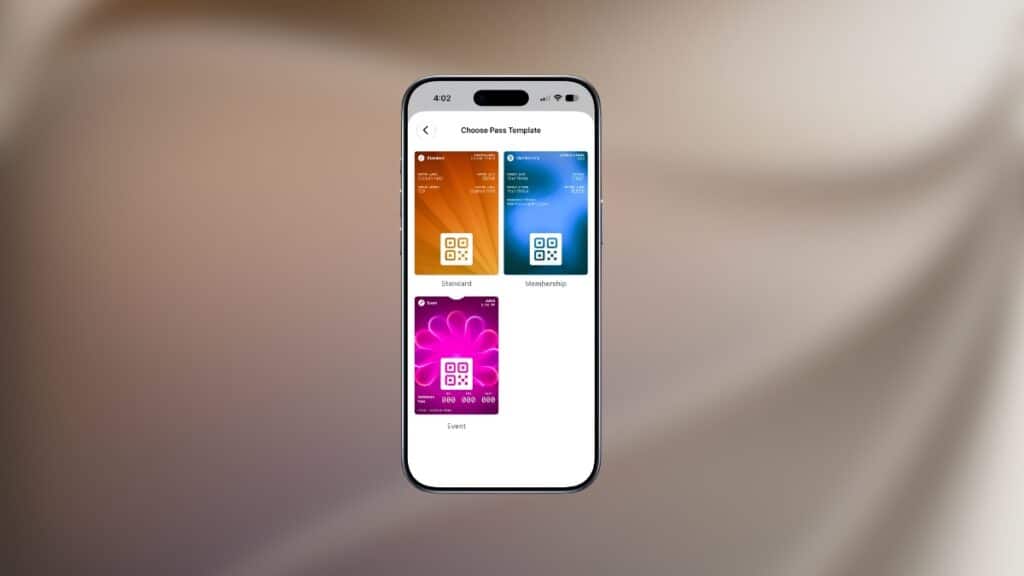
Tap the plus button in Wallet and choose Create a Pass to digitize a loyalty card, gym membership, or event ticket that never had official Wallet support. Two paths exist: scan a physical card’s barcode or QR code with Siri mode in the Camera app (this again needs an Apple Intelligence device), or build a pass manually from three templates: Standard, Membership, and Event.
Manual passes support 12 background colors and seven category-specific art styles for things like theater, music, sports, and movies, plus fields for membership numbers, contact details, coupon codes, and even a VIN. Once saved, a pass presents as a barcode or QR code from your iPhone or Apple Watch, and you can pin it to the Apple Watch Smart Stack for quick access.
One caveat worth knowing: Apple lets you verify a pass issuer’s certificate to confirm a digital pass is legitimate, but that check doesn’t apply to passes you build yourself with Create a Pass. Self-made passes are convenient, not authenticated the way brand-issued ones are.
Official Passes Get a Bolder Look, Too
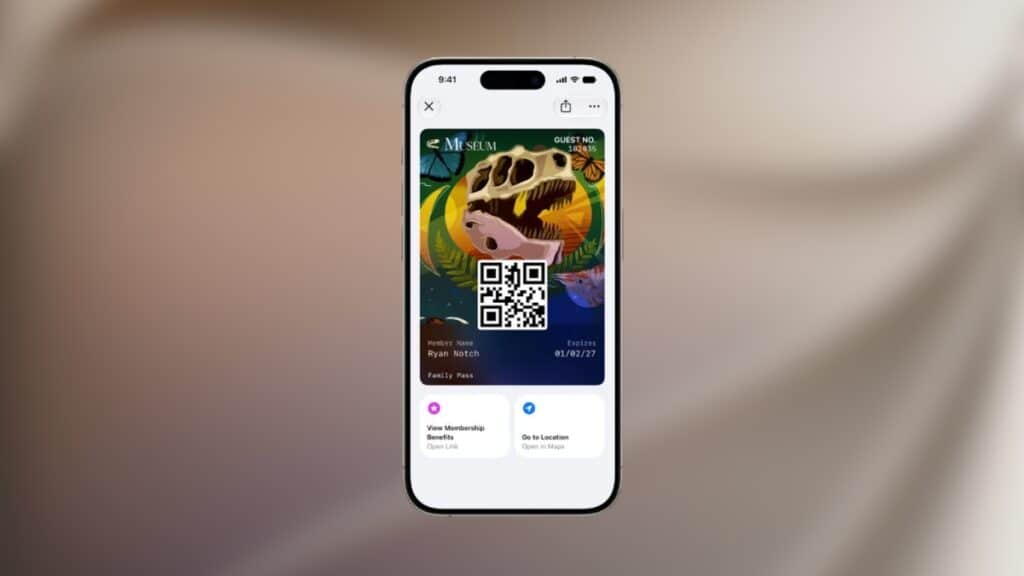
Separately from Create a Pass, Apple upgraded how brands design their own Wallet passes. Membership, loyalty, gift, and rewards cards can now use a “Poster Generic” style with full background artwork and up to two tappable actions, like getting directions or checking a rewards balance.
Apple also added four new barcode formats (EAN-13, Code 39, Codabar, and Interleaved 2 of 5) so more physical card types qualify for official digital passes, plus a new Pass Designer app for Mac, in beta, that lets developers build these visually. You won’t interact with this directly, but expect passes from your favorite retailers to look noticeably better over time.
Hotel Keys Show More Than the Door Lock
Wallet’s hotel key feature already let guests at participating properties unlock rooms and amenities with an iPhone or Apple Watch. With iOS 27, that same key now surfaces trip details, updates on booked activities, and access to in-stay services, all inside Wallet. Apple hasn’t published which hotel brands support the enhanced experience yet.
Track Subscriptions With Apple Card’s Recurring Hub
Apple Card users get a new Recurring option, tucked behind the three-dot menu on the Apple Card screen, that lists every upcoming recurring charge in a calendar view or a simple list. It’s a small addition, but a genuinely practical one for catching a forgotten subscription before it renews.
Faster Checkout With Tap to Share and a Redesigned Apple Pay
Tap to Share lets you connect to a participating merchant’s iPhone at checkout to securely share an email address, shipping details, or a loyalty number, cutting down on typing at the register. It requires an iPhone 12 or later running iOS 27 and isn’t currently available in the European Economic Area.
Apple Pay’s checkout screen also got a redesign: swipe between saved cards and see rewards balances, debit account balances, and pay-later options before you commit to a card. Later this year, Apple plans to let users add funds to an eligible debit card directly through Apple Pay, though that piece wasn’t part of the September 14 launch.
Smaller Upgrades Worth Knowing About
A few additional changes round out the update:
- Order tracking expands to Australia and Canada. It was limited to the US and UK in iOS 26.
- Insights lets you monitor spending across linked accounts. It’s an expansion of the older Connected Accounts feature, covering spending, recurring transactions, and balances. It’s live for select territories, including some UK banks, but Apple has held it back from US users at launch despite the feature appearing in earlier betas.
- A new Discover section inside Wallet offers guided walkthroughs for Apple Pay, Apple Card, Apple Cash, Transit, Boarding Passes, Event Tickets, IDs, Keys, and Apple Account balance, each with one-tap shortcuts to start using the feature.
None of these move the needle on their own, but together they make Wallet feel more like a genuine financial hub than a card holder with a payment button.
Do You Need to Update to Get These Features?
iOS 27 is a free update, live now, for any iPhone that supported iOS 26: iPhone 11 and later. Most of what’s covered here, including manual pass creation, hotel keys, the Recurring hub, Tap to Share, and the order tracking expansion, works across that entire range.
The camera-based, Apple Intelligence-powered features are the exception. Scanning a card or receipt with Siri mode needs an iPhone 15 Pro or newer, and Split Bill with Apple Cash adds a second restriction on top of that: a US Apple Cash account, regardless of hardware. Check our full iOS 27 compatibility list if you’re unsure where your device lands.
Final Thoughts
Apple didn’t give Wallet a keynote moment this year; Siri AI took that spot. But iOS 27 quietly does more real work on payments, passes, and everyday spending than most Wallet updates have in years. Split Bill with Apple Cash and Create a Pass are the two features worth updating for, though region and hardware gates mean not everyone gets the full picture on day one. If your iPhone qualifies, there’s no real reason to wait.