Apple officially announced iOS 27 at WWDC 2026 on June 8, and the big question that followed almost immediately was whether your iPhone would make the cut. Good news for most people: the answer is yes, and the picture is now fully settled. Apple confirmed iOS 27 arrives as a free update on Monday, September 14, alongside the launch of the iPhone 18 Pro, iPhone 18 Pro Max, and Apple’s first foldable iPhone, the iPhone Duo.
iOS 27 Device Compatibility: No Surprise Cuts This Year
Before WWDC, there was real chatter in the Apple community that iOS 27 would drop support for the iPhone 11 lineup and the iPhone SE (2nd generation). It did not happen. iOS 27 runs on the exact same device list as iOS 26. If your iPhone runs iOS 26 today, it runs iOS 27 starting September 14.
That is a relief for a lot of people holding onto older but still-capable hardware.
Full iOS 27 Device List
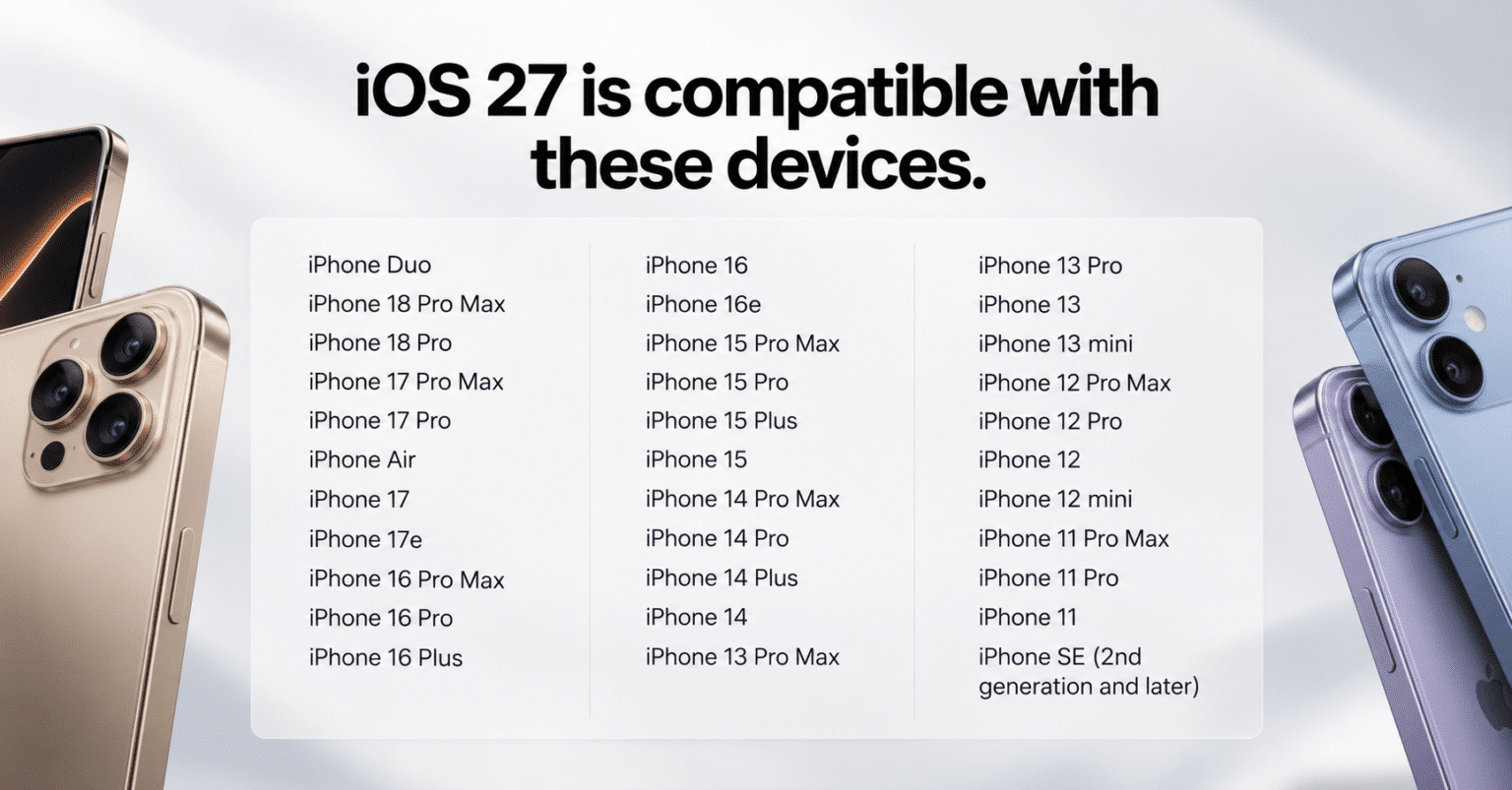
Here is the complete iOS 27 device list, including the new hardware announced alongside it.
iPhone Duo
- iPhone Duo (Apple’s first foldable iPhone)
iPhone 18 Series
- iPhone 18 Pro
- iPhone 18 Pro Max
iPhone 17 Series
- iPhone 17e
- iPhone 17
- iPhone 17 Pro
- iPhone 17 Pro Max
iPhone Air
- iPhone Air
iPhone 16 Series
- iPhone 16e
- iPhone 16
- iPhone 16 Plus
- iPhone 16 Pro
- iPhone 16 Pro Max
iPhone 15 Series
- iPhone 15
- iPhone 15 Plus
- iPhone 15 Pro
- iPhone 15 Pro Max
iPhone 14 Series
- iPhone 14
- iPhone 14 Plus
- iPhone 14 Pro
- iPhone 14 Pro Max
iPhone 13 Series
- iPhone 13
- iPhone 13 mini
- iPhone 13 Pro
- iPhone 13 Pro Max
iPhone 12 Series
- iPhone 12
- iPhone 12 mini
- iPhone 12 Pro
- iPhone 12 Pro Max
iPhone 11 Series
- iPhone 11
- iPhone 11 Pro
- iPhone 11 Pro Max
iPhone SE
- iPhone SE (2nd generation and later)
One naming detail worth clearing up: the standard iPhone 18, iPhone 18e, and iPhone Air 2 are not part of this launch. Apple is holding those back for a separate event in spring 2027, alongside the iPhone 18 Fold successor cycle. Only the Pro models and the new foldable arrived this September.
What About Devices Left Behind?
If you are on anything older than the iPhone 11, think iPhone XS, XR, or earlier, you will not be getting iOS 27. Those devices stay on iOS 26, and Apple will continue pushing security patches for a while, but the road for major updates ends there.
It is not a dramatic cut, but it is worth knowing if you are helping a family member decide whether to upgrade their older device.
Not All iOS 27 Features Work on Every Supported iPhone
This is the part that often gets glossed over, and it matters more than ever now that the device list has grown.
The new iOS 27 features, especially the revamped conversational Siri and the full Apple Intelligence suite, are not available equally across all supported devices. The most advanced AI capabilities run on-device and require serious hardware muscle, specifically the A17 Pro chip or later with 8GB of RAM.
In practical terms, that means full Apple Intelligence lands on:
- iPhone Duo
- iPhone 18 Pro and iPhone 18 Pro Max
- iPhone 17 series (all models)
- iPhone Air
- iPhone 16 series (all models)
- iPhone 15 Pro and iPhone 15 Pro Max
If you are on an iPhone 11 through the non-Pro iPhone 15, you will still get the iOS 27 update, and you will still see real improvements in speed, Photos, AirDrop, and some AI tools. But the headline Siri overhaul and the deeper Apple Intelligence features remain unavailable on that hardware.
It is a meaningful distinction that Apple does not always highlight loudly, and it applies just as much to the brand-new iPhone Duo and iPhone 18 Pro as it does to last year’s models. Owning the newest phone on the shelf is what actually unlocks the feature set, not simply running iOS 27 itself.
When Can You Actually Install iOS 27?
The timeline is now fully confirmed rather than a guess.
- Developer beta: available since June 8, 2026
- Public beta: available since July 2026
- Stable release: Monday, September 14, 2026, for every supported device
The new hardware follows its own separate release schedule. iPhone 18 Pro and iPhone 18 Pro Max open for preorder on Saturday, September 12, and ship Friday, September 18, arriving with iOS 27 already installed. The iPhone Duo runs on a later timeline entirely, with preorders opening October 16 and shipping starting October 23.
If you already own a supported iPhone and just want the software, you do not need to wait for either device to ship. iOS 27 reaches every eligible iPhone on September 14 regardless of what hardware you already have.
Bottom Line
The iOS 27 compatibility story is genuinely good this year. Apple held the line on support, older devices like the iPhone 11 get another cycle, and the new iPhone 18 Pro, iPhone 18 Pro Max, and iPhone Duo all ship running iOS 27 out of the box. That said, if you want the full iOS 27 experience, particularly everything Apple is building around on-device AI, you will want to be on at least an iPhone 15 Pro or newer.
For the most current official compatibility details, Apple’s iOS page is always the source of truth.