You are scrolling through Messages, clearing out old conversations, and your thumb catches the wrong option. A thread you actually needed, maybe a delivery code, a photo from a friend, or a conversation with an important receipt, suddenly disappears. For a moment, it feels permanent.
Fortunately, Apple gives you a built-in recovery window. On recent versions of iOS, deleted messages and conversations move to a Recently Deleted section before they are permanently removed. Deleted messages can generally be recovered for 30 to 40 days.
If the message is still there, getting it back takes less than a minute. If it has already disappeared from Recently Deleted, your options depend on whether you use Messages in iCloud and whether you have an older backup. Here is how to recover recently deleted messages on your iPhone and what to try when the built-in method no longer works.
How Long Do Deleted Messages Stay on iPhone?
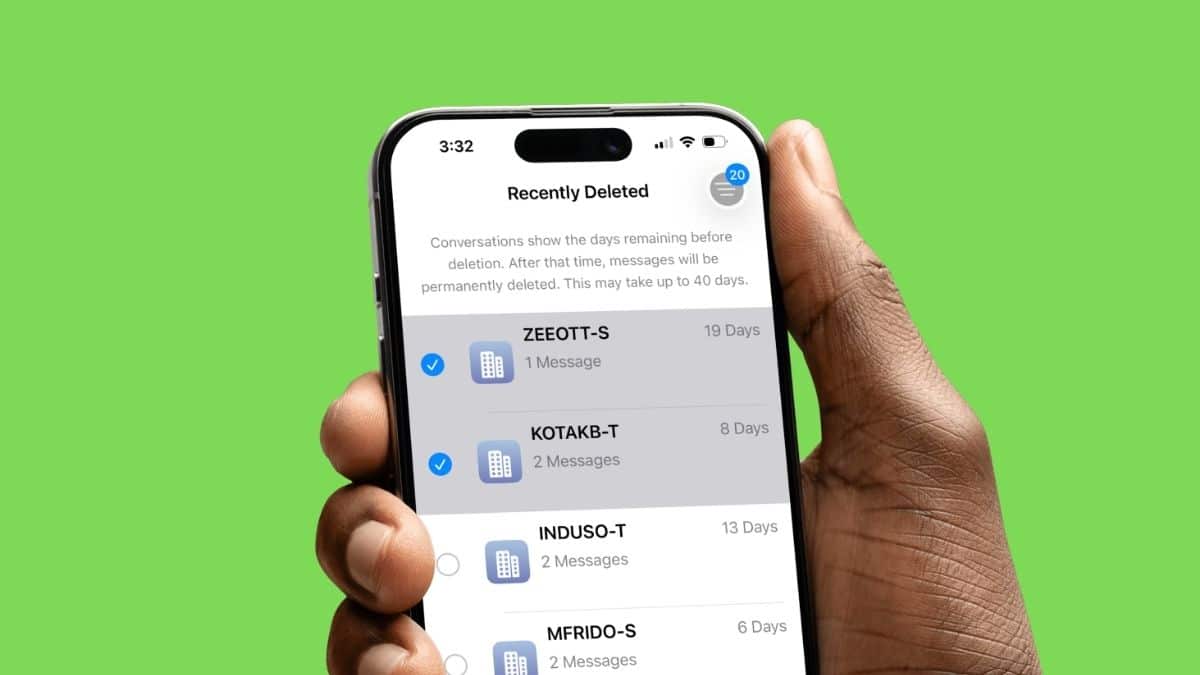
Apple introduced message recovery with iOS 16 and iPadOS 16.1. When you delete a conversation or message, it does not always disappear immediately. Instead, it moves to Recently Deleted, where it can remain recoverable for around 30 to 40 days before permanent deletion.
That feature only applies to messages deleted after your device was already running iOS 16 or later. Messages deleted before upgrading to a supported version cannot be recovered through Recently Deleted.
If you are running a recent version of iOS, including iOS 26 or the iOS 27 public beta, the feature is already available.
The important part is timing. Once the recovery window expires and the message is permanently removed, the Messages app itself cannot bring it back.
How to Recover Recently Deleted Messages on iPhone
Apple’s built-in recovery option is the first thing you should try. It works for individual messages as well as entire conversations. Follow these steps:
- Open the Messages app on your iPhone.
- From the conversation list, tap Filters at the top.
- Tap Recently Deleted.
- Select the conversation containing the messages you want to restore.
- Tap Recover.
- Tap Recover Messages to confirm.
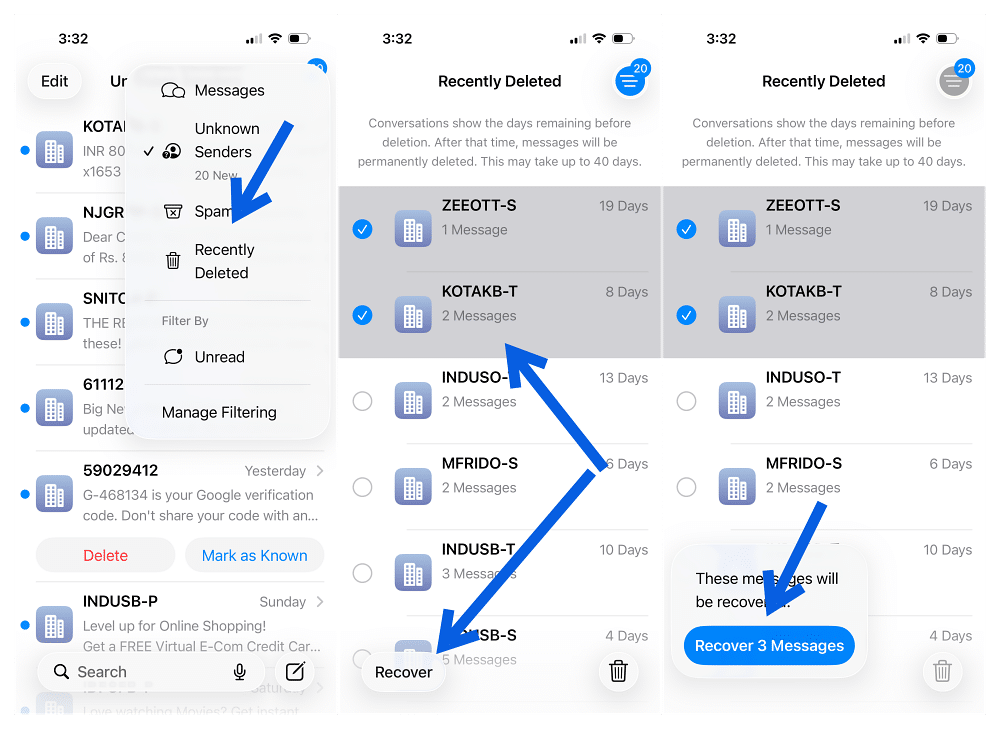
Depending on your Messages configuration and iOS version, you may see slightly different navigation, such as an Edit option instead of Filters. Once recovered, the messages return to the conversation in the Messages app.
You can also select multiple conversations from Recently Deleted and recover them together rather than restoring each thread individually.
If you use Messages in iCloud, recovering a deleted conversation on one device also restores it across your other devices where Messages in iCloud is enabled.
What If Recently Deleted Does Not Appear?
If you cannot find Recently Deleted, first make sure your iPhone is running iOS 16 or later. Also check whether anything has actually been deleted recently. The Recently Deleted section may not be useful if there are no recoverable conversations available.
If a conversation disappeared because of an iMessage syncing problem rather than because you manually deleted it, Recently Deleted may not help. In that situation, check whether Messages is syncing correctly across your devices and whether iMessage itself is working normally.
If you are seeing activation or sending problems instead, our guide to fixing the iMessage needs to be enabled error covers the most common fixes.
If you check Recently Deleted and there’s nothing there, or the specific conversation you need just isn’t listed, don’t assume it’s unrecoverable yet. A few things are worth ruling out first.
What If the Deleted Message Is Not in Recently Deleted?
If the conversation you need does not appear, check how long ago you deleted it. Messages that have passed the recovery window may already have been permanently removed. Before attempting a backup restore, there is another important question to answer:
Do you use Messages in iCloud? That setting completely changes how backups work.
When Messages in iCloud is enabled, your messages sync directly with iCloud and are not included separately in your daily iCloud Backup. Deleting a message on one synced device also updates your other devices.
That means restoring an old iCloud device backup generally will not bring back permanently deleted messages if Messages in iCloud was enabled at the time.
If Messages in iCloud was turned off, however, your messages may have been included in an older iPhone backup. In that situation, restoring a backup made before the deletion may be worth considering.
Can You Recover Deleted Messages From an iCloud Backup?
Possibly, but only under the right conditions. If Messages in iCloud was disabled, your messages may have been included in your iCloud device backup.
Before doing anything, check whether you have a backup from before the messages were deleted. Restoring an iCloud backup requires erasing the iPhone first, so this is not something I would do for one unimportant text.
To restore an older iCloud backup:
- Check that a suitable backup exists.
- Back up any current information you do not want to lose.
- Go to Settings > General > Transfer or Reset iPhone.
- Tap Erase All Content and Settings.
- Go through iPhone setup again.
- At the Transfer Your Apps & Data screen, choose From iCloud Backup.
- Sign in with your Apple Account.
- Select a backup created before you deleted the messages.
Keep in mind that a restore takes your device back toward the state captured in that backup. Data created afterward may need to sync back from iCloud or other services.
How to Recover Deleted Messages From a Mac or PC Backup
A computer backup is another possibility if you made one before deleting the messages. Again, this is most useful when Messages in iCloud was not enabled. To restore a backup:
- Connect your iPhone to the Mac or Windows PC where the backup is stored.
- Open Finder on a recent Mac.
- On Windows, use the appropriate Apple device-management software.
- Select your iPhone.
- Choose Restore Backup.
- Pick a backup created before the messages were deleted.
- Start the restore and keep the iPhone connected until it finishes.
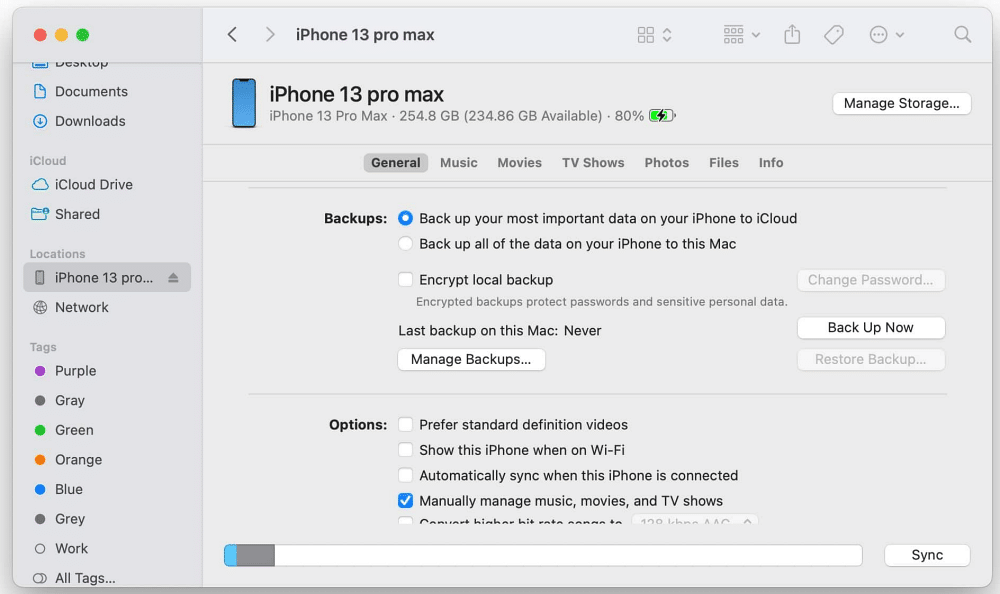
Before restoring, make sure the backup date is actually old enough to contain the missing messages. If the only backup you have was created after the deletion, restoring it will not help.
Messages in iCloud Does Not Work Like a Backup
This is one of the most important distinctions in message recovery. Turning on Messages in iCloud is useful, but it is not an archive of every message you have ever deleted.
When enabled, your messages remain synchronized across devices signed in with the same Apple Account. Send, receive, recover, or delete a message on one device, and that change can appear across the others.
That means deleting a conversation on your iPhone can also delete it from your iPad and Mac if Messages in iCloud is enabled. What Messages in iCloud does help with is keeping your current conversation history available when you switch devices.
To check the setting on recent iOS versions:
- Open Settings > Tap your name.
- Tap iCloud > See All or Show All.
- Tap Messages in iCloud.
- Turn on Use on this iPhone.
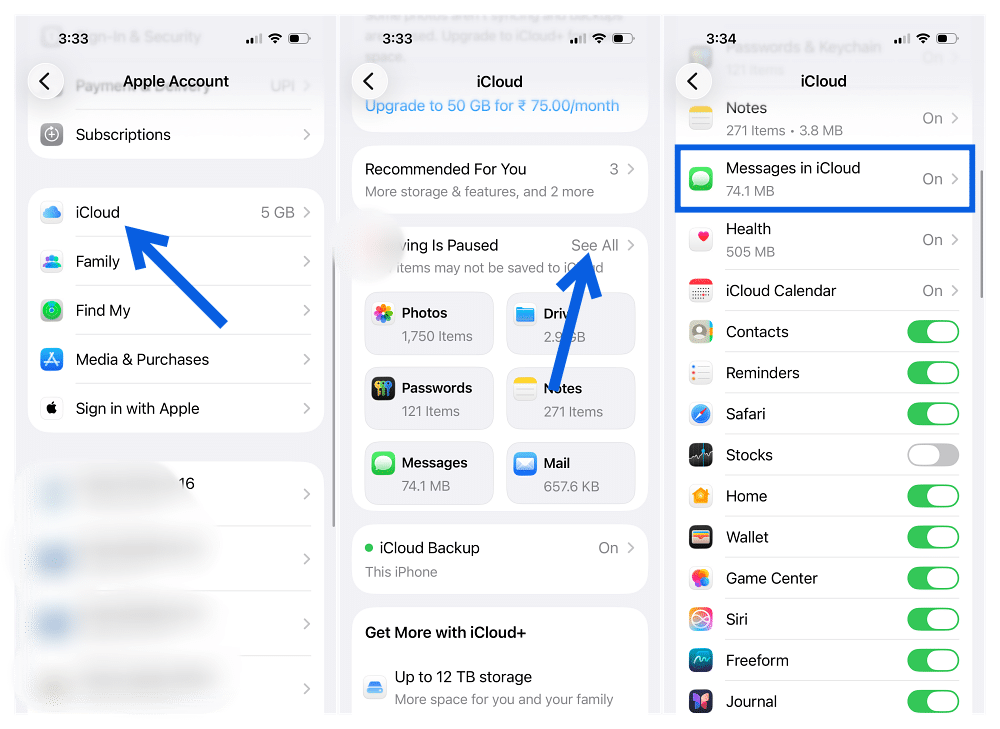
New messages are then stored in iCloud and kept available across supported devices signed into the same Apple Account.
Can Third-Party Apps Recover Permanently Deleted iPhone Messages?
Be cautious with apps that promise to recover permanently deleted messages directly from a modern iPhone.
If a message is no longer in Recently Deleted, is not available through synchronized Messages data, and is not present in an older backup, consumer recovery software usually has very little to work with.
Modern iPhones use encryption and hardware-backed security specifically to prevent arbitrary access to deleted data.
Some desktop tools can help inspect existing backups, but that is different from magically recovering a message that has already been permanently removed from the device.
I would be particularly skeptical of software that promises guaranteed recovery and asks for your Apple Account password or other sensitive credentials.
Do Deleted Photos and Attachments Come Back Too?
When you restore a deleted conversation through Recently Deleted, the associated message content returns with it.
That can include images, videos, links, and other attachments that were still part of the recoverable conversation. The restored conversation returns to Messages rather than appearing as a brand-new thread. Timestamps and the original conversation structure are also preserved.
Does Recently Deleted Work With SMS and RCS Messages?
Recently Deleted is part of the Messages app, so it is not limited only to blue-bubble iMessages. Messages conversations handled by the app can appear there regardless of whether you were communicating through iMessage or supported carrier messaging. The important factor is that the conversation was actually deleted through Messages and is still inside the recoverable window.
If you have customized Messages with features such as conversation backgrounds, recovering messages does not reset those appearance settings.
A Few Things Worth Remembering
Recovering recently deleted messages is straightforward, but a few rules make the process easier to understand.
- Act quickly: The recovery window is limited, so do not leave an important deleted conversation sitting for weeks.
- Check Recently Deleted first: Do this before thinking about erasing your iPhone or restoring backups.
- Understand Messages in iCloud: It keeps messages synchronized, but deletions synchronize too. It should not be treated as a permanent archive.
- Check backup dates before restoring: An old backup only helps if it was created while the missing conversation still existed.
- Avoid questionable recovery tools: Do not hand over your Apple Account credentials to software promising guaranteed message recovery.
Final Thoughts
Accidentally deleting a text feels worse than the problem usually turns out to be. For most recent deletions, Apple’s Recently Deleted feature is all you need. Open Messages, find the deleted conversation, tap Recover, and it can be back in seconds. The situation becomes harder once the 30-to-40-day recovery period passes.
At that point, an older backup may help, but only under certain conditions, particularly if Messages in iCloud was not enabled. The biggest mistake is assuming Messages in iCloud works like a permanent backup. It does not. It keeps your messages synchronized, which means deletions sync too. So if an important conversation disappears, check Recently Deleted immediately. The sooner you catch the mistake, the better your chances of getting everything back without touching a backup.
Open Messages, tap Filters, select Recently Deleted, choose the conversation you want, and tap Recover > Recover Messages. Recently deleted messages can generally be recovered within about 30 to 40 days.
Messages and conversations can remain recoverable for approximately 30 to 40 days after deletion. Once they are permanently removed, they no longer appear in Recently Deleted.
Only in limited situations. If the message is no longer in Recently Deleted, an older backup may help if Messages in iCloud was disabled and the backup was made before the deletion. Otherwise, recovery may not be possible.
No. Messages in iCloud synchronizes your conversation history across devices. If you delete a message, that deletion also syncs to your other devices using Messages in iCloud.
Yes, if they are still available in Recently Deleted. You do not need a backup to use Apple’s built-in recovery feature.
It may if Messages in iCloud was disabled and you have a backup from before the messages were deleted. When Messages in iCloud is enabled, messages sync separately and are not included in the normal daily iCloud Backup.
Don’t miss these related reads: