The first iOS 27 public beta is now available for iPhone, arriving right on schedule. Apple released it on Monday, July 13, 2026, roughly a week after Developer Beta 3. If you’ve been reading up on the iOS 27 features announced at WWDC26 and waiting for a version that didn’t require a developer account, this is it. It’s free, it runs on every iPhone that supports iOS 26 (iPhone 11 and newer), and it’s based on the same build as the re-released Developer Beta 3, 24A5380h.
That build detail matters more than it sounds. Public betas typically trail the developer channel by a few days and focus on polish rather than introducing new code. What you’re installing today is a version Apple considers ready for a much wider audience. Bloomberg’s Mark Gurman has described this release cycle as reliability-first, closer in spirit to Snow Leopard than a feature-packed overhaul. Early testers largely agree that it feels steadier than iOS 26 did at the same stage last summer. Steadier, however, isn’t the same as stable.
Below, you’ll find everything new in this build, what you should know before installing it, and the exact steps to get the iOS 27 public beta on your iPhone.
iOS 27 Public Beta: Quick Facts
| Detail | Info |
|---|---|
| Release date | July 13, 2026 |
| Build number | 24A5380h (same as the re-released Developer Beta 3) |
| Cost | Free through the Apple Beta Software Program |
| Compatible iPhones | iPhone 11 and newer (same compatibility list as iOS 26) |
| Also released | iPadOS 27, macOS Golden Gate, watchOS 27, tvOS 27, visionOS 27, HomePod Software 27, and AirPods firmware |
| Expected final release | Mid-September 2026, following a Release Candidate around the September keynote |
What’s New in the iOS 27 Public Beta
Siri is the headline feature, but much of this update focuses on making your iPhone feel faster, smarter, and more refined. Here are the biggest additions.
Siri AI
Siri finally supports natural conversations. It understands follow-up questions, keeps track of context, searches your personal information when asked, and performs actions across supported apps. A dedicated Siri app also stores conversation history, making interactions feel far more natural.
Siri AI requires an Apple Intelligence-compatible iPhone, and access is currently rolling out through a waitlist.
Visual Intelligence in Camera
Point your camera at an object, sign, menu, or flyer, and Siri can identify what it sees, answer questions, create calendar events, scan barcodes, or explain objects in view. It’s one of the most practical Apple Intelligence features arriving in iOS 27.
Faster iPhone Performance
Apple has optimized app launches, AirDrop transfers, photo processing, keyboard responsiveness, unlocking, Home Screen navigation, and animations. These improvements also benefit older supported devices, including the iPhone 11 lineup.
Liquid Glass Controls
Rather than replacing Liquid Glass, Apple gives you more control over it. A new slider under Settings > Appearance lets you adjust how transparent or tinted the interface appears, making the design easier to customize.
Smarter Safari
Safari can now organize tabs automatically, group bookmarks by topic, monitor webpages for changes, and even generate browser extensions from natural-language descriptions.
Better Photos Editing
The Clean Up tool removes larger distractions, Extend expands image backgrounds using AI, and Spatial Reframing lets you adjust the perceived camera angle after taking a photo.
Natural-Language Shortcuts
Simply describe the automation you want, and Shortcuts builds it for you. If it isn’t quite right, you can refine it using follow-up instructions.
Improved Password Security
The Passwords app can automatically replace compromised passwords on supported websites, manage verification codes, and display replacements through Live Activities.
Redesigned Screen Time
Parents gain a clearer activity dashboard, category-based screen limits, weekday and weekend schedules, and approval requests for new contacts and websites.
Expanded Child Safety
Communication Safety now detects and blurs violent and graphic images in addition to sensitive content.
AirPods Custom Equalizer
Compatible AirPods now include adjustable bass, mids, and treble controls instead of relying solely on preset sound profiles.
Messages Improvements
Large media uploads continue in the background instead of blocking conversations, while Tapback notifications in group chats are much less intrusive.
Better Shared Albums
Shared Albums now support full-resolution media, Windows and Android contributions, keywords, ratings, and customizable slideshows.
Independent Alarm Volume
You can finally adjust alarm volume without changing the overall system volume.
Extra-Large Home Screen Widgets
Widgets can now occupy an entire Home Screen page, displaying far more information at a glance.
Home App Improvements
HomeKit Secure Video becomes more reliable, and the Home app now supports compatible 4K security cameras.
Faster Network Switching
Your iPhone switches between Wi-Fi and cellular connections more quickly whenever signal quality begins to drop.
Should You Install the iOS 27 Public Beta?
This is still beta software, so expect bugs, occasional battery drain while indexing finishes, and some third-party apps that haven’t caught up yet. Banking apps, VPNs, and fitness apps are usually among the first to experience compatibility issues.
The bigger consideration is downgrading. Returning to iOS 26 requires erasing your iPhone and restoring an older backup. Any backup created on iOS 27 won’t restore to iOS 26.
Before installing, create a fresh archived backup using iCloud or your computer.
If you own a secondary iPhone, install the beta there first. If your primary device is your only option, understand that you’ll be living with beta software until Apple releases a stable version.
How to Install the iOS 27 Public Beta
Before starting, back up your iPhone.
- Visit the Apple Beta Software Program website.
- Sign in using your Apple Account.
- Accept the program terms and enroll your account.
- Open Settings.
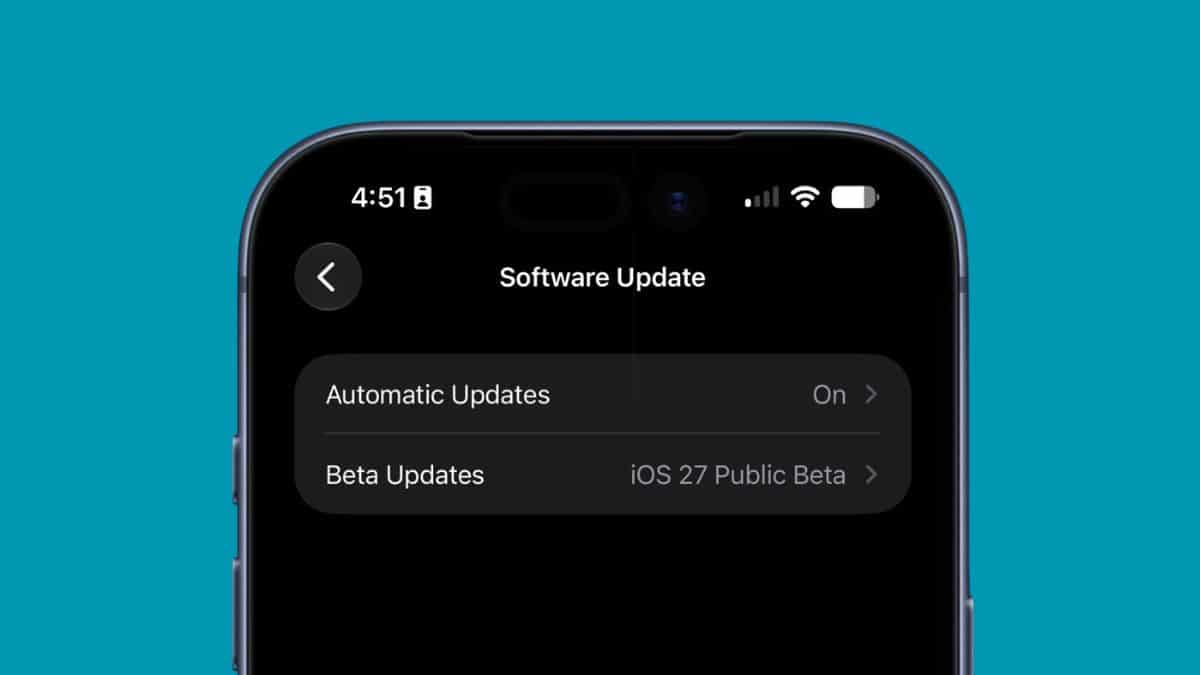
- Go to General > Software Update > Beta Updates.
- Select iOS 27 Public Beta.
- Return to the previous screen and tap Update Now.
Make sure your iPhone has enough available storage, is connected to Wi-Fi, and has at least 50% battery or is plugged into power.
If the update doesn’t appear immediately after enrollment, wait a few minutes and reopen Software Update.
Wrapping Up
The iOS 27 public beta offers the clearest look yet at Apple’s next major iPhone update, but it’s still unfinished software. Apple will continue releasing additional public betas throughout the summer before the Release Candidate arrives in early September and the final version launches alongside the next iPhone lineup.
If you decide to install it, use the Feedback Assistant app to report any bugs you encounter. Those reports directly help improve the final release.