A thief grabs your locked Pixel, swipes down from the top of the screen, and taps Airplane mode. Your phone drops off the network, and Find Hub can’t see it anymore. That one swipe has been a gap in Android’s theft defenses for years.
Android 17 QPR3 Beta 2 closes it. Google released the build on October 20, 2026, 18 days after QPR3 Beta 1, and it’s mostly a cleanup release: 21 fixes, one meaningful new security setting, and a few smaller additions. If QPR3 Beta 1 made your Pixel crash or drain overnight, this is the update you’ve been waiting for.
Here’s what changed, what got fixed, and whether you should install it.
Android 17 QPR3 Beta 2 at a Glance
- Release date: October 20, 2026
- Build number: DP11.261002.005 (one build for every eligible device)
- Security patch: 2026-10-05
- Google Play services: 26.36.33
- Supported devices: Pixel 6a through the Pixel 11 series, including Pixel Fold, Pixel Tablet, Pixel 9a, and Pixel 10a
- Expected stable release: Around March 2027 (not confirmed by Google)
The security patch jump deserves attention. QPR3 Beta 1 shipped with the August 5, 2026 patch, two months behind. Beta 2 brings testers up to the October patch, the same level as the current QPR2 Beta 7 build. If you stayed on Beta 1 for its features, you were running older security fixes than people on the QPR2 track.
Google’s release notes also state that QPR builds include no app-impacting API changes, so developers don’t need to retest app behavior against new APIs here.
Lock Quick Settings Connectivity: The New Anti-Theft Setting
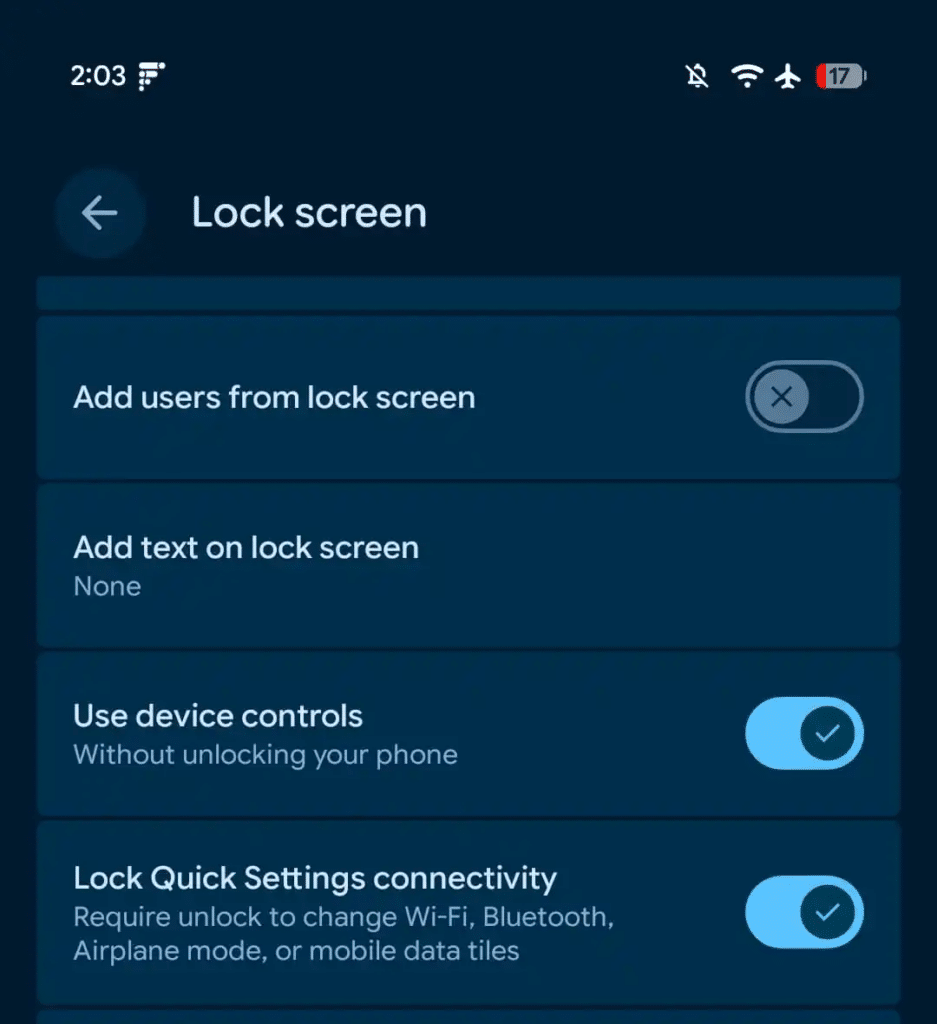
The headline addition is a toggle called Lock Quick Settings connectivity. Turn it on, and your Pixel requires your PIN, pattern, or fingerprint before anyone can change four tiles from the lock screen:
- Wi-Fi
- Bluetooth
- Mobile data
- Airplane mode
Every other tile works as before. You can still switch on the flashlight, change auto-rotate, or turn on Battery Saver without unlocking.
Why this matters more than it looks
Phone thieves know that the fastest way to stop you from tracking a stolen device is to kill its connection. Before this setting, anyone holding your locked Pixel could do that in one swipe and one tap. Now that swipe hits a PIN prompt, and your phone stays online long enough for you to locate it or lock it remotely.
It fills a specific hole in Google’s existing theft protection stack. Theft Detection Lock reacts after a phone is snatched, and Offline Device Lock kicks in once the phone has already been offline for a while. This setting stops the disconnect from happening in the first place.
Android Central makes a fair point: it’s a hurdle, not a guarantee. It won’t stop every theft or promise you’ll get the phone back. Still, it costs you nothing in daily use unless you regularly toggle Wi-Fi from the lock screen.
How to turn it on
The setting is off by default. You’ll find it in either of two places:
- Open Settings > Security & privacy > Device unlock, or go to Settings > Display & touch > Lock screen.
- Turn on Lock Quick Settings connectivity.
Swipe down on your lock screen and tap the Wi-Fi tile to confirm it works. You’ll get an unlock prompt instead of an instant toggle.
This feature first surfaced in the Android Canary 2609 build, so it has already been through some testing before reaching the beta channel.
Other New Changes in Beta 2
Beyond the security toggle, 9to5Google spotted a revised Wallpaper & style carousel that groups theme packs, custom icons, shape effects, the animate option, and weather effects in one place.
You may also see Google’s Noto 3D emoji on your Pixel. Be careful attributing that to this beta, though. Google is rolling Noto 3D out to more Android phones separately, and Android Authority reported the wider rollout on October 19, a day before Beta 2 arrived. The QPR3 Beta 2 changelog doesn’t list it.
These additions stack on top of everything from Android 17 QPR3 Beta 1, including the Notes Quick Settings tile on Pixel 11, refreshed status bar icons, and the Gemini Intelligence boot animation on Pixel 10.
Every Bug Fixed in Android 17 QPR3 Beta 2
New features are the smaller story here. Google fixed 21 issues, and several of them were serious enough to make Beta 1 hard to live with. We’ve grouped them by what you’d actually notice.
Crashes, reboots, and shutdowns
- Random crashes and reboots during normal use. This fix links to eight separate bug reports, the most of any issue in this release. If you install Beta 2 for one reason, it’s this.
- Shutdowns during WhatsApp video calls. Your phone no longer powers off mid-call.
- Black, unresponsive screen after ending a call. The display now wakes properly when you hang up.
Battery drain
- High idle drain from motion sensors. After you used Face Unlock or the camera, motion sensors stayed active instead of sleeping, burning battery while your phone sat on the desk. Google fixed it.
This one is easy to miss because the phone looks idle. If your Pixel lost more charge overnight than usual on Beta 1, this bug is the likely cause.
Calls, carriers, and connectivity
- Bluetooth pairing failures caused by connection timeouts
- Paired watch keeps ringing after you answer the call on your phone
- Wi-Fi Aware failing to set up later connections with a “no interfaces available” error
- Dish Network: cellular data, MMS, and hotspot failing to connect
- IT&E: VoLTE, VoNR, and Wi-Fi calling unavailable
- OXIO: Wi-Fi Calling unavailable
The carrier fixes only matter if you’re on Dish, IT&E, or OXIO. For everyone else, the Bluetooth pairing and smartwatch fixes are the ones you’ll feel. If you’re fighting broader connection drops, our guide to fixing Android 17 Wi-Fi problems on Pixel covers what this beta doesn’t.
Display and interface glitches
- System UI, fonts, and apps rendering too small, ignoring your display size settings
- Lock screen in-progress notifications overlapping other UI and making panel animations stutter
- Internet Quick Settings tile showing persistent text when you’re on mobile data without Wi-Fi
- Bluetooth tile subtitle misaligned to the right
- Media output dialog ignoring the monochrome theme when external audio devices connect
- Share sheet pin icon sitting in the wrong spot next to pinned apps
- App drawer closing when you switch keyboard languages
The text-scaling bug stands out. Tiny fonts across the whole system make a phone genuinely hard to use, especially if you rely on larger display sizes for readability.
Apps and developer tools
- Screen recording freezing after you rotate the screen
- Terminal app failing to launch the Linux development environment VM after installation
- Airbnb failing to connect when sending messages
- Internal PublishedApi declarations triggering false API lint and source compatibility errors
The Terminal fix matters if you’ve been testing Android’s Linux environment on your Pixel. Beta 1 effectively broke it.
Should You Install Android 17 QPR3 Beta 2?
That depends on which beta track you’re on.
- If you’re already on QPR3 Beta 1, update now. Beta 2 fixes the crashes, the battery drain, and the tiny-text bug, and it moves you to the October security patch. There’s no reason to stay behind.
- If you’re on QPR2 Beta 7, think before you jump. QPR2’s stable release is expected in December alongside the next Pixel Drop, though Google hasn’t confirmed a date. Our Android 17 QPR2 Beta 7 coverage explains the exit window: you can leave the beta program without wiping your phone only for a short period after a stable build installs. Moving to QPR3 now closes that window. Leaving the beta later means a full factory reset.
- If your Pixel is your only phone, wait. Twenty-one fixes in one build tells you how rough Beta 1 was. QPR3 still has months of testing ahead before stable.
How to Get Android 17 QPR3 Beta 2
- Back up your phone. Beta software can fail, and a downgrade wipes your data.
- Visit Google’s Android Beta for Pixel page at google.com/android/beta and sign in with the account on your phone.
- Find your device and tap Opt in.
- On your Pixel, go to Settings > System > Software updates > System update and download the OTA.
If you already run QPR3 Beta 1, the update arrives automatically as an OTA. If you prefer flashing manually, Google posts OTA and factory images on the Android Developers site. Not sure which version you’re on now? Our explainer on the current Android version shows how to check.
Signing Off
QPR3 Beta 2 is a repair job with one smart addition. The 21 fixes turn Beta 1’s crash-prone, battery-hungry build into something you can reasonably use, and the October patch closes the security gap testers were living with.
The Lock Quick Settings connectivity toggle is small, but it targets exactly what thieves do in the first ten seconds. Turn it on, whether you’re testing betas or waiting for it to reach stable.