If your Pixel has frozen mid fingerprint unlock, or your eSIM keeps switching itself off in Settings, this beta is aimed at you.
Google released Android 17 QPR3 Beta 1 on October 2, 2026, about two weeks after Android 17 QPR1 reached stable Pixels with the September Pixel Drop. QPR2 is still in beta and expected in December. That makes QPR3 the third update stacked in Google’s pipeline right now, and the furthest from your phone.
It’s a light build. You get 20 documented fixes, a few visual tweaks, and two unfinished features buried in code. Here’s what changed, which Pixels qualify, and whether installing it makes sense.
Android 17 QPR3 Beta 1 at a glance
These details come from Google’s official QPR3 release notes:
- Release date: October 2, 2026
- Build numbers: DP11.260918.005 (Pixel 11 series) and DP11.260918.006 (all other supported Pixels)
- API level: 37
- Security patch level: August 5, 2026
- Google Play services: 26.32.34
- Update size: about 597MB from a QPR2 beta on a Pixel 11 Pro, per Droid-Life
- Expected stable release: March 2027 (reported by 9to5Google; Google hasn’t confirmed a date)
Google’s notes also say that QPRs don’t include API changes that affect apps. That’s why the API level stays at 37 and why app developers have little to test here.
Which Pixel phones get Android 17 QPR3 Beta 1?
The beta supports 23 devices, from the Pixel 6a through the Pixel 11 series:
- Pixel 6a
- Pixel 7, 7 Pro, 7a
- Pixel Fold and Pixel Tablet
- Pixel 8, 8 Pro, 8a
- Pixel 9, 9 Pro, 9 Pro XL, 9 Pro Fold, 9a
- Pixel 10, 10 Pro, 10 Pro XL, 10 Pro Fold, 10a
- Pixel 11, 11 Pro, 11 Pro XL, 11 Pro Fold
The Pixel 6 and Pixel 6 Pro are missing. That’s not a beta glitch. Both phones reach end of life in October 2026, and Android 17 QPR1 was their final major OS update, as Droid-Life reported. The Pixel 6a launched later, in July 2022, so its support window runs longer.
If you own a Pixel 6 or 6 Pro, QPR3 will never reach your phone. Check which Android version your phone runs today and start planning your next device.
The bug fixes are the real update
Google lists 20 fixes, each tied to a public Issue Tracker report. Here they are, grouped by what you’d actually notice:
Unlocking and biometrics
- Fingerprint unlock freezes. The phone could hang and stop responding after a fingerprint unlock. Google lists three separate bug reports under this one fix, which suggests plenty of people hit it.
- Face Unlock crash. Turning on “require eyes to be open” in Face Unlock settings could crash the device.
Cellular, eSIM, Wi-Fi, and NFC
- eSIM silently turns off. You’d turn on an eSIM profile and it would switch back off without an error.
- Lost cellular service. The phone process (com.android.phone) could crash in a loop and kill cellular service when the modem reported unexpected SIM slot numbers.
- Wi-Fi doesn’t reconnect in the background. Your Pixel’s Wi-Fi chip runs low-power PNO (Preferred Network Offload) scans while the screen is off. When those scans failed or weren’t supported, the phone woke up without reconnecting. If you’ve unlocked your Pixel at home and found it on mobile data, this bug could be why. Our guide on fixing Android 17 Wi-Fi problems on Pixel covers workarounds for stable builds.
- NFC stops after one tap. The NFC service crashed with a DeadObjectException and stopped reading tags after the first scan. Google’s own notes describe this as an Android 16 issue, so the bug has followed Pixels across a full OS version.
Audio and Bluetooth
- Stuck audio output. You couldn’t switch the output device while an app without media controls played audio.
- LHDC v5 dropouts. Audio stopped on an LHDC v5 Bluetooth device when a second connected device disconnected.
- MediaPlayer crash. Audio files with non-ASCII tags, such as song titles in Hindi, Japanese, or Arabic script, could crash MediaPlayer.
Battery
- Flip to Shh idle drain. Flip to Shh turns on Do Not Disturb when you lay your phone face down. With it enabled, the phone drained too much battery while idle.
- Battery settings crash. Opening battery settings could crash the Settings app.
Camera, display, and apps
- The front camera failed while screen recording was active.
- Video calls on an external display in desktop mode showed the camera feed rotated 90 degrees.
- App icons in the app menu had too much space between them.
- The Recents screen failed to show app previews.
- A stray dot appeared on the Mobile Data icon in Quick Settings.
- Going back to the home screen from an app caused UI glitches.
- Apps froze at launch with an ANR (Application Not Responding) error.
- Apps crashed when starting a foreground service from a Quick Settings tile.
- Calling apps crashed when handling a call right after a reboot.
The eSIM, cellular, and fingerprint fixes matter most, because those bugs can leave you without service or locked out of your own phone. The icon spacing fix is cosmetic. Worth knowing: these fixes land in the beta first, so if you’re on stable, you won’t get them until Google adds them to a monthly or quarterly release.
Small visual changes you’ll notice in QPR3 Beta 1
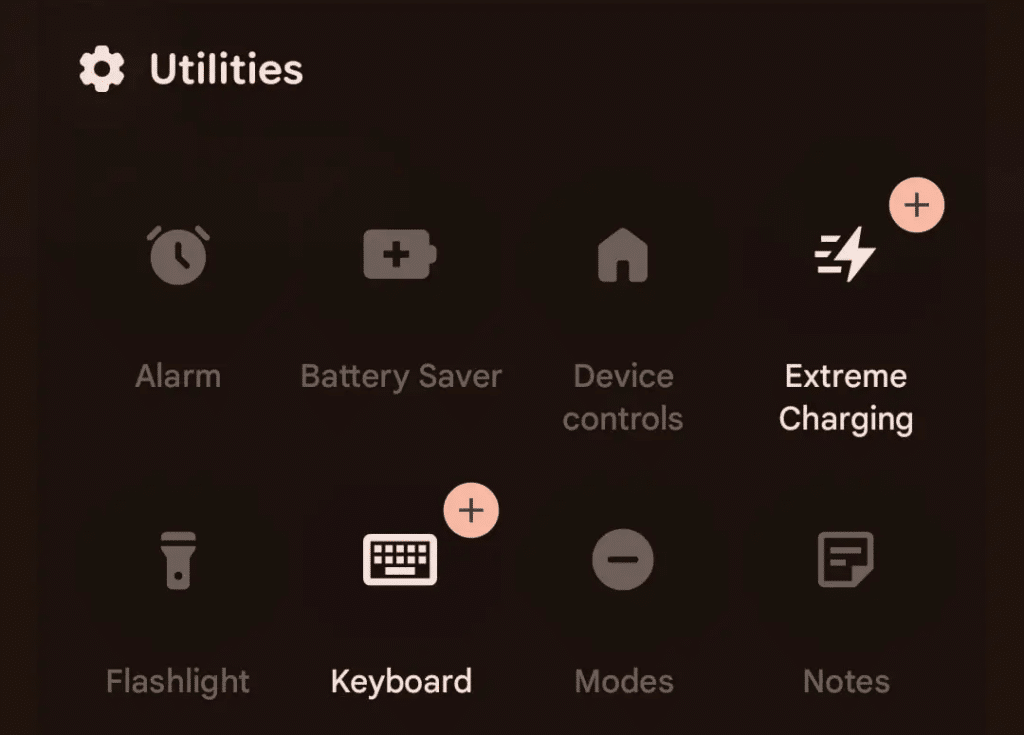
There isn’t much new here, according to 9to5Google’s hands-on:
- Notes tile for Pixel 11. A new Quick Settings tile opens the Notes app in one tap. It’s limited to the Pixel 11 series.
- Status bar tweaks. The VPN icon is bolder, the Bluetooth and Airplane mode icons are larger, and the silent icon now matches the volume panel design.
- Gemini Intelligence boot animation on Pixel 10. The Pixel 10 series now shows the boot animation that was exclusive to the Pixel 11.
- Proactive Assistance in Settings. It now appears above Magic Cue in system Settings.
The Pixel 10 changes are the interesting part. Google is bringing Pixel 11 branding to last year’s phones, which hints that more Gemini Intelligence features on Android could follow. Whether your phone can run them depends on the Gemini Intelligence hardware requirements, not on this beta.
Two hidden features point at phone and laptop integration
Android Authority found code strings for two features that aren’t live yet:
- Gamepad mouse. Lets you move a cursor and control the Android interface with a connected game controller.
- Phone Unlock. Lets a nearby, unlocked phone unlock another device, similar to how an Apple Watch unlocks a Mac. The strings warn that it “could be less secure than a PIN or password.”
Neither feature works in Beta 1. Features found in code often change or get dropped before the stable release, so treat these as hints of what Google is working on, not promises.
Should you install Android 17 QPR3 Beta 1?
For most people, no. There are two reasons.
First, the security patch. Beta 1 carries the August 5, 2026 patch. Stable Pixels already have the September 2026 patch (2026-09-05), which fixed CVE-2026-58704. That’s a modem flaw Google says may be under limited, targeted exploitation. Installing this beta puts you on an older patch level than stable users.
Second, the cost of leaving. Once you install QPR3 Beta 1, going back to stable means a factory reset that wipes your data. If you’re on a QPR2 beta and want the stable December release, opt out now, before this update installs.
Install it if you’re a developer, if you have a spare Pixel, or if one of the 20 bugs above breaks your daily use and you’re comfortable with beta risk.
How to get it
- Back up your phone.
- Go to the Android Beta for Pixel program and enroll your device.
- Open Settings > System > Software updates > System update and tap Check for update.
Developers can also sideload the OTA image (no data wipe) or flash a factory image with the Android Flash Tool. Report bugs through Google’s Issue Tracker.
How to leave the beta
Go to the Android Beta for Pixel page, tap Opt out for your device, and wait for the downgrade update. That update wipes your phone. To avoid the wipe, stay enrolled until the stable QPR3 release, install it, and then opt out.
Final Thoughts
Android 17 QPR3 Beta 1 is mostly a repair job. The Notes tile and status bar tweaks are minor, and the two hidden features don’t work yet. The real value is in the fixes for frozen fingerprint unlocks, eSIMs that switch themselves off, and lost cellular service. If those bugs hit you on stable, you now know relief is coming, probably by March 2027. If they don’t, the older security patch and the factory reset needed to leave the beta make waiting the smarter choice.
Which of these fixes have you been waiting for?
Worth checking on Amazon: