Your status bar fills up with tiny icons you never asked for. Your accent color is stuck on whatever presets Google picked. And on some Pixel 11 phones, a photo occasionally just didn’t save.
Android 17 QPR2 goes after all three. Google started rolling it out on November 10, 2026, bundled with the November Pixel Drop and the November security patch. That’s roughly a month ahead of the usual cadence: last year’s Android 16 QPR2 didn’t land until early December.
This is a control-focused release, not a flashy one. Here’s what changed and whether you should install it today.
Which Pixel Phones Get Android 17 QPR2?
The update covers the Pixel 6a and newer:
- Pixel 6a
- Pixel 7, 7 Pro, 7a, Pixel Fold and Pixel Tablet
- Pixel 8, 8 Pro and 8a
- Pixel 9, 9 Pro, 9 Pro XL, 9 Pro Fold and 9a
- Pixel 10, 10 Pro, 10 Pro XL, 10 Pro Fold and 10a
- Pixel 11, 11 Pro, 11 Pro XL and 11 Pro Fold
The Pixel 6 and 6 Pro are missing. Google promised them five years of updates from their October 2021 US launch, and that window closed in October 2026. Google hasn’t posted a formal end-of-life notice, but the OTA list is the answer. The cheaper Pixel 6a survives because it launched later, in July 2022.
Build numbers and security patch
- Pixel 6a through Pixel 10a (including Fold and Tablet): CP4A.261105.040.A1
- Pixel 11 series: CP4A.261105.040.D1
- Pixel 11 series (Canada): CP4A.261105.040.B2
The bundled November patch fixes 135 issues at the 2026-11-01 level and 97 at the 2026-11-05 level, plus 166 Pixel-specific fixes in Google’s separate Pixel Update Bulletin. Severity runs from high to critical. That alone makes this update worth installing, even if you never touch a single new feature.
Android 17 QPR2 Finally Lets You Pick Any Accent Color
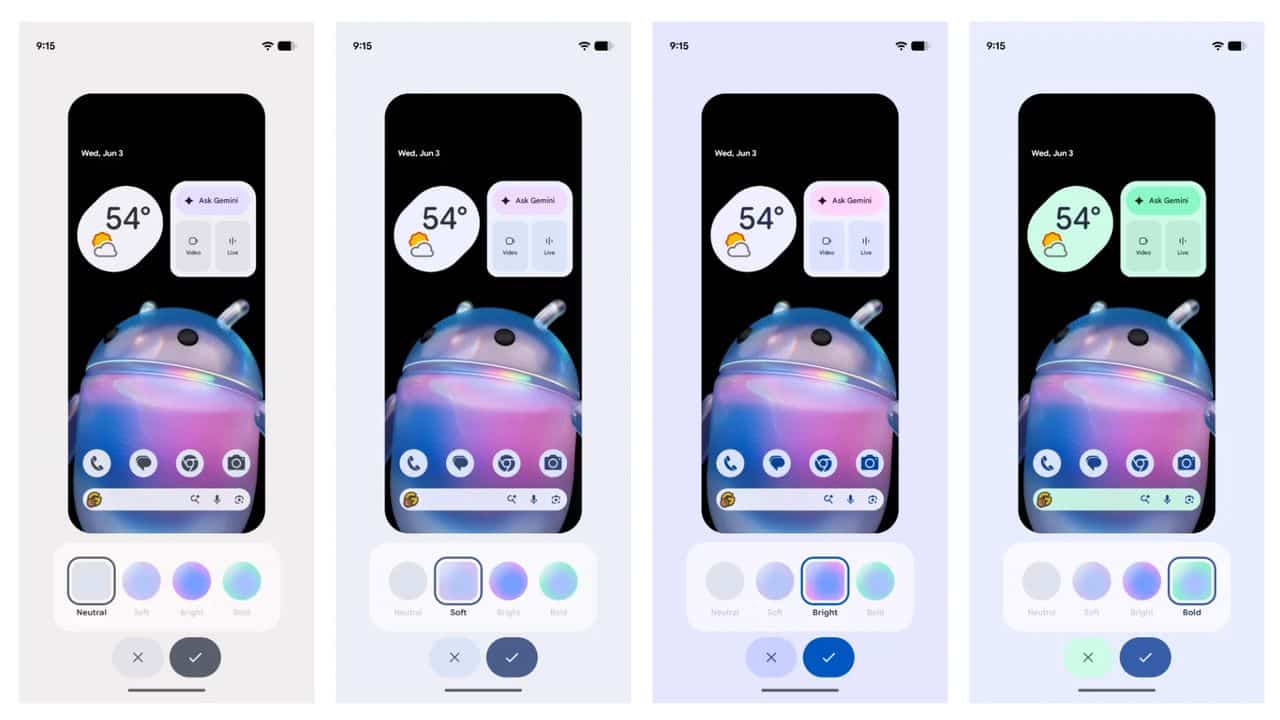
Personalization gets the most visible upgrade. Open Wallpaper & style, tap Color, and you’ll find a new paint palette icon. It opens a hue slider, so you choose the exact accent shade instead of settling for a preset.
A pencil icon in the corner then sets intensity across four styles: Neutral, Soft, Bright, and Bold. Wallpaper collections can also flip between light and dark versions to match your system theme.
The home screen long-press menu is redesigned too, with the wallpaper carousel now appearing first. Small change. You’ll notice it the first time you press and hold.
Status Bar Clutter Is Now Under Your Control
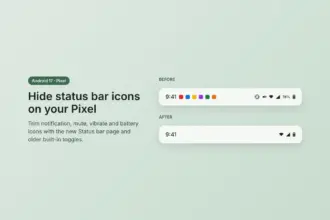
If your status bar looks crowded by noon, this is the feature to try first. Go to Settings > System and you can now choose which notification icons appear: All, Priority, or None. You can also hide individual system icons, including Mute, Vibrate, and battery percentage.
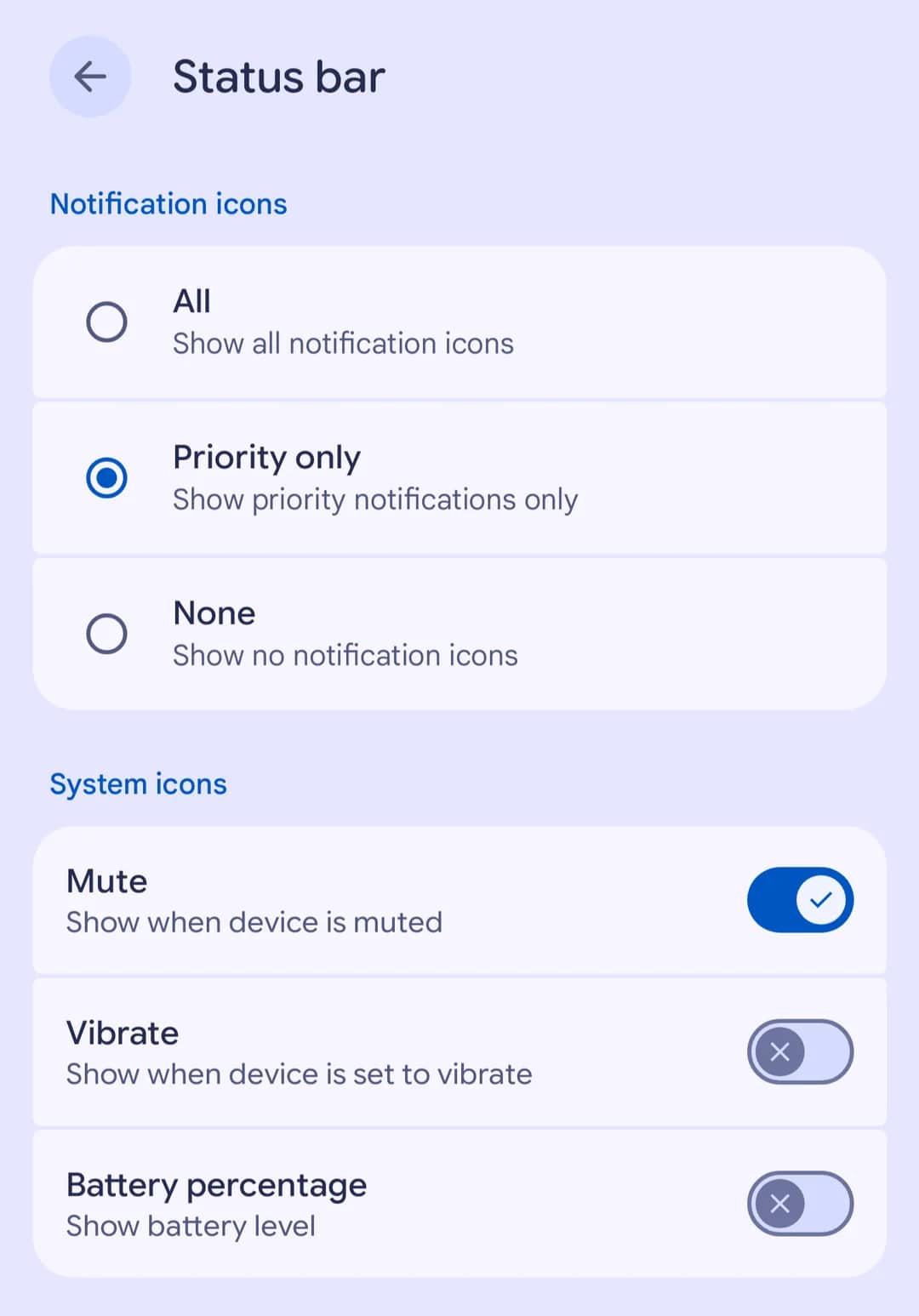
Before QPR2, cleaning this up meant workarounds or hidden developer settings. We covered those in our guide on how to hide status bar icons on Android 17. Now it’s a native toggle.
A few related tweaks land alongside it:
- Brightness overrides. You can lower brightness from Quick Settings even when an app has locked it at maximum, a fix for anyone who’s been blinded by a boarding pass or payment screen at night.
- Battery icon outline. The Quick Settings battery icon shows an outline while charging or when Battery Saver is on.
- Battery & charging. The battery menu has a new name and combines its options in one place.
One thing didn’t make the cut. A larger Quick Settings update that lets you rearrange the brightness slider and media player isn’t part of this release.
New Quick Settings Tiles Bring Auracast Sharing to Pixel
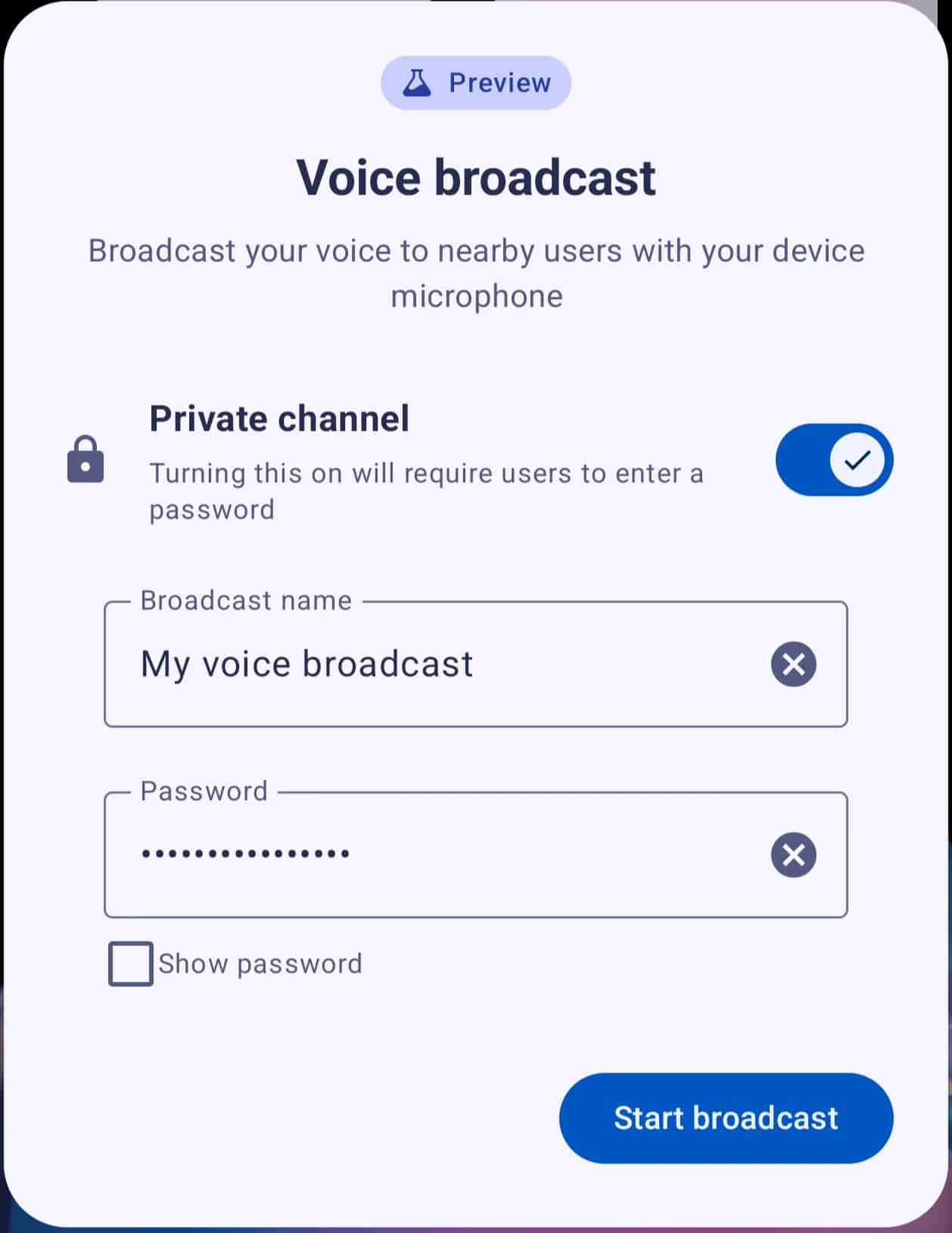
Two new tiles appear: Audio streams and Voice broadcast. Both build on Auracast, the Bluetooth LE Audio standard that lets one phone send audio to multiple compatible earbuds or hearing aids at once.
Voice broadcast is the interesting one. Your Pixel can broadcast live from its microphone or a wired headset, with optional password protection for private sessions. Listeners join by scanning a QR code, tapping via NFC, or using the Quick Settings tile. Live Caption and translation also work with broadcasts.
Who benefits? Tour guides, teachers, and anyone with hearing-aid users in the family. Everyone else can safely ignore it until LE Audio earbuds become more common.
New Privacy Tools Show What On-Device AI and Agents Are Doing
As Gemini takes on more tasks on your phone, Google is adding ways to audit it. Two new settings matter here:
- Private Compute Core log: Found under Security & privacy > Privacy dashboard > Data logging, it shows what data is shared with on-device AI features.
- Agents dashboard: Found under Security & privacy > Privacy controls > Agents, it gives you one place to review AI agent activity.
Notification controls get consolidated too. Notification intelligence now groups notification summaries, the notification organizer, and notification cooldown in one settings area, instead of scattering them across menus.
How QPR2 Blocks a Common Phone Scam
This is the most underrated change in the release. A popular scam has a caller pose as your bank or carrier and talk you into dialing a short code like *21#. That code silently forwards your calls, including one-time verification calls, to the scammer’s number.
QPR2 adds friction at exactly that point. During calls from unknown contacts, Android blocks risky actions such as turning on Developer options and asks for confirmation before running call-forwarding codes. Google’s developer notes confirm the mechanism: apps holding only the basic phone-call permission can no longer send call-forwarding codes in the background, and manual dialing now triggers a system confirmation dialog.
The app-install prompt also changes. When you sideload an app, you can now grant install permission temporarily or permanently, instead of leaving it open indefinitely.
Smaller changes worth knowing
- Foldables: A handle at the top of app windows makes switching between full-screen, split-screen, and floating bubble modes easier.
- Linux Terminal: Adds guest-to-host file sharing, and the Files app can browse, edit, and move files inside the Linux VM.
- Accessibility: Keyboard vibration customization, better hearing-device controls, and a home time zone option.
- HiLight messages: On the Pixel 11 Pro, 11 Pro XL, and 11 Pro Fold, Pixel HiLight now glows for messages from favorite contacts when the phone is face down, not just calls.
Android 17 QPR2 Fixes 33 Pixel Bugs
Google lists 33 fixes across camera, audio, Bluetooth, battery, telephony, and UI. Three apply only to the Pixel 11 family:
- Photos occasionally failing to save.
- Background battery drain tied to sensor service management.
- Slow restart and startup times.
If you own a Pixel 11, install this update today for the photo fix alone.
Fixes that apply more broadly include:
- Notification shade failing to expand on swipe down.
- Quick Switch gesture not working while Circle to Search is active.
- Media volume jumping up when you trigger voice commands.
- Ringtone distortion during some VoIP calls on older models.
- Wi-Fi Calling status missing after a restart on some carriers.
- Charging indicator appearing with no charger connected.
- Overview thumbnails getting stuck in a locked state.
Many of these were first caught in beta. If you followed testing, the Android 17 QPR2 Beta 7 release already addressed the idle battery drain and broken downloads that bothered early testers.
What the November Pixel Drop Adds on Top
QPR2 is the platform layer. The November Pixel Drop adds Google’s app-level features on the same day, and some depend on your model:
- Custom icon styles and Pixel search (photos, emails, messages, calendar events, and settings) reach the Pixel 6a and newer.
- Gemini Intelligence features, including Rambler voice typing and personalized widgets, target the Pixel 10 and 11 series. The Pixel 10a is left out of proactive suggestions and widgets.
- Multi-step Gemini tasks like ordering groceries or booking rides are live in Japan, the UK, and India.
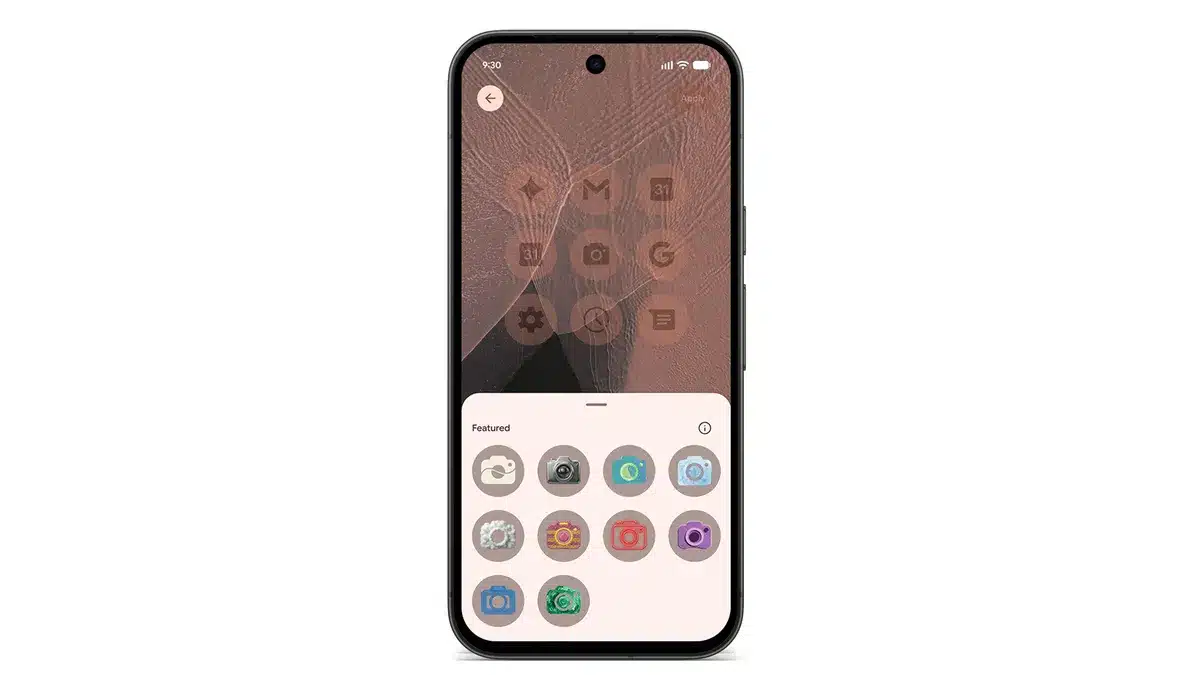
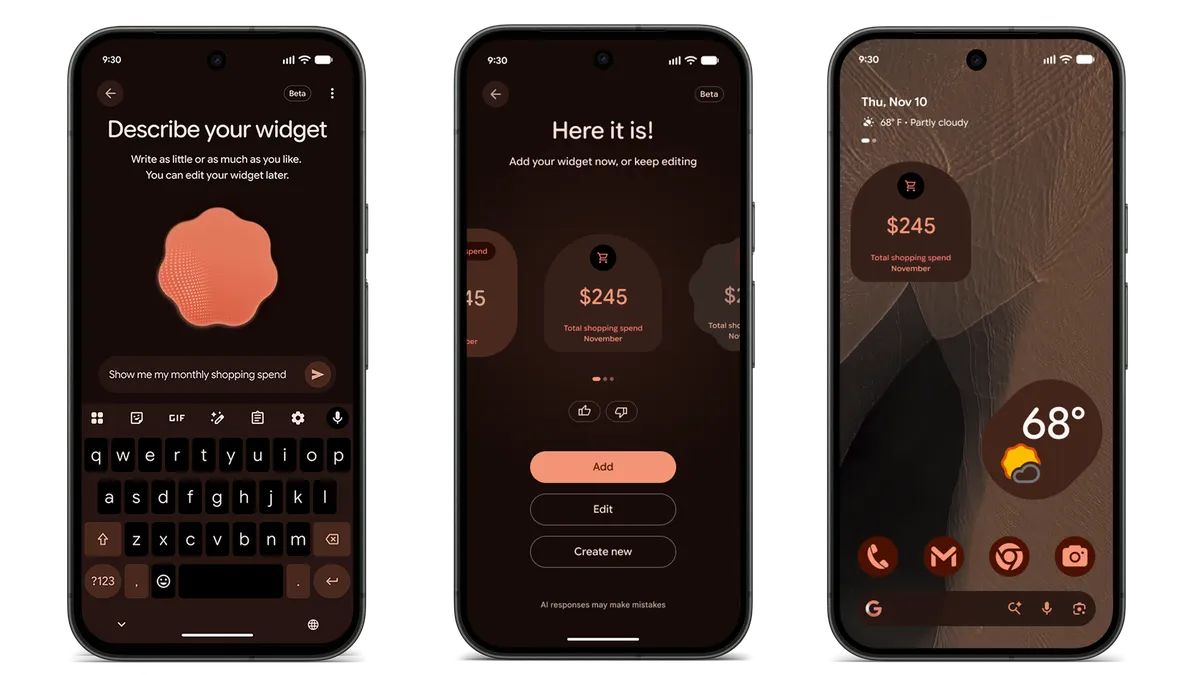
Google says Pixel Drop features keep reaching phones over the next few weeks, so a missing feature today doesn’t mean you’re excluded.
How to Update Your Pixel to Android 17 QPR2
- Open Settings.
- Tap System, then System update.
- Tap Check for update and install when it appears.
Rollouts are staged, so it may take a few days to reach your phone. Impatient? Google has posted OTA images you can sideload from its official OTA page, which doesn’t wipe your data.
If you’re on the Android Beta Program
Beta users receive a small update that moves them onto the final QPR2 build. Once you’re on it, you can opt out at google.com/android/beta and stay on stable without a wipe. Opt out before that update arrives and you risk a factory reset. The program stays open for QPR3, which is already in testing; our Android 17 QPR3 Beta 3 breakdown shows what’s coming next.
Signing off
Android 17 QPR2 won’t change how your Pixel looks at a glance. It changes how much of it you decide. You pick the exact accent color, you decide which icons earn space in the status bar, and you get real tools to see what AI features touch on your device.
The call-forwarding protection and November security patch make it worth installing on every eligible Pixel, and Pixel 11 owners get a photo-saving fix they shouldn’t wait on. Pixel 6 and 6 Pro owners, meanwhile, have reached the end of the line.