If you tested the QPR2 betas this summer, you probably locked your banking app with Android’s native app lock, got used to it, and then watched it vanish a few builds later. That feature is back.
Google started rolling out Android 17 QPR3 Beta 3 to Pixel phones on October 29, 2026, nine days after Android 17 QPR3 Beta 2. Google’s release notes list 26 bug fixes and no new features. The build itself tells a different story: app lock, lock screen blur, a camera Quick Settings tile, and app bubbles from Recents all show up on devices.
Here’s what changed, what’s still missing, and whether you should install it.
Android 17 QPR3 Beta 3 at a Glance
- Release date: October 29, 2026
- Build numbers: DP11.261016.004 (Pixel 11 series), DP11.261016.003 (all other supported Pixels)
- Security patch: October 5, 2026 (2026-10-05)
- Google Play services: 26.36.33
- Download size: 3.92 GB on a Pixel 11 Pro XL, per Beebom
- Known issues: None listed by Google
Which Pixel Phones Get Android 17 QPR3 Beta 3?
Every Pixel from the 6a onward qualifies:
- Pixel 6a, Pixel 7, 7 Pro, 7a, Pixel Fold, Pixel Tablet
- Pixel 8, 8 Pro, 8a
- Pixel 9, 9 Pro, 9 Pro XL, 9 Pro Fold, 9a
- Pixel 10, 10 Pro, 10 Pro XL, 10 Pro Fold, 10a
- Pixel 11, 11 Pro, 11 Pro XL, 11 Pro Fold
The Pixel 6 and 6 Pro are absent. Google ended QPR updates for both after the QPR1 beta series, so this cycle won’t reach them.
Native App Lock Is Back on Pixel
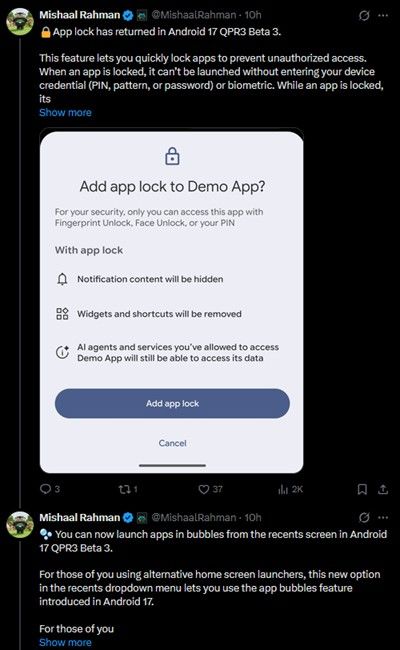
App lock has had a rocky year. It first appeared in an Android Canary build, disappeared from later Canary builds, missed the Android 17 stable release, and finally reached testers in Android 17 QPR2 Beta 3. Then Google pulled it again in September. Android community manager Mishaal Rahman said the team removed it to fix underlying bugs and promised it would return.
Beta 3 keeps that promise. Based on how the feature worked in earlier builds, you’ll find it under Settings > Security & privacy > App lock. You need a PIN, pattern, or password set up first. Pick the apps you want to protect, and Android asks for your fingerprint, face, or PIN every time you open one.
Here’s the part most coverage skips. Locking an app does more than add a password prompt:
- Notification content stays hidden for locked apps.
- Widgets and shortcuts disappear from your home screen.
- Recents hides the app’s preview, so nobody sees your last screen while you swipe through.
There’s one real caveat. Earlier builds warned that AI agents and services you previously granted access can still read a locked app’s data, and locking a file manager doesn’t stop other apps with photo permission from seeing your images. App lock guards against someone holding your unlocked phone. It doesn’t wall off data at the system level the way Private Space does, which Google still recommends for hiding apps completely. Our rundown of Android 17’s security and privacy features covers the difference.
Who benefits most? Anyone who hands their phone to kids, or anyone who previously relied on a third-party locker app. Samsung users have Secure Folder and Xiaomi users have had app lock for years, so Pixel owners are catching up here, not leaping ahead.
Lock Screen Blur Returns Too
The same September cleanup that removed app lock also stripped the background blur from lock screen UI. Beta 3 restores it. Wake your phone with notifications waiting and you’ll see a frosted layer behind them and behind the fingerprint sensor area, instead of notifications sitting directly on your wallpaper.
It’s a cosmetic change. It does make text easier to read on busy or bright wallpapers, which was the point of adding it in the first place.
Two Small Additions Worth Trying
Beyond the returning features, Beta 3 adds a couple of genuinely new options.
- Camera tile in Quick Settings. Pull down the shade, add the new Camera tile, and you get a direct route to camera modes and camera privacy controls. It’s handy if you’d rather not hunt for the camera icon on a cluttered home screen.
- Open apps as bubbles from Recents. You can now launch an app into a floating bubble straight from the Recents screen. Beebom notes this mainly helps people using third-party launchers, who now get bubble access without relying on the Pixel Launcher.
There’s also a minor clock fix: lock screen alarm notifications now show AM or PM when you use 12-hour time. Small, but anyone who has squinted at “7:00” before bed will appreciate it.
All 26 Bug Fixes in Android 17 QPR3 Beta 3
The features grab attention, but fixes make up most of this release. They fall into a few clear groups.
Display and Foldable Fixes
- Inner display stays black when unfolding a foldable
- Display randomly turns off and on
- Display rendering glitch when adjusting the font size slider
- Home screen wallpaper appears on the lock screen after waking from an open app
- Incorrect image transparency with the Multiply blend mode
System UI and Notification Fixes
- Recents flickers after a quick app switch followed by a home gesture
- Navigation bar animation glitches when swiping up to Recents
- Image action icons missing from Recent Apps
- UI buttons show as blank white squares in dark mode
- Grouped notification icons and titles appear grayed out
- A persistent UI message can’t be dismissed
- Bubbles get stuck minimized at the bottom after swiping to dismiss
- Inconsistent status bar icon spacing
- Mobile Data Quick Settings icon has the wrong size and visual artifacts
- Colored icons flicker on the Accessibility settings page
- Equalizer frequency bars cut off at the top of the screen
- Toast notifications fail under high memory pressure
Stability, App, and Connectivity Fixes
- Intermittent crashes on the lock screen or shortly after startup
- Force stop in app settings fails to close apps
- Apps can’t launch new activities while a Picture-in-Picture window is active
- The X (Twitter) app crashes when viewing mentions in a post thread
- Apps crash when
BluetoothLeScanner.stopScan()gets a null callback - WPA-Enterprise Wi-Fi fails with PEAP authentication
- Screen recording callback reports recording active after you stop sharing from floating controls
- Poor video quality when using the phone as a webcam
- SettingsDumpService uses excessive memory after opening SIM settings
Two fixes stand out for daily use. The PEAP fix matters if you connect to office or university Wi-Fi, since those networks commonly use WPA-Enterprise. The lock screen crash fix addresses the most disruptive bug class in this cycle, following Beta 2’s fixes for random reboots.
Should You Install Android 17 QPR3 Beta 3?
That depends on which build you run today.
If you’re already on QPR3, install it. It fixes more than it adds, and Google lists no known issues.
If you’re on stable Android 17, think twice. Leaving the beta later means a full data wipe through the Android Flash Tool. QPR2 stable is expected in early December, so app lock may reach you without beta risk soon. Google hasn’t confirmed that app lock ships in QPR2 stable, though.
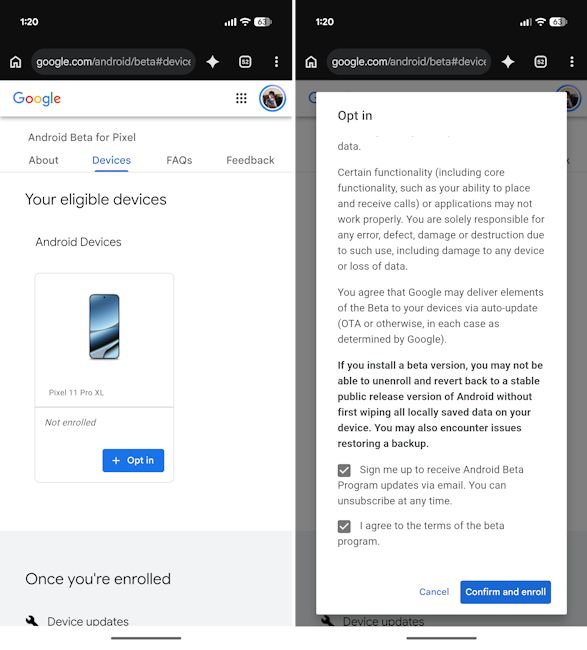
Still want in? Here’s how:
- Back up your phone.
- Enroll your Pixel at the Android Beta Program website (google.com/android/beta).
- Open Settings > System > System update and tap Check for update.
You can also sideload the OTA image from Google’s Android developer site. Report bugs through the Android Beta Feedback app.
When Will Android 17 QPR3 Reach Stable?
QPR3 beta testing began with Android 17 QPR3 Beta 1 on October 2, 2026. Beta 2 followed on October 20, and Beta 3 on October 29. Based on Google’s usual quarterly cadence, the stable QPR3 release should land around March 2027 as a Pixel Drop. Google hasn’t announced a date or Platform Stability milestone yet.
Not sure where QPR3 fits in Android’s release cycle? Our explainer on the current Android version breaks it down.
Signing Off
Google’s changelog calls Beta 3 a bug-fix release, and the 26 fixes justify that label. The real story is what Google quietly put back: app lock and lock screen blur, both pulled in September to fix bugs. Their return suggests Google trusts that work now. For testers, this is the most polished QPR3 build yet. Everyone else can wait for QPR2 stable in December and see whether app lock makes the cut.
Which returning feature matters more to you, app lock or the blur?