If you’ve ever handed your Pixel to a kid, a coworker, or a curious friend and felt a flicker of panic about what app they might accidentally open, you already know the gap Android has had for years. iPhones have had app-level locking through Screen Time. Samsung phones have had Secure Folder. Stock Android has had neither, unless you counted Private Space as a workaround.
Google shipped Android 17 QPR2 Beta 3 on August 14, 2026, and it closes that gap. This is the third beta in the second Quarterly Platform Release cycle for Android 17, arriving a few weeks after the final QPR1 beta wrapped up its own bug-fixing run. It’s less about flashy keynote features and more about the kind of quality-of-life additions testers have been asking for since QPR2 started rolling out in July.
Here’s everything that changed in Beta 3, what it means for your Pixel, and when the rest of us get it.
When Does Android 17 QPR2 Arrive, and Which Pixels Get Beta 3?
Android 17 QPR2 has moved through three beta builds so far, each tied to a specific security patch level and Google Play services version:
- Beta 1: July 20, 2026, build CP41.260701.005, security patch 2026-07-05, Google Play services 26.23.34
- Beta 2: August 3, 2026, build CP41.260717.006, security patch 2026-07-05, Google Play services 26.24.35
- Beta 3: August 14, 2026, builds CP41.260731.005.A2 and CP41.260731.005.B1, security patch 2026-08-05, Google Play services 26.26.34
Beta 3 is available for Pixel 6a, Pixel 7, 7 Pro, and 7a, Pixel Fold, Pixel 8, 8 Pro, and 8a, the Pixel 9 series (9, 9 Pro, 9 Pro XL, 9 Pro Fold, 9a), the Pixel 10 series (10, 10 Pro, 10 Pro XL, 10 Pro Fold, 10a), and Pixel Tablet. That’s the same lineup running the stable Android 17 release today. You’ll need to be enrolled in the Android Beta Program to get it over the air, or you can flash the OTA image manually from Google’s developer site.
Google hasn’t given an official stable release date for QPR2 yet. Based on the pattern from QPR1 and prior quarterly releases, it’s expected to land as a stable update in December 2026, likely bundled with that month’s Pixel Feature Drop. Treat that as an educated guess, not a confirmed date.
Worth knowing: this is still beta software. Expect occasional bugs, and don’t install it on your only phone if you rely on it for work or can’t tolerate the odd restart.
Android Finally Gets a Native App Lock
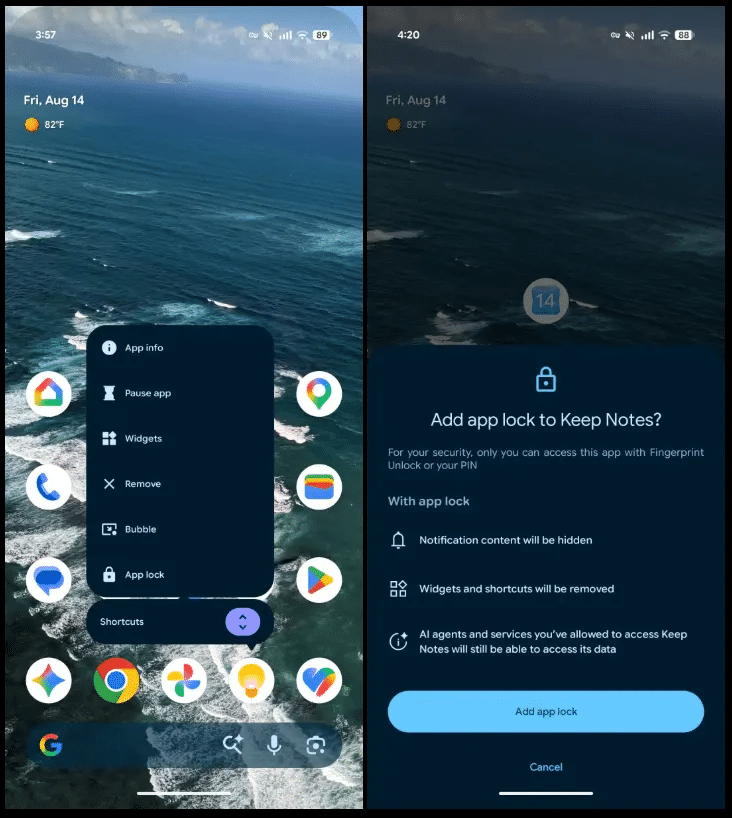
The headline feature is right there in the name. App Lock lets you require a fingerprint or PIN before anyone, including you on a bad day, can open a specific app. It fits the same security-first direction Google has been pushing since it overhauled how Android 17 verifies your OS integrity, just applied at the app level instead of the system level.
Turning it on is simple. Long-press any app icon and you’ll see a new App lock option sitting next to App info and Pause app in the context menu. Tap it, and that app now demands authentication through the system authentication sheet every time someone tries to open it.
You can manage everything centrally too: head to Settings > Security & privacy > App lock to see every protected app in one place and adjust or remove protection.
Locking an app does more than gate the launch screen. Notification content from that app gets hidden, and its widgets and shortcuts disappear from your home screen and app drawer. That’s a meaningfully different approach from just adding a lock screen to the app itself. It also comes with a caveat worth flagging: AI agents that already had permission to access an app’s data before you locked it keep that access. Locking the app blocks a person tapping the icon, not an assistant that was already authorized.
Who actually needs this? Anyone who shares a phone occasionally, hands it to kids for games, or just wants banking and messaging apps a step more protected than the rest of the home screen. Casual users who never lend their phone out can safely skip it.
If you’re already hiding app names on your Pixel home screen for a little extra discretion, App Lock is the natural next layer on top. App Lock is still tagged as a beta feature, and 9to5Google’s reporting says Google intends to carry it through to the stable QPR2 release, so treat what you see now as close to final but not guaranteed to ship unchanged.
The Lock Screen Gets a Softer, Blurrier Look
Beyond App Lock, Beta 3 leans into a visual refresh that’s been building across QPR2. Google added system-level blur to more of the lock screen, including the notification list, the two lock screen shortcuts, and the fingerprint icon. Instead of flat, opaque elements sitting on top of your wallpaper, they now have translucency that lets color and detail from the wallpaper show through.
How noticeable this is depends heavily on your wallpaper. Busy, high-contrast wallpapers make the blur pop; a plain dark background barely shows it. It’s also not applied everywhere yet. Beta 3 blurs the notification list and two of the lock screen shortcuts, but not every element on the screen, which suggests Google is still rolling this out gradually rather than shipping the finished design in one pass.
Quick Settings Finally Bends to How You Actually Use It
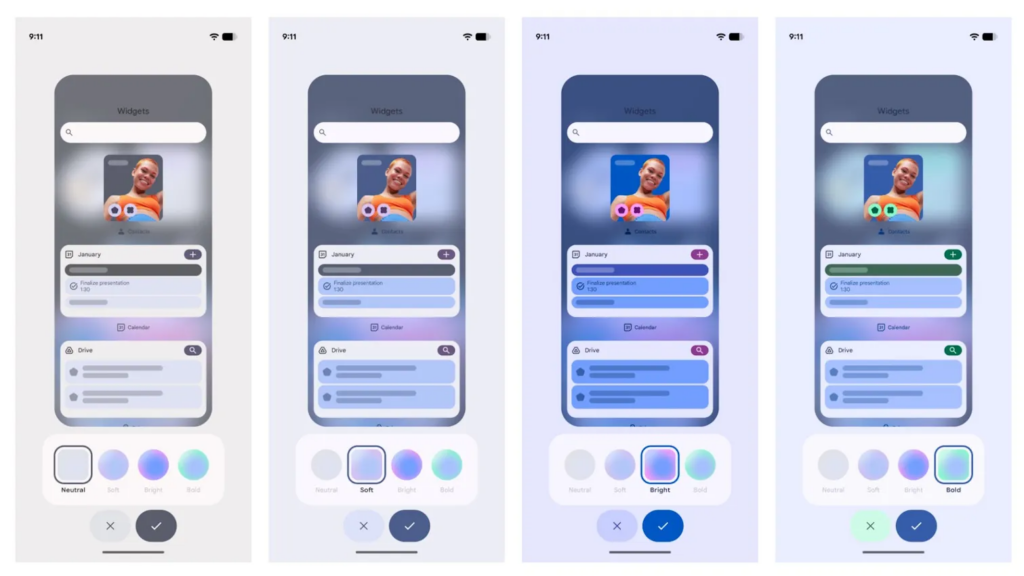
Quick Settings has stayed largely rigid on Pixel for years: the tiles Google picks, in roughly the order Google picks. QPR2 Beta 3 changes that. You can now edit and reorder segments of the Quick Settings panel, including repositioning elements like the brightness slider and the Now Playing media card to wherever makes sense for how you actually use your phone.
Theming got an upgrade alongside it. The themes section now includes adjustable hue control plus four additional color combinations, extending the dynamic color system that already pulls accents from your wallpaper. Combined with the reordering options, it’s the most control Pixel owners have had over Quick Settings since the panel was introduced.
Foldable Owners Get Easier Window Management
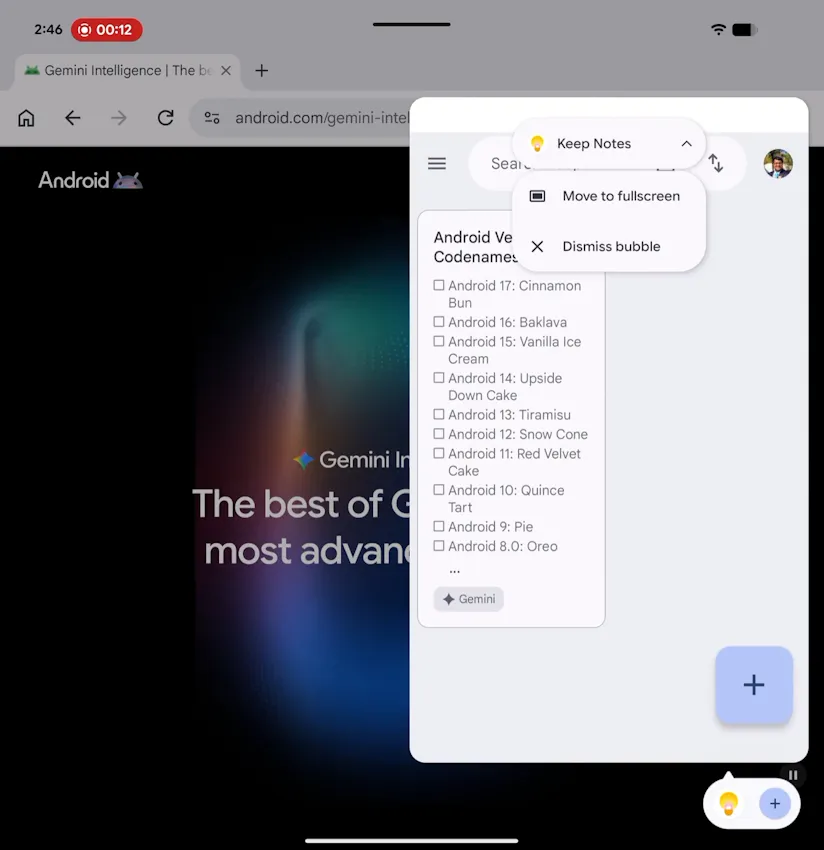
The customization push carries over to foldables too. If you’re on a Pixel Fold or Pixel 9/10 Pro Fold, Beta 3 adds app window handles that make dragging windows around and converting them to fullscreen noticeably easier. It’s a small addition on paper, but multitasking on a foldable’s inner screen has always involved more fiddly dragging than it should.
A dedicated handle for grabbing and resizing windows addresses that directly rather than asking you to hunt for the right pixel to tap.
Google Is Cracking Down on Call-Forwarding Scams
The least visible change in Beta 3 might matter the most for anyone who’s been targeted by a scam call. Google restricted how apps can programmatically trigger call-forwarding USSD codes through the TelephonyManager API. Apps now need explicit CALL_PHONE permission to attempt it, and any attempt to run a call-forwarding code in the background gets blocked outright with a USSD_ERROR_NOT_ALLOWED error.
This directly targets a well-documented fraud pattern: a scammer convinces a victim to dial a code that silently forwards their calls, then uses that forwarding to intercept one-time passcodes and verification calls meant for banking or account recovery.
Even manually dialing a forwarding code now triggers an OS-level confirmation dialog, so you can’t fat-finger your way into forwarding your calls without at least one warning first. Non-call-forwarding USSD requests, like the codes used for mobile money transfers in several countries, are unaffected by the change.
It’s part of a broader pattern. Google has also been rolling out on-device fake call detection to flag scam calls before they connect, and this USSD restriction closes off one of the quieter ways scammers get around that kind of protection.
Bug Fixes
Beta 3 also cleans up two issues that made QPR2 testing rougher than it needed to be. Google fixed the visual corruption and unexpected restarts that some testers hit when opening the notification shade or Quick Settings, and it corrected false battery degradation warnings that the Device Health and Support tool had been showing incorrectly on some units.
How to Get Android 17 QPR2 Beta 3
If your Pixel is on the compatible list above, enroll it in the Android Beta Program and the update should arrive over the air.
If you’d rather not wait for the rollout or your device isn’t currently enrolled, Google also publishes the official QPR2 release notes and OTA images on the Android Developers site for manual installation.
Final Thoughts
None of this is keynote material, and Google isn’t pretending otherwise. What QPR2 Beta 3 actually delivers is the app-level privacy control Android has been missing for years, a visual refresh that’s still finding its footing, and a genuinely useful anti-fraud fix buried in the API layer where most people will never notice it.
That’s a fair trade for a point release between now and the December stable build. Is App Lock enough to make you finally trust your phone in someone else’s hands, or were you already getting by with Private Space?