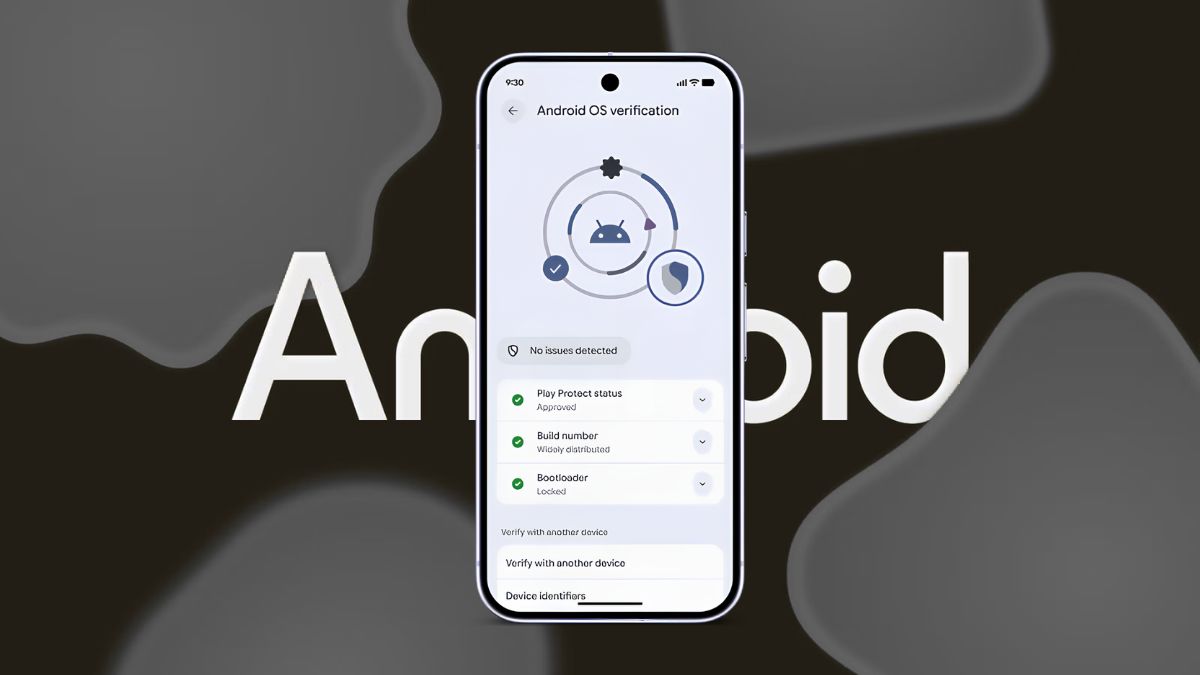
Google recently rolled out Android 17 stable to Pixel devices with several new security features, but one notable addition didn’t make the final release. The new OS Verification feature, first spotted earlier this year, has now resurfaced in Android 17 QPR1 Beta 5, giving us the clearest look yet at how it works.
The feature addresses a serious security problem. Counterfeit Android builds can look identical to the real thing while secretly disabling Play Protect, intercepting communications, or installing system-level spyware. Until now, there hasn’t been an easy way for everyday users to verify whether a phone is running an authentic version of Android. Technologies like Android Verified Boot, Play Protect, and Pixel Binary Transparency have handled this behind the scenes for years, but they’re aimed primarily at developers and security professionals.
Here’s everything you need to know about Android 17’s upcoming OS Verification feature, including how it works, what it checks, and who will benefit most from using it.
What Is Android 17’s OS Verification Feature?
OS Verification is a new security tool that lets you verify whether your phone is running a genuine, unmodified, Google-approved version of Android.
Instead of relying entirely on background security systems, Android 17 presents the verification results in a simple, user-friendly interface. For a deeper security check, it also uses a trusted second device to independently confirm the phone’s integrity.
Android Authority discovered nearly the complete verification workflow in Android 17 QPR1 Beta 5, suggesting the feature is approaching release. Unlike many security features that operate silently, OS Verification gives users a clear confirmation of whether their device can be trusted.
How Android 17 OS Verification Works
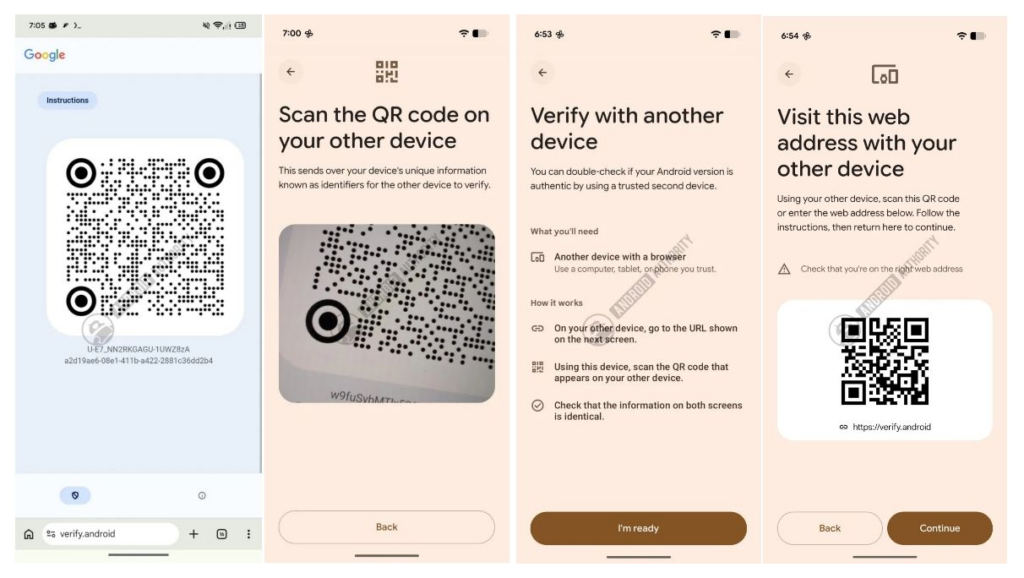
The verification process uses two devices:
- The Android phone you want to verify.
- A second trusted device, such as another phone, tablet, or computer.
Here’s how the process works:
- Open OS Verification on the Android phone you want to check. The phone displays a QR code and the URL verify.android.
- On your trusted device, visit verify.android by scanning the QR code or entering the address manually. The website generates another QR code.
- Scan the second QR code using the phone you’re verifying. The device securely sends its boot hashes and verification data to Google.
- Both devices display the verification results. The phone shows a summary, while the trusted device displays detailed information, including the build number, bootloader status, and boot hash.
- Compare the boot hashes. If they match and there are no warnings, the phone is running an authentic Android build.
Using a second trusted device is an important part of the process. If the phone itself has been compromised, it shouldn’t be responsible for verifying its own software. By displaying the detailed report on another device, Google creates a much more trustworthy verification system.
What Android 17 OS Verification Checks
Rather than relying on a single test, OS Verification combines several security checks.
It verifies:
- Play Protect status to confirm Google’s malware protection is active.
- Build number to ensure it’s an official Android release.
- Bootloader status to determine whether the bootloader is locked or unlocked.
- Boot hashes that uniquely identify genuine production builds.
- Overall device integrity using Google’s verification signals.
If something doesn’t match, Android displays a warning.
For example, Android Authority reported that QPR1 Beta 5 showed a “Not widely used” warning because the device was running beta software instead of the stable release.
Similarly, custom ROMs such as GrapheneOS and other Android forks will likely trigger warnings because they aren’t official Google builds.
Why OS Verification Matters
If you bought your phone directly from Google, Samsung, or a trusted carrier, you probably won’t need to use OS Verification very often.
Its biggest advantage comes when buying:
- Used phones
- Refurbished devices
- Imported phones
- Gray-market devices
In these situations, it’s difficult to know whether the phone has been modified before reaching you.
OS Verification gives buyers a simple way to check whether the operating system is genuine before trusting the device with passwords, banking apps, personal photos, and sensitive data.
It’s not a replacement for advanced developer tools, but it’s far easier for everyday users.
When Is Android 17 OS Verification Coming?
Although Android 17 QPR1 Beta 5 includes almost the complete user interface, some parts of the verification system are still unfinished.
For example, the protocol that powers the two-device verification process isn’t fully functional yet.
Google has confirmed that OS Verification will launch first on Pixel devices, followed by a broader rollout to other Android phones.
Based on Google’s typical release schedule, the feature is expected to arrive with the Android 17 September Feature Drop, although Google hasn’t officially confirmed that timeline.
Final Thoughts
Android 17’s OS Verification feature may not grab headlines like new AI tools or interface changes, but it could become one of the platform’s most valuable security additions.
By giving users an easy way to verify whether a phone is running authentic Android software, Google is making advanced security checks accessible to everyone, especially those buying used or refurbished devices.
As the feature continues to mature throughout the Android 17 QPR1 beta cycle, Pixel owners will likely be the first to try it before it expands to the broader Android ecosystem.
No. The feature currently appears in Android 17 QPR1 Beta builds and wasn’t included in the initial Android 17 stable release.
Google has confirmed that Pixel devices will receive the feature before it expands to other Android phones.
Not completely. Since the tool verifies official Google-approved Android builds, custom ROMs and Android forks will likely trigger verification warnings.
Don’t miss these related reads: