Google didn’t wait for I/O 2026 to make its move. A full week before the developer conference, the company hosted a dedicated Android Show, a deliberate choice that signals just how seriously Google wants you to pay attention to this update. Android 17, internally codenamed Cinnamon Bun, isn’t a cosmetic refresh. It’s the most AI-forward version of Android yet, and after going hands-on with the feature breakdown, it’s clear that several of these upgrades will genuinely change how you interact with your phone every single day.
Stable release lands in June 2026, rolling out to Pixel devices first, Pixel 6 and newer, before making its way to Samsung Galaxy, Xiaomi, and the rest of the Android ecosystem later in the year. If you’re trying to decide whether to jump on the beta or wait, here’s the honest breakdown of Android 17’s key features you should know before making that call.
Gemini Intelligence Is the Core of Everything
If there’s one thread running through Android 17, it’s Gemini. Not Gemini as a chatbot you open separately, but Gemini embedded so deeply into the OS that it starts to feel less like a feature and more like a new layer of the phone itself.
Google describes this as agentic AI, which essentially means Gemini can now act on your behalf across apps without you manually switching between them. Need to book a ride, confirm an appointment, or pull together a quick summary of a long article? Gemini handles the back-and-forth between apps, including select third-party services, so you don’t have to. It’s the kind of thing that sounds like a demo-stage trick until you’re actually using it.
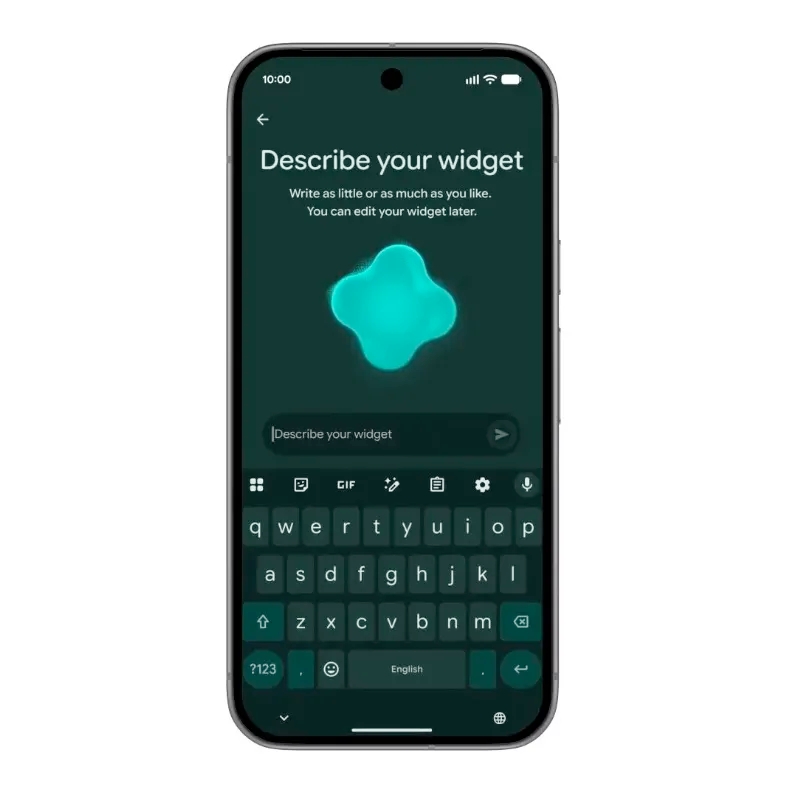
Two specific Gemini-powered additions stand out:
- Create My Widget lets you describe what you want, say, a combined clock and weather widget with your calendar overlay, and Gemini builds it on-device. No template hunting, no third-party widget app required.
- Rambler in Gboard is quietly one of the most useful features for anyone who dictates messages or notes. It transcribes your voice in real time while automatically stripping out filler words, the “ums,” “likes,” and false starts that make voice-to-text feel unusable in professional contexts. For multilingual users especially, this makes voice input feel genuinely polished.
Worth noting: not every Gemini Intelligence feature will run on every device. Some capabilities are hardware-dependent, so check the Gemini Intelligence hardware requirements before assuming your current phone qualifies for the full experience.
Quick Share Finally Crosses the Platform Wall
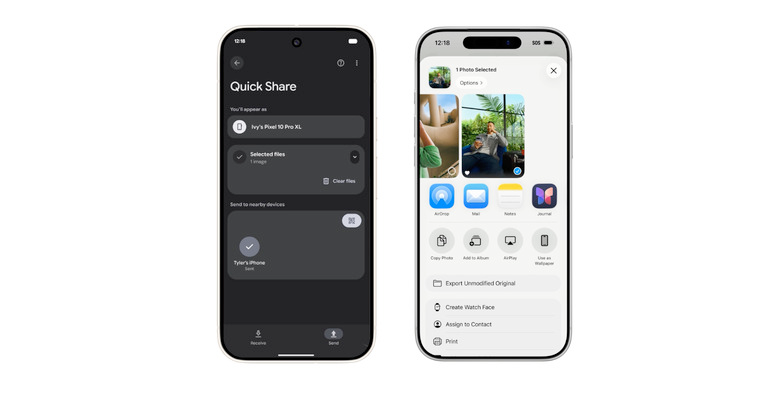
Cross-platform file sharing has been the stubborn friction point between Android and iPhone users for years. Google started chipping away at this last year when the Pixel 10 series gained the ability to send files directly from Android’s Quick Share to Apple’s AirDrop. That expanded to the Pixel 9, Samsung Galaxy S25, and S26 lineups shortly after.
With Android 17, Google extends this capability significantly further. Oppo, OnePlus, Vivo, Xiaomi, and Honor devices all get Quick Share-to-AirDrop support. For Android users constantly moving files between platforms, photos from an iPhone or documents between office devices, this is the kind of practical fix that removes a genuine daily annoyance. No third-party apps, no cloud detours, no Bluetooth workarounds.
Pause Point: Android’s Answer to Doomscrolling
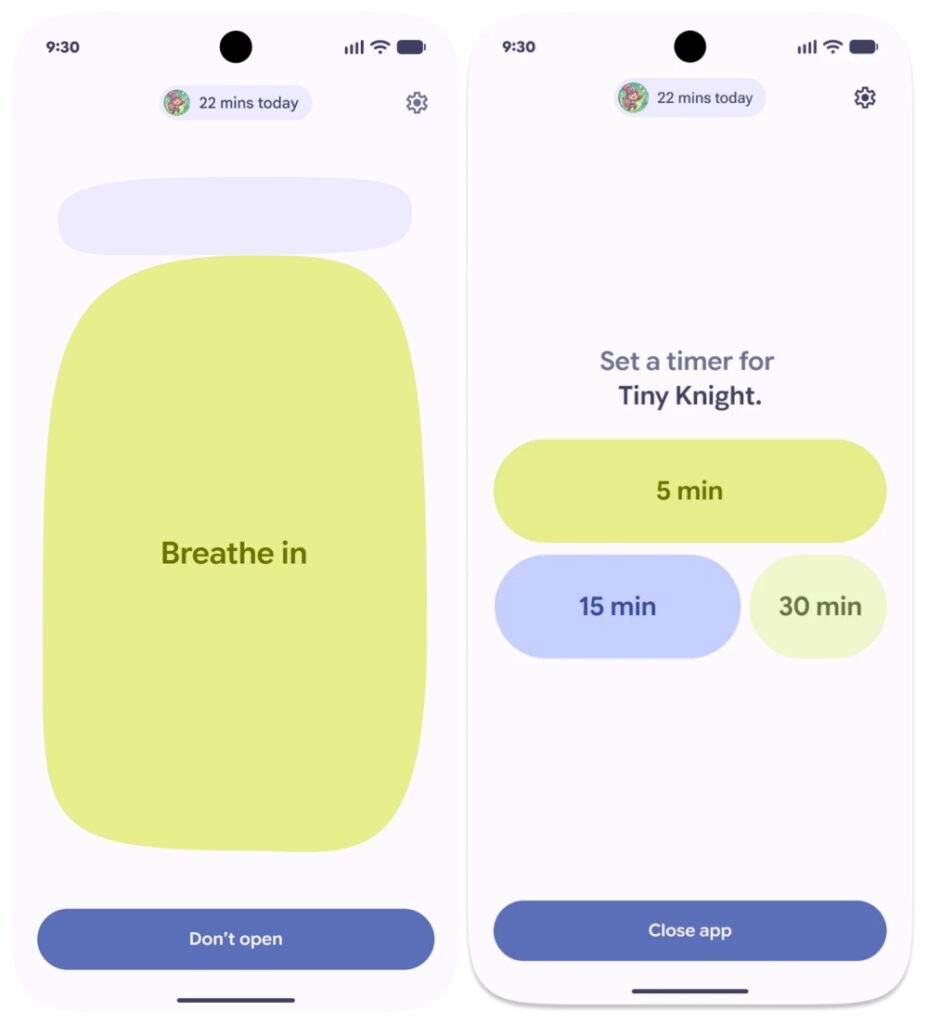
One of the new features in Android 17 that makes it better than ever for mental clarity is also one of the hardest to fully describe without just experiencing it. [Pause Point] lives under Digital Wellbeing, but it works differently from every screen-time tool that came before it.
Here’s how it actually works: you flag specific apps as “distracting,” such as Instagram, YouTube, TikTok in supported regions, or anything you find yourself mindlessly opening. The next time you tap that app icon, Android doesn’t open it immediately. Instead, it surfaces a 10-second pause screen. During those ten seconds, it offers alternatives: a short breathing exercise, a usage timer, a glance at your favourite photos, or a nudge toward something calmer like an audiobook app.
You can still open the app. Pause Point isn’t a parental control. It’s a friction-based intervention for adults who genuinely want to be more intentional with their time. The difference from every other screen-time feature is that it meets you at the moment of impulse, not after the fact. That’s where the psychology actually works.
It’s worth spending time exploring everything Android 17’s Pause Point feature can do because the customization options go deeper than the basic overview suggests.
The Emojis Got a Full 3D Redesign
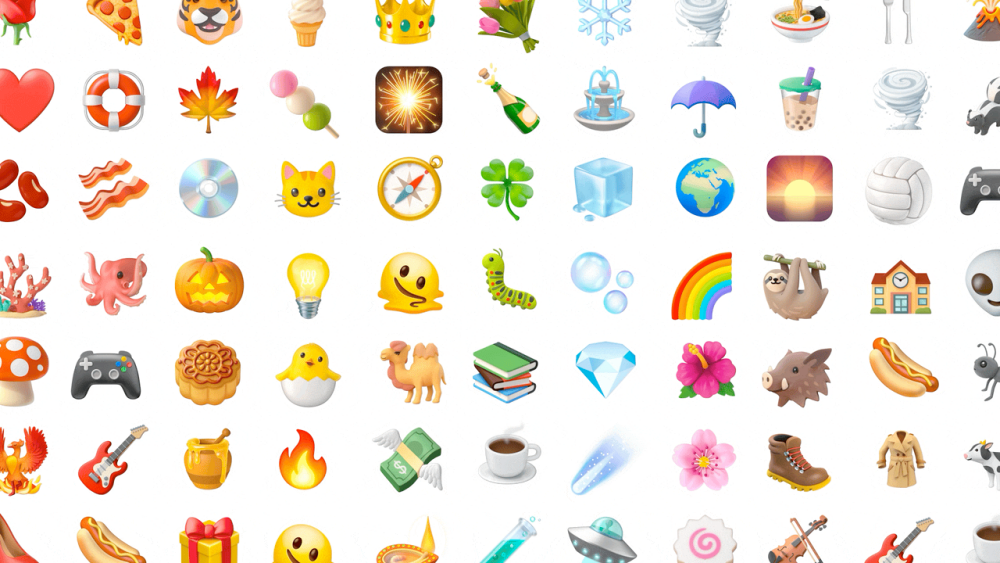
This one’s smaller in scope but surprisingly delightful in person. Google teased a new emoji set called Noto 3D, fully redesigned with dimensional shading, more expressive faces, and visual detail that makes the existing flat emoji set look dated by comparison.
Google hasn’t revealed the full collection yet, but the samples shown during the Android Show are noticeably more alive-looking. The rollout starts on Pixel devices later in 2026, with broader Android expansion to follow. A small thing, sure, but it’s the kind of polish that adds up across hundreds of messages a day.
Security Gets Smarter, Not Just Stricter
The security and privacy upgrades in Android 17 deserve more attention than they typically get in feature roundups because several of them solve real problems that existing tools handle poorly.
- Anti-spoofing call protection is the headline here. In partnership with select banks, Android 17 can cross-check incoming calls against your installed banking apps to detect spoofed numbers, the kind used in financial fraud calls that convincingly impersonate your bank. If a call is flagged as suspicious, Android can alert you or disconnect it automatically. This isn’t a general spam filter. It’s targeted specifically at the social-engineering attacks that are responsible for the majority of phone-based financial fraud.
- Live Threat Detection gets a meaningful upgrade too. Android 17 now scans for a wider range of risky app behaviors in real time: SMS forwarding without your knowledge, apps running hidden background processes, and accessibility feature misuse, a common vector for spyware and stalkerware. The scanning runs locally, so there’s no data leaving your device.
- FindHub’s Mark as Lost mode also gets a security reinforcement worth knowing about. If your device is marked lost, Android now locks it behind biometric authentication in addition to your PIN or password. So even someone who has observed your passcode, or found it written down, can’t fully access the device without your fingerprint or face. It’s a meaningful gap-closer in physical device theft scenarios.
For a full look at everything covered, the security and privacy features in Android 17 go considerably further than these headline additions.
The Bottom Line on Android 17
The best Android 17 features aren’t flashy for the sake of it. They’re unusually focused on things that matter during a normal day. Gemini Intelligence brings genuinely useful automation rather than AI for AI’s sake. Pause Point addresses a real behavioral problem with more intelligence than any previous digital wellbeing tool. The security upgrades close actual exploit paths rather than shuffling existing protections around.
For power users, the Bubbles multitasking mode, which lets you run apps as resizable floating windows, and the enhanced Desktop Mode, complete with a taskbar, freeform windows, and touchpad support, will feel like the kind of features that make you wonder how you worked without them.
This update rewards the users who actually engage with it. If you’ve been dismissing recent Android updates as incremental, Android 17 is the one worth paying attention to.
Android 17 stable release is expected in June 2026. Eligible Pixel users can join the Android Beta Program for early access today.
You might also like: