If you’ve ever typed something like “good workout for bad knees” into YouTube‘s search bar and scrolled through a wall of thumbnails hoping something useful would surface, that frustration is exactly what Google is trying to fix.
Announced at Google I/O 2026 on May 19, YouTube’s new Ask YouTube feature doesn’t just tweak the search experience. It rebuilds it from the ground up, replacing the old keyword-match logic with something that actually understands what you’re trying to accomplish.
Sundar Pichai described it plainly: it “entirely reimagines the experience.” That’s a bold claim, but the mechanics back it up.
What Ask YouTube Actually Does and Why It Feels Different
With Ask YouTube, we’re bringing a new conversational search experience to YouTube, one where you’re not forced to reduce your question to a handful of keywords and hope the algorithm guesses your intent correctly.
Instead, you can ask the way you’d ask a knowledgeable friend.
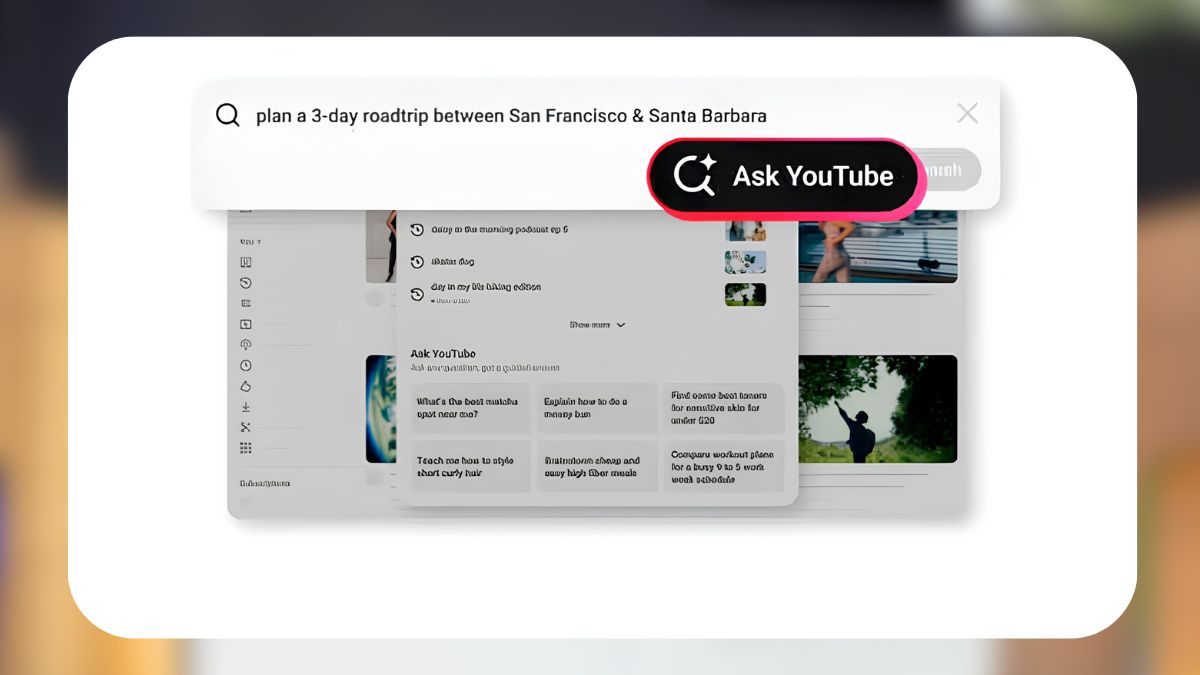
Want to know how to teach your kid to ride a bike? Ask that. Looking for creator reviews of cozy games to wind down with before bed? Ask that too. Need a practical 3-day road trip itinerary from San Francisco to Santa Barbara, with actual video recommendations baked in? That’s now a reasonable search query.
YouTube processes these natural-language questions using Gemini, Google’s AI, and returns something far more useful than a ranked list of video titles. It generates a structured response that blends text summaries, relevant long-form videos, and YouTube Shorts, and can jump you directly to the timestamp in a video where the relevant section begins. No more scrubbing through a 20-minute video to find the two-minute segment that matters to you.
The follow-up question feature is where it gets genuinely useful. Ask YouTube maintains context across your search session, so if your first question is too broad or leads somewhere unexpected, you can narrow it down conversationally, the way you’d refine a request with a human expert, not restart from scratch.
This conversational approach to search isn’t entirely new territory for Google. If you’ve used Ask Maps on Google Maps, you’ll recognize the same underlying philosophy: turning a utilitarian search tool into something closer to a planning partner. Ask YouTube applies that same logic to the world’s largest video library.
Who Can Use It Right Now
As of May 20, 2026, Ask YouTube is available to YouTube Premium subscribers aged 18 and older in the United States, currently running as a desktop-focused experiment. You can opt in at youtube.com/new.
The experiment is live through at least June 8 for early testers, with a broader rollout planned for all U.S. users, including non-Premium subscribers, expected sometime this summer. International expansion is on the roadmap after that.
One honest caveat worth noting: like every AI search feature at this stage, accuracy and response quality can vary. YouTube is collecting thumbs-up/thumbs-down feedback directly in the interface, which suggests this is still very much a feature in active development rather than a finished product. That’s not a knock. It’s just useful context if you’re evaluating it seriously.
Also worth clarifying: Ask YouTube is a viewer-facing search tool. It’s separate from Ask Studio, which is an AI assistant inside YouTube Studio built specifically for creators to dig into their analytics, read through comment trends, and brainstorm content directions.
Gemini Is Coming to Shorts Creation Too
The AI push at Google I/O 2026 wasn’t limited to search. If you create content on YouTube, there’s a meaningful update heading to your workflow as well.
Gemini Omni is now being integrated into both Shorts Remix and the YouTube Create app, and it’s more capable than the AI tools that came before it.
Remix has always let creators take an eligible Short and build something new from it, adding filters, overlaying prompts, and inserting themselves into the visual context of the original video. Gemini Omni upgrades the intelligence behind that process. It’s designed to better understand creative intent, which in practice means more consistent storytelling across complex video and audio edits, rather than results that feel stitched together.
There are transparency measures built in: any Short created through Omni Remix will carry a digital watermark, identifying metadata, and an automatic link back to the source video. Creators whose content gets remixed retain the ability to opt out entirely.
Remixing with Omni is rolling out today, free of charge, through Shorts Remix and the Create app. It’ll also arrive in AI Playground in the near future.
Signing off
The thread running through all of this is the same: Google is pushing its products toward interfaces that understand intent, not just input. For YouTube specifically, that shift matters more than it might for a typical search engine because most of what people are actually looking for on YouTube isn’t a video. It’s an answer, a plan, or a feeling. Ask YouTube is an attempt to meet that need directly.
You might also like: