Google has rolled out Android 17 Beta 4, and if you’ve been following this development cycle closely, you know this one is different. This isn’t just another incremental drop. This is the final scheduled beta before Android 17 goes public, and Google is calling it the “near-final environment.” In plain terms, what you test today is very close to what millions of Android users will experience later this year.
It’s been about three weeks since Beta 3 landed, and the pace has been consistent. Beta 4 is now live for every Pixel device from the Pixel 6 onwards, including tablets. If you’re already enrolled in the beta program, your device should already be nudging you to update.
So, what exactly does the latest Android 17 Beta 4 update bring to the table? Let’s break it down.
Android 17 Beta 4 Is the Final Beta Before Release
Before diving into features, it’s worth understanding what “final beta” actually means for everyday users and developers alike.
Since Android 17 Beta 3 already crossed the platform stability milestone, Google has now locked down the core APIs. That means no new developer-facing features are coming in through that channel. But that doesn’t mean this release is quiet. There’s still meaningful progress here, from under-the-hood performance work to a handful of user-facing changes that make a real difference in daily use.
What’s New in the Android 17 Beta 4 Update
Smarter App Memory Management
One of the more practical additions in Android 17 Beta 4 is the new app memory limits system. Google’s goal here is straightforward: make sure every app on your device gets “the right amount of RAM” based on what’s actually available at any given moment. For most people, this translates to a smoother experience across multitasking, less background app killing, and better overall responsiveness, especially on mid-range Pixel hardware.
The Android 17 Easter Egg Has Finally Arrived
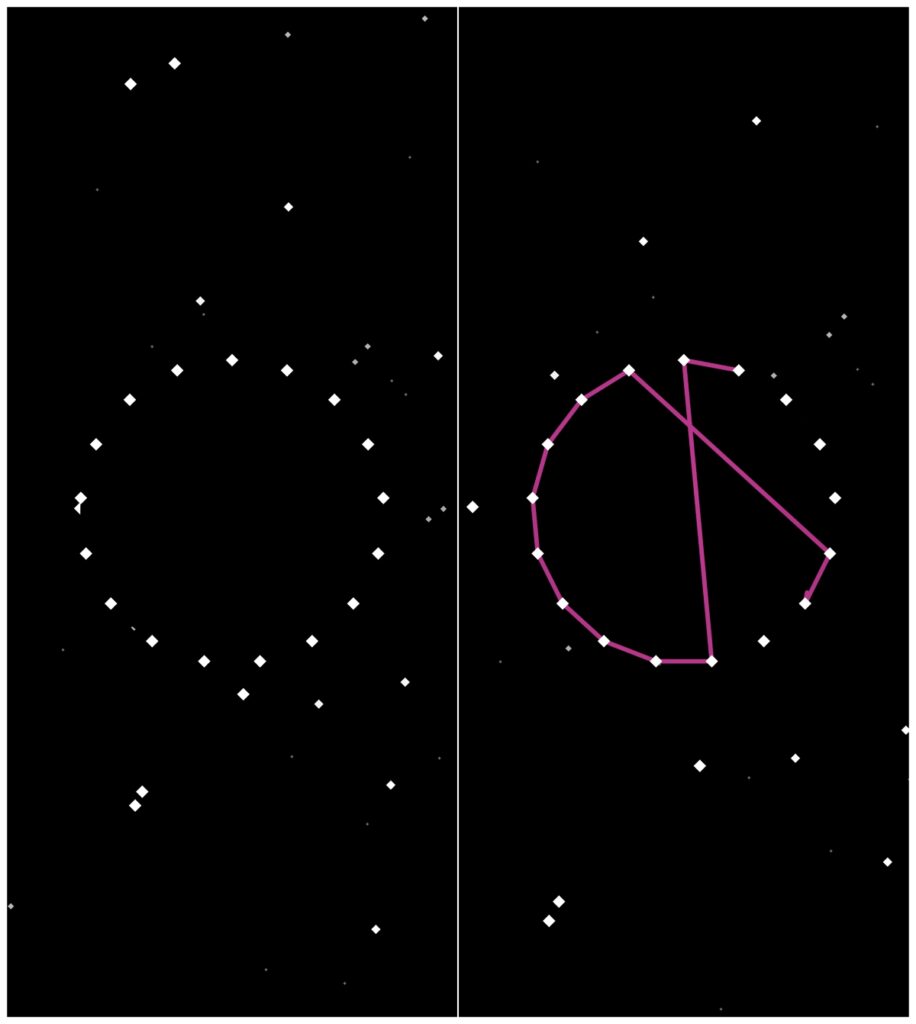
This one’s been anticipated since the early betas. Every major Android release comes with a hidden Easter egg, and Android 17 is no exception. Beta 4 delivers it, continuing one of Android’s longest-running traditions. It’s a small thing, but for Android enthusiasts, spotting and sharing the Easter egg has become something of a ritual.
Must read: What’s New in Android 17: Key Upgrades Worth Getting Excited About
Post-Quantum Cryptography: A Big Security Upgrade
This is arguably the most significant technical addition in Android 17 Beta 4 features, even if it’s invisible to most users. Google previewed post-quantum cryptography support a few weeks ago, and it’s now live in Beta 4. The idea is to future-proof Android’s security layer against the kind of threats that quantum computing could eventually pose. It’s a long-term investment in protecting user data, and the fact that it’s landing now gives developers time to adapt before the stable release.
A Friendlier Notification Empty State
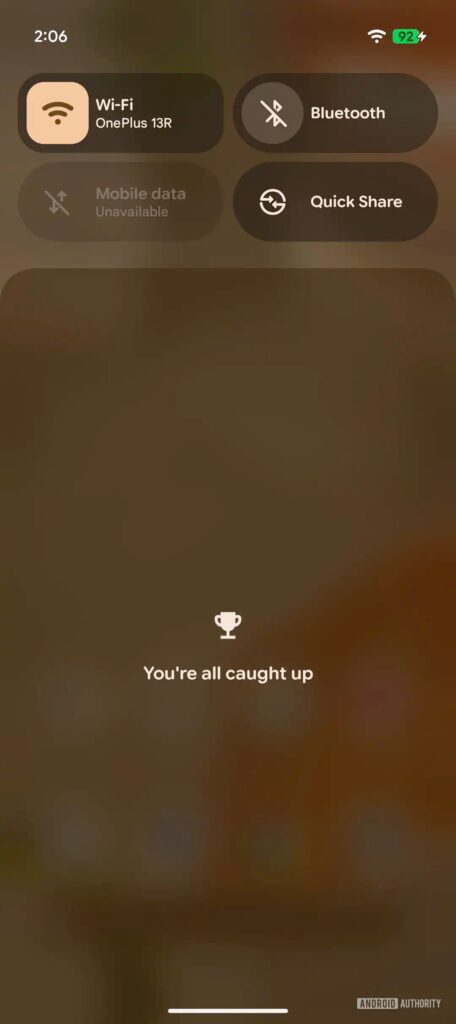
Here’s a small but genuinely delightful change. If you’ve cleared all your notifications, you used to be greeted by a flat “No notifications” message. Beta 4 replaces that with “You’re all caught up,” complete with a congratulatory trophy icon. It’s a minor UX polish, but these are the touches that make a platform feel considered rather than purely functional. Tapping the message also pulls up your notification history, which is a handy bonus.
The Long-Press Photo Save Is Back
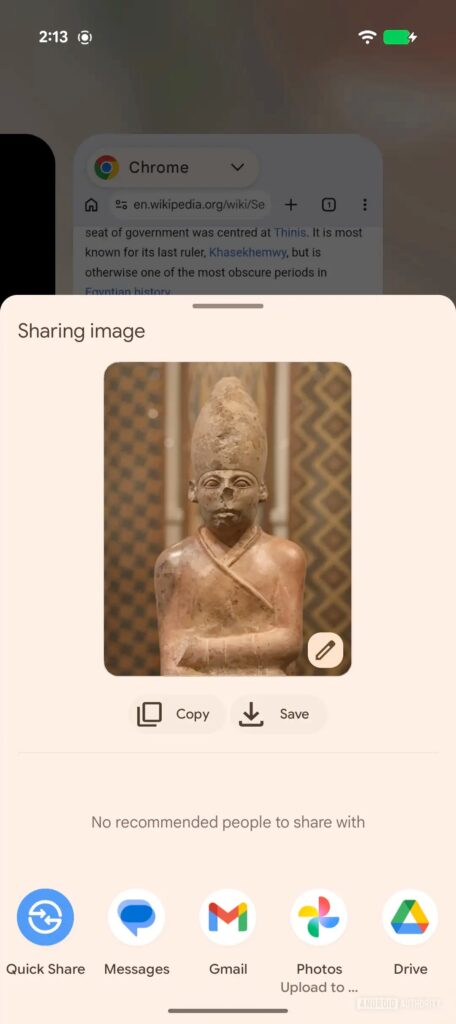
This one deserves a bit of context. Android 16 QPR3 quietly removed the ability to save a photo directly from the Recents screen using a long press. It wasn’t a popular call. In fact, it felt like one of those changes that made it past QA without enough user feedback. Google appears to have heard the complaints, because Android 17 Beta 4 brings the “Save” button back to the Recents screen. A quiet reversal, but a welcome one.
Bug Fixes: A Long and Meaningful List
The bulk of this release is dedicated to stability, and the fix log is genuinely extensive. Here are the highlights that are most likely to affect real users:
- Charging slowdown near 80%: Devices were taking an unusually long time to charge past the 80% battery limit, with delays before entering bypass mode. That’s now fixed.
- Random display glitches: Multicolored horizontal lines were randomly appearing across the screen during normal use. Multiple device reports flagged this issue, and it’s resolved.
- Keyboard freezes in messaging apps: If your device froze or restarted while typing a message, this fix addresses it. It’s one of the more disruptive bugs in the list.
- Post-reboot crashes: After a reboot, core components including Pixel Launcher and navigation were crashing or becoming unresponsive for several minutes. That’s been addressed.
- Bluetooth toggle issues: Turning Bluetooth off through Quick Settings and then trying to turn it back on simply didn’t work. Fixed.
- Wi-Fi analyzer apps not detecting signals: This affected a broad range of network scanning apps and has been resolved across multiple reported variants.
- Screenshot sharing including URLs: When sharing a screenshot from the capture preview, webpage URLs were being quietly attached to the image file. That’s the kind of accidental data leak that could cause real problems. Patched.
- Accessibility regressions: Two separate accessibility fixes are included, one for a device-wide unresponsive state and another for apps becoming unusable after returning from split-screen.
- Media controls disappearing: The media widget was occasionally vanishing or failing to switch between active sessions. Four separate issue reports were rolled into one fix here.
- System UI crash from notification drawer: Pulling down the notification shade during an active feedback report could freeze the entire UI. Resolved.
All Pixel phones and tablets from the Pixel 6 and newer are eligible. Existing testers receive an OTA notification automatically.
It’s close to stable, but as a beta, it may still have rough edges. If you rely heavily on your device for work, it’s better to wait for the stable release unless you’re comfortable troubleshooting occasional issues.