Most people know Gemini exists on their Android phone. Far fewer actually understand what it can do or how dramatically it has evolved from a glorified voice shortcut into something that is genuinely trying to handle your day for you.
Gemini Intelligence on Android isn’t a single feature. It’s Google’s way of describing the entire AI layer now baked into Android, a collection of tools that range from conversational assistants and real-time call translation to fully autonomous background agents that can complete multi-step tasks while you’re doing something else. And with the announcement at The Android Show on May 12, 2026, Google made its ambitions unmistakably clear: Android is no longer just an operating system. It’s becoming an intelligence system.
This guide breaks down every Gemini Intelligence Android feature, what it actually does in practice, and which devices can run it, so you’re not left reading a press release version of reality.
What Is Gemini Intelligence, Really?
Gemini Intelligence isn’t a standalone app or a premium add-on. It’s the collective name for Google’s AI-powered features across Android, encompassing everything from the Gemini assistant you can summon by long-pressing the power button to silent, on-device models working in the background without you ever opening an app.
At its core, Gemini Intelligence on Android operates on two distinct layers:
- Cloud-powered reasoning: For complex queries, drafting documents, deep research, generating images, and understanding nuanced prompts, Gemini connects to Google’s servers and uses its most capable models remotely.
- On-device intelligence via Gemini Nano: This is where things get genuinely interesting. Gemini Nano is a smaller, compressed model that lives entirely on your phone. It handles privacy-sensitive tasks, like reading your screen context, analyzing your calls, or surfacing suggestions, without your data ever leaving the device. On Pixel phones, this runs on Google’s Tensor chipset, which is purpose-built for this kind of local AI processing.
The distinction matters practically: features powered by Gemini Nano are faster, more private, and functional even offline. Features relying on the cloud require a connection and often a subscription for the best models.
From Bard to Gemini Intelligence: A Quick Timeline Worth Knowing
Understanding where Gemini came from explains why it works the way it does today.
It started as Bard, Google’s answer to ChatGPT, announced in December 2022 and formally introduced at Google I/O 2023. By September 2023, Bard gained extensions, letting it reach into Google Workspace, YouTube, Maps, and Flights to pull real information rather than generating plausible-sounding guesses.
Then in February 2024, Google rebranded Bard to Gemini, overhauled the product entirely, and introduced a tiered model structure with significantly faster and smarter capabilities. Google I/O 2024 marked the moment Gemini stopped being a standalone chatbot and became deeply woven into Android, Chrome, Photos, and Workspace.
By early 2026, Gemini had already replaced Google Assistant on Android entirely, something that felt unthinkable just two years earlier. It also brought features like Pixel Screenshots and Pixel Studio into the ecosystem.
Then came the May 2026 announcement. At The Android Show, Google introduced Gemini Intelligence as a formal term for the proactive, agentic capabilities arriving with Android’s next generation, not just answering questions, but autonomously completing tasks across apps while you stay in control. It also announced a new security framework specifically designed to make sure Gemini acts as a helpful partner rather than an overzealous agent operating without oversight.
Related: Everything Google Announced at Google I/O 2026: The Complete Breakdown
When Is Gemini Intelligence Rolling Out, and Will Your Phone Get It?
This is the part most articles gloss over, so let’s be direct.
The full Gemini Intelligence experience is rolling out in Summer 2026, starting with the Google Pixel 10 series and Samsung Galaxy S26. Broader availability for other Android phones, watches, and cars is expected later in 2026, but the hardware requirements for the complete feature set are steep.
To run the full suite, Google requires: 12GB or more RAM, a flagship SoC with Gemini Nano v3+ support, recent media processing capabilities, and strong security commitments, specifically five or more OS upgrades and six years of security patches. These requirements mean a meaningful number of phones released in 2025 and earlier, including some high-end flagships, will likely be excluded from the most capable features.
Check the full list of Gemini Intelligence supported devices to see where your phone stands before getting too excited.
For the regional picture: features are rolling out progressively, and some are tied to Google AI subscription plans. Not every feature will be available in every country or language at launch.
How to Enable Gemini on Your Android Phone
On current Pixel phones, Gemini is already your default assistant, nothing to set up. On other modern Android phones, it typically comes pre-installed or updates silently through Google Play Services.
If you’re on an older Android device running Android 10 or higher with at least 2GB of RAM:
- Download the Google Gemini app from the Play Store.
- Open it and follow the prompts to make it your default assistant.
- Once set, you can activate it via “Hey Google” or by long-pressing the power button.
The transition from Google Assistant to Gemini happens automatically once you accept. You keep the same trigger words but get a fundamentally more capable AI underneath.
Every Gemini Intelligence Android Feature, Explained Without the Marketing Fluff
1. Gemini Live: When You Actually Want to Talk to AI
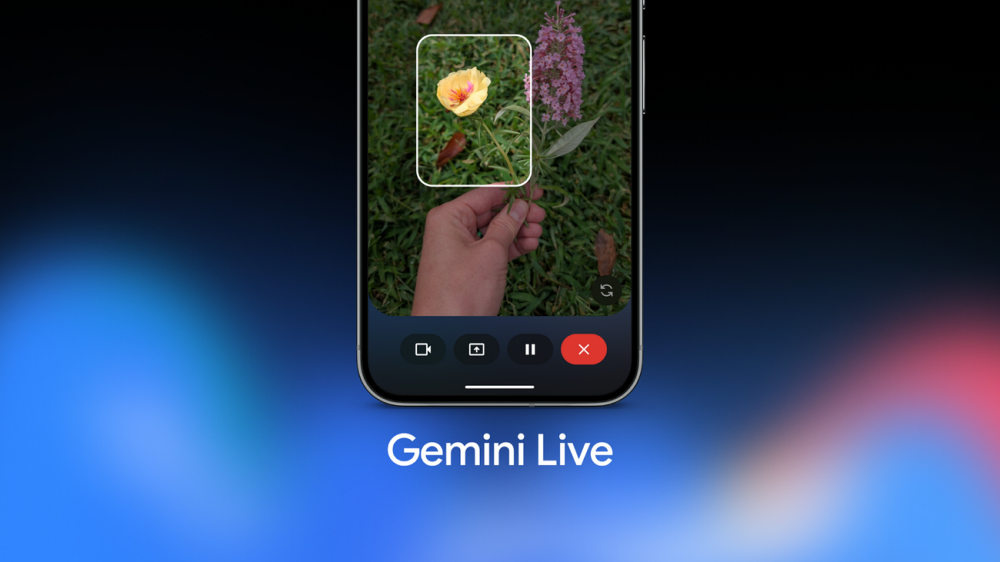
Most AI assistants feel like filling out a form. Gemini Live feels more like a phone call. You can interrupt it, change the subject halfway through, ask it to slow down or reconsider an idea, and have it talk with you rather than at you.
Beyond conversation, Gemini Live lets you share your screen or point your camera at something in the real world. It processes what it sees and gives you real-time audio responses and on-screen prompts, useful for everything from reading a menu in a foreign language to troubleshooting hardware you’re looking at.
Available on all Android phones.
2. Circle to Search: The Fastest Way to Look Something Up
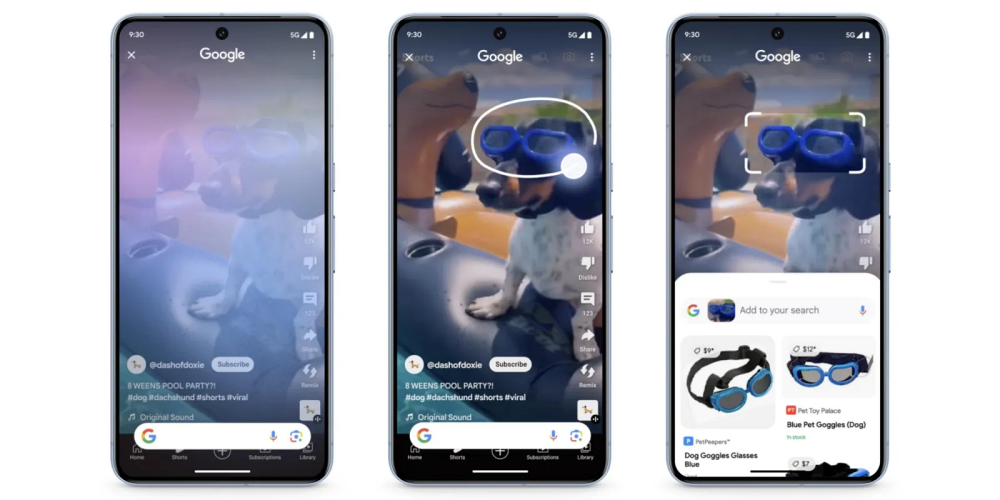
Long-pressing the navigation bar brings up Circle to Search, one of the most practically useful features Google has shipped in years. Instead of copying text, switching apps, pasting, and waiting, you draw a circle, or tap or highlight, around whatever you’re curious about, text, an image, or a product, and Google immediately surfaces relevant results in a panel over whatever you were already doing.
It also reads text in images, translates on the spot, identifies songs, and does reverse image lookups. Originally a Pixel exclusive, it’s now available on essentially all modern Android phones.
3. Magic Cue: Proactive Intelligence Before You Even Ask
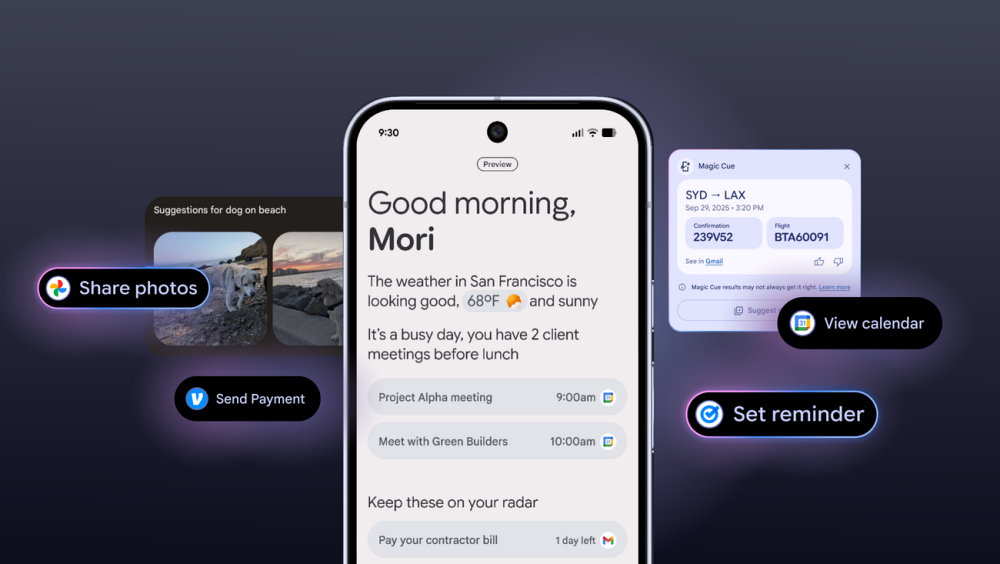
This one is new with the Pixel 10 and represents the clearest signal of where Gemini Intelligence is heading.
Magic Cue runs continuously in the background using Gemini Nano entirely on-device. It reads the context of your texts, calls, and chats and surfaces exactly the information you’re about to need, a contact’s address when you’re discussing meeting up or a flight number when someone mentions their arrival, before you think to look for it.
It’s the difference between a search engine that waits for your query and an assistant that understood what you were about to search before you formed the thought. Because it runs entirely on-device, none of this context leaves your phone.
The more passive “Ask about Screen” feature, where you manually pull up Gemini and ask what’s on screen, is available across other Android phones. Magic Cue’s proactive version is currently Pixel-exclusive.
4. Personal Intelligence and Gemini Autofill
Personal Intelligence is Gemini’s evolution of the extensions concept, and it’s still in early stages, which is worth noting.
Once enabled, Gemini gains permission to pull from your connected apps intelligently. Ask for a photo from last Christmas and it retrieves it from Google Photos without you opening the app. Ask who attended a meeting and it checks your Calendar and Gmail. The idea is a single natural-language layer over your entire digital life.
Alongside this, Gboard’s Autofill is getting a Gemini upgrade. Instead of just remembering your name and email, Gemini-powered Autofill can intelligently complete complex forms, passport details, shipping addresses, and forms that don’t follow standard patterns, by reasoning about what each field actually needs. It’s genuinely more useful than anything autofill has done before.
5. Agentic AI and Scheduled Actions: The Biggest Leap
This is the feature that represents the most significant shift in what a phone can do for you, and also the one furthest from fully released.
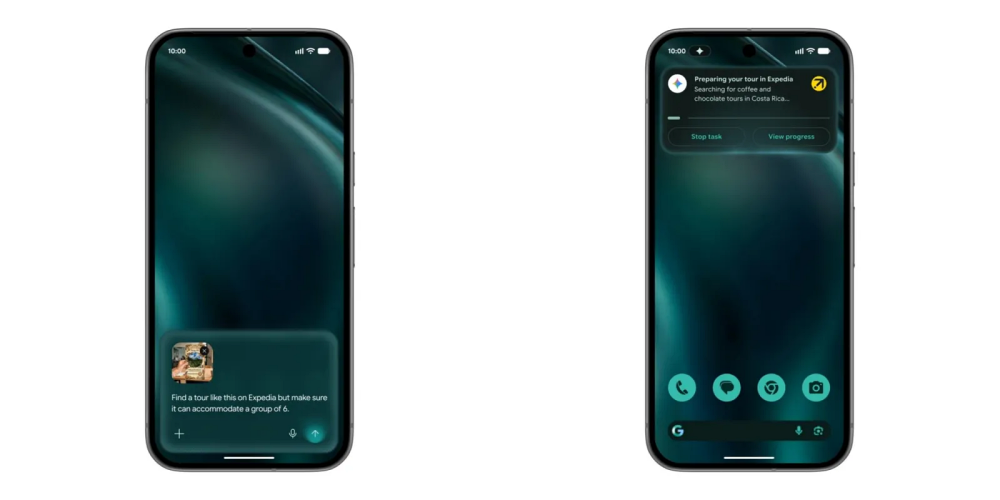
Gemini can now take on multi-step tasks that span multiple apps. You set up a Scheduled Action, say, compiling a personalized news digest every morning or monitoring a flight and messaging someone when it lands, and Gemini executes it autonomously, navigating app interfaces on your behalf.
A persistent Live Update notification chip tracks what Gemini is doing in real time, so you’re never left wondering if it actually started. And for anything involving spending money, Google has hard-coded a confirmation requirement. Gemini cannot make purchases without explicit user approval.
This is the “agentic” shift Google has been building toward since introducing extensions in Bard. The full rollout is still in progress, but the scaffolding is in place.
For a deeper look at the model powering these agentic capabilities, see Gemini 3 features and what changed in the underlying architecture.
6. Rambler: Voice Typing That Doesn’t Need Editing Afterward
Voice typing has always had the same problem: the way we speak is not the way we write. Filler words, backtracking, and repeated thoughts. Transcription captures all of it faithfully, which means you still spend time cleaning up what you dictated.
Rambler is Gemini’s solution. It listens to your spoken input, strips the noise, and reassembles your actual meaning into a coherent, send-ready message. It’s not just transcription. It’s intelligent editing of your spoken intent into written output. It also handles mid-sentence language switches, making it particularly useful for multilingual speakers who naturally code-switch.
7. Camera Coach: Real-Time Photography Feedback on Device
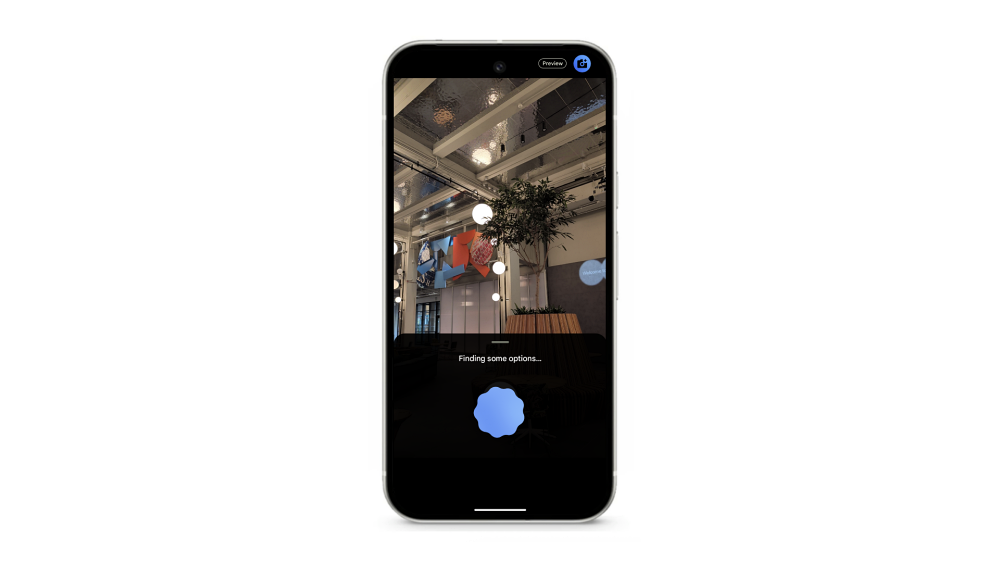
Camera Coach is a Pixel-exclusive feature powered by Gemini Nano that analyses your shot composition in real time and offers specific, actionable suggestions before you press the shutter: move left, step closer, wait for the subject to clear the background.
It’s the kind of feedback a knowledgeable friend would give you, not generic tips. And because Gemini Nano processes it on-device, there’s no lag waiting for a server response while your subject moves.
8. Real-Time Call Translation and Call Notes
Pixel’s call translation has existed for a while, but Gemini makes it meaningfully better in one specific way: it doesn’t sound robotic anymore.
The previous generation translated your words accurately but flattened your delivery into a monotone relay. Gemini-powered translation analyses your natural speaking pace, tone, and rhythm and mirrors them in the translated output, making conversations feel like actual communication rather than two people narrating to a machine.
Complementing this: Call Notes gives you a summary after any phone call. Take a Message lets you screen calls and read what a caller wants before deciding whether to pick up. Scam Detection, powered by Gemini Nano entirely on-device, flags potential fraud in real time during a call, no data sent to the cloud, no delay.
9. Pixel Studio and Searchable Screenshots
Pixel Studio is Google’s on-device image generation tool. Type a description, get a generated image, entirely on your Pixel without needing to open a browser or pay for a third-party service.
Pixel Screenshots is underrated. Every screenshot you take is automatically analyzed by Gemini Nano, text, images, context, and all of it becomes searchable. Looking for that restaurant someone texted you a screenshot of three months ago? Search for it. The context is indexed and findable without you having to remember which app it was in.
10. Writing Tools in Gboard
On Pixel phones, Gboard’s writing tools use Gemini Nano to proofread, rephrase, or adjust the tone of text you’ve typed: more professional, more casual, shorter, clearer. It operates entirely on-device, which means it works in any app, including ones that handle sensitive information.
11. AI Photo Editing in Google Photos
What you can do with Gemini Intelligence in Google Photos goes beyond what most editing apps offer at any price: Magic Eraser, AI Unblur, Move, reposition subjects, Add Me, insert yourself into a group shot, Best Take, composite the best expressions from a burst, Portrait Blur, and Zoom Enhance.
The Ask Gemini prompt interface in Photos takes it further. Describe the edit you want in plain language, “make the sky golden hour” or “remove the person in the background,” and Gemini interprets and executes it rather than requiring you to navigate specific tools.
What You Can Do With Gemini Intelligence: Is It Actually Free?
The standard version of Gemini Intelligence on Android is free. Basic conversation, voice, image understanding, Circle to Search, call features, and on-device Nano features are all included without a subscription.
The ceiling shifts when you want Google’s most capable models, currently Gemini Pro, access to the most advanced reasoning, higher generation limits, and integration with Google Workspace at a deeper level. That’s where Google One AI Premium comes in.
For most users, the free tier is genuinely capable. The paid tier is for people who hit its limits regularly.
The Honest Bottom Line
Gemini Intelligence is the most ambitious version of Android’s AI story yet, and also, for now, the most unfinished. The agentic features are still rolling out. The hardware requirements for the full experience will exclude a significant portion of current Android users. And some features remain firmly in the Pixel ecosystem for the foreseeable future.
What’s already here, though, is substantial, and the trajectory is clear. Google is building toward an Android where the phone handles the routine, context-aware work so you don’t have to think about it. Whether that’s genuinely useful or quietly unsettling probably depends on how much you trust the company holding the keys to your digital context.
The features are real. The depth is growing. And the gap between what Gemini can do today and what it could do by the end of 2026 is wider than most upgrade cycles have ever promised.
You might also like: