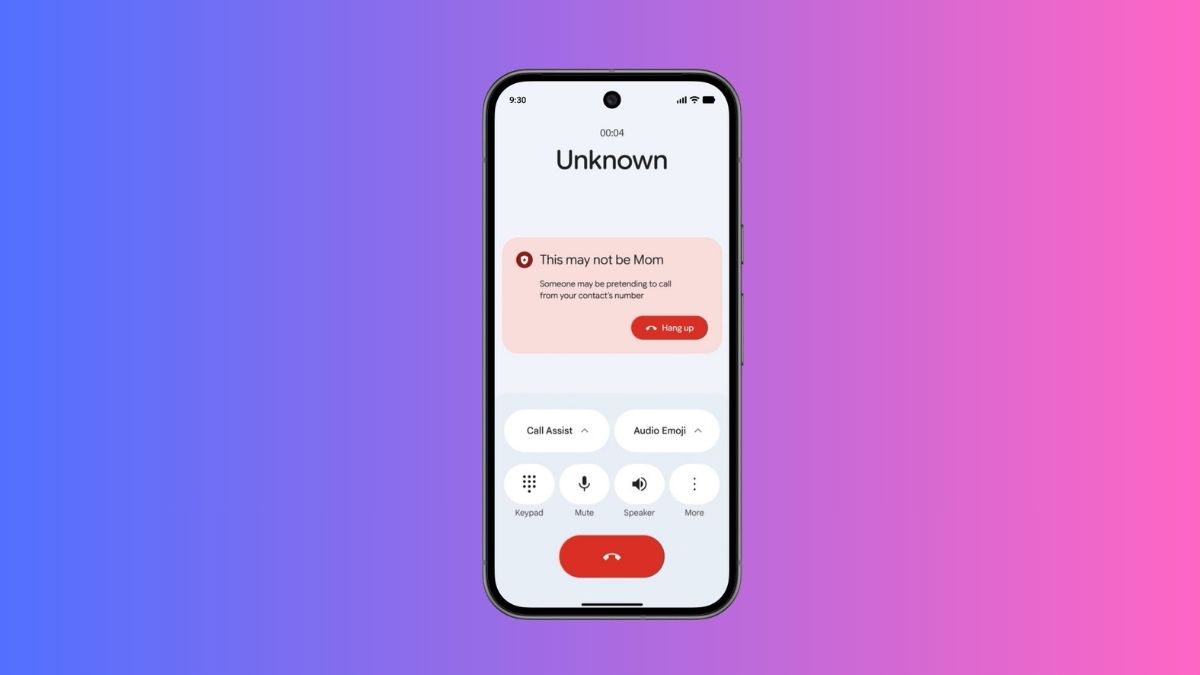
If you’ve ever second-guessed a call from a family member asking for money, or felt something was slightly off about a voice on the other end, you’re not being paranoid. You’re reacting to one of the fastest-growing threats in digital security: AI-powered voice impersonation scams.
On June 2, 2026, Google officially launched fake call detection on Android through the Phone by Google app. It’s now rolling out globally, and if you’re on Android 12 or newer, this protection is already headed to your device.
What’s Actually Happening Out There (And Why Google Had to Act)
The FBI has reported hundreds of millions of dollars lost annually to AI voice scam operations. These aren’t clunky robocalls anymore. Scammers are now using deepfake voice cloning tools to sound convincingly like your mom, your boss, or your bank in real time. They pair that with number spoofing, so your caller ID shows a name you trust.
The result? You pick up, you hear a familiar voice, and your guard drops before you’ve said a word.
Google’s broader 2026 Android security push addresses exactly this threat. Fake call detection is one piece of that, alongside the existing Scam Detection feature (which uses on-device AI to analyze conversation patterns, available especially on Pixel devices) and the recently launched Verified Financial Calls. This new layer specifically targets the spoofing side of the equation, and it works in a surprisingly clever way.
How Fake Call Detection on Android Actually Works
The feature runs silently and automatically. No setup required, no interruption to normal calls.
When someone from your contacts dials you and you’re both using Phone by Google, the caller’s device fires off a silent digital “handshake” signal in real time. This signal travels through end-to-end encrypted RCS, the same messaging infrastructure powering Google Messages screen effects and richer Android communications, to confirm the call is genuinely coming from that person’s device.
Here’s where it gets smart: if a scammer is spoofing your contact’s number through internet-based software, that confirmation signal never arrives. Your device notices the gap instantly, then pings your contact’s real phone with a background check: “Are you currently making a call?”
If the answer comes back no, you get an on-screen warning before you’ve had a chance to be fooled, something along the lines of “Someone may be pretending to call from your contact’s number” or even “This may not be Mom.” The contact’s photo may disappear from the call screen too, removing a subtle visual cue scammers rely on to seem legitimate.
Our latest @Android Drop helps you stay ahead of AI voice cloning attacks.
Fake call detection now alerts you if a suspected scammer appears to call you from a phone number in your contacts — so you can spot impersonators and end the call fast. pic.twitter.com/FSfmP9Smhe
— Google (@Google) June 3, 2026Importantly, this focuses on detecting number spoofing, not analyzing the voice itself for AI artifacts. But that distinction is more tactical than limiting. The spoofing-plus-voice-cloning combo is the dominant attack pattern, and neutralizing the spoofing side breaks the whole chain.
What You Need for It to Work
Google launches fake call detection with a specific set of requirements that both parties must meet:
- Phone by Google set as the default dialer on both devices.
- Google Messages with RCS enabled (here’s a good moment to check your Google System Updates for June 2026 for anything relevant to your RCS setup).
- Google Contacts in use on both ends.
- Android 12 or higher.
The rollout is starting with Pixel devices first, then expanding broadly through the month. Since Phone by Google is already the default dialer on the majority of Android phones, most users won’t need to do anything. If your device uses a manufacturer’s native app, you can download Phone by Google from the Play Store and set it as default to get covered.
The feature is on by default but can be toggled off anytime in Phone app settings, a sensible balance between protection and user control.
One thing worth knowing: this only protects Android-to-Android calls where both users have the required Google apps active. It doesn’t extend to calls from iPhones or devices running non-Google dialers.
The Bigger Picture for Android Security in 2026
This isn’t an isolated update. Google is clearly treating AI-driven voice fraud as a systemic problem, not a niche edge case.
The fake call detection feature sits alongside Scam Detection, Phone by Google’s existing on-device AI that monitors live call patterns for suspicious behavior, and Verified Financial Calls, which flags potential impersonation of banks and financial institutions. Together, these form a layered defense: one layer catches spoofed identities before you answer, another monitors the conversation as it unfolds.
There’s also an open architecture angle worth noting. Google has built this feature on RCS, an open standard, meaning other Android manufacturers and third-party dialer apps could technically adopt the same verification protocol. Whether they do will shape how broadly this kind of protection actually spreads.
For anyone following the trajectory of Android 17 features, this kind of on-device, privacy-preserving security, where verification happens through encrypted signals without sending call audio to any server, reflects exactly the design philosophy Google has been pushing forward.
Should You Do Anything Right Now?
Mostly, no. If you’re already using Phone by Google and Google Messages with RCS enabled, the protection is being pushed to you automatically via the Play Store. Check that your Phone app is up to date, verify RCS is active in Google Messages, and you’re covered.
The bigger takeaway here isn’t a setting to flip. It’s a mental shift. The next time a call from a saved contact feels off and you see that warning screen, trust it. The system is doing exactly what it’s supposed to.
For the full technical breakdown, Google’s security blog has the official documentation. Updates are delivered silently through the Play Store, so no manual action is required.
Have questions about how this interacts with existing scam call features, or want to know which Pixel devices are getting it first? Drop them below.
You might also like: