If you just updated your Pixel and the phone swears it’s connected to Wi-Fi while Gmail, the Play Store, or YouTube Music act like you’re standing in a dead zone, you’re not imagining it. You’re also not alone. Within hours of Android 17 for Pixel starting to roll out this week, people began noticing the same odd thing: full Wi-Fi bars up top, and apps that flat-out refuse to load.
I dug through the reports, the Reddit threads, and the fixes people are actually having luck with. Here’s what’s going on, what tends to work, and what to skip.
What the Android 17 Wi-Fi Issue Actually Looks Like
The frustrating part is how normal everything looks at first glance. Your phone shows it’s connected. The Wi-Fi icon is lit. It even pulls a valid IP address. By every visible signal, you’re online.
Then you open an app and nothing happens. Instead of your feed or inbox, you get the dreaded “No internet connection” screen, even though the device technically is connected. Flip over to mobile data and everything springs back to life instantly, which is the tell that this isn’t your router dying or your ISP having a bad day.
The weird twist? Google’s own apps seem to take the hardest hit. The Play Store comes up again and again in reports, with YouTube Music close behind, and plenty of people pointing at Gmail and other Google services. Third-party apps aren’t fully spared either, with TikTok also being flagged. But if you live inside Google’s ecosystem, you’re more likely to feel this one. Oddly, a few apps (Chrome for some, YouTube Music for others) keep working while everything around them stalls, which only adds to the confusion.
Android 17 Wi-Fi Issue Spotted by Reddit Users
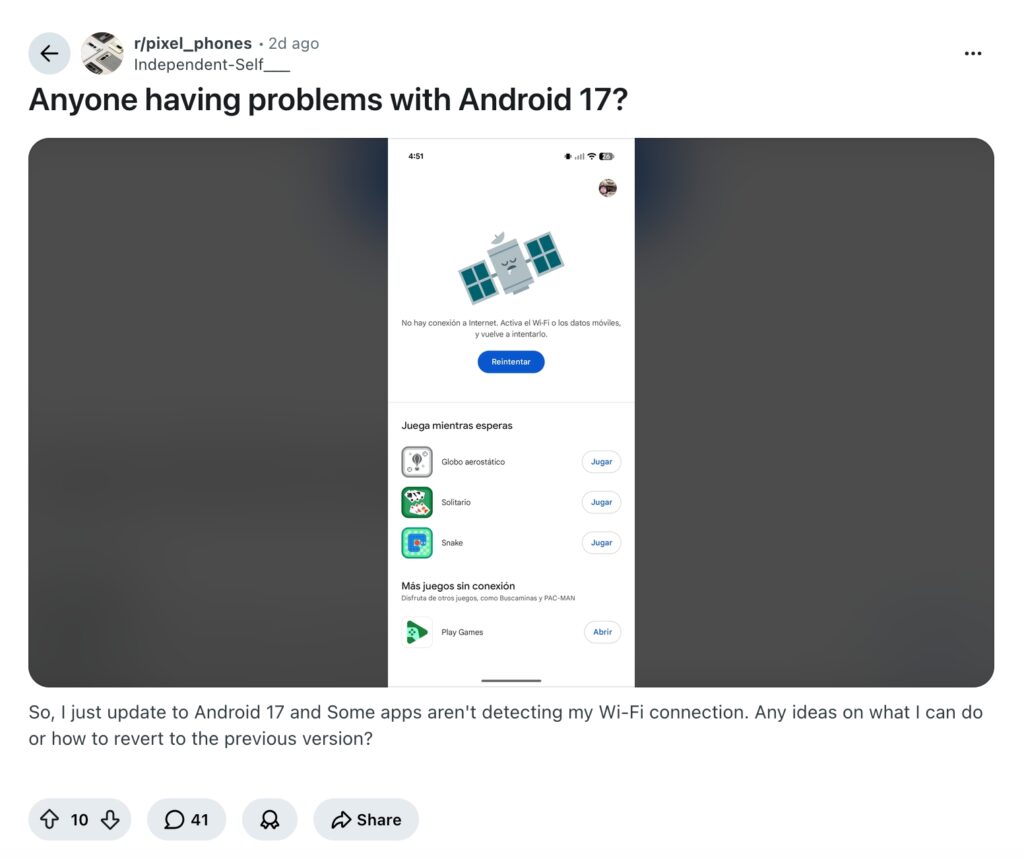
This didn’t come from a lab. It came from people comparing notes. The Android 17 Wi-Fi issue was spotted by Reddit users almost immediately after the stable update landed, with threads filling up from owners of devices spanning the Pixel 7 right through to the Pixel 10 series. Same story across the board: phone says Wi-Fi, apps say otherwise, mobile data saves the day.
One Reddit user, who first raised the alarm, later circled back to update their own post after stumbling onto a fix, and that’s where the most promising lead came from.
The Likely Culprit: IPv6 and Google’s Services
Here’s the theory that keeps holding up. The bug appears tied to how Android 17 handles IPv6, the newer internet addressing standard. The working idea among affected users is that Android 17 leans on IPv6 for Google’s services, so when a router has IPv6 switched off, those requests have nowhere to go, hence the “connected but useless” feeling.
It’s a strong lead, but not a clean-cut diagnosis. When Android Authority tried to force the bug by toggling IPv6 off, they couldn’t reproduce it, a sign the real trigger is some combination of router configuration, network setup, and possibly device model, rather than IPv6 alone. There’s also a real chance this traces back to a Google Play Services or Play System update rather than Android 17’s core code, since some people fixed things purely by updating that component. In plain terms: it might not be Android 17 itself, but something riding alongside it.
Possible Fixes for the Android 17 Wi-Fi Issue
Start with the one most people swear by, then work down the list if it doesn’t stick.
1. Enable IPv6 on Your Router (The Fix That Works Most Often)
This is the headline fix for Android 17 Wi-Fi issue reports, and it’s worth trying first:
- Log into your router’s admin page, usually 192.168.1.1 or 192.168.0.1 (check the sticker on the router).
- Find the IPv6 setting, typically under WAN, LAN, or Advanced > IP.
- Switch it on (Dual-Stack or Native), save, and reboot the router.
- Reconnect your phone and test a problem app.
Fair warning: not every router exposes this toggle, and not everyone needs it on, so this won’t be universal.
2. Update Google Play System and Your Apps
Several people fixed it just by grabbing the latest Google Play System update (Settings > Security & Privacy > System & Updates > Google Play System Update) and updating their apps. Given the Play Services angle, this is a quick, low-effort win.
3. Restart the Phone and Router
Unglamorous, but it genuinely cleared the bug for some users. Power-cycle both the phone and the router rather than just the phone.
4. Other Troubleshooting Steps to Fix the Android 17 Wi-Fi Issue
If IPv6 isn’t an option or didn’t help, try these in order:
- Reset network settings: Settings > System > Reset Options > Reset Wi-Fi, Mobile & Bluetooth. This wipes saved networks, so you’ll need to re-enter your Wi-Fi password afterward.
- Forget and rejoin the network. If your phone has it, turn Randomized MAC off for that network before reconnecting.
- Test in Safe Mode to rule out a misbehaving third-party app.
- Switch networks to isolate the problem. Try a different Wi-Fi network or a phone hotspot. If the problem follows you everywhere, it’s the phone or OS. If it’s tied to one network, it’s more likely router-related.
- Use mobile data temporarily. Not a fix, but a reasonable workaround until a proper patch arrives.
Has Google Acknowledged the Bug Yet?
Not yet. As of now, Google hasn’t put out a public statement on the Android 17 Wi-Fi issue, and the official release notes don’t mention it. That’s not unusual this early. These things tend to get triaged quietly through Google’s issue trackers first.
The encouraging part is Google’s track record with this category of bug. It has quietly fixed Pixel connectivity issues before through silent server-side updates pushed via Google Play Services, with nothing for users to manually install. Given that some people are already resolving the problem through a Play System update, a background rollout feels like the most likely path here, and probably sooner rather than later. Android 17 QPR1 betas are already in motion ahead of an expected September release, but a bug this disruptive would almost certainly be patched in a smaller update well before then.
Should You Update to Android 17 Right Now?
If your Pixel is still on Android 16 and you rely on your home Wi-Fi for everything, there’s a reasonable case for waiting a bit. You’ll miss the new features in Android 17, including Bubbles for multitasking, Screen Reactions for creators, a foldable-friendly Gaming Mode, and a stack of camera, audio, and charging improvements. But they’ll still be there once the rollout settles and this gremlin gets stamped out.
If you’ve already updated and you’re stuck, start with the IPv6 toggle and the Play System update. Between those two, most people are getting back online, and a broader fix from Google is almost certainly on the way.