If you’ve been following along with Google’s Pixel update cycle, you already know the QPR1 betas have been quietly doing the heavy lifting, patching rough edges, refining features, and getting the platform ready for its first major quarterly drop. With Android 17 QPR1 Beta 4, that process feels like it’s crossing the finish line.
Released on June 10, 2026, build CP31.260522.006 is rolling out to Pixel 6a and newer devices (more on the Pixel 6 and 6 Pro situation in a moment). It’s not a headline-grabbing release, but that’s almost the point. This one is about getting things right before the stable QPR1 lands.
What’s New in Android 17 QPR1 Beta 4
Screen Reactions Finally Come to Screen Recorder
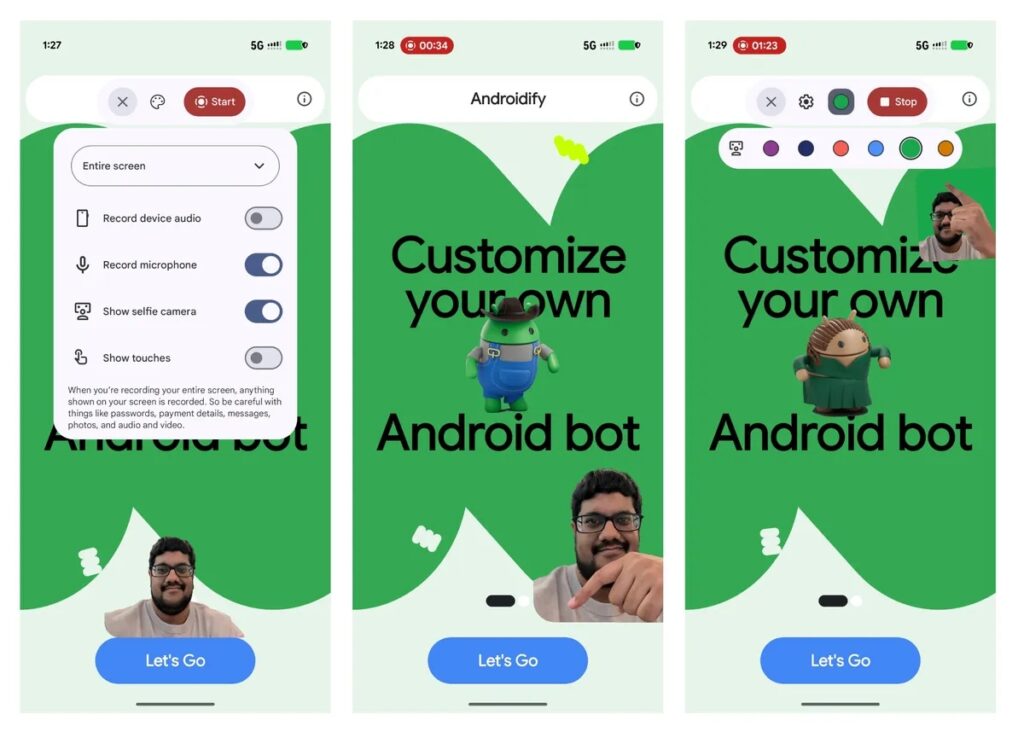
The most talked-about addition here is one that was teased at Google I/O 2026: Screen Reactions support in the Screen Recorder, which now lets your front camera appear as a floating overlay while you capture your screen. It’s the kind of feature that content creators and tutorial makers have wanted for a long time, and it’s genuinely useful. You can reposition the overlay as needed, making reaction videos or walkthroughs far more natural to produce without needing a third-party app.
A New Quick Settings Tile for Your Keyboard
Small, but handy. Android 17 QPR1 Beta 4 introduces a Keyboard Quick Settings tile, letting you toggle the on-screen keyboard directly from your Quick Settings panel. If you frequently switch between a physical keyboard and your phone’s software one, this saves a few unnecessary taps every single time.
UI Refinements Under the Hood
There are also minor interface tweaks in this build. Some spacing adjustments in the Display & Touch settings section from earlier builds have been refined. It’s worth noting that the expanded Dynamic Color theming spotted in earlier canary builds hasn’t made it into this beta, so don’t expect that just yet.
For a broader look at what Google has been rolling out across Android and Pixel this month, check out the Google System Updates for June 2026. There’s more happening under the hood than most people realize.
Android 17 QPR1 Beta 4 Fixes Bugs and Crashes That Actually Mattered
This is where Beta 4 earns its place. Google has addressed a solid list of real-world issues, the kind that users have been flagging for weeks.
- Invisible mouse pointer on external displays: If you were using Work Profile apps or apps flagged with FLAG_SECURE on an external display, your mouse cursor would simply vanish. That’s fixed.
- Settings crash in Private Space: Launching credential provider settings from Private Space was causing a hard crash in the Settings app. Resolved.
- Silent screenshots: One of the more irritating bugs: screenshot sounds were tied to your ringer volume, meaning silent mode didn’t actually silence captures. Now you can take screenshots quietly without muting your calls.
- Camera jitter at 5x zoom: Video recording showed frame jumps and jitter when panning at 5x. A frustrating one for anyone who relies on telephoto recording, and it’s been squashed.
- Back Tap on the lock screen: Back Tap gestures weren’t registering on the interactive lock screen at all. That’s back to working as expected.
- OpenGL ES / 3D performance regression: A graphics driver bug was causing noticeable performance drops in OpenGL ES apps, particularly relevant if you game on your Pixel. Google has patched the regression.
- Wireless ADB and local network connections: Developers will be relieved: Wireless ADB and local network app connection failures have been resolved.
- Home screen widgets disappearing after reboot: This one’s been a known pain point. The fix is in, though a handful of user reports suggest it may not be completely resolved for everyone. Keep an eye on this one.
Important: Pixel 6 and Pixel 6 Pro Are Sitting This Beta Out
If you’re on a Pixel 6 or Pixel 6 Pro, your device is not included in this beta wave. Google has skipped both for Beta 4, but they’re expected to return with the next QPR1 beta. Every other supported device, including Pixel 6a and newer models, the Pixel 10 series, and Pixel tablets, is eligible.
How to Get Android 17 QPR1 Beta 4
Getting on the beta is straightforward:
- Head to google.com/android/beta, sign in, and enroll your eligible Pixel device.
- Go to Settings → System → System Update and check for the OTA. It should appear shortly after enrollment.
- Factory images and full OTA packages are also available on the Android Developers site, if you prefer a manual flash.
The build comes in at around 588 MB on a Pixel 10 and includes the May 2026 security patch.
One Critical Warning Before You Install
If you’re currently on an Android 17 stable beta and want to cleanly receive the stable Android 17 release, expected very soon, do not install QPR1 Beta 4. Opt out of the beta program now. Installing this update and then attempting to opt out later will trigger a factory reset, wiping your device. It’s a detail that’s easy to miss and painful to learn the hard way.
What This Beta Tells Us About the QPR1 Timeline
The fourth beta of the Android 17 QPR1 feature cycle lands exactly where you’d expect at this stage: refinement, not reinvention. Google is ironing out the last rough edges before pushing the stable QPR1 release, which is currently tracking for next month. There may be a hotfix or two in between, but the bulk of the work is clearly done.
If you want to understand the full picture of where Android 17 is headed, including features that didn’t make the cut for QPR1, the new features in Android 17 breakdown covers everything from the stable release forward.
For most Pixel users, this beta is a signal that the platform is in good shape. The bugs that slipped through earlier betas are getting cleaned up, and the features being added are practical ones. That’s exactly what a late-stage beta should look like.