
If your Pixel on the QPR3 beta has been stuttering, crashing the home screen, or rebooting on its own, you weren’t imagining it. Google has now named the cause and shipped the fix.
Google released Android 17 QPR3 Beta 4 on November 12, 2026, two days after the stable Android 17 QPR2 rollout and two weeks after Beta 3. The official changelog lists just four fixes and no new features. One of those fixes matters more than the rest combined, and one useful change isn’t in the changelog at all.
Here’s what Beta 4 changes, who should install it, and what to know before you do.
Android 17 QPR3 Beta 4 at a Glance
- Release date: November 12, 2026
- Build number: DP11.261030.003 (one build for every supported device)
- Security patch: October 5, 2026
- Google Play services: 26.41.31, per early reports
- OTA size: About 900 MB from Beta 3
- Previous QPR3 betas: Beta 1 (October 2), Beta 2 (October 20), Beta 3 (October 29)
- Stable QPR3 date: Google hasn’t announced one
Note the single build. Beta 3 shipped a separate build (DP11.261016.004) for the Pixel 11 series. Beta 4 puts every Pixel on the same code, which usually signals Google is consolidating ahead of a release candidate.
The security patch stays on October, even though QPR2 stable users already have the November patch. That’s normal for betas, but it means a beta Pixel briefly trails a stable one on security fixes.
The Memory Leak Behind Months of Pixel Lag Is Fixed
The headline fix targets memory leaks in system_server, the core Android process that runs window management, notifications, app launching, and most of what you see on screen. Google ties five separate issue tracker reports (#440977407, #560540681, #561107077, #562344942, #564034352) to this one root cause.
Here’s how a leak like this plays out. system_server grabs memory and fails to release it. Over hours or days, it eats into the RAM your apps and Pixel Launcher need. Animations start dropping frames, the launcher gets killed and redraws itself, and when memory runs out completely, Android restarts the whole system to recover. From your side, it looks like three unrelated bugs: lag, a blank home screen flash, and a surprise reboot.
That’s why the fix matters. Five bug reports collapsing into one cause suggests many of the “random” stability complaints across recent QPR3 builds, including the 26 fixes in Beta 3, were symptoms of the same leak. If your phone felt fine right after a reboot and got worse through the day, this is almost certainly your bug.
Bluetooth Battery Drain Gets Its Own Fix
Memory wasn’t the only thing quietly draining your phone. Beta 4 also fixes excessive background Bluetooth activity that caused fast battery drain (Issue #566820683).
This one hits hardest if you keep a smartwatch, earbuds, or car head unit paired all day. The radio kept working in the background more than it should, so battery dropped even with the screen off. If you’ve noticed your Pixel losing charge overnight while connected to a Pixel Watch, Beta 4 is the build to test.
Pixel battery bugs have been a recurring theme this year. QPR2 Beta 7 also targeted battery drain, so treat this as one more fix rather than the last word on beta battery life.
The Hidden Change: Disable Absolute Volume Is Back
The most requested change in Beta 4 isn’t in Google’s changelog. The Disable absolute volume toggle has returned to Developer Options, which Android Community Manager Mishaal Rahman confirmed after users reported it.
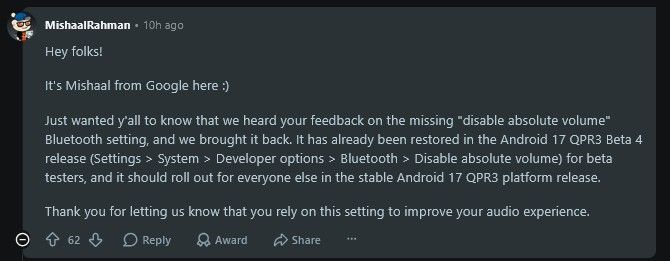
Absolute volume links your phone’s volume slider to your Bluetooth device’s own volume. Most of the time that’s convenient. But some headphones, speakers, and car stereos handle it badly: volume jumps from silent to loud with no middle steps, or stays too quiet even at max. Turning absolute volume off splits the two controls so you can set each one separately.
To find it:
- Open Settings and go to About phone.
- Tap Build number seven times to unlock Developer Options.
- Go to Settings > System > Developer options.
- Turn on Disable absolute volume, then reconnect your Bluetooth device.
If your car audio has been stuck at a whisper since an earlier QPR build, this toggle is likely your fix.
Two Smaller Fixes: Keyboard Clipping and a Developer Error
The remaining two fixes are narrower.
- The on-screen keyboard no longer appears cut off during text input (Issue #568381960). It’s a visual bug, but an annoying one when the top row of keys or the suggestion strip disappears.
- Conscrypt now throws a clear error message when an app targeting API 36 tries TLSv1 or TLSv1.1 and the connection gets rejected (Issue #568014509). Android already blocks these outdated encryption protocols; the fix just tells developers why their connection failed instead of throwing a vague exception.
If you’re not a developer, you can ignore the Conscrypt fix entirely.
Which Pixels Get Android 17 QPR3 Beta 4?
Beta 4 is available for 23 devices plus the Android Emulator:
- Pixel 6a, Pixel 7, Pixel 7 Pro, Pixel 7a
- Pixel Fold, Pixel Tablet
- Pixel 8, Pixel 8 Pro, Pixel 8a
- Pixel 9, Pixel 9 Pro, Pixel 9 Pro XL, Pixel 9 Pro Fold, Pixel 9a
- Pixel 10, Pixel 10 Pro, Pixel 10 Pro XL, Pixel 10 Pro Fold, Pixel 10a
- Pixel 11, Pixel 11 Pro, Pixel 11 Pro XL, Pixel 11 Pro Fold
The Pixel 6 and Pixel 6 Pro are missing. They didn’t get QPR2 stable either, and their absence from the QPR3 program confirms they’re off Google’s update track. The Pixel 6a stays on because it launched later.
Should You Install Beta 4 or Wait?
It depends on where you are now.
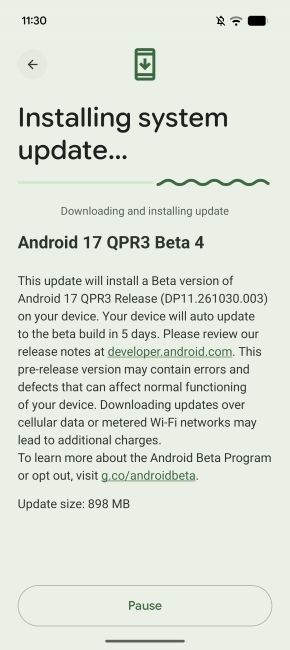
Already on QPR3 Beta 3? Install it. Beta 4 fixes stability bugs you’re likely already hitting, and it adds nothing new that could break. Go to Settings > System > Software update and tap Check for update.
On QPR2 stable and curious? There’s little reason to join now. Beta 4 has no new features over what QPR3 Beta 1 and Beta 2 introduced, and it runs an older security patch than QPR2 stable.
Want to leave the beta? Know the cost first. QPR3 Beta 4 is newer than any stable build, so opting out at the Android Beta for Pixel page triggers a downgrade that wipes your phone. To leave without losing data, stay enrolled until QPR3 stable arrives, install it, then opt out before the next beta lands.
To join, enroll your Pixel at Google’s Android Beta for Pixel page and wait for the over-the-air update. You can report bugs through the Android Beta Feedback app.
Final thoughts
Android 17 QPR3 Beta 4 won’t change how your Pixel looks. It changes how it holds up after a day of use. Fixing the system_server leak addresses the root of the lag, launcher crashes, and reboots that defined recent betas, and the return of the absolute volume toggle solves a real problem for Bluetooth users.
If you’re already testing QPR3, update today. If you’re on stable, this is a sign QPR3 is getting close, but Google hasn’t said when it lands.