You remember the birthday at 11:40 PM, set a mental note to text at midnight, and wake up at 7 AM with the message still unsent. Every WhatsApp user has a version of that story. Until now, the only fixes were phone alarms or sketchy third-party apps that needed your phone awake and online.
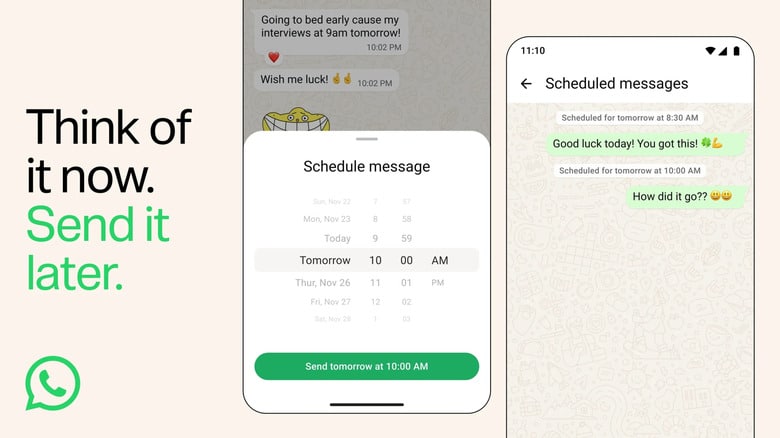
On November 25, 2026, WhatsApp started rolling out scheduled messages for individual and group chats on Android and iOS. Meta calls it one of the app’s most-requested features, and it shows: Instagram, WhatsApp’s own sibling app, has offered scheduling since 2024.
The feature is simple on the surface. The useful details sit in the fine print, so here’s what actually matters.
When Will You Get WhatsApp Scheduled Messages?
WhatsApp is releasing the feature globally over the coming weeks. It’s a server-side rollout, so updating the app won’t force it to appear.
- Announced: November 25, 2026
- Android beta: October 2026, starting with version 2.26.40.7
- iOS beta: Late October 2026, for select TestFlight users
- Stable rollout: Started November 25, 2026, reaching all users in the coming weeks
- Platforms: Android and iPhone. WhatsApp hasn’t confirmed WhatsApp Web, Windows, or Mac support yet.
If you don’t see it, keep WhatsApp updated from the Play Store or App Store and check again in a few days. There’s no setting or flag to turn it on manually.
How to Schedule a Message on WhatsApp
WhatsApp built scheduling into the send button rather than burying it in a menu. That’s a smart choice: you don’t learn a new workflow, you just press a little longer.
- Open the individual or group chat.
- Type your message, or attach a photo or video.
- Press and hold the Send button instead of tapping it.
- Pick a date and time in the picker that appears.
- Tap the green confirm button, which displays the exact delivery time.
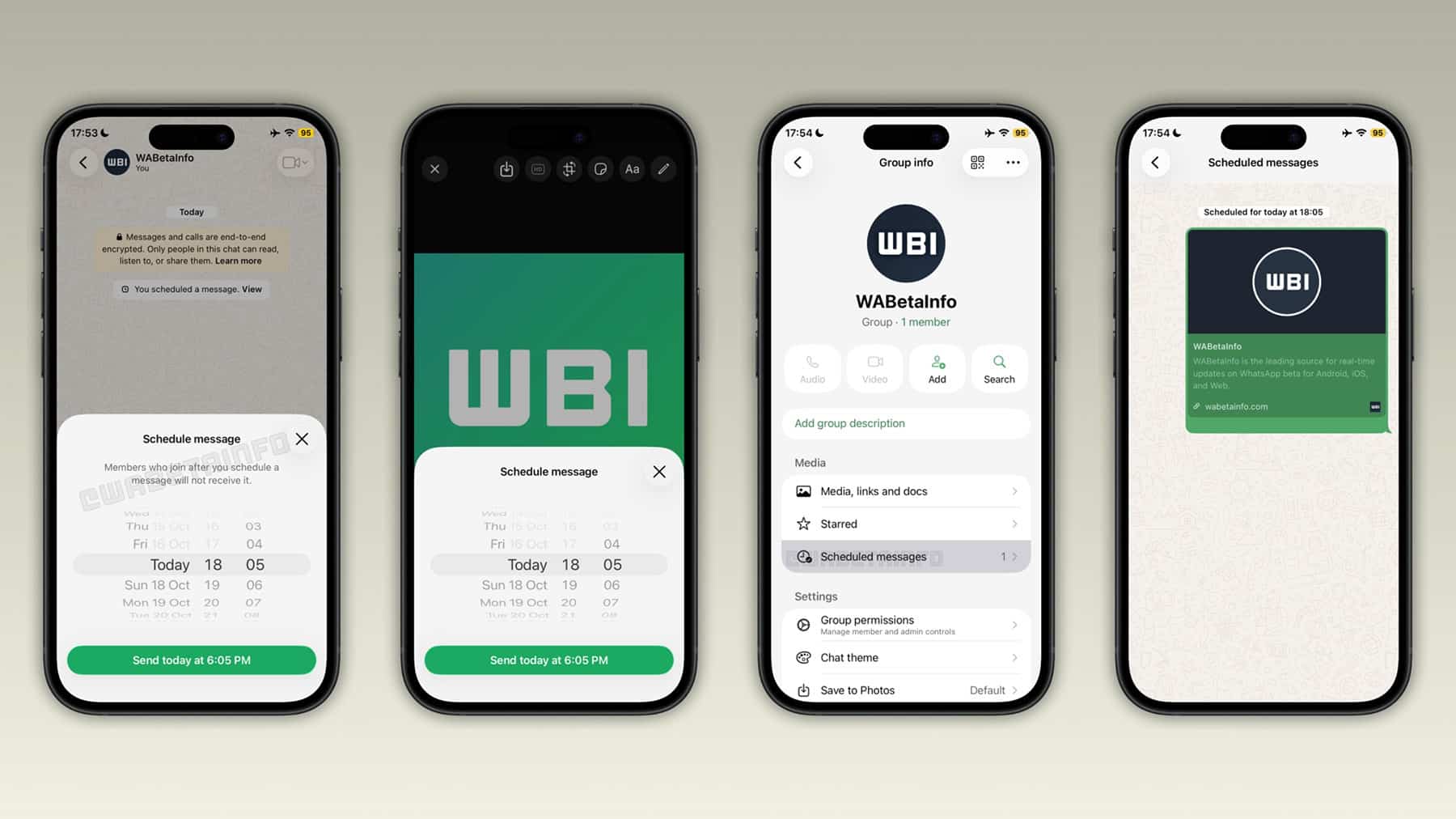
WhatsApp then shows a confirmation in the chat that only you can see. The recipient sees nothing until the message arrives.
What You Can and Can’t Schedule
- Supported: Text, photos, videos, and links.
- Time window: At least 10 minutes and at most 14 days ahead.
- Chats: One-on-one conversations and group chats.
- Media limit (in beta): You couldn’t schedule several photos or videos in one go during testing. Each item needed its own schedule.
- Not supported (for now): Voice notes don’t appear to work, according to 9to5Google. Nobody has confirmed polls, documents, or view-once media either, so assume they’re out until WhatsApp says otherwise.
The 10-minute floor tells you what this feature is for. It’s a planning tool, not a “send in 30 seconds” delay.
How to View, Edit, or Cancel a Scheduled Message
Scheduled messages don’t live in a central inbox. Each one sits inside the conversation it belongs to.
- Open the chat or group.
- Tap the contact or group name at the top to open Chat info or Group info.
- Find the Scheduled messages section.
- Review your queued messages and delete any you no longer want sent.
The recipient doesn’t get notified when you delete a scheduled message. It simply never arrives.
Worth knowing: 9to5Google reports you can edit a queued message, but WhatsApp’s other launch details only mention viewing and deleting, and nobody has confirmed rescheduling or “send now.” If you don’t see an edit option, delete the message and schedule it again. For cleaner wording before you commit, draft it first with WhatsApp’s Writing Help feature.
Your Phone Can Be Off When the Message Goes Out
This is the detail that separates WhatsApp’s version from every workaround you’ve used before.
When you schedule a message, your phone hands it to WhatsApp’s servers right away. The server delivers it at the chosen time. Your phone can be dead, in airplane mode, or out of coverage, and the message still lands on time. Third-party schedulers and automation apps sent the message from your phone, so a flat battery meant a missed birthday.
WhatsApp says scheduled messages stay end-to-end encrypted like any personal chat, so only you and the recipients can read them. The recipient also can’t tell a message was scheduled. It looks like you typed it at that exact moment, and the delivery and read ticks behave the same way they do for any normal message.
The Group Chat Catch Nobody Mentions
Scheduling in groups works with one quirk that can trip you up. WhatsApp sends the message only to people who were members when you scheduled it.
Say you schedule a welcome note in your team group for Monday morning, and two new hires join on Sunday. They won’t get it, even though they’re in the group when it sends. Anyone added after you hit schedule is skipped.
So for onboarding messages, event reminders, or anything aimed at new members, schedule after the group roster is final. If it changes, delete the queued message and set it again.
Time Zones: Do the Math Yourself
WhatsApp pitches scheduling for people in different time zones, such as landing a birthday wish at midnight where your friend lives. But nothing in the launch details says the picker shows the recipient’s local time.
Pick the time based on your own clock. If your friend in London is 5 hours 30 minutes behind you in India, their midnight is 5:30 AM for you. A quick check in your phone’s Clock app saves an awkward 6 PM “Happy Birthday.”
How WhatsApp Compares to iMessage and Telegram
WhatsApp is late here, and the comparison shows where it caught up and where it didn’t.
- iMessage (Send Later): Also caps at 14 days and also delivers when your iPhone is offline. Apple lets you edit, reschedule, or send early. It only works between Apple users, though, while WhatsApp scheduling works with anyone on Android or iPhone.
- Telegram: Lets you schedule up to 365 days ahead, and Telegram Premium users can set repeating messages. WhatsApp has no recurring option, so weekly rent reminders or daily standup pings still need another tool.
WhatsApp’s version is the most basic of the three. For most people, it’s also the one that matters most, because that’s where their family and work groups already live.
Who Should Actually Use This
Scheduling earns its place in a few specific situations:
- Late-night thinkers. Write the message when it’s on your mind and send it during working hours, without pinging a colleague at 1 AM.
- Cross-border families. Hit birthdays, exam-day wishes, and festival greetings at the right local time.
- Group admins and small teams. Queue reminders for events or deadlines up to two weeks out.
If you mainly need recurring reminders or anything beyond 14 days, Telegram or a calendar app still does it better. And if you’d rather hand the job to an assistant, you can already send WhatsApp messages hands-free through Gemini, though that sends immediately rather than on a schedule.
Scheduled messages also pair well with WhatsApp’s earlier planning tool. If a chat needs a voice or video follow-up, you can schedule WhatsApp calls too.
The Bottom Line
Scheduled messages won’t change how you use WhatsApp, and they’re not meant to. They fix one small, constant failure: the message you meant to send at the right moment and didn’t. Server-side delivery is the real upgrade here, since it finally removes the need to keep your phone awake. Just remember the two traps: groups lock in their member list when you schedule, and the clock is yours, not your friend’s. Which message are you queuing up first?
Yes. It’s part of the regular WhatsApp app with no subscription.
WhatsApp hasn’t confirmed it. The launch covers Android and iPhone.
No. It arrives like any normal message.
WhatsApp hasn’t published a cap.