You set up a passkey on your iPhone last year, using Face ID to skip the six-digit code every time you signed in. Then you picked up an Android phone, maybe for work, maybe just to try something new, and WhatsApp had no way to recognize it. Your Face ID credential lived in iCloud Keychain. Your new phone’s fingerprint sensor talked to Google Password Manager instead, and the two never met.
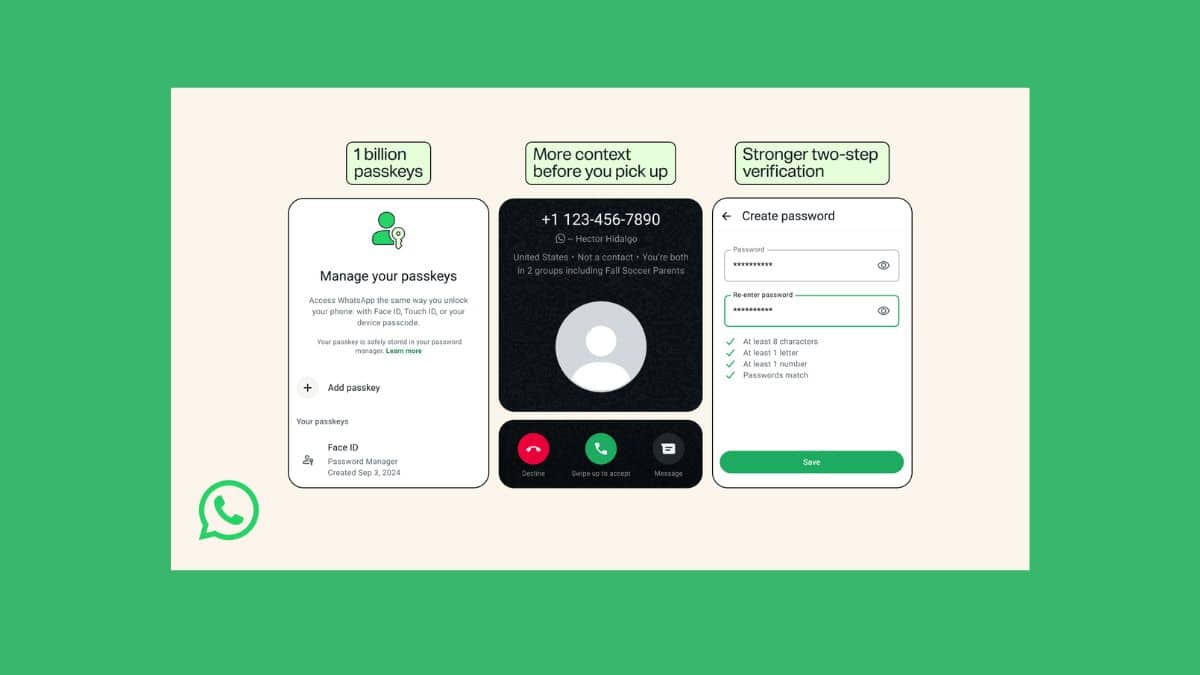
WhatsApp fixed that on August 25, 2026, with support for multiple passkeys on a single account. The update also rewrites two-step verification from a six-digit PIN into a full password, and adds caller context for unknown numbers on Android. None of this arrived as a flashy keynote moment. It’s a quiet account security update, the kind that matters more once you actually live with two phones than it does on a features list.
Here’s what changed, how the mechanics work, and whether it’s worth setting up today.
When Did WhatsApp Add Multiple Passkeys?
WhatsApp announced the change on its official blog on August 25, 2026, alongside a claim that more than a billion people had already set up at least one passkey on the platform. The rollout is gradual across both iOS and Android, which means some accounts saw the option immediately while others are still waiting on it to appear. If you don’t see it yet, an app update usually surfaces it within a few days.
Passkey login itself isn’t new. WhatsApp brought it to Android in October 2023 and to iOS in April 2024, letting you sign in with a fingerprint, Face ID, or your device’s screen lock instead of typing anything. What changed this week is the ceiling: an account that used to recognize one passkey now recognizes several.
How Multiple Passkeys Actually Work
Passkeys run on public-key cryptography. Your device generates a private key that never leaves it and a public key that WhatsApp stores. Signing in means proving you hold the private key, usually by unlocking your phone, rather than sending a password or code that could be intercepted or phished. That’s what makes them resistant to the SIM-swap and credential-stuffing attacks that still catch people out with SMS-based verification.
The catch has always been storage. Apple keeps passkeys in iCloud Keychain, and it syncs across your iPhone, iPad, and Mac. Google keeps them in Google Password Manager, synced across Android devices and Chrome. Those two vaults don’t talk to each other. A passkey created on an iPhone was never going to show up on a Pixel, no matter how the software evolved on either side.
Multiple passkeys support doesn’t merge those vaults. It just lets your WhatsApp account hold a reference to more than one of them at once. Add a passkey from your iPhone, then add a second one from your Android phone, and WhatsApp will accept either device’s credential at sign-in. Each one still lives entirely inside its own platform’s secure storage.
The Problem This Actually Solves
If you’ve only ever owned one phone, this update won’t change your day. It matters for a specific, common group: people who carry a personal iPhone and a work Android, families sharing accounts across mixed devices, or anyone who just switched ecosystems and didn’t want to lose their passwordless sign-in along the way.
Before this week, that switch meant friction. You’d either fall back to entering your two-step verification PIN on the second device, or reset your passkey entirely and lose the one tied to your original phone. Neither option was disastrous, but both undercut the reason passkeys exist in the first place: sign in without typing anything, on whichever device is in your hand.
Your Two-Step Verification Password Just Got Stronger
WhatsApp shipped a second change in the same update: two-step verification no longer locks you into a six-digit PIN. You can now set a full alphanumeric password, with special characters, as the backup check when you sign in on a new device.
Six digits sounds secure until you remember how predictable most people’s PINs are: birthdays, repeated digits, sequences. A PIN space of a million combinations is trivial next to a password that can mix upper and lower case letters, numbers, and symbols across a longer string. This isn’t the flashy half of the announcement, but it’s arguably the more consequential one for anyone who hasn’t adopted passkeys yet and is still relying on two-step verification as their main line of defense.
How to Add a Passkey to Your WhatsApp Account
- Open WhatsApp and go to Settings.
- Tap Account, then Passkeys.
- Tap Create a passkey and confirm with your device’s fingerprint, Face ID, or screen lock.
- Repeat the same steps on any other device, iPhone or Android, that you want to sign in from directly.
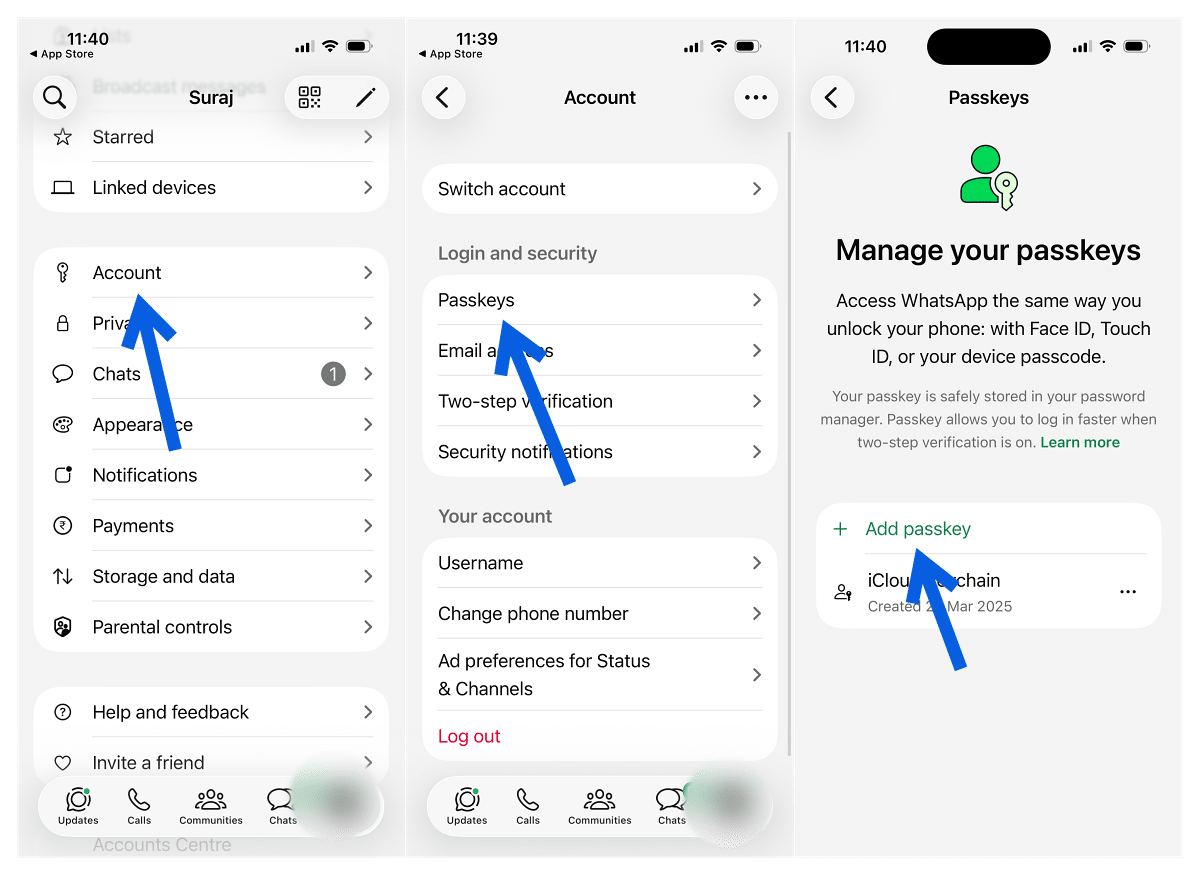
Each device generates and stores its own passkey locally. There’s no code to copy between phones and nothing to write down.
Other Security Changes Rolling Out Alongside It
The caller-context feature, currently Android-only, shows extra information when a number you haven’t saved calls you: whether it’s dialing in from a different country and whether you share any groups with that contact. It’s aimed squarely at the kind of scam calls that rely on urgency and unfamiliarity to work, giving you a beat to decide before you pick up.
It’s also worth separating this week’s news from a related feature WhatsApp shipped last fall. Back in October 2025, WhatsApp introduced passkey-encrypted chat backups, letting you protect your end-to-end encrypted backup with a fingerprint or Face ID instead of a 64-digit key. That’s a different passkey use case, backup encryption rather than account login, and it’s already been live for months. Multiple passkeys support doesn’t change how that feature works, but the two now sit on the same underlying login technology.
Should You Set This Up Now?
If you own one phone and never plan to change platforms, the practical upside here is small; passkey login already worked fine for you. If you split time between an iPhone and an Android device, or you’re the kind of person who upgrades phones the moment a new one drops, this closes a real gap and is worth the two minutes it takes.
Everyone still using a numeric PIN for two-step verification has a clearer reason to act. Switching to a full password takes the same two minutes and meaningfully raises the bar for anyone trying to guess their way into your account. Full rollout is still working its way to every user as of this writing, so if the option isn’t visible yet in Settings, an app update should bring it.
If you’re new to managing WhatsApp across two phones in general, our guide to using the same WhatsApp account on two phones covers the linked-devices side of that setup, and pairs well with getting a passkey registered on each one.
Final Thoughts
Multiple passkeys support isn’t a headline feature, but it fixes a genuine annoyance for anyone living across two operating systems, and the two-step verification password upgrade is the more broadly useful change even if it draws less attention. Neither requires new hardware or a beta. Open Settings, spend two minutes, and both are done.