You open WhatsApp to check a friend’s vacation photos, tap through a few Status updates, and suddenly you’re watching a sponsored clip from a brand you’ve never heard of. For years, WhatsApp was the one Meta app without ads. That changed.
WhatsApp rolled out Status ads and Promoted Channels worldwide on February 27, 2026, after months of limited testing in select countries, including India. The ads live only in the Updates tab. Your chats, calls, and groups stay ad-free.
Here’s the catch most guides skip: outside Europe, there’s no switch that turns these ads off. You can hide them, limit who reaches you, and cut down personalization. Here’s how each option works and which ones actually make a difference.
Where WhatsApp Status Ads Show Up (and Where They Don’t)
Status ads appear between your contacts’ Status updates in the Updates tab, marked with a Sponsored label. WhatsApp shows one after you’ve viewed a certain number of updates. The company hasn’t published that number.
Promoted Channels work differently. They sit in the Channels directory with a small label showing a business paid for placement.
- Chats, calls, and groups: No ads.
- Status tab: Ads between contacts’ updates.
- Channels directory: Promoted Channels from businesses.
If you rarely open the Updates tab, you’ll rarely see an ad. Heavy Status viewers get the most exposure.
How to Hide a Status Ad on WhatsApp
This works on both iPhone and Android. Hiding an ad removes it and signals WhatsApp to show you fewer like it.
- Open the Updates tab and view Status updates until a Sponsored post appears.
- Tap the three-dot menu on the ad.
- Tap Hide ad. Some app versions label this Not interested and ask you to pick a reason.
To skip an ad without hiding it, swipe past it like any other Status. That takes a second but teaches WhatsApp nothing.
How to Hide a Promoted Channel Ad
Channel ads use a different entry point, which confuses a lot of people.
- Go to Updates and scroll to Channels.
- Tap the Sponsored label on the promoted channel.
- Select Hide ad.
Block an Advertiser That Keeps Coming Back
Hiding one ad doesn’t stop the same brand from returning with a new one. If a single business keeps showing up, block it at the source.
- Open Ad preferences. Depending on your version, find it in the Updates tab menu, under Settings > Account, or under Settings > Accounts Center > Ad preferences if you’ve linked WhatsApp to your Meta accounts.
- Open Advertisers you’ve seen.
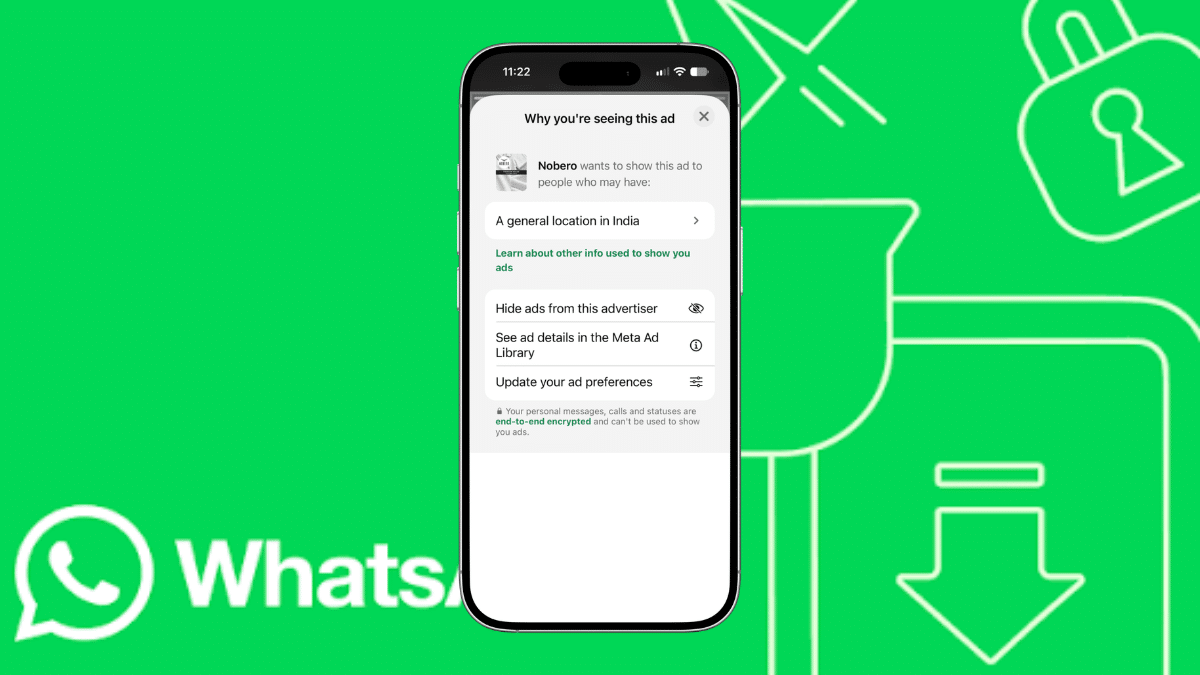
- Pick the brand and tap Hide ads from this advertiser.
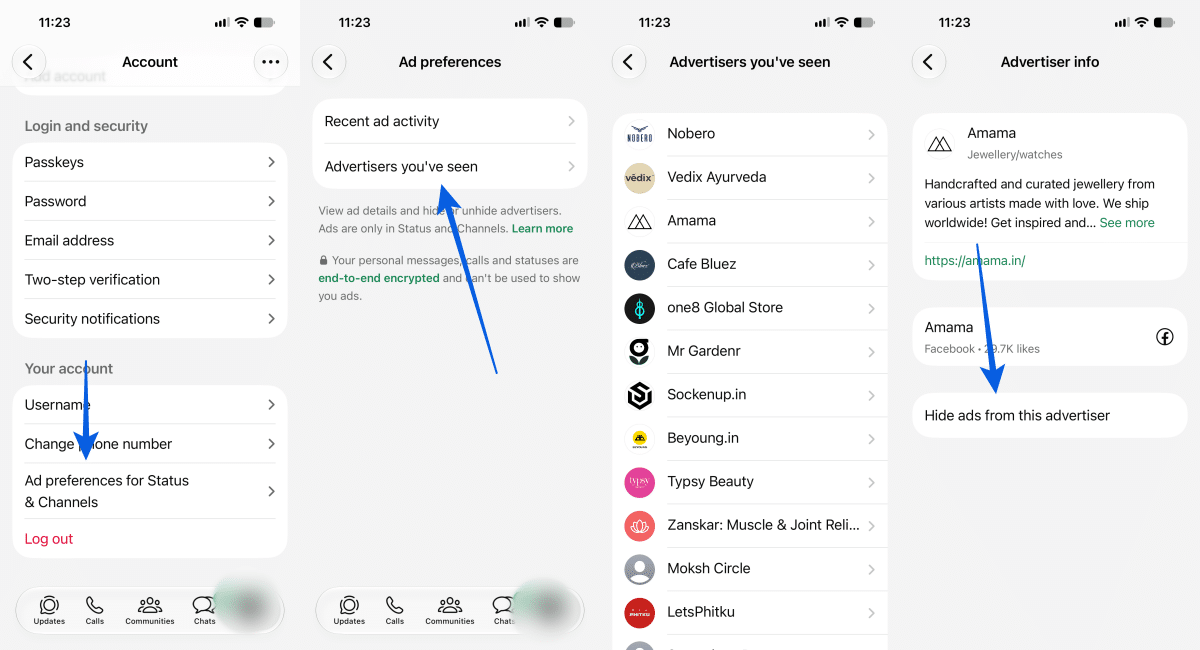
The same screen shows Recent ad activity from the past 30 days, which helps when you swiped past something and can’t remember who ran it. Ad preferences work only in the phone app, not on WhatsApp Web.
What WhatsApp Uses to Pick Your Ads
Knowing the inputs tells you which controls matter. According to WhatsApp’s official blog, ads in Status and Channels use:
- Your country or city and device language
- The Channels you follow
- How you interact with ads you’ve seen
WhatsApp says it doesn’t use your personal messages, calls, or groups to choose ads, and never sells or shares your phone number with advertisers. Your personal messages, calls, and Status updates stay end-to-end encrypted.
The bigger lever is Accounts Center. If you’ve added WhatsApp to Meta’s Accounts Center, WhatsApp also uses your ad preferences and information from your Facebook and Instagram accounts. Keeping WhatsApp unlinked won’t reduce how many ads you see, but it keeps them less personalized.
If you linked it only for cross-posting Status to Instagram, weigh whether that convenience is worth the extra targeting.
Report Scam or Misleading Status Ads
Status ads open a chat or a website with one tap, which makes them an easy channel for fake offers and phishing links. If an ad looks off, report it instead of just hiding it.
- Tap the three-dot menu on the ad.
- Tap Report ad, then Report.
- If the ad already opened a website, tap the three-dot menu on that page and choose Report website.
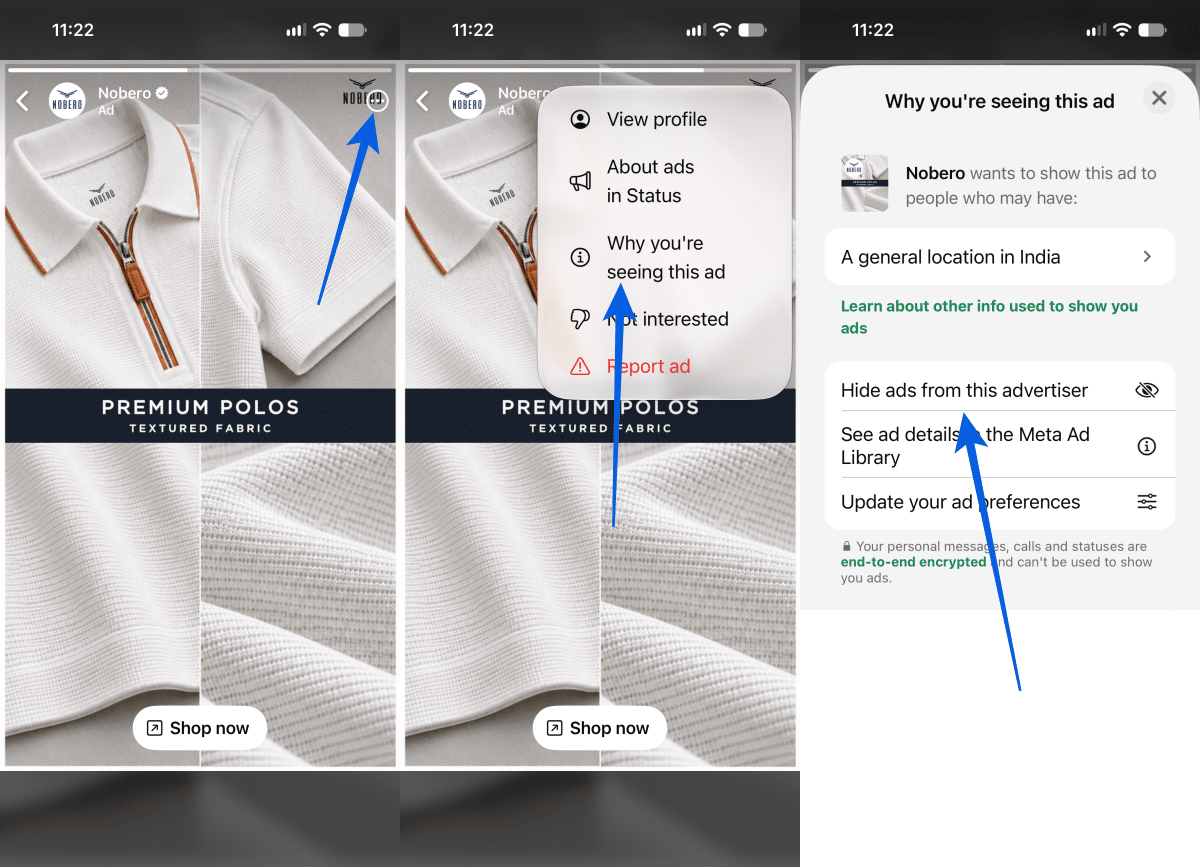
You can also tap Why you’re seeing this ad from the same menu to see which signals triggered it. Track your submitted reports under Settings > Help and feedback > Reports.
Worth knowing: you can download everything WhatsApp has logged about your ad activity.
Go to Settings > Account > Request account info > Request an ads report. WhatsApp takes about three days to prepare it.
Can You Pay to Remove WhatsApp Status Ads?
Only in Europe. Users in the European Region who are 18 or older and have added their account to Accounts Center can subscribe to remove ads from Status and Channels. WABetaInfo reports pricing at roughly €3 per month through Facebook.com or Instagram.com and €4 per month through the App Store or Google Play. WhatsApp says pricing varies by platform and location. Subscribers also stop having their ad interactions used for targeting across Meta products.
That option doesn’t exist in India, the US, or other markets as of October 2026.
WhatsApp Plus doesn’t fix this either. The $2.99 per month subscription launched globally on May 27, 2026, and adds stickers, themes, custom app icons, ringtones, and up to 20 pinned chats. Ad removal isn’t on its feature list. If you’re thinking about WhatsApp’s Plus premium plan as an escape from Status ads, save your money.
Skip the “Ad-Free WhatsApp” Mods
Search for ways to block WhatsApp ads and you’ll hit modded APKs, including an unofficial app also called “WhatsApp Plus” that predates Meta’s real subscription. These come from third-party sites, not the Play Store or App Store. They break WhatsApp’s terms of service and can get your number permanently banned. They also run your private messages through unofficial code nobody audits, which undercuts the point of end-to-end encryption.
System-wide ad blockers and private DNS won’t help either. WhatsApp serves ads inside the app, not through a browser.
If privacy is what’s bothering you, a better move is turning on WhatsApp Advanced Chat Privacy for sensitive conversations and adding two-step verification on WhatsApp so a scam ad can’t easily lead to an account takeover.
Signing Off
WhatsApp kept its promise on one front: your chats stay ad-free and encrypted. The Updates tab is a different story, and outside Europe you can’t pay or toggle your way out of it. Your best defense is a mix of habits. Hide ads you don’t want, block advertisers who repeat, keep WhatsApp out of Accounts Center if you care about targeting, and report anything that smells like a scam. Do that for a week, and the ads you still see will at least be easier to ignore.
No. WhatsApp shows ads only in the Updates tab.
No. WhatsApp says it never sells or shares your number with advertisers. If you tap an ad and message the business, though, that business can usually see your number, as with any chat.
Yes. India saw early testing in December 2025, and the February 2026 rollout made ads global. Your account may get them later than others as WhatsApp rolls out gradually.