
Epic has rolled out the end-of-season recap for Fortnite Chapter 7 Season 4, titled Override, as the season enters its final days. It covers your wins, eliminations, XP, Sprite extractions and playstyle from a season that kicked off on August 20, 2026.
The recap is free and sits at fortnite.com/recap, a website rather than an in-game menu. Its data carries an “Updated October 25, 2026” stamp. Override is set to end on November 1, 2026, according to the in-game Battle Pass timer, though some trackers list October 31. Epic hasn’t confirmed an exact end time, so save your cards early.
Steps to get your Fortnite Override recap
- Open fortnite.com/recap in any phone or PC browser.
- Select Sign In To See Your Recap at the bottom, or Sign In at the top right.
- Log in with the Epic account that holds your Fortnite progress. Steam, Google, Apple and console logins work only if they’re linked to that same Epic account.
- Scroll down to go through each stat section.
- Use the arrows to flip through the share cards. Tick Hide username if you want, then select Share Recap or Save Recap.
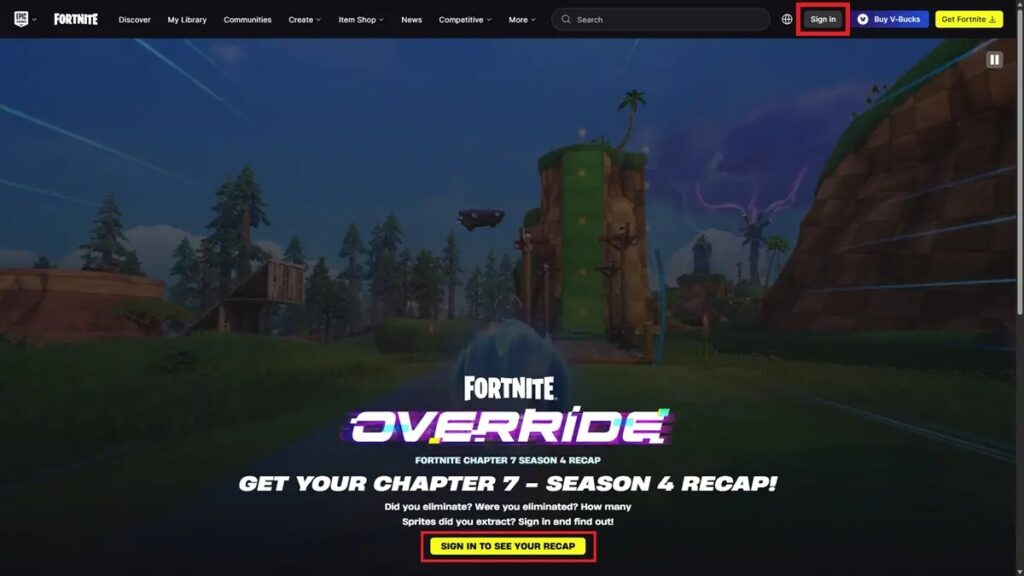
Only you can see your recap unless you share a card. Saved cards download straight to your device, which matters because the next recap will likely replace this one.
What your Override recap shows
The recap splits your season into six sections:
| Section | Stats included |
|---|---|
| Your Stats | Victories out of matches played, eliminations, XP earned |
| Combat | K/D ratio, headshots, most eliminations in one match |
| Survival | Average Battle Royale placement, storm circles survived, quests completed |
| Distance | Distance on foot, in vehicles, and total |
| Play Style | Archetype label with Lethality and Survival bars |
| Sprites | Total extracted, most extracted, rarest extraction, top drop-in and top starting Sprites |
The recap also flags your favorite drop zone and favorite modes. The Sprites section is unique to this season. It is the closest thing to a record of how you used Override’s power-ups and Sprites across 10 weeks.
Why your recap stats may look wrong
Most recap complaints come down to one of these five causes:
- Zeros or “no data”: You’ve likely signed into a secondary Epic account. Sign out and use the one that matches your in-game name.
- Missing recent matches: The data is a snapshot from October 25, 2026. Matches played after that date won’t count unless Epic refreshes it.
- Odd placement numbers: Average placement tracks Battle Royale only. Creative and other modes don’t affect it.
- Sign-in loop: Switch browsers or open a private window with extensions disabled.
- Page won’t load: Check Epic’s server status page before retrying.
Importantly, the recap gives no rewards. Treat any site promising V-Bucks in exchange for your recap login as a scam.
Signing Off
The Override recap is a time-bound snapshot, so save your share cards before the season flips. Epic has not said how long the page stays live after the season ends.
Epic also hasn’t announced what comes next. Dataminers and insiders point to a One Piece-themed mini-season around November 1 and Chapter 8 in early December, but none of it is confirmed. Until then, there’s still time to finish the Battle Pass before unclaimed tiers disappear.
No. The recap is only available on fortnite.com/recap through a browser.
The recap offers four share cards. You can flip between them with the arrows.
Yes, as of writing. Epic hasn’t said when the page comes down, so save your cards before the season ends.
No. Only you can view them unless you share a card, and you can hide your username on cards you share.
Creative play can count toward general stats like XP. Average placement tracks Battle Royale matches only.
Level Up Your Gaming: