You spot a follower number on your Snapchat profile and want the names behind it. Instagram hands you that list in one tap. Snapchat doesn’t, because “following” on Snapchat means different things depending on your account type and age.
Here’s how to check each list, plus the details Snapchat keeps from you on purpose.
Friends, Followers, or Added Me: Which List Do You Need?
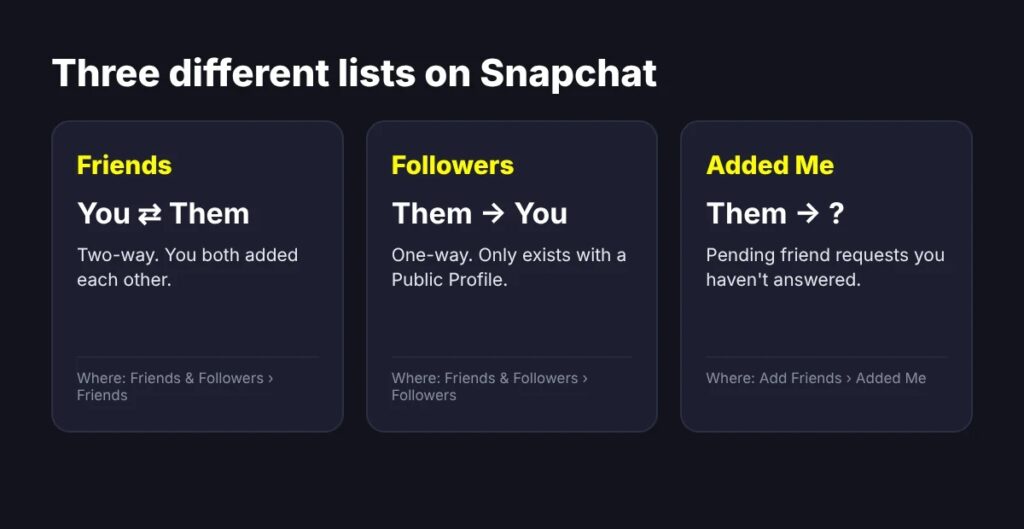
Snapchat sorts connections into three buckets, and each lives in a different spot:
- Friends are two-way. You both added each other.
- Followers are one-way. Someone follows your Public Profile without you following back. This list only exists if you have a Public Profile.
- Added Me holds people who sent you a friend request you haven’t accepted or ignored.
On a regular private account, nobody follows you in Snapchat’s sense. Anyone who added you waits in Added Me (open Add Friends from your profile) until you tap accept or Ignore.
How to See Your Followers List on Snapchat
The steps match on iPhone and Android:
- Open Snapchat and tap your Bitmoji or Story icon in the top-left corner.
- Scroll to Friends & Followers and tap View All.
- Switch to the Followers tab. Friends and Following sit right beside it.
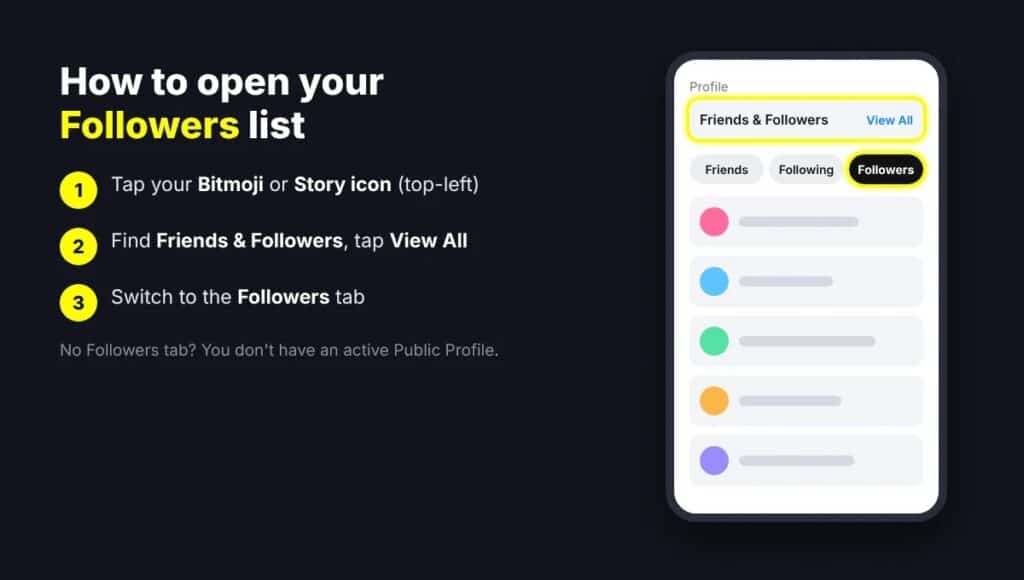
No Followers tab? You don’t have an active Public Profile, so Snapchat shows only Friends and Following.
Keep your expectations realistic. Snapchat doesn’t document how many names the Followers tab displays, and creator-focused guides report that large accounts see a partial list rather than every username. You also get no search, sort, or export. On a small account, you’ll likely see everyone. On a big one, treat the tab as a sample, not a census.
Why Your Followers Tab Is Missing
Snapchat Support lists three requirements for a Public Profile:
- You’re 16 or older. Local laws can set a different minimum in some regions.
- Your birthday is saved in settings. Eligible users often miss the option because this field is blank.
- You have no past Community Guidelines violations.
Under-16 accounts get My Profile instead, which only friends can view, so followers don’t apply at all. Once a teen becomes eligible and upgrades to a Public Profile, Snapchat makes that switch permanent. Parents weighing this should read our breakdown of Snapchat parental controls. If you qualify and want one, here’s how to make a public profile on Snapchat.
How to Check Your Exact Follower Count in Insights
The Followers tab shows who. Insights shows how many and what kind.
- Tap your Bitmoji, then Public Profile.
- Open the Insights tab.
- Read your total under Audience.
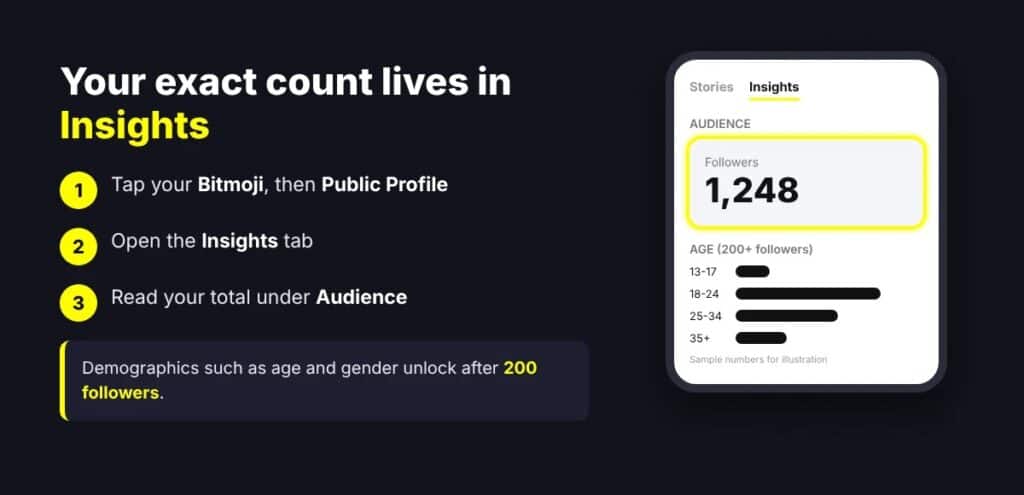
Pass 200 followers and Audience Insights adds demographics like age and gender. Below that, you get the count only.
That total has a blind spot. If five people unfollow and five new people follow on the same day, the number doesn’t budge. Snapchat sends no unfollow alert and keeps no list of who left. For friends who disappear, these signs someone unadded you on Snapchat help more than the counter.
One useful detail most guides skip: Spotlight Metrics show how many new followers each individual Spotlight video earned. That tells you which posts actually grow your audience. Our guide to how Snapchat Spotlight works covers the rest.
Use Public Story Viewers to Spot Active Followers
A follower count tells you who subscribed. Story viewers tell you who pays attention. Post to My Story · Public, then:
- Tap your public Story Snap.
- Swipe up to open Insights and Replies.
- Check the names under Viewers.
Snapchat says this list mixes friends, followers, and other Snapchatters, so a name here doesn’t confirm a follow. Cross-check it against your Followers tab. You also can’t post to your friends-only and public Story at the same time, so pick one per Snap.
How to Hide Your Follower Count (and Who Still Sees It)
- Open your profile and tap Public Profile.
- Tap the pencil icon at the top.
- Toggle Show Follower Count off.
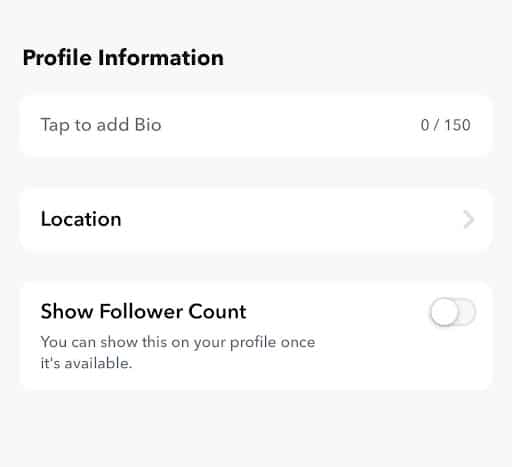
You’ll still see the number in Insights. The catch sits in Snapchat’s Insights Glossary: if you’re eligible for monetization and brand discovery, brands can still see your follower count even after you hide it. Hiding works for casual profile visitors, not for partnership pitches. To lock down the rest of your account, run through these Snapchat privacy settings to change and hide your Snapscore.
Can You See Who Follows Someone Else?
No. You can see another account’s follower count only if they’ve left it visible. Snapchat never exposes anyone’s follower list to outsiders, and that includes yours.
Skip the Follower-Tracker Apps
Apps promising a complete follower list or unfollow alerts usually want your Snapchat login. Snapchat bans unauthorized third-party apps under its Terms of Service, and using one can get your account locked. If you already typed your password into one, reset your Snapchat password now.
Final thoughts
Snapchat gives you three honest tools: the Followers tab for names, Insights for the real count, and public Story viewers for who’s engaged. None of them gives a full, sortable list, and that’s a privacy choice, not a bug.
Check the right list for your account type, ignore the tracker apps, and judge your audience by who watches rather than one number on your profile.