When someone removes you from Snapchat, it isn’t as obvious as it is in other apps. You don’t see any notifications, alerts, or anything, since the app keeps it very subtle. This is an intentional design choice from Snapchat and might confuse users about their status with certain contacts.
I’ve been using Snapchat for a long time and went through a couple of breakups to help you out. In this guide, you’ll learn all the clear signs that someone unadded you on Snapchat, including step-by-step methods to check and what it means for your Snapchat connection.
What Does It Mean When Someone Unadded You on Snapchat?
When someone unadds you on Snapchat, they remove you from their friends list. This is different from blocking. It is less extreme but still affects how you interact with them.
Once you are unadded, you lose access to their private stories, your messages may show as Pending, and the connection becomes one-sided. You can still find their profile and send a new friend request, although that is not always a good idea, especially after a breakup.
Does Snapchat Notify You When Someone Unadded You?
No. Snapchat does not notify you when someone removes you from their friends list. The app takes a privacy-first approach, so you need to look for signs instead of receiving alerts. This is intentional and helps avoid awkward or uncomfortable situations.
4 Signs to Tell If Someone Unadded You on Snapchat
These signs tend to show up consistently when someone removes you. Do not rely on just one. Look for multiple indicators before jumping to conclusions.
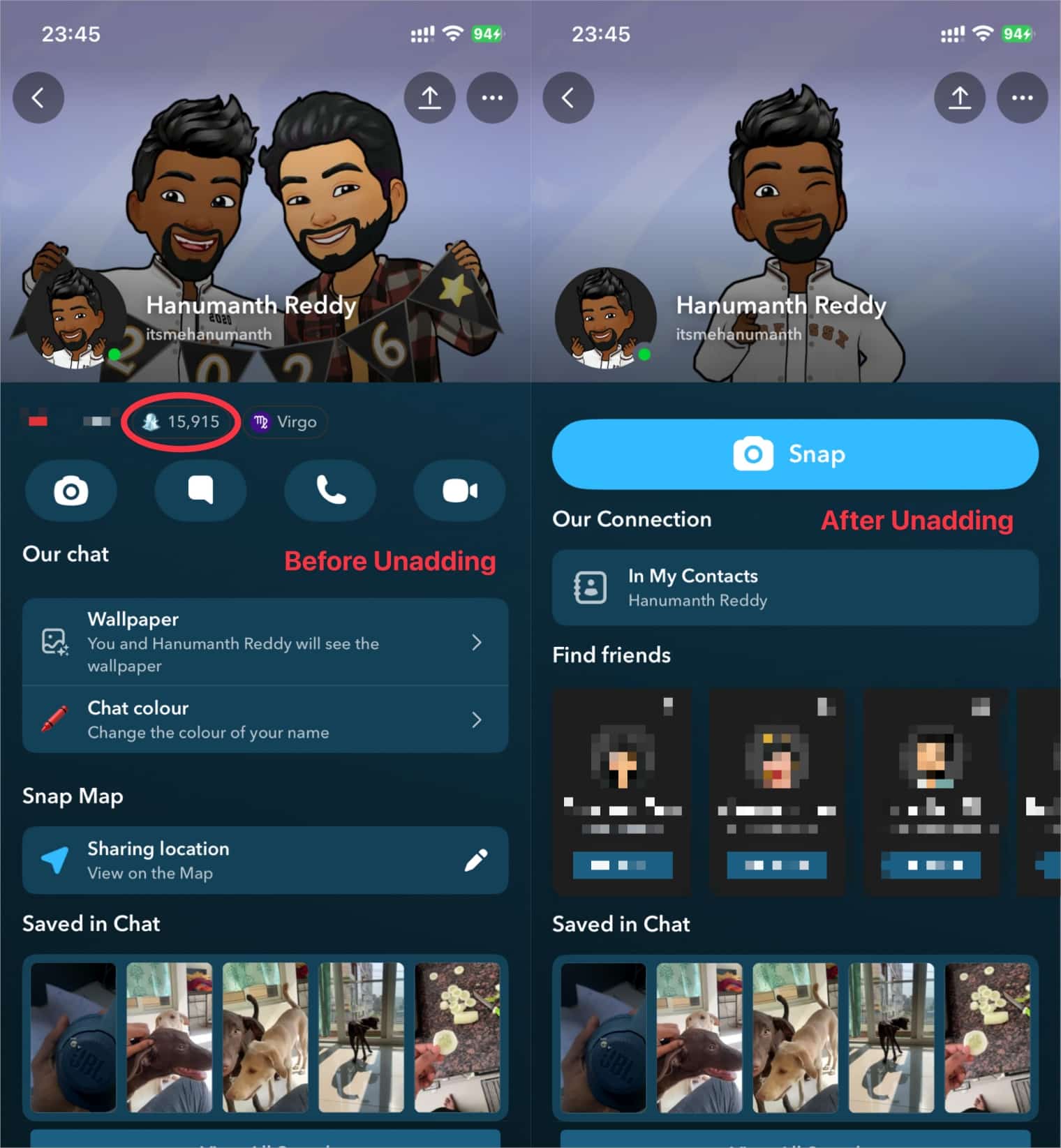
1. Their Snapscore is Hidden
This is the first sign that someone has removed you from their friends list on Snapchat. Their Snap Score under their username disappears.
2. You Can’t See Their Story
If someone regularly posts private stories and they suddenly disappear from your feed, they may have unadded you. However, if they have a public profile and you follow them, you will still see their stories. Keep in mind they could also have changed their story privacy settings or simply not posted recently.
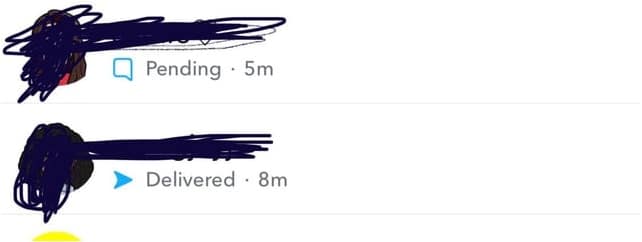
3. Messages Show “Pending”
This isn’t something that everyone sees often, but when you send snaps or messages, they display a gray Pending label instead of Delivered. It indicates that the recipient hasn’t accepted your request for messaging, which usually happens when you’re no longer on their friends list.
4. Their Profile Shows “Add Friend” or “+ Add” or “Snap”
When you search for their profile and see an Add Friend or (+ Add) button instead of options like Send Snap or Chat, they’ve likely removed you. Now this indicates you’re not currently connected.
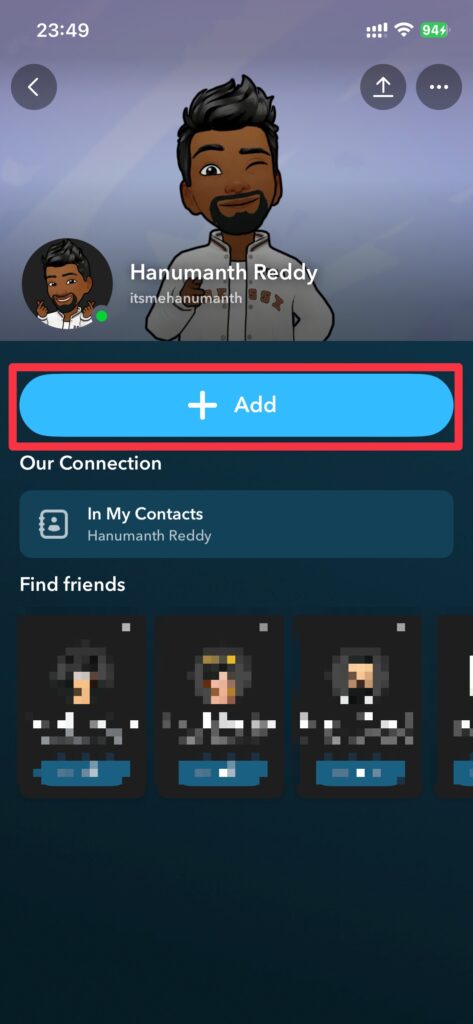
How to Check If Someone Unadded You on Snapchat (Step-by-Step)
I have tested all four methods below over time. Each offers a different level of confirmation, so try at least two to be sure.
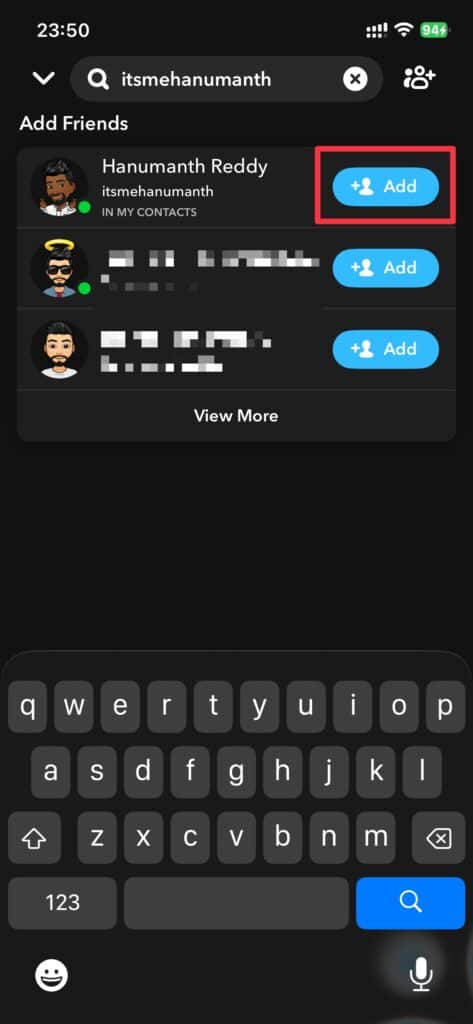
Method 1: Search for Their Username
Open Snapchat and tap the search icon at the top. Type their username or display name, and if their profile appears with an Add button, they’ve unadded you. But if you’re still friends, you’ll see options to send snaps or chat.
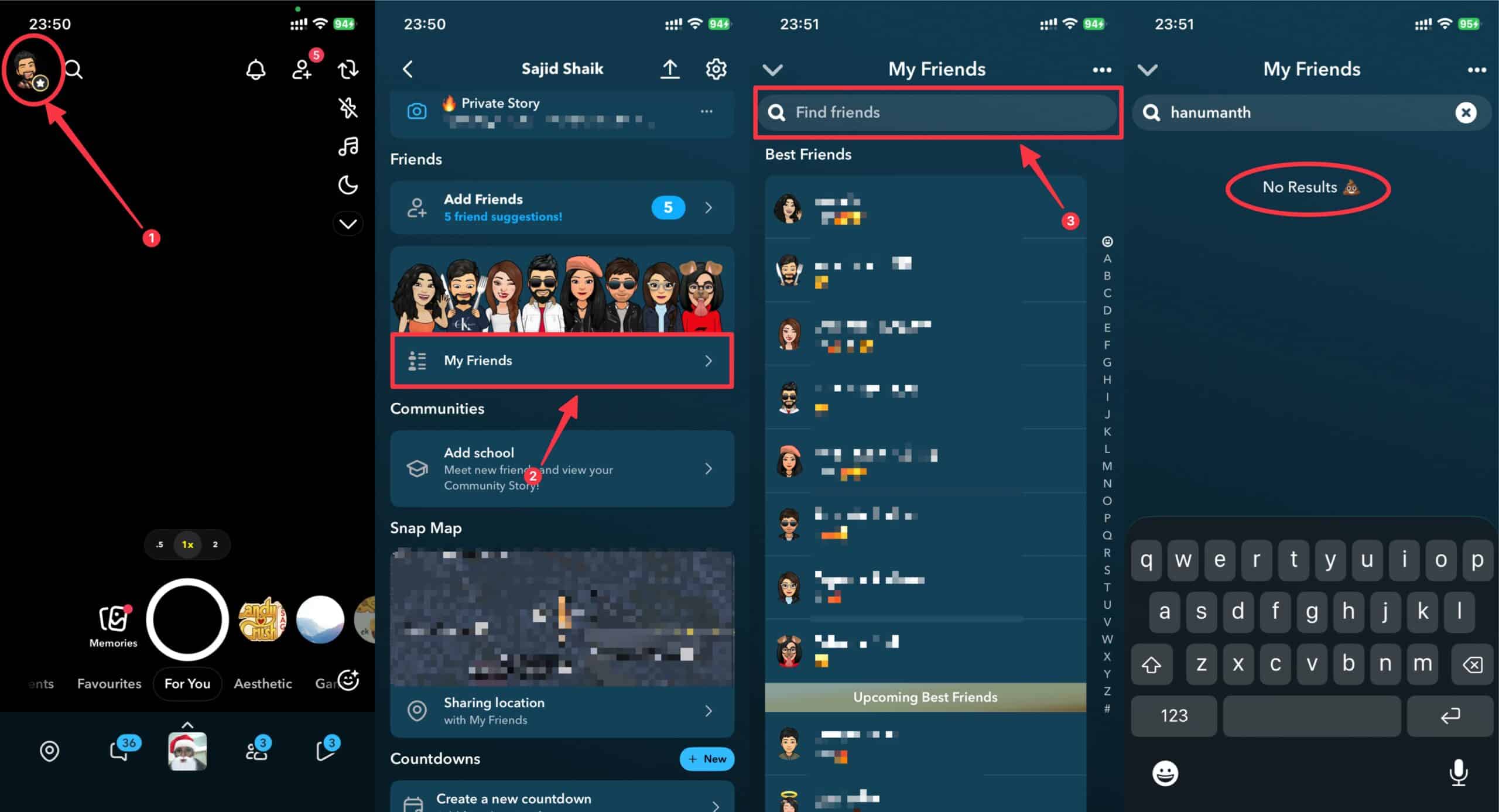
Method 2: Check Your My Friends List
Tap your profile picture on the top-left, select My Friends, and scroll through your list or use the search function. If their name doesn’t appear, they’ve either unadded you or deleted their account from existence.
Method 3: Try Sending a Snap
You can capture a snap and send the person in question. If the message still shows Pending in gray text rather than Delivered, they’ve likely removed you from their friends’ list. But you’ll need to Add them first and then you’ll see the Snap option.
Method 4: Look at Their Story
Check your Stories feed (if they post often) and if you can’t see their stories, this suggests they’ve removed you or changed their privacy settings to exclude you.
How to Confirm If You’ve Been Unadded (Not Just Blocked)
If you suspect someone unadded you, these three confirmation methods will show the truth, that is, whether you’ve been unadded or blocked.
1. Try Adding Them Back
If it’s a fresh breakup, you can try to search for their profile, and if you find them and see the option to add them as a friend, don’t worry, you’re not blocked, just removed from the friend list. Because when they block you, their profile won’t appear in search results at all.
2. Check Mutual Friends
You can ask a mutual friend if they can still see the person’s profile and stories. If your friend can see them but you can’t, then you may be blocked. Open their profile on your mutual friend’s phone, but only you see the Add Friend button, then you’re just unadded.
3. Look for Their Username in Old Chats
You can go through your chat list and find your conversation history with them. If the chat still exists and shows their username, you’re just unadded. If the chat has disappeared completely, you have been blocked.
Unadded vs. Blocked on Snapchat: What’s the Difference?
There are differences that matter because being unadded is reversible in one way, but if you’re blocked on Snapchat, say goodbye to them, since it’s permanent (not exactly).
When You’re Unadded
You can still find their profile by searching their username. You can view their public stories if they have a public account and have made them accessible to everyone. Your messages appear as Pending until they accept your request. You have the option to send them a new friend request from their profile.
When You’re Blocked
You can’t find their profile at all when you search, but you can see it on a mutual friend’s account. All previous chats and conversations disappear from your chat list. You can’t view any of their stories, regardless of the fact that they’re set to public or private. Their Snap Score goes out of the universe, so you can’t find it.
Quick Comparison Table
| Feature | Unadded / Removed | Blocked |
|---|---|---|
| Profile appears in search | Yes | No |
| Can send friend request | Yes | No |
| Previous messages visible | Yes (may show Pending in some cases) | No |
| Can view public stories | Yes | No |
| Snap Score visible | No | No |
Why Would Someone Unadded You on Snapchat?
While there could be many reasons (because people think a lot), here are four primary and most common reasons why someone removes you from their friends list on Snapchat:
- Privacy Reasons: Many users just clean up their friends list to limit who sees their content, and it’s not always personal. They might simply be reducing their digital footprint or sharing their updates more privately.
- Relationship Changes: Friendships evolve, relationships are torn, and people drift apart. A change in your relationship status, whether romantic or platonic, might prompt them to reorganize their social media connections, including Snapchat.
- Accidental Removal: Sometimes people accidentally remove friends while scrolling through their list, but in reality, they were trying to perform another action. It’s also worth considering this possibility, especially if you feel the removal was sudden or unexpected.
- Switching to Private Mode: Some people may decide to keep their Snapchat circle small and include only a few people in their cocoon. This small shift in how they start using this platform might lead to casual disconnection.
What Happens to Your Messages If Someone Unadded You?
Here’s what happens to your chats and snaps when someone removes you from their friends list.
1. Sent Messages Show “Pending”
Any new snaps or messages you send will display as Pending gray text rather than Delivered. When you see this, it means they haven’t accepted your message request.
2. They Can Still See Old Conversations
If previous conversations remain visible on both ends, they can review your past messages, but new ones require acceptance for your message to get delivered.
3. Stories Are Limited
If someone has unadded you, and you can only view their public stories. Private stories and stories set to Friends Only become inaccessible to you.
Can You Still Message Someone Who Unadded You?
Yes, you can still message someone who unadded you, but there would be limitations. Your messages will show Pending in gray text. They’ll receive your message request in their Pending section rather than their main chat list. And only when they accept your request, will your messages be delivered normally. Until their acceptance, your snaps won’t appear in their primary chat interface.
What Should You Do If Someone Unadded You?
Well, the first thing is don’t panic or overreact (even though it’s natural). Take a deep breath and understand their reason behind it. But once you’re done with all that, here’s what you should actually do, and choose whatever is the right option with maturity, and not desperation:
1. Respect Their Decision
Accept it. Trust me, the most mature response you can take at this moment is to respect their choice. Everyone has the right to curate their social media experience as per their requirements, and if you take that personally, it won’t do any good to your productive life.
2. Reach Out (If Appropriate)
If you have a genuine reason to reconnect with them or believe it was a mistake, consider reaching out through another platform to ask for the reason. Keep your message more casual and don’t make it sound confrontational.
3. Move On
Yeah, you heard it right. Sometimes this is the healthiest option. You should focus your energy on maintaining connections with people who actively want to stay in touch with you.
4. Re-evaluate the Friendship
Try using this opportunity to re-reflect on this relationship. Consider whether this connection adds value to your life and whether this connection is something that you want to pursue and re-establish.
How to Prevent Being Unadded on Snapchat
Well, the past is past, but you can prevent it the next time before it even happens. Here’s how you can prevent yourself from being unadded on Snapchat in the future:
- Maintain Regular Communication: You should stay connected by regularly engaging with your friends’ content and sending occasional snaps because consistent interaction keeps relationships active.
- Post Quality Content: You can share interesting, authentic stories and snaps that add value to your friends’ feeds. And don’t post too much as well because excessive posting might overwhelm or annoy your connections.
- Be Genuine and Respectful: The most important part, be yourself and treat others with all due respect in all your interactions because authenticity matters. Also, ensure that you avoid behavior that might make others uncomfortable.
- Clean Communication: Try keeping your messages positive and appropriate. Ensure you respect boundaries and don’t spam people with unwanted content or excessive messages.
Snapchat Privacy Settings: Managing Your Own Friends List
If you’re on the other side of the spectrum, you can tweak some of your privacy settings to be safer from the people who you think are not the right ones in your life.
How to Unadd Someone on Snapchat
- Open your Friends list.
- Find and tap the person’s name.
- Tap the three-dot menu → Manage Friendship.
- Select Remove Friend to unadd them instantly.
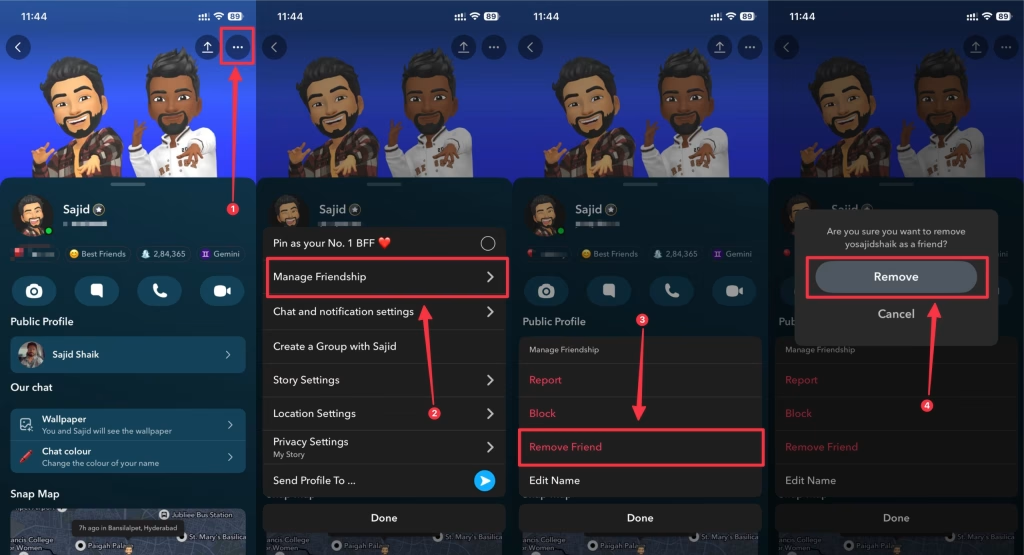
Control Who Can Add You
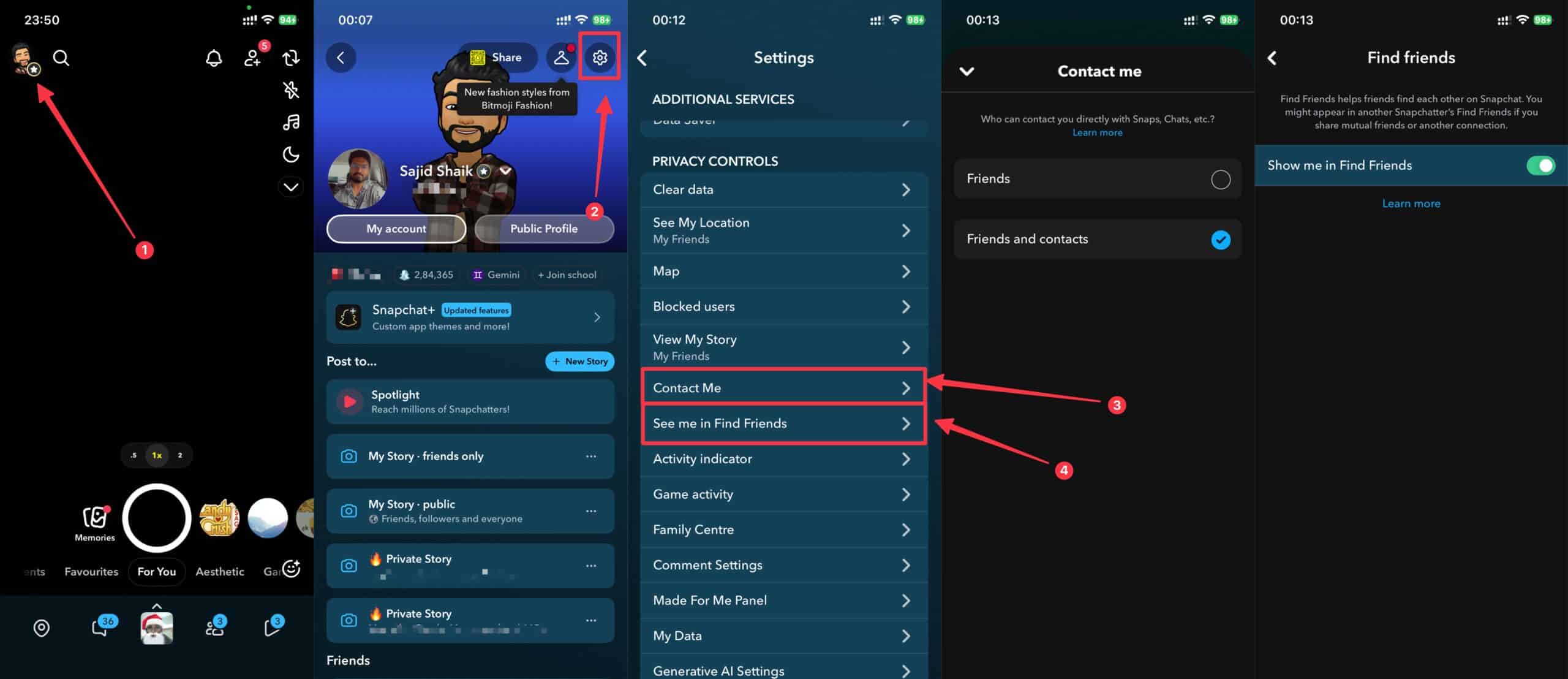
Just tap your profile picture in the top-left, go to Settings, select Contact Me, then select My Friends or Friends. If you want more privacy, you can also turn off See my in Find Friends and contact syncing as well.
Block vs. Unadd
The thing is that blocking is more severe and prevents all kinds of interaction with the person on the platform. So use blocking only when you want to completely cut off the contact. Unadding is a softer approach and allows the other person to reach out if needed.
Final Thoughts
If you find out that someone unadded you on Snapchat, it can feel disappointing at first, but it’s a normal part of navigating relationships on social media. Snapchat’s discreet approach to these changes means you need to stay aware of these signs and know how to check your status with specific contacts.
Always remember that social media connections may not reflect the full picture of your relationships. If someone removes you from Snapchat, it doesn’t necessarily mean they don’t value your friendship, but it might be simply adjusting their social interaction settings on the platform. You should focus on maintaining genuine connections both online and offline, and stop letting digital interactions define your self-worth.