You ask Siri for a dinner spot on Monday. By Thursday you’ve forgotten the name, and Siri has too. That gap between “smart assistant” and “assistant with a memory” is the main thing iOS 27.2 sets out to close.
Apple released iOS 27.2 on October 26, 2026, about six weeks after the first developer beta landed on September 16. Apple skipped a public iOS 27.1 beta entirely, and this is the biggest point release of the iOS 27 cycle so far: Siri AI gets memory and five new languages, Messages suggestions come back, Apple TV finally supports profiles, and Photos starts labeling AI edits with Google’s SynthID watermark.
It also leaves something out. The redesigned Health app that headlined the betas didn’t make the cut. Here’s what actually shipped, what changed since the beta, and whether you should update today.
iOS 27.2 Release Date, Build Number, and Supported iPhones
- Released: October 26, 2026
- Build: 24B119 (iPhone Duo gets build 24B91020)
- Release candidate: October 19, 2026 (build 24B115)
- Supported devices: Every iPhone that runs iOS 27, including iPhone Duo. Check the full iOS 27 compatibility list if you’re unsure about yours.
- Older iPhones: Apple also released iOS 26.7.2 (build 23H128) for devices staying on iOS 26.
Build numbers come from iClarified’s release report. If you followed our iOS 27.2 beta 1 coverage, most of the beta features made it through. One big one didn’t, and we’ll get to that.
Siri AI in iOS 27.2 Now Remembers Past Conversations
Siri AI launched with iOS 27 as a strong but forgetful assistant. Ask a follow-up the next day and you started from zero. iOS 27.2 fixes that.
According to Apple’s release notes as reported by 9to5Mac, Siri now:
- Recalls earlier conversations. Ask “what was that restaurant you suggested?” and Siri can pull it from a past chat.
- Reads from more personal sources. Photos attached in Messages, Calendar event attendees, and Voicemails join the list. Results from Safari history and Reading List also improve.
- Lets you copy part of a response. Granular text selection means you can grab one address or phone number instead of the whole answer.
- Speaks five new languages. French, Japanese, Korean, Portuguese, and Spanish join English.
Hardware hasn’t changed. Siri AI still needs an iPhone 15 Pro, iPhone 15 Pro Max, or any iPhone 16 or later. It remains unavailable in the EU and mainland China. If you’re new to Siri AI, our iOS 27 Siri features guide covers the basics this update builds on.
Excluded Apps Is the Setting You Should Check First
More context means Siri sees more of your data. Apple paired the memory upgrade with a privacy control that’s easy to miss.
The old App Access setting is now Excluded Apps, and it applies to Siri, Search, and suggestions together. The real improvement: you can block several apps in one pass instead of excluding them one at a time. You’ll find it in Siri settings (Apple’s Siri settings guide covers that menu).
Worth five minutes after updating. If Siri can now read Voicemails and Messages photos, you should decide which banking, health, or work apps stay off-limits.
Messages Suggestions Return, This Time With an Off Switch
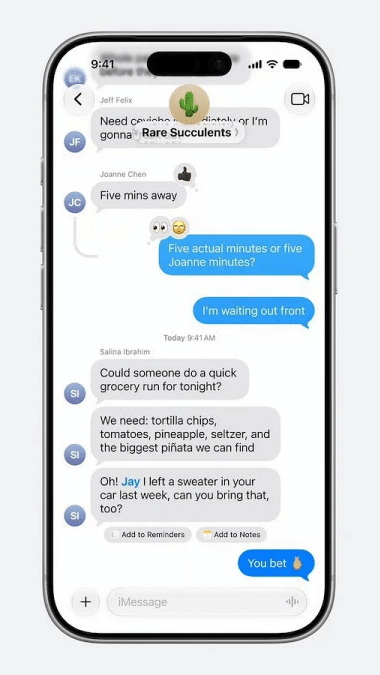
Apple pulled Messages suggestions before iOS 27 launched. They’re back in 27.2.
When a friend texts “dinner Friday at 8,” a chip appears above the keyboard offering to add it to Calendar. Shipping notifications can surface a tracking shortcut. Supported actions cover Calendar, Reminders, Notes, Maps, and Flights and Packages.
The difference from the first attempt is control. Beta 3 code hinted at per-app toggles, and they shipped. Go to Settings > Apps > Messages > Suggested Actions to switch off each suggestion type individually, as Cult of Mac confirmed. If you only want Calendar chips and nothing else, that’s now possible.
Photos Labels AI Edits With Google’s SynthID
This is the quiet change with the longest tail. iOS 27.2 applies Google’s SynthID watermark to images made in Image Playground and to photos changed with Extend, Reframe, or large Clean Up edits.
SynthID hides an imperceptible watermark in the image pixels instead of relying on metadata alone, and Google built it to survive common edits like cropping and compression. Anyone can check an image with Google’s SynthID Detector website.
One caveat: Apple applies it only to “large” Clean Up edits. Remove a small speck and your photo likely stays unlabeled. If you use the Reframe and Extend tools introduced in iOS 27 for client work or journalism, assume those images now carry a detectable AI marker.
Shared Albums also pick up practical fixes:
- Edit captions and comments after posting
- Avoid adding duplicate photos
- Get a reminder before a shared album expires
Apple TV Profiles Fix the Shared-Account Problem
If your kid’s cartoons keep flooding your recommendations, this one’s for you. The Apple TV app on iPhone and iPad now supports profiles, each with its own name, recommendations, and content rating.
Child profiles default to PG, and you can customize them with age-based ratings. A profile picker appears when you open the app.
MacRumors also reports that Multiview now works on iPhone, showing up to four live streams at once for MLS, F1 in the U.S., and Friday Night Baseball doubleheaders. You’ll need a subscription that includes those sports.
FaceTime and Phone Get Smarter About People
- Dual Capture in group FaceTime. Share front and rear camera views at once in group calls. Flipping the camera turns it on. It works on iPhone 17, iPhone 17 Pro, iPhone 17 Pro Max, iPhone Air, iPhone 18 Pro, iPhone 18 Pro Max, and iPhone Duo.
- Interpreters and captioners. You can add a third-party sign language interpreter or live captioner to a FaceTime call. That’s a meaningful accessibility gain for Deaf and hard-of-hearing users.
- Call Context. The Phone app shows a contact’s anniversary while you’re on a call with them, if the date is saved in Contacts.
Home and HomePod: Fewer Accidental Taps
Anyone with a toddler or a curious cat knows the HomePod problem: a brush against the top starts music at 2 a.m. iOS 27.2 adds a Lock Controls option in the HomePod’s accessory settings in the Home app.
Turn it on and taps no longer start audio. Timers, alarms, Intercom, Check In, and FaceTime controls still respond. Per 9to5Mac, both your iPhone and HomePod need the 27.2 software.
Compatible smart locks also gain Lock After Closing and Door Left Open alerts, which you can set from 5 to 30 minutes.
iPhone Duo Gets Apple Pencil Support
Apple said at launch that Pencil support would come later this year. It arrives now, with one catch: only the USB-C Apple Pencil works. Apple Pencil Pro and older models don’t. If you already own a Pro, check out our best styluses for iPhone Duo before spending more.
iPhone Duo also gains Edge Light, which lights your face during video calls, and a Shortcuts automation that triggers when the phone opens or closes.
Apple Music, Podcasts, and the Smaller Changes
None of these will change your day, but you’ll notice them:
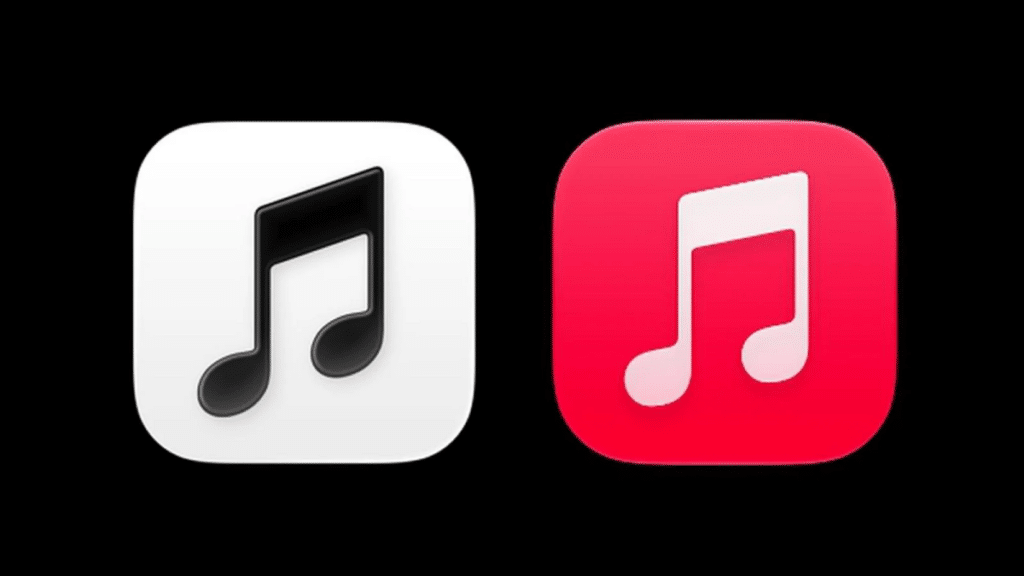
- Apple Music: A new black-and-white icon replaces the red one. A blue accent marks the selected tab, and widgets get black backgrounds.
- Podcasts: The Home tab splits Up Next into New Episodes and Continue Playing.
- Books: Reading view gets a Liquid Glass menu and a progress bar.
- Games: The Friends tab explains friend suggestions and shows recent games on player pages.
- Shortcuts: The Workout automation supports Fitness, and you can rename shortcuts and change icons from the library.
- Clock: Smaller a.m. and p.m. labels in the alarm list.
- CarPlay Ultra: Cult of Mac reports new wallpaper, gauge, and color options in compatible cars. MacRumors’ final feature list doesn’t mention it, so treat it as unconfirmed.
What Didn’t Ship: The Health App Redesign
The redesigned Health app, with Insight, Longevity, and Browse tabs and a “Health Age” score built from VO2 max, sleep, and activity data, appeared in the early 27.2 betas. Apple removed it before release. The current Health app ships instead.
Apple still plans to release the redesign later this year, per 9to5Mac. If you installed the public beta to try it, the stable release won’t keep it.
EU Users Get a New Tracking Prompt
iPhone owners in the EU still can’t use Siri AI, but they do get something new: an expanded App Tracking Transparency prompt. It’s required in France, Germany, Italy, Poland, and Romania, and apps can re-ask once a year. Expect to see more tracking prompts, not fewer.
How Serious Are the iOS 27.2 Security Fixes?
iOS 27.2 patches more than 160 vulnerabilities, according to MacRumors. That includes more than 30 WebKit bugs, around 15 kernel flaws, an Apple Intelligence issue that could expose sensitive data to a remote attacker, and a Hide My Email bug that could reveal your real address.
Apple hasn’t flagged any as actively exploited. That makes this a “soon” update rather than a “right now” emergency. But Apple publishes the details, and unpatched phones become easier targets as time passes.
How to Update to iOS 27.2
- Back up your iPhone to iCloud or a computer.
- Open Settings > General > Software Update.
- Tap Update Now and keep your phone charging during the install.
Update not appearing? Our guide to fixing “Unable to Check for Update” covers the common causes.
Signing Off
iOS 27.2 is the update that makes Siri AI useful day to day. Memory and wider personal context matter more than any icon change, and Excluded Apps gives you a real say in what Siri sees. SynthID labeling is the sleeper feature, and Apple TV profiles fix a long-standing annoyance.
The missing Health redesign stings, but it’s delayed, not canceled. With 160+ security fixes included, there’s little reason to wait. Which iOS 27.2 change will you try first?