We’ve all done this at some point. Someone mentions an Instagram username, or you stumble across a profile link, and you just want to take a quick look. No login, no account, no commitment.
It sounds simple, but Instagram doesn’t exactly make it obvious.
After testing different methods and seeing what actually works consistently, the answer is clear: yes, you can view Instagram without an account, and it’s completely legal, as long as you stay within certain boundaries.
Here’s how it works, what you can see, and where things stop.
Is It Legal to View Instagram Without an Account?
Short answer: yes, as long as you’re only accessing public content.
Instagram doesn’t restrict casual browsing of public profiles. Whether you’re opening a profile through a direct link, searching on Google, or using a third-party viewer, you’re still accessing content that the user has chosen to make public.
Where people get into trouble is when they try to bypass restrictions. Tools that claim to unlock private profiles or scrape large amounts of data cross into terms of service violations, and in some cases, worse.
If you stick to public profiles and avoid anything that feels like a workaround, you’re on safe ground.
3 Ways to View Instagram Without an Account
These are the methods that actually work in real-world use. Some are quick, some are more flexible, depending on what you want to see.
1. Use a Third-Party Instagram Viewer
If you want the closest experience to browsing Instagram without logging in, a viewer tool is the most practical option.
One that works reliably is Inflact.
Here’s how I use it:
- Go to https://inflact.com/instagram-viewer/profile/
- Enter the username or paste the profile link.
- Click View Profile.
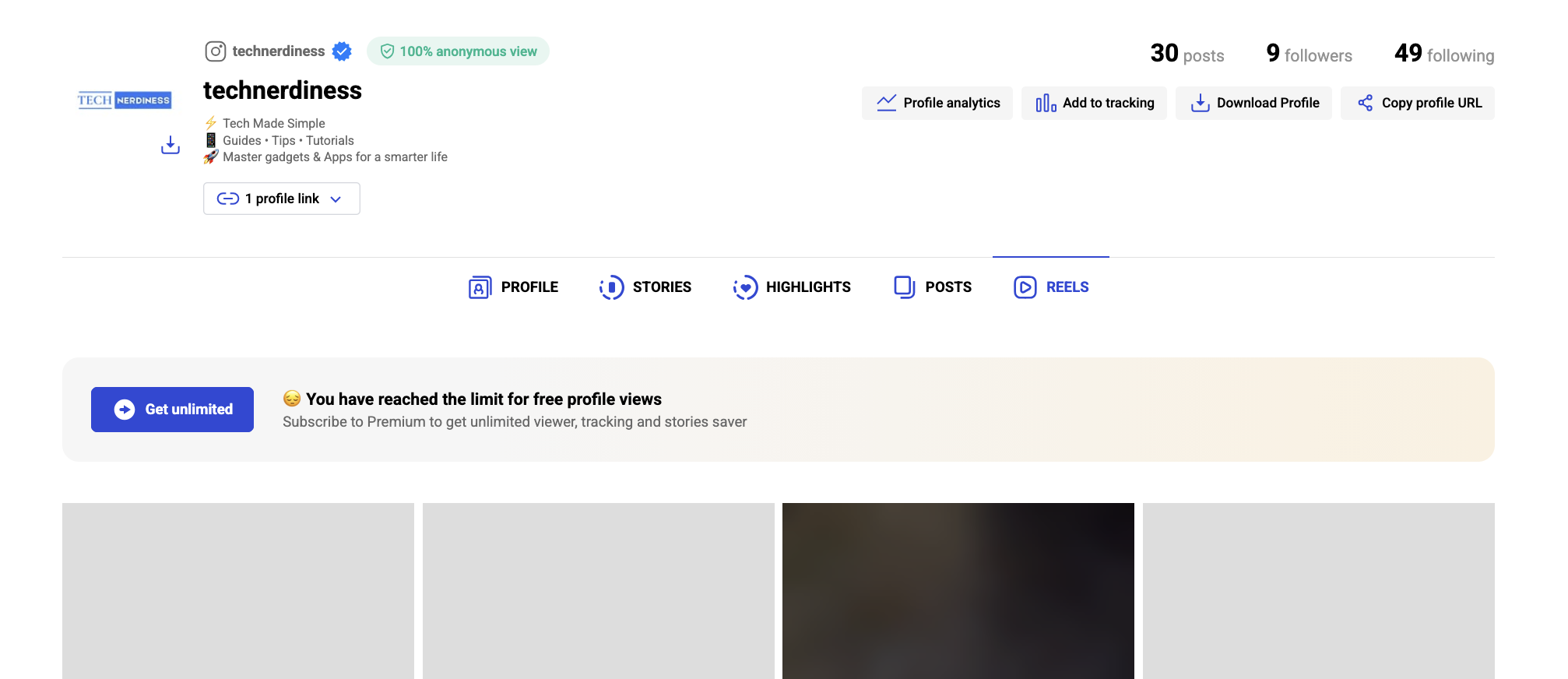
You’ll be able to browse posts, Reels, Stories, and Highlights, all without signing in.
It’s especially useful when you want more than just a quick glance. Instead of dealing with Instagram’s login prompts, everything is laid out cleanly in one place.
2. Open Instagram Profiles Directly in Your Browser
This is the simplest method and the one I use most often.
Just type: https://www.instagram.com/username
Instagram will push a login prompt almost immediately. Close it, and you’ll still be able to see:
- Profile photo
- Bio
- Follower and following counts
- A limited grid of posts
The limitation is that you can’t open posts fully, read captions, or view Stories.
Still, for a quick check, it’s often enough.
3. Use Google Search
This method is underrated, but surprisingly effective.
Search:
site:instagram.com username
Google often surfaces public posts, profile pages, and sometimes even cached previews. For brands, creators, or public figures, this can give you a decent snapshot without opening Instagram directly.
Can You View Private Instagram Profiles Without an Account?
No, and there’s no legitimate way around it.
Private profiles exist for a reason. The content is only visible to approved followers, and Instagram enforces that strictly.
If a tool claims it can unlock private profiles or let you view hidden Stories, it’s almost always a scam.
In most cases, these tools either:
- Try to collect your personal data
- Push ads or fake downloads
- Deliver nothing at all
If you’re trying to figure out access or interaction limits on Instagram, it’s better to understand features like know if someone blocked you on Instagram or what does restrict mean on Instagram, both of which explain how visibility and interactions actually work on the platform.
But private content itself? That stays private.
What You Can and Can’t Do Without an Account
Once you start using these methods, the boundaries become clear.
What you can do:
- View public profiles
- See posts, Reels, and some profile details
- Browse limited content without logging in
What you can’t do:
- View private profiles
- See Stories (in most cases)
- Interact, like, comment, or follow
- Access full captions or comments consistently
So while it works well for viewing, it’s not a replacement for having an account.
When This Is Actually Useful
From experience, this comes in handy more often than you’d expect.
- Checking out a brand or creator before following
- Looking up a profile someone shared
- Verifying content without logging in
- Avoiding distractions while browsing
It’s also useful if you’re stepping back from social media but still want occasional access.
And if you’re dealing with account-related issues, like being locked out or restricted, it’s worth looking into how to recover a disabled Instagram account, which solves a completely different but equally common problem.
Final Thoughts
Instagram isn’t designed for anonymous browsing, but it doesn’t completely block it either.
As long as you stay within public content and avoid sketchy tools, you can view profiles without an account fairly easily. It’s not a full experience, but for quick access, it’s more than enough.
And honestly, once you know these methods, you’ll probably stop logging in just to check something small.
Yes. If you use a browser or a viewer tool, you’re not logged in, so your identity isn’t visible to the profile owner.
Instagram pushes login prompts aggressively, but you can dismiss them and still access limited public content.
Some are, but only for public content. Avoid anything that asks for login credentials or claims to access private profiles.
You might also like: