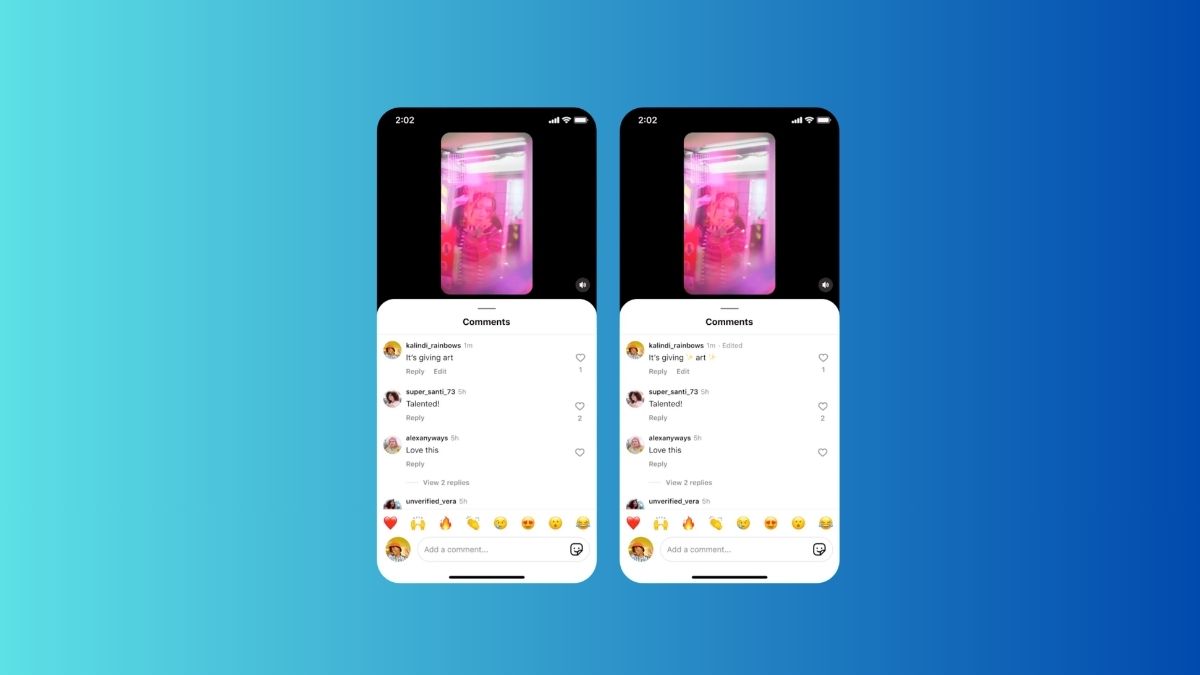
I can’t count how many times I’ve posted a comment on Instagram, only to notice a typo the second it goes live. Sometimes it’s just a spelling mistake. Other times, it completely changes the tone of what I meant to say.
Until recently, the only fix was to delete the comment and post it again. That sounds simple, but it often breaks the flow of the conversation, especially if someone has already replied.
That’s finally changed. Instagram now lets you edit a comment after posting, and while it sounds like a small update, it’s one of those features you end up using more than you expect.
Here’s how it works and what you should know before using it.
How to Edit a Comment on Instagram

The process is simple and takes just a few seconds once you know where to look:
- Open Instagram and go to the post where you left your comment.
- Tap the comment icon to open the thread.
- Find your comment and tap on it.
- Select the Edit option from the menu.
- Make your changes.
- Save the updated comment.
That’s it.
Not sure what the icons mean? Here’s a breakdown of Instagram symbols and icons.
You don’t have to delete anything, and your comment stays in the same place in the thread, which makes a big difference if people have already interacted with it.
The 15-Minute Rule: What You Can and Can’t Change
This is the part most people don’t realize until they try it.
Instagram gives you a 15-minute window after posting a comment to edit it. Within that time, you can go back and tweak it as many times as you want.
From using it, here’s what stood out:
- You can edit the text, but not any media attached.
- Once the 15 minutes are over, the edit option disappears completely.
- The timer does not reset when you edit, it starts from the original post time.
In practice, this means you need to catch mistakes early. If you notice something later, you’re back to the old delete-and-repost method.
Will Others Know You Edited Your Comment?
Yes, but not in a way that feels intrusive.
Instagram marks edited comments so people can see that a change was made. But it doesn’t show what you originally wrote.
So while there’s transparency, there’s no version history or “before and after” comparison. From my experience, this strikes a good balance between accountability and flexibility.
Why This Update Actually Matters
At first glance, this feels like a small quality-of-life update. But once you start using it, the impact is pretty clear.
Before this, fixing even a minor mistake meant deleting your comment, which often meant:
- Losing replies
- Breaking the conversation flow
- Reposting in a way that felt slightly awkward
Now, you can fix things without disrupting anything.
It also reflects something real about how people communicate online. We don’t always get things right the first time. Sometimes a single word changes how a comment is perceived.
Being able to correct that quickly makes conversations feel more natural and less rigid.
No. You can only edit your own comments, and only within the allowed time window.
No. The timer starts when you first post the comment and does not reset after edits.
Check out more Instagram posts: