Are you curious about who’s visiting your Instagram profile? Maybe you just want to know the kind of people interested in your content, or perhaps you’re wondering if someone is quietly checking your page. The truth is, Instagram doesn’t have a built-in feature that shows who visits your profile, but there are still safe and accurate ways to get an idea of who might be viewing it.
In this guide, I’ll walk you through real, working methods to check who views your Instagram profile frequently and how to manage unwanted attention.
Does Instagram Show Who Viewed Your Profile?
In short, no. Instagram doesn’t show who viewed your profile, on any account type, personal, business, or creator. This is due to strict privacy protections. Revealing that data could lead to harassment, privacy violations, or reduced engagement from users worried about being “seen.” Instagram’s official API also doesn’t expose this data to developers, which is exactly why no third-party app can legitimately offer it either.
Still, there are indirect ways to figure out who’s been interacting with your content or profile.
How to See Who Visits Your Profile on Instagram
Here are the legitimate methods you can use to find out who might be viewing your Instagram profile.
Method 1: Use Instagram Stories (Visible Names)
One of the easiest ways to see who’s checking in on you is through your Story views.
- Post a Story (make it public or visible to your followers).
- After posting, open your Story and swipe up to see the list of viewers.
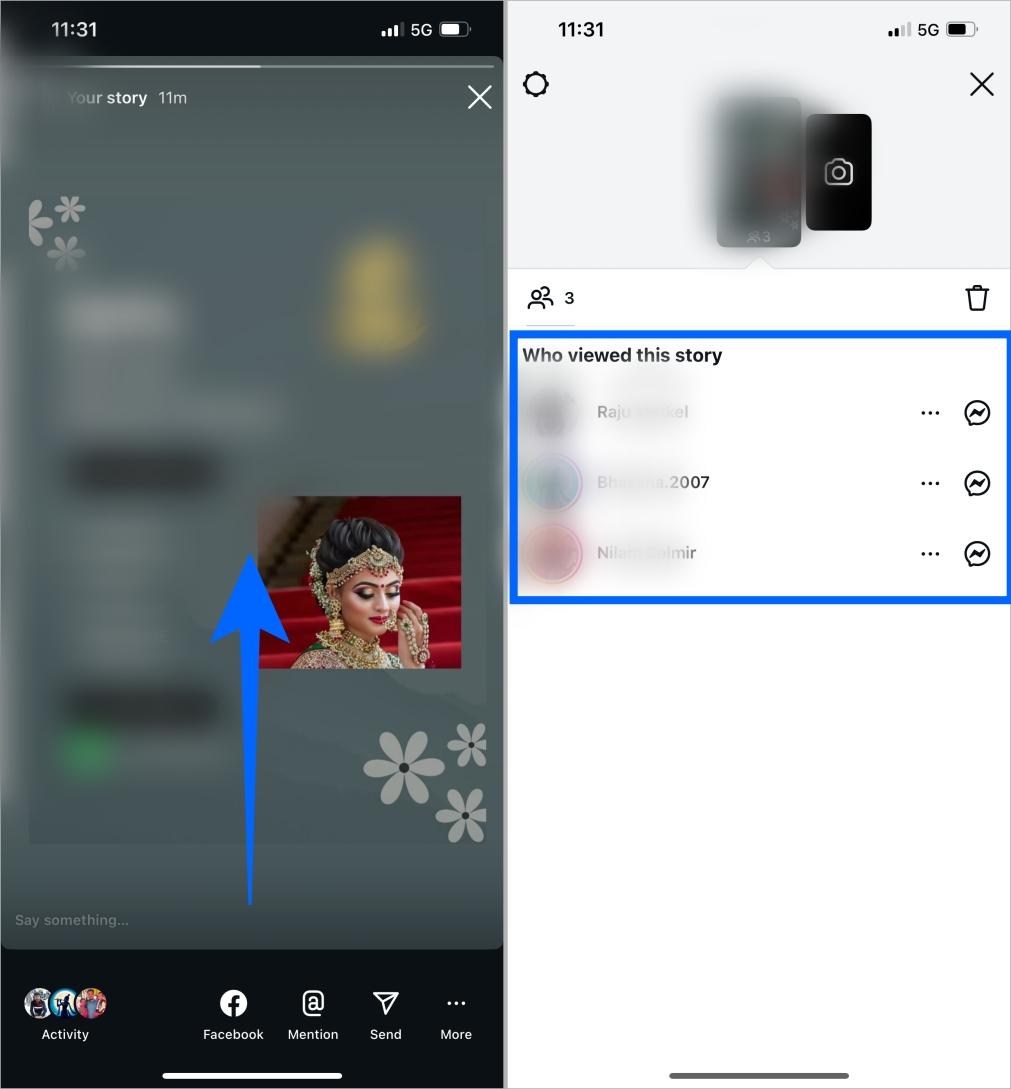
You’ll get a list of usernames of people who viewed it. Keep in mind that this data is temporary. Instagram shows the full named viewer list for about 48 hours total from the moment you post, not 48 hours after the Story expires. That’s roughly 24 hours while it’s live, plus another 24 hours if it’s saved to your Archive. After that window closes, the names are gone for good, though the total view count sometimes lingers a bit longer.
If someone who used to view your stories suddenly disappears, you might want to check if they blocked you on Instagram.
Method 2: Use Story Highlights (Extend Availability)
If you want to track views for longer, add your stories to Highlights.
Here’s how to do it:
- Open your Story, tap the three dots.
- Select Highlight
- Tap the Plus icon, name your Highlight, and then tap Add.
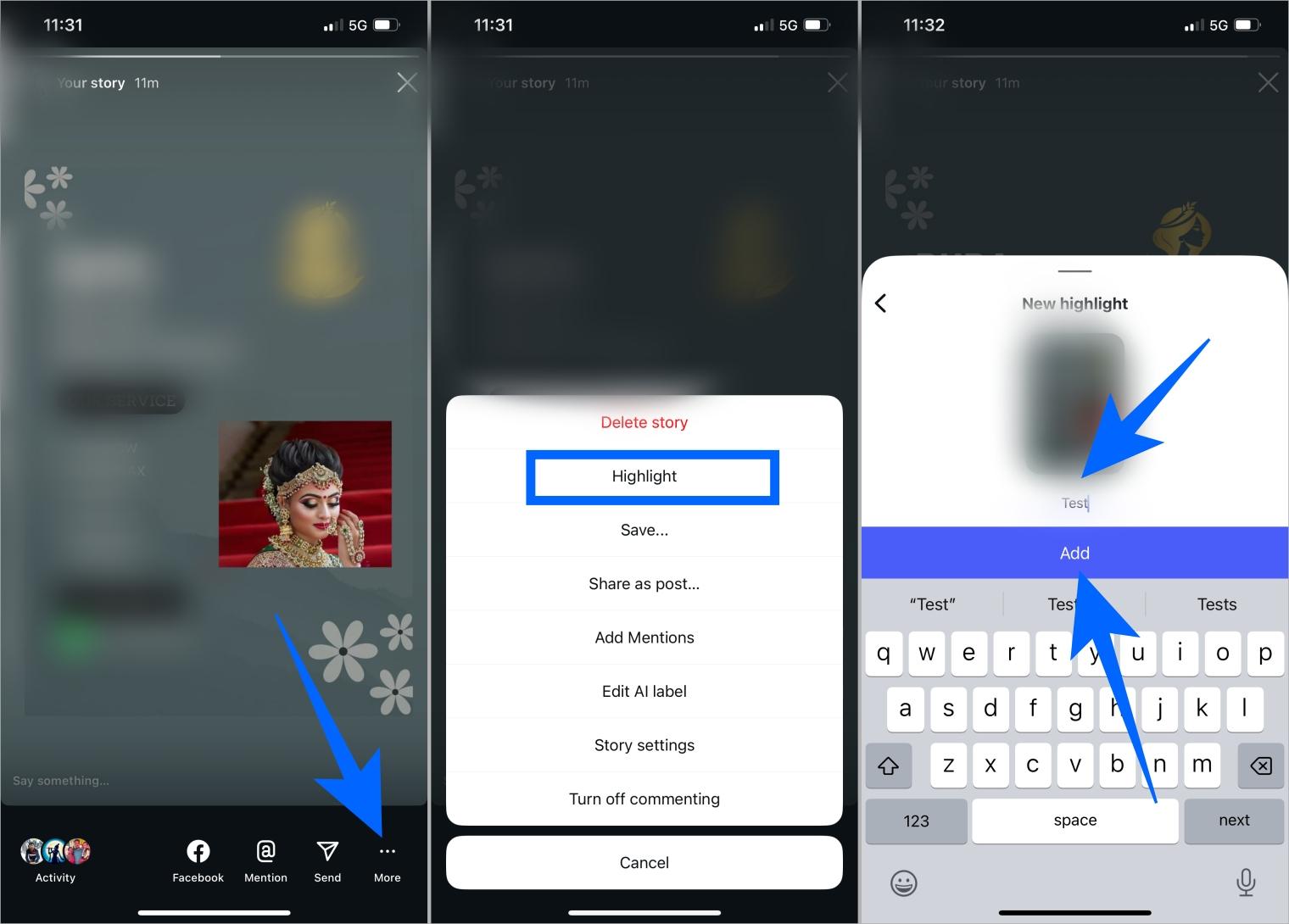
Your Story will stay visible on your profile indefinitely, but the viewer list still follows the same 48-hour rule from the original post time, not from when you added it to the Highlight. After that window, you’ll still see engagement counts, but not the names.
Method 3: Switch to a Professional Account for Insights
If you switch to a Professional Account, you can access deeper insights about your profile’s performance, like the number of profile visits and where visitors come from. This still won’t give you names, but it’s the closest thing Instagram offers to real visibility.
To do it:
- Go to your profile and tap the menu (☰).
- Select Account type and tools under for Professionals → Switch to professional account.
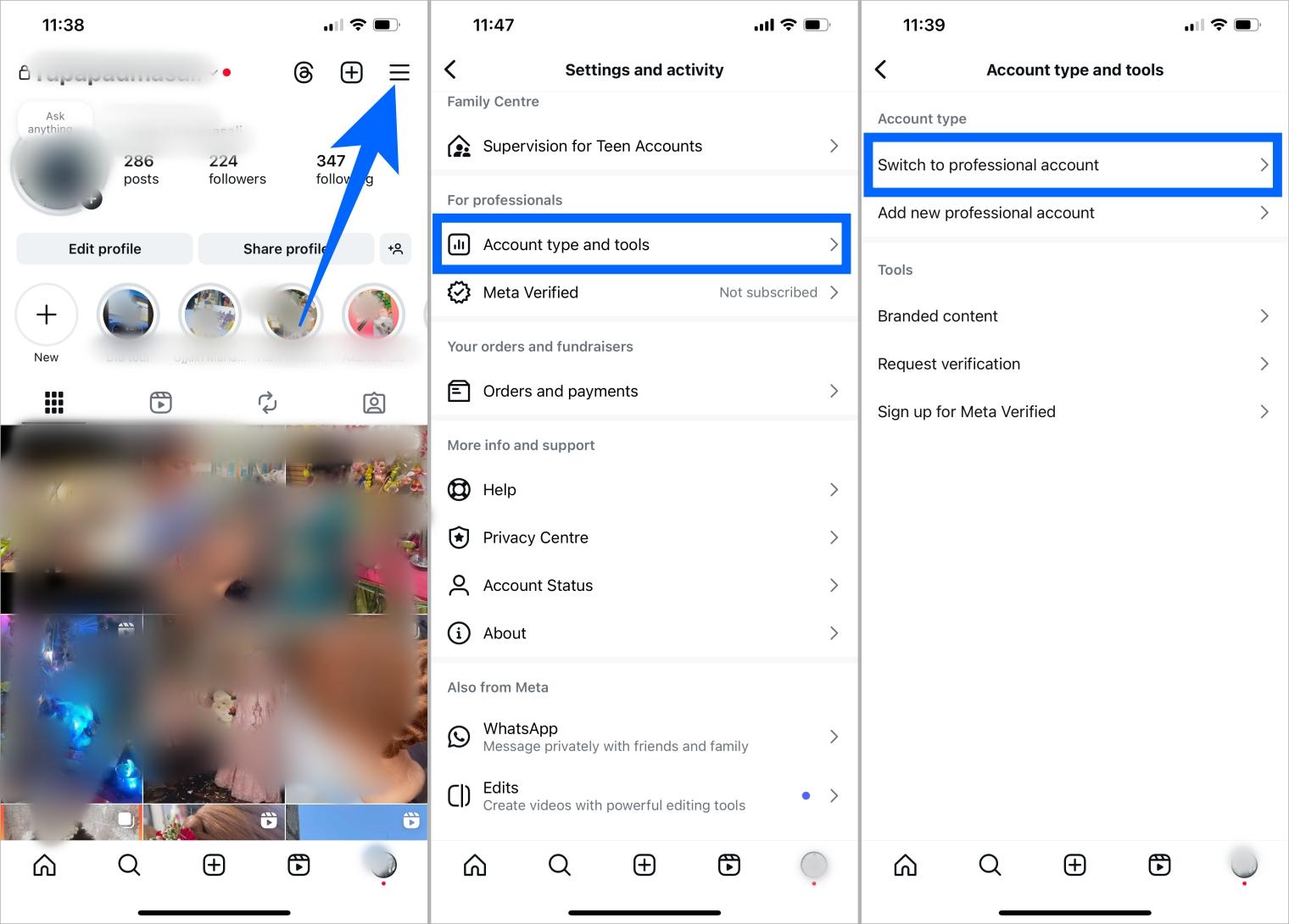
- Tap Next button. If you are creating one temporarily, then you can choose any option > Next button.
- Now, select a Creator option > Next button.
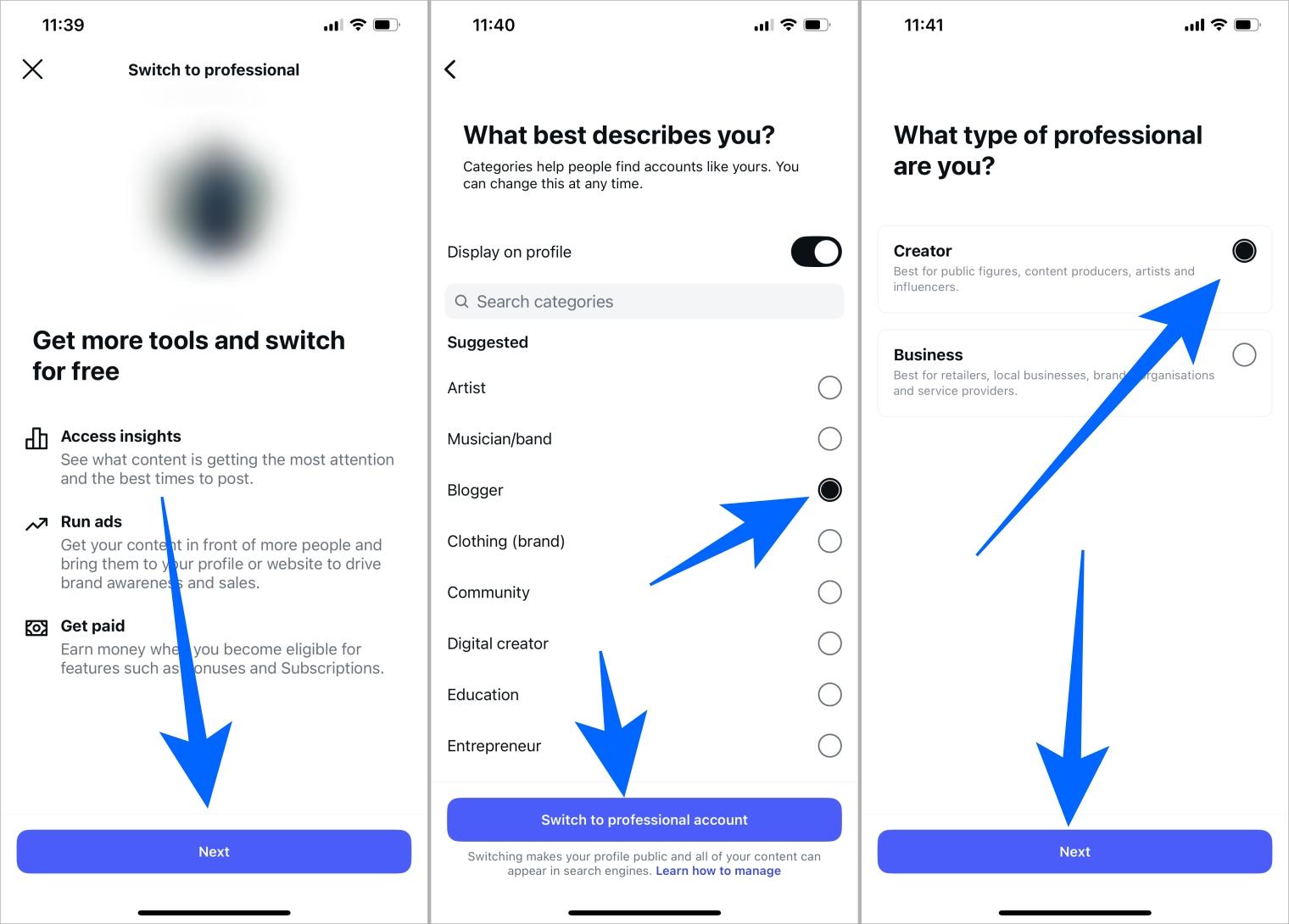
That’s it, your account is now professional. Next, check how many people have engaged with your profile:
Go to your Instagram profile → tap the menu (☰) → select Insights → check the Interactions section to see how many users viewed your account.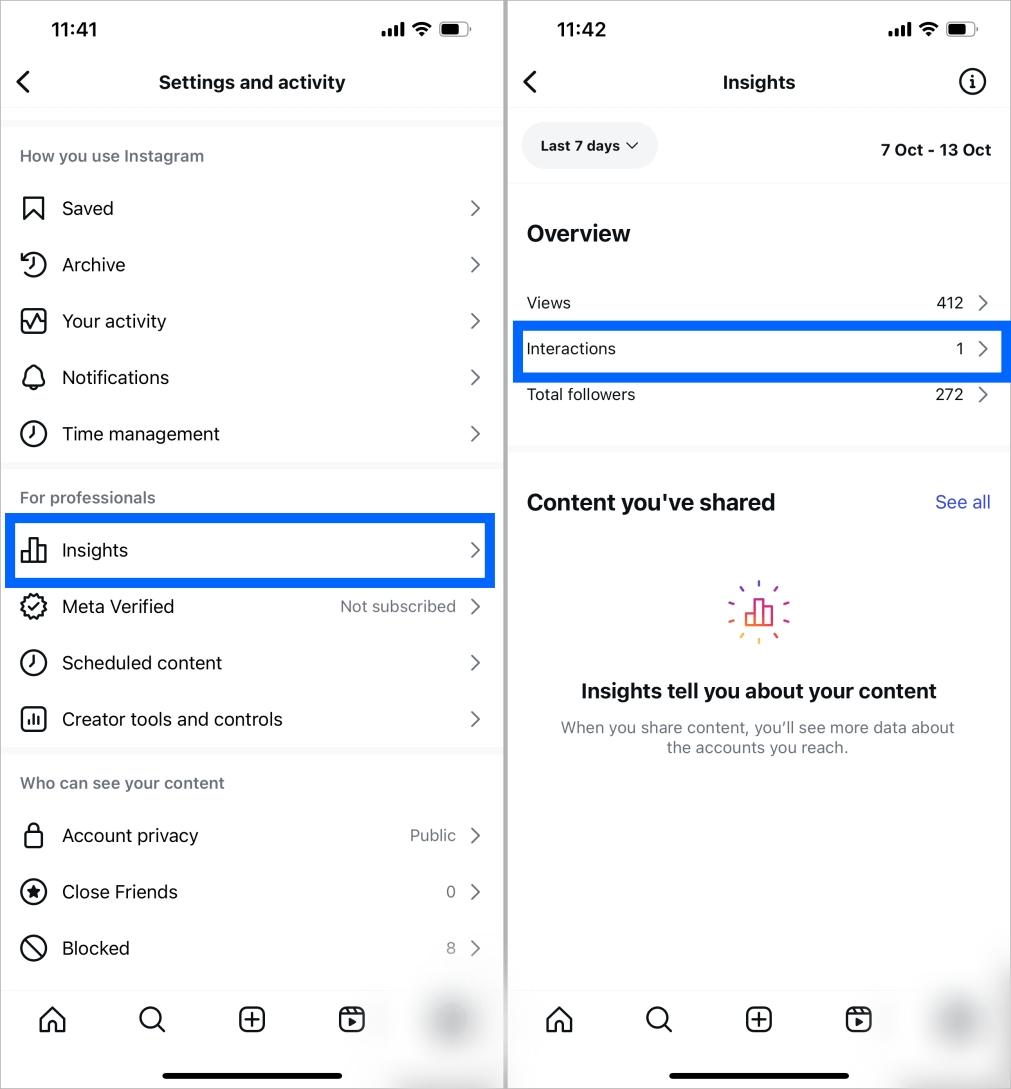
You won’t see specific names, but you’ll get valuable aggregate metrics like reach, impressions, and total profile visits over a rolling 7, 14, or 30-day window.
Don’t have a Professional profile yet? Follow a step-by-step guide on how to change account type on Instagram, then come back to check your profile Insights.
“Insta Profile Viewer” Apps: Do They Work? (Avoid These)
You’ve probably seen apps that claim to show who views your Instagram profile. The truth? They don’t work, and the risk goes well beyond wasted time.
Instagram’s data policy doesn’t allow third-party apps to access profile viewer data. The platform only shares limited public information, like a username, bio, and profile photo, through its official API. There’s no legitimate way around that, no matter what an app claims.
Using these apps can also put your account at real risk. Independent testing of these tools has repeatedly flagged the same red flags: apps and sites promising “private profile unlockers” that are actually phishing pages designed to steal your Instagram password, downloads that bundle malware or keyloggers, and paid subscriptions that charge you and then deliver nothing.
If an app or website asks for your Instagram password, requires an install to “unlock” a feature, or promises access to a private account you don’t follow, that’s your sign to close it immediately.
- Change your password immediately.
- Go to Accounts Center → Password & security → Apps and websites and revoke access.
- Enable two-factor authentication (2FA) for extra protection.
Privacy Controls to Reduce Unwanted Profile Views
If you’re concerned about privacy, you can control who sees your Instagram activity.
You can:
- Make your account private: Go to Settings → Privacy → Account privacy → Private.
- Hide your stories or use Close Friends: Limit who sees your stories.
- Turn off activity status: Hide when you’re active.
- Check third-party logins regularly: Remove suspicious access.
These small tweaks help reduce unwanted visits and protect your account from unauthorized access.
One thing worth knowing either way: Instagram never notifies anyone when you view their profile, so browsing itself is always silent, on any account type.
Conclusion
Even though Instagram doesn’t show exactly who views your profile, these legitimate workarounds help you get insights into who might be checking your page. Whether it’s a curious follower, a potential fan, or someone from your past, you’ll at least have an idea of what’s happening.
If you’ve ever wondered “Who’s viewing my Instagram profile?”, try these steps to start understanding your audience better.
No. Instagram does not display who viewed your profile on any account type, personal, business, or creator. You can only see who views your Stories or engages with your posts.
No, you can’t see the names of visitors. However, business and creator accounts can track an aggregate profile visits count through Instagram Insights.
No. Instagram doesn’t share viewer data with third-party apps, since its API simply doesn’t expose that information. Any service claiming to show who views your profile is either non-functional or actively harvesting your data.