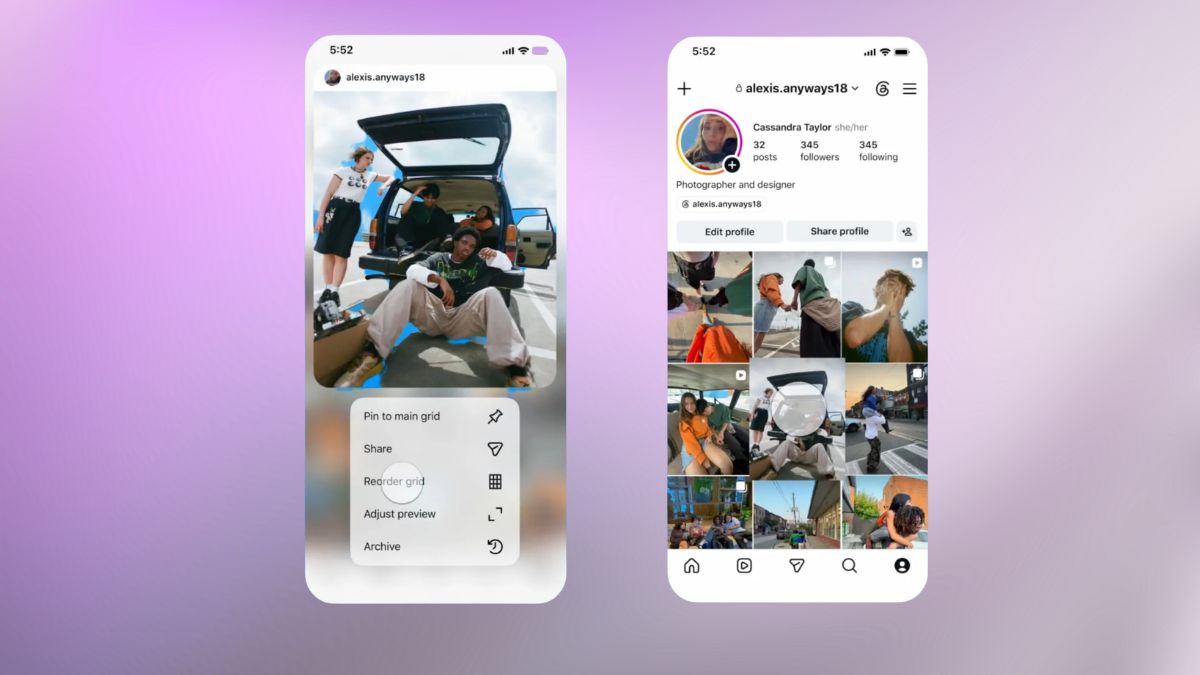
After years of user requests, Instagram has finally delivered. On June 8, 2026, Instagram officially rolled out the profile grid rearrangement feature. If you’ve ever wanted to move an older post off your top row without deleting it, you can now do exactly that.
Here’s everything you need to know about how it works, why it matters, and how to use it.
What Is Instagram’s Grid Rearrangement Feature?
Instagram’s new “Reorder Grid” feature lets you freely drag and drop photos, videos, and carousels anywhere on your profile. You’re no longer locked into reverse-chronological order.
As Instagram explained:
With the new ‘Reorder your grid’ feature, you can now rearrange content on your main profile grid, which is perfect for highlighting your best work or making your profile feel more like you.
That’s a significant change. Your profile grid has always reflected your posting timeline rather than your creative vision. Now, it can reflect how you want to present yourself, whether you’re a creator, business, or casual user.
Why This Update Took So Long and Why It Matters Now
This wasn’t exactly a surprise launch. The feature was first spotted in testing back in 2022, posted by app researcher Alessandro Paluzzi, meaning it’s been in development for several years. Instagram later shifted focus to redesigning profile grids with taller thumbnails better suited for vertical content, a change that arrived in January 2025.
Now that the redesigned grid is established, the Instagram profile grid rearrangement feature makes much more sense.
You’re no longer organizing simple square thumbnails. You’re curating a visual layout that looks polished and intentional in Instagram’s modern profile design.
For creators and businesses, this is especially valuable. You can:
- Highlight your best-performing content
- Create portfolio-style layouts
- Refresh seasonal campaigns
- Showcase important posts without deleting and reposting them
If you’re also looking to customize your Instagram experience further, you may want to explore tools like Instagram Plus.
How to Reorder Posts on Your Instagram Profile Grid
The process is simple, but make sure you’re using the latest version of Instagram.
Important: The feature is currently available only on the latest Instagram app for iOS and Android. It’s not available on desktop or web.
Steps to Reorder Your Grid:
- Open Instagram and visit your profile.
- Press and hold any post on your grid.
- From the menu that appears, tap “Reorder Grid” or “Edit Grid”.
- Drag and drop posts into your preferred positions.
- Exit the editor when finished. Changes are saved automatically.
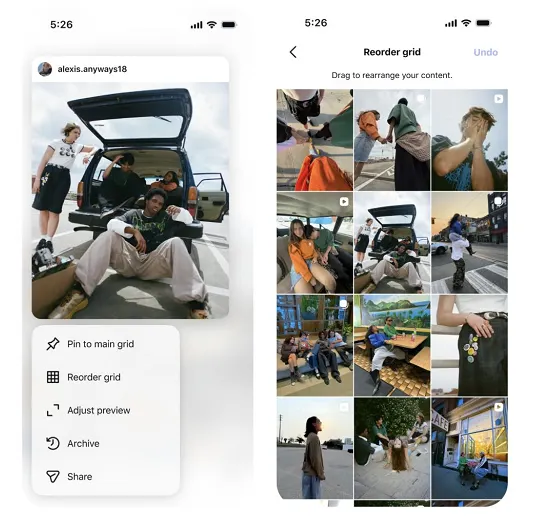
You can also access it through: Profile → Edit Profile → Edit Grid.
Things to Know Before Rearranging
- Pinned posts remain fixed. Posts you’ve pinned stay at the top of your profile.
- Changes can be undone while you’re still editing.
- Likes, comments, and reach remain unchanged. Reordering does not affect engagement metrics.
Who Can Use Instagram’s Grid Reordering and What Are the Limits?
As of the June 2026 rollout, the feature is available to all users running the latest Instagram app on iOS and Android.
If you don’t see it yet:
- Update Instagram.
- Restart the app.
- Restart your phone.
- Wait a few days if the rollout hasn’t reached your account.
The biggest limitation right now is that grid reordering isn’t available on desktop or web. You’ll need the mobile app to make changes.
Smart Ways to Use Grid Rearrangement
The feature is simple, but using it strategically can make a noticeable difference.
For Creators
Move your strongest content into the first two rows of your profile. Most visitors decide whether to follow you before they scroll very far.
For Businesses
Create a consistent visual theme using colors, campaigns, products, or branding elements. A polished grid helps strengthen first impressions.
For Personal Accounts
Bring older favorite posts back into view or move less-relevant content farther down your profile.
You can also combine grid rearrangement with profile improvements like updating your highlights, refining your bio, or understanding how Instagram symbols and icons affect profile presentation.
Another useful strategy is refreshing visibility for older posts that still perform well. Pairing this with tools like editing Instagram comments after posting can help clean up and improve your profile’s overall appearance.
The Bottom Line
Instagram’s new profile grid rearrangement feature is one of the platform’s most requested updates, and it finally gives users real control over how their profiles look.
It’s simple to use, doesn’t affect engagement metrics, and lets you showcase your content exactly how you want. Whether you’re building a brand, growing an audience, or simply organizing your profile, the ability to reorder posts makes Instagram profiles far more flexible than before.
Update your app, try it out, and don’t be surprised if you spend more time than expected perfecting your grid layout.