Mojang reworked how Java players switch game modes across two 2026 drops: 26.2 Chaos Cubed (June 16, 2026) and 26.3 Wilderness Bound (September 15, 2026). The old Open to LAN button is gone, and switching modes as the world host now changes the world’s default mode too. That matters if you hop into Spectator to scout new test-build content like the Minecraft Ice Caves.
You can change your game mode three ways: the /gamemode command, the F3 + F4 switcher (Java only) or the in-game menus. Mojang’s 26.3 Snapshot 6 notes confirm the World Options button now sits where Open to LAN used to be. This guide covers Java 26.3 and Bedrock 26.52.
Minecraft game modes and their commands
Both editions share four game modes. Java only accepts full mode names, while Bedrock also takes letters and numbers.
| Game mode | Java command | Bedrock command | What it does |
|---|---|---|---|
| Survival | /gamemode survival | /gamemode s or 0 | Health, hunger and item loss on death |
| Creative | /gamemode creative | /gamemode c or 1 | Unlimited blocks, flight, no damage |
| Adventure | /gamemode adventure | /gamemode a or 2 | Limits breaking and placing blocks |
| Spectator | /gamemode spectator | /gamemode spectator | Fly through blocks, no interaction |
| Default | Not available | /gamemode d or 5 | Resets you to the world’s default mode |
Java dropped numeric IDs and abbreviations back in 1.13, so /gamemode 1 fails there. Hardcore isn’t a valid mode in either edition, so no command switches a world into it.
How to change game mode in Minecraft Java Edition
Java 26.3 gives the host a menu option that skips commands entirely. Commands and the switcher still work once you turn them on.
1. Use the World Options screen
- Press Esc to open the pause menu.
- Click World Options…
- Click the Game Mode button until it shows the mode you want.
- Click Done and return to the game.
Since 26.2, the host’s choice here also becomes the world’s default game mode, so new players joining over LAN spawn in that mode.
2. Use the /gamemode command
- Press Esc, open World Options… and set Allow Commands to ON.
- Press T to open chat.
- Type /gamemode creative (or survival, adventure, spectator) and press Enter.
Add a player name or selector to change someone else: /gamemode survival Steve or /gamemode adventure @a. On servers, you need operator permission level 2.
3. Use the F3 + F4 game mode switcher
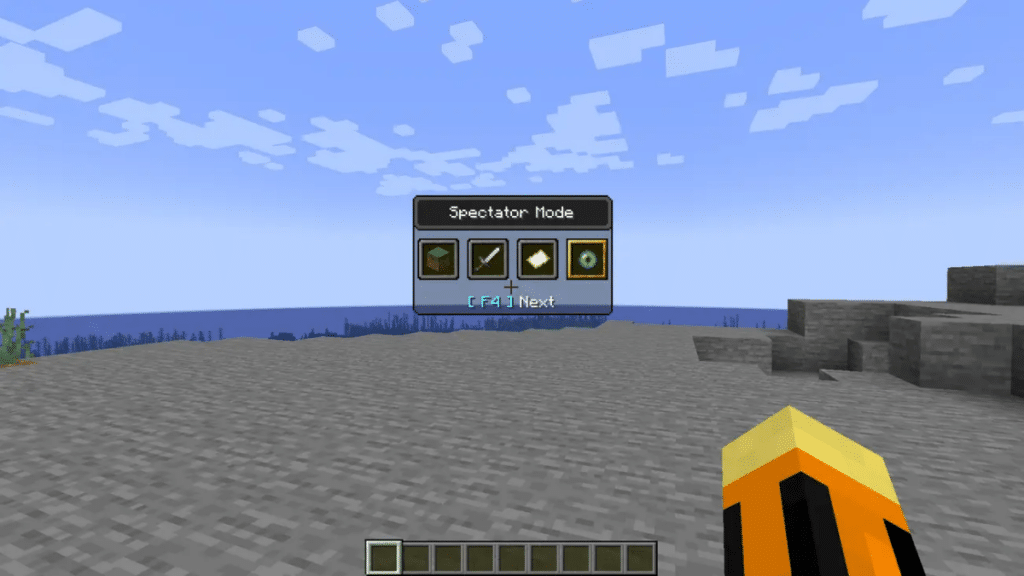
- Hold F3.
- Press F4 repeatedly to cycle Creative, Survival, Adventure and Spectator.
- Release F3 to apply the highlighted mode.
The switcher needs commands enabled and opens on the mode you used last. On most laptops, hold the Fn key too, or F4 won’t register.
How to change game mode in Minecraft Bedrock Edition
Bedrock splits the setting in two: a Personal Game Mode for you and a Default Game Mode for everyone joining. Both live in the same menu on PC, mobile and console.
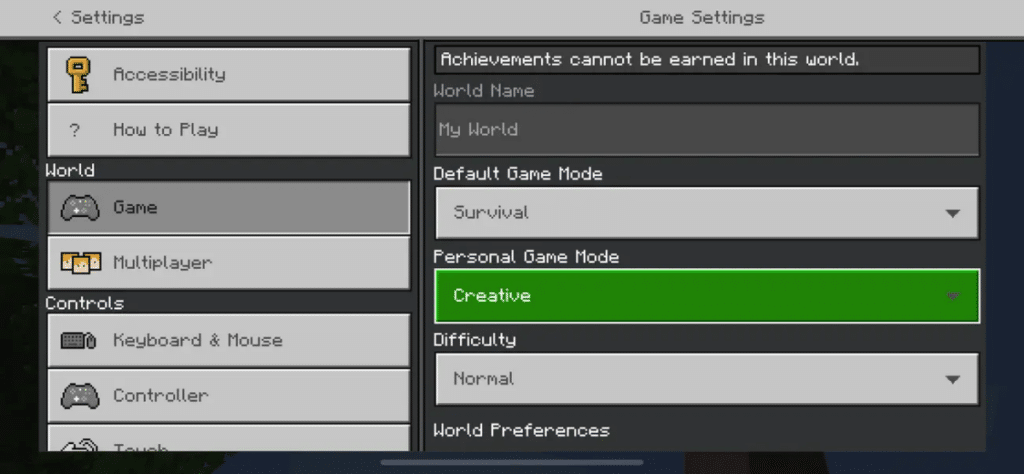
1. Use the Settings menu
- Pause the game and select Settings.
- Open the Game tab under World.
- Turn on Activate Cheats and confirm the achievement warning.
- Set Personal Game Mode to Survival, Creative, Adventure, Spectator or Default.
To change the mode for everyone, use Default Game Mode in the same tab. Only the host or an operator can edit it.
2. Use the /gamemode command
- Make sure Activate Cheats is on.
- Open chat: press T on PC, tap the chat icon on mobile, or press right on the D-pad on controllers.
- Type /gamemode c (or any mode from the table) and send it.
Older guides claim Bedrock can’t enable cheats in an existing world. That’s outdated: the toggle works in any non-Hardcore world.
What happens when you switch game modes
Switching modes looks harmless, but each edition has a catch worth knowing first.
- Bedrock achievements: Enabling cheats or Creative permanently disables achievements in that world. Turning cheats back off doesn’t restore them.
- Java world default: Since 26.2, a host switching modes with F3 + F4 or commands also changes the world’s default mode.
- Hardcore worlds: Java 26.2 removed the Game Mode and Allow Commands buttons from Hardcore worlds, and Bedrock blocks cheats in Hardcore. Either way, a Hardcore run stays locked.
- Java Advancements: Unlike Bedrock achievements, Java advancements keep working after you switch modes.
Signing Off
The Java changes in 26.2 and 26.3 make switching modes simpler for hosts, since one World Options screen now handles game mode, commands and LAN access. Bedrock still relies on the Settings menu, with the permanent achievement lock as the main trade-off.
The next drop is already in testing as Java 26.4 snapshots and Bedrock Preview, with Ice Caves and Brittle Ice on the way. Mojang has redesigned the debug screen in 26.4 Snapshot 2 but hasn’t announced changes to the switcher so far.
Use /gamemode followed by the mode name, like /gamemode creative. Bedrock also accepts short forms such as /gamemode c or /gamemode 1.
Both editions have four playable modes: Survival, Creative, Adventure and Spectator. Hardcore is a world setting, and Bedrock adds a Default option that resets you to the world’s mode.
Java removed numeric and letter shortcuts in version 1.13. You need to type the full mode name.
On Bedrock, yes, permanently for that world once cheats or Creative are enabled. Java advancements are unaffected.
On Java 26.3, the host can use the Game Mode button in World Options. On Bedrock, changing your Personal Game Mode requires Activate Cheats.
Worth checking on Amazon: