Instagram Highlights live in a strange in-between world. They’re more permanent than a Story that disappears in 24 hours, but somehow less “official” than a Grid post. That middle ground is exactly why so many people aren’t sure what’s private, what’s visible, and who’s quietly watching.
Maybe you’re wondering if someone can tell you’ve been going through their old Highlights at 1 AM. Or maybe you’ve built a professional portfolio on your profile and want to know who’s actually engaging with it. Either way, the rules aren’t as simple as Instagram makes them seem, and they’ve quietly shifted enough in 2026 that it’s worth getting clear on what’s actually happening.
What Instagram Highlights Actually Are?
Before getting into the privacy mechanics, it helps to understand what Highlights fundamentally are, because most of the confusion about visibility stems from people treating them like regular posts.
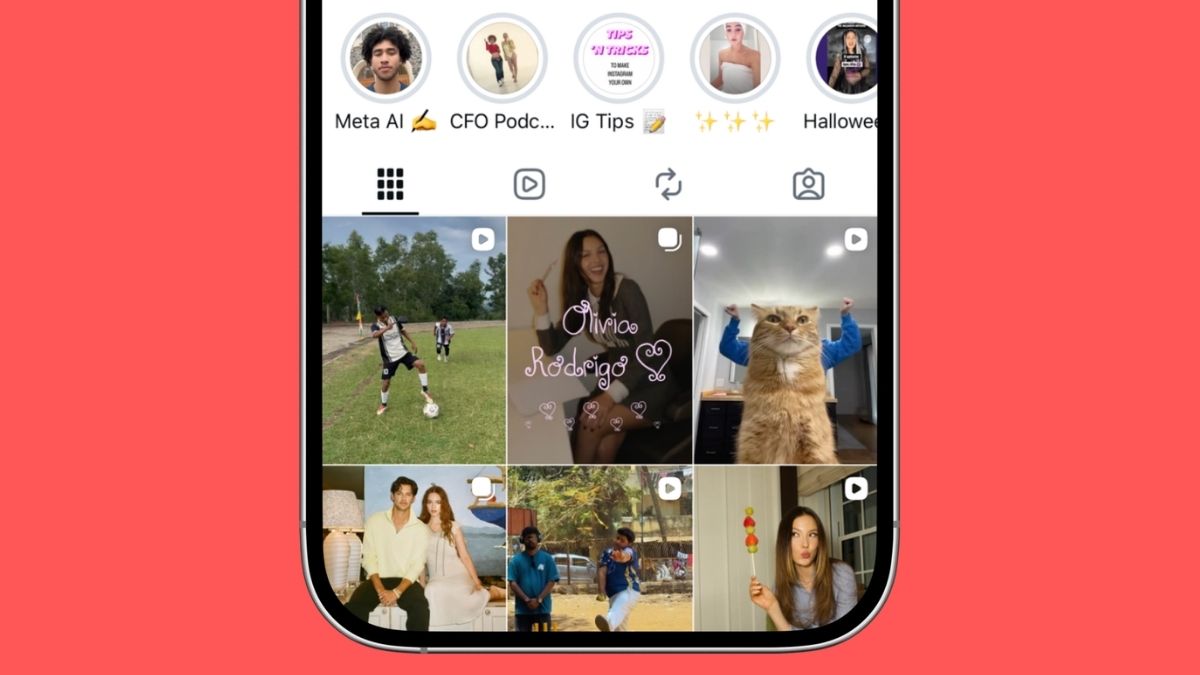
Highlights are archived Stories you’ve chosen to pin to your profile. They sit right below your bio, acting like a curated preview of your life or brand. But here’s the thing: because Highlights originate as Stories, they inherit Story behavior, including how viewer data works. They’re not posts with permanent engagement data. They’re Stories wearing a longer lifespan.
That distinction matters a lot when we get into what you can and can’t see.
Can People See If You View Their Instagram Highlights?
Here’s the honest answer: it depends entirely on how old the original Story is.
This trips people up constantly, so let’s be precise about the rule that’s still in effect in 2026.
The 48-Hour Window: How It Actually Works
If the Story behind the Highlight was posted less than 48 hours ago, yes, the account owner can see your username in the viewer list. Viewing a recent Highlight shows up the same way as viewing a live Story because Instagram is still treating it as active Story content under the hood.
If the Story is older than 48 hours, you’re invisible. Instagram permanently removes the individual viewer list after roughly 48 hours (some sources put it at 24–72 hours depending on server timing, but 48 is the reliable benchmark). After that point, the account owner can still see a total view count on older content, but individual names are gone permanently.
This applies whether you’re viewing the Highlight directly from someone’s profile or anywhere else on the platform.
The practical takeaway: If you’re curious about someone’s old Highlights from months ago, you can scroll freely. They won’t know. But if they posted a new Highlight Story within the last two days, your username will show up in their viewer list just like it would for a regular Story.
Can You See Who Looks at Your Instagram Highlights?
If you’re on the other side of this and trying to see who’s been checking out your own Highlights, here’s what you’re actually working with.
When a Story first goes live, you can see a full viewer list for 24 hours. Add that Story to a Highlight, and that viewer list stays accessible for 48 hours from the original post time, not from when you added it to the Highlight. After that window closes, the names disappear and you’re left with just a view count on older content.
Instagram does not send push notifications when someone views your Highlights. There’s no alert, no ping, no “someone watched your Highlight” notification in 2026, and that’s intentional. It’s the same design logic as viewing a profile quietly, similar to how you can view Instagram profiles without an account if you’re not logged in.
A few other things worth knowing:
- Viewing a Highlight multiple times doesn’t move you higher on someone’s viewer list or make you more visible, unlike the algorithm-influenced ordering on very fresh Stories.
- This applies equally to public and private accounts, as long as the viewer has access to see your content in the first place.
- Third-party apps claiming to show permanent Highlight viewer lists are either scams or Terms of Service violations. More on this below.
Who Can Access Your Instagram Highlights in 2026?
The answer here starts with your account type, but it doesn’t end there.
- Public accounts: Anyone on Instagram, and even people browsing without logging in, can view your Highlights. You have no control over who sees them unless you take additional steps.
- Private accounts: Only approved followers can see your Highlights. If someone isn’t following you, your Highlights won’t appear on your profile at all. This is the most straightforward privacy setting.
But there’s a third layer that most people overlook.
How to Control Exactly Who Sees Your Highlights
You don’t have to choose between “public to everyone” or “locked down completely.” Instagram gives you more nuance than that.
Blocking Specific People From Your Stories and Highlights
Because Highlights are built on Stories, hiding your Stories from someone also hides your Highlights from them.
Go to your profile and tap the Menu (three lines) → Story, live and location → Hide story and live from → then search for the username you want to exclude. That person will still see your Grid posts normally, but your Stories and Highlights will vanish from their view entirely.
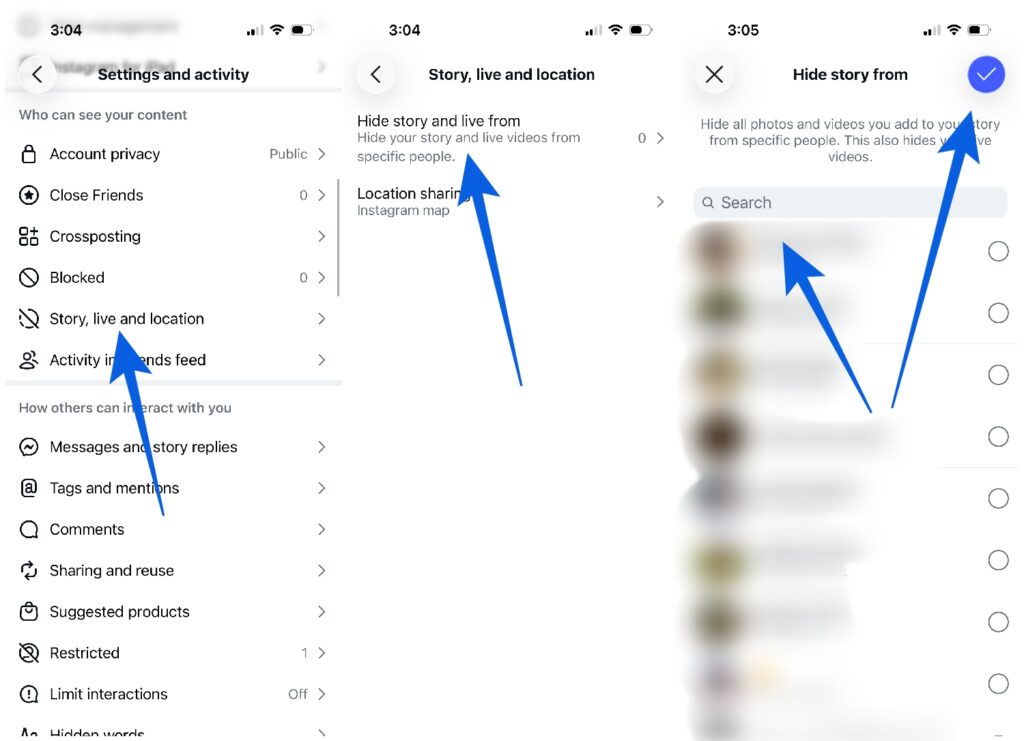
This is the cleanest way to block one person without affecting anyone else. It’s useful for situations like keeping an ex from seeing your daily life, or keeping work colleagues out of more personal content.
Using Close Friends as a Privacy Layer
This is genuinely underused. When you post a Story exclusively to your Close Friends list and then add it to a Highlight, that Highlight becomes invisible to everyone outside your Close Friends group, even if your account is public.
Go to your profile → tap the three-line menu → select Close Friends → add the people you trust. Then, when creating a Story you plan to highlight, post it to Close Friends only before adding it to a Highlight.
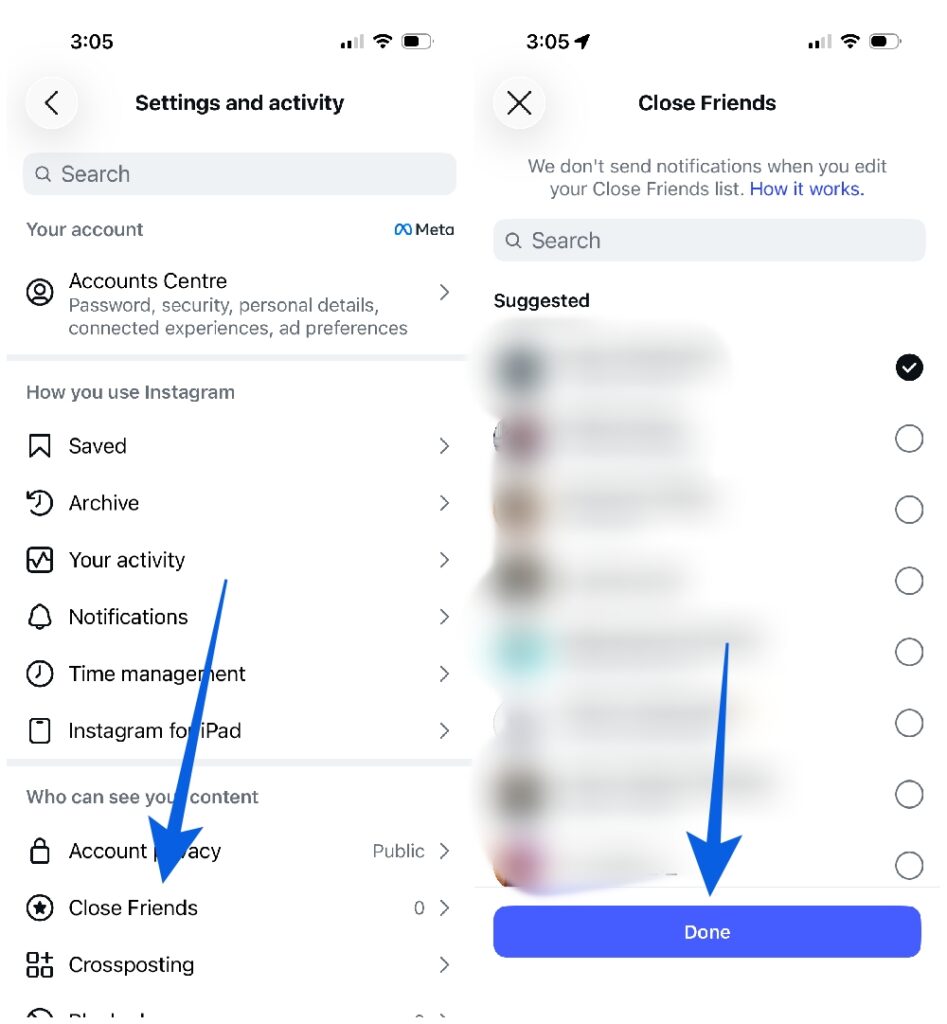
The result is essentially a VIP section on your profile, visible only to people you’ve specifically chosen and sitting right alongside your public Highlights.
Can I View Instagram Highlights Without Them Knowing?
Yes, with one important condition: the Highlight’s original Story needs to be older than 48 hours.
For anything posted within the last two days, your view will register. For anything older, you’re completely anonymous from the account owner’s perspective.
One thing worth noting: Instagram doesn’t have an “incognito mode” for Highlights built into the app. Some people try to work around this by turning off active status on Instagram before viewing, but that only hides your online status. It doesn’t affect whether your username shows up in a Highlight viewer list.
If anonymity matters to you, the 48-hour rule is the only reliable window that genuinely protects your privacy.
Common Myths About Instagram Highlight Privacy (That Still Circulate in 2026)
“If someone blocks me, I can still see their old Highlights.”
No. Blocking removes access to everything, including past Highlights. The content doesn’t disappear from Instagram, but it becomes completely inaccessible to the blocked account.
“I can see how many times one person watched my Highlight.”
Even within the 48-hour window where viewer names are visible, Instagram doesn’t show a frequency count. You can see that someone viewed it, not how many times. There’s no way to know if someone watched it once or twenty times.
“Third-party apps can show me permanent Highlight viewer lists.”
This is consistently false and potentially dangerous. Apps advertising this capability are either fabricating data or accessing your account in ways that violate Instagram’s Terms of Service. Handing over your login credentials to these tools is a real security risk. The same skepticism applies to tools claiming to show who viewed your profile, Instagram doesn’t share that data with third-party developers.
“People get notified when I view their Highlights.”
No notifications are sent for Highlight views, ever. This is one area where Instagram’s privacy design genuinely protects viewers.
What About Understanding the Icons You See on Highlights?
If you’ve ever noticed unfamiliar symbols while managing your Highlights, the lock icon, the star for Close Friends, viewer eye icons, it helps to know what you’re actually looking at. A solid grounding in Instagram’s icons and symbols can save a lot of confusion when you’re navigating privacy settings or trying to understand what your audience sees versus what’s restricted.
The Bottom Line on Instagram Highlight Privacy
The 48-hour rule is the single most important thing to understand here. Old Highlights, anything where the original Story is more than 48 hours old, are essentially anonymous to view. Recent ones aren’t.
For managing your own privacy, your account type sets the baseline, hiding Stories from specific people gives you surgical control, and Close Friends lists let you run a semi-private layer within a public account.
For understanding engagement, after 48 hours, long-term Highlight views stay anonymous. If you’re building a brand or professional presence, this is actually a reason to focus more on signals like saves and shares, engagement actions that persist, rather than trying to track who’s watching your Highlights weeks after you posted them.
The privacy here is more nuanced than most people realize, which is exactly why it’s worth understanding before you assume something is private that isn’t, or assume you’ve been caught when you actually haven’t.
Related articles worth reading: