Nobody likes the quiet pressure of knowing someone has seen their message and chosen not to reply. Learning how to turn off read receipts on Instagram fixes that: the moment you open a DM right now, the sender gets notified. Whether it is a clingy contact, a work conversation you are not ready to deal with, or just someone you want to read on your own time, that little receipt can feel like an obligation.
The good news is that Instagram has let you turn off message read receipts since early 2024, and the feature is still fully supported today. Better yet, you get two levels of control. You can switch it off for one specific conversation, or kill it across all your chats at once. Here is how both work.
A Few Things Worth Knowing Before You Start
Before you dive in, a handful of quirks affect how this feature actually behaves.
Before you dive in, a handful of quirks affect how this feature actually behaves.
- It works both ways. Turn off read receipts, and the other person no longer sees when you have read their message; their end just shows “Sent.” You lose visibility on their end too, though. You will not know when they have read yours either. It is a mutual trade-off, similar to how WhatsApp handles it.
- Mobile only. This setting is not available on the Instagram web or desktop version. You need the mobile app.
- Vanish Mode is exempt. Disappearing messages in Vanish Mode still send read receipts regardless of your settings.
- Marking as unread does not help. If you have already opened a message and the receipt has already sent, marking the chat as unread afterward will not reverse it.
- Your settings sync across devices. Change it on your phone, and it applies everywhere you are logged in.
Turn Off Read Receipts for All Your Instagram Chats at Once
If you would rather switch this off globally and stop thinking about it on a per-person basis, Instagram gives you a master toggle that covers every conversation at once.
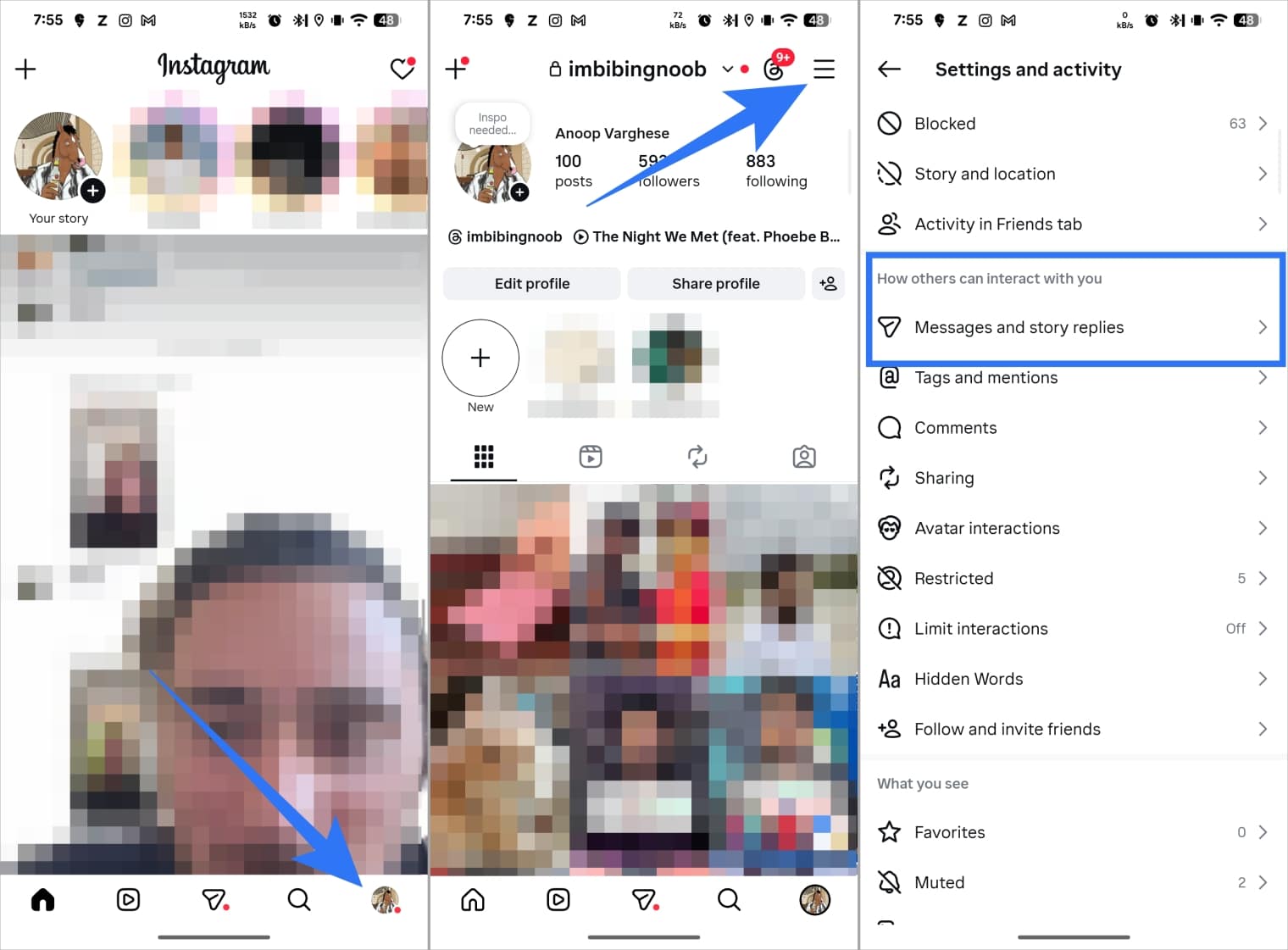
- Open the Instagram app and head to your profile screen.
- Tap the hamburger menu (the three lines in the top-right corner).
- Scroll down and tap Messages and story replies.
- Tap Show read receipts.
- Toggle off Read receipts.
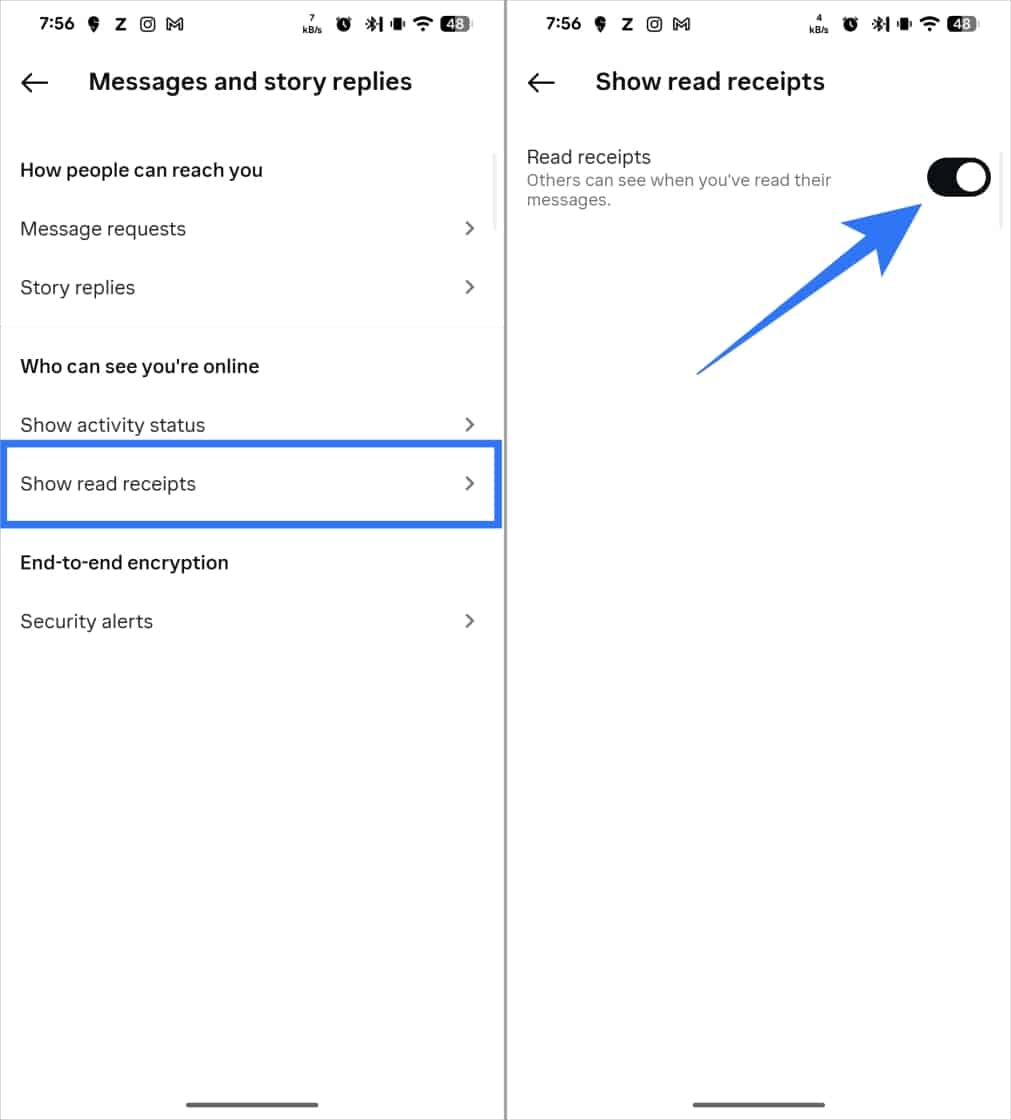
Once this is off, no one across any of your chats will know when you have read their messages.
Turn Off Read Receipts for a Specific Person on Instagram
If someone messages you frequently and you want to read their DMs without triggering that “Seen” notification every time, you can turn off read receipts for just that sender without touching your other conversations.
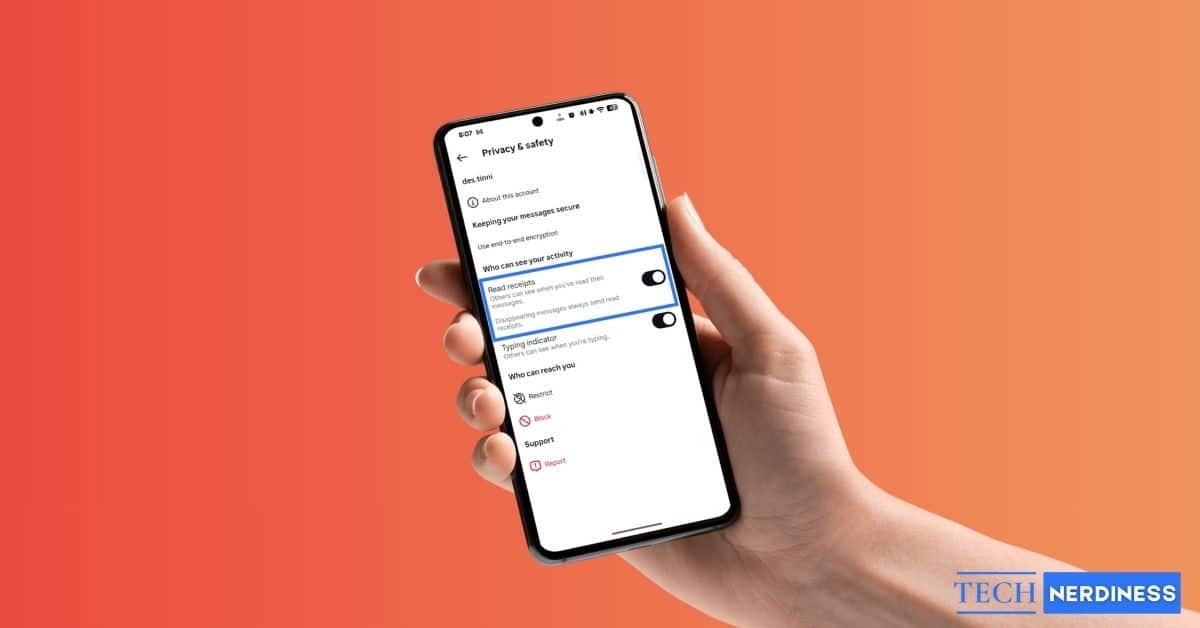
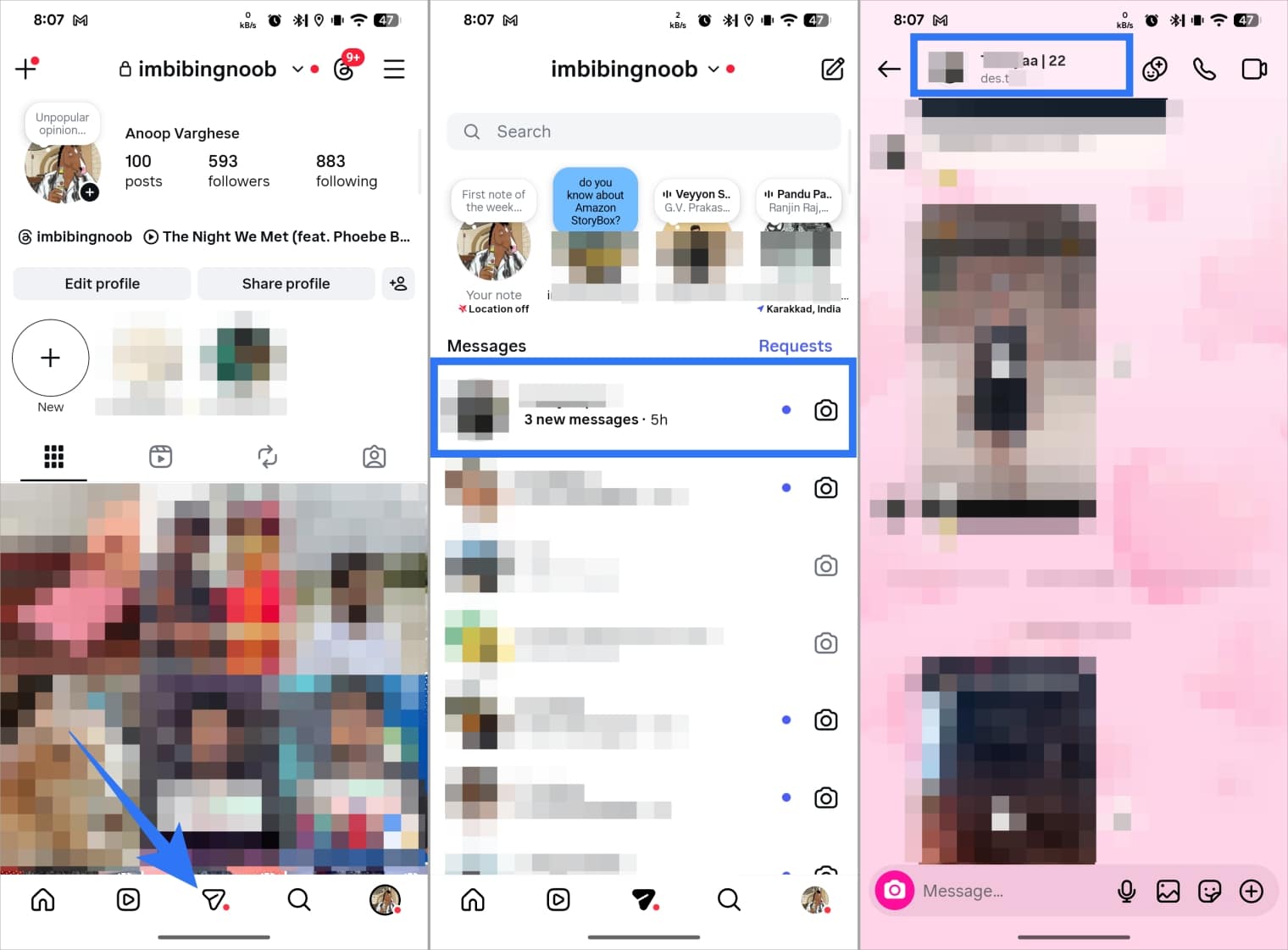
- Open Instagram on your iPhone or Android device and go to your DMs. Tap on the conversation with the person you want to adjust. If you do not have an existing chat with them, search for their profile and tap Message — you do not need to actually send anything, just get to the chat screen.
- Once you are inside the conversation, tap their name at the top of the screen.
- Tap Privacy & safety.
- Toggle off Read receipts.
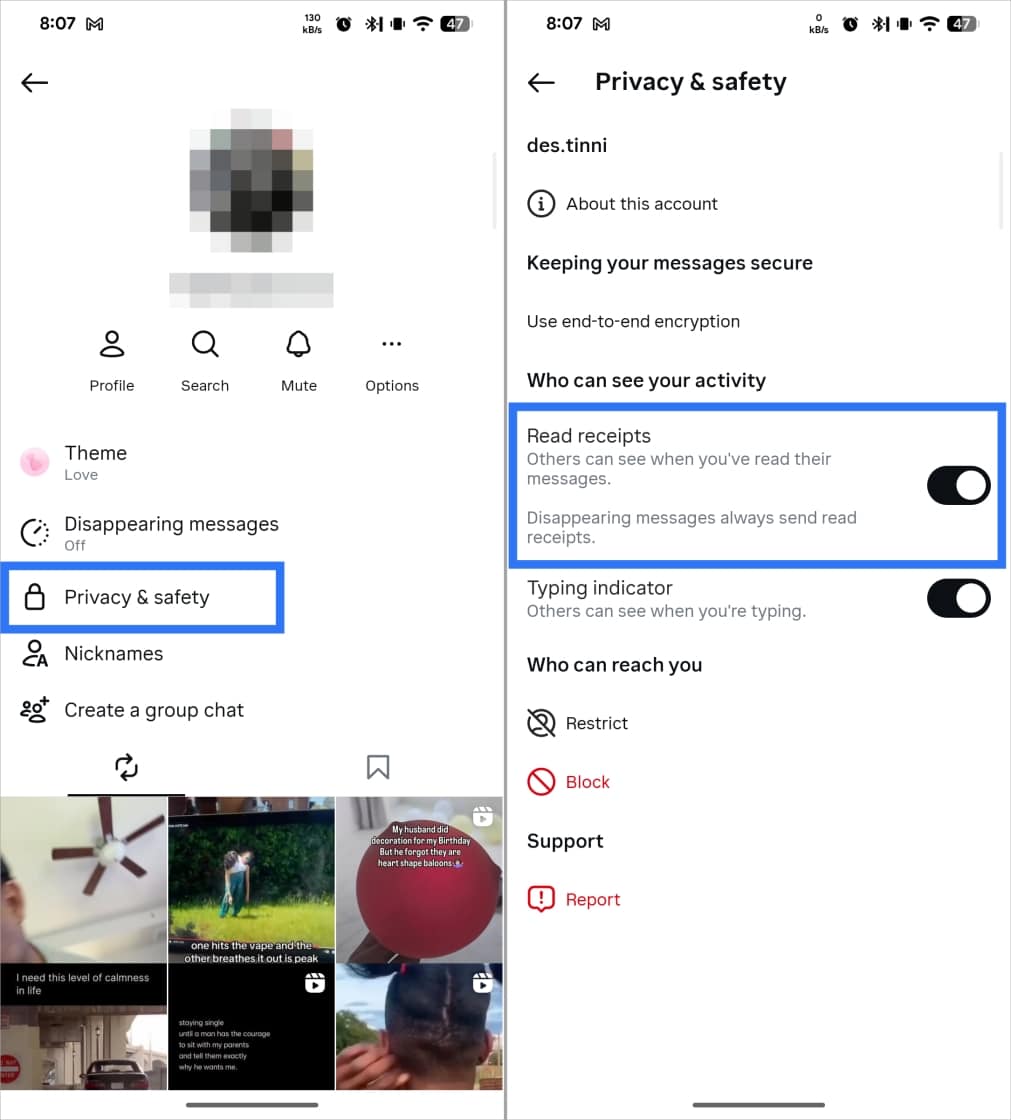
That is it. From this point on, that person will not see when you have read their messages, and you will not see when they have read yours. The message status on their end stays as “Sent.”
Note: read receipts stay active in Vanish Mode no matter what. Swipe up on a conversation to activate it, and receipts still go through regardless of this setting.
Make an Exception for Someone After Turning It Off Globally
Turning off read receipts for all chats does not lock you in. If you want one specific person to see when you have read their message, say, a close friend or someone you are actively coordinating with, you can override the global setting for just that one conversation.
Go to their chat, tap their name at the top, select Privacy & Safety, and toggle Read Receipts back on. This creates an individual exception without changing anything for the rest of your inbox. You will also be able to see when they have read your messages again.
A Related Toggle Worth Knowing About
Instagram tucks another useful privacy control right next to read receipts in the same menu: typing indicators, the little animated dots that show up while someone is composing a reply.
Turning this off works the same mutual way. You stop showing your typing dots to others, and you stop seeing theirs too. If the “they’re typing, they stopped, they’re typing again” cycle gets in your head, this toggle is worth flipping off alongside read receipts.
Do Not Stop There: Hide Your Active Status Too
Turning off read receipts only solves half the problem. If your active status still shows, people can see you are online or check when you were last active, and it does not take much to connect the dots when their message sits unread while you are clearly active.
To fully protect your privacy, turn off your Active Status on Instagram too. This stops others from seeing your online indicator or last active time, and it pairs well with read receipts being off to keep the whole picture private.
For the most current steps, or if the interface looks slightly different on your version of the app, Instagram’s own help page covers this feature as well.