Meta Muse Image lets a stranger type your public Instagram username into an AI tool and generate brand-new images of you: no request, no heads-up, nothing. That’s the reality behind Meta’s newest image generator, and it’s exactly why the internet spent this week in an uproar. The good news: you can shut most of it down in under a minute, once you know where Meta buried the switch.
Here’s what the tool actually does, why creators and privacy advocates are furious, and the step-by-step way to stop Meta’s AI from using your photos before someone else beats you to it.
What Is Meta’s Muse Image?
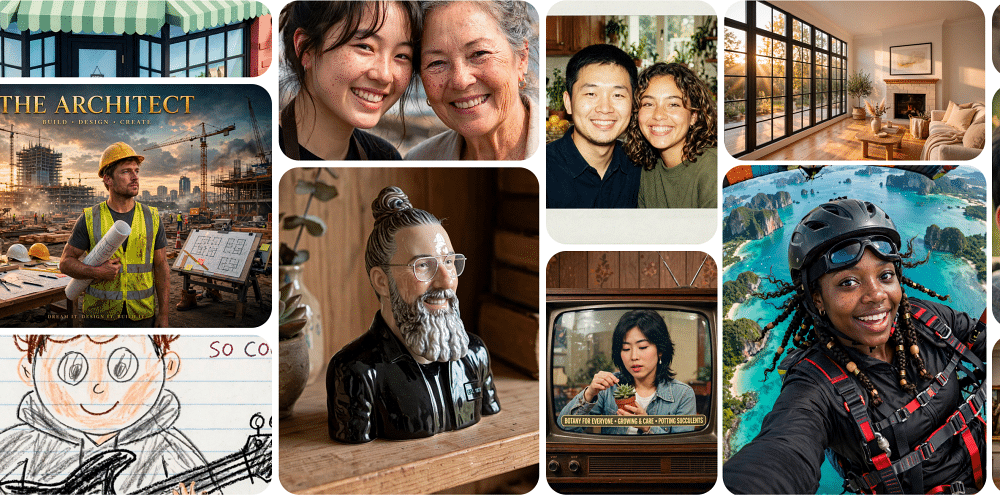
Muse Image launched on July 7, 2026, and it’s a bit of a milestone for the company. It’s the first in-house image model out of Meta Superintelligence Labs, the team Mark Zuckerberg built to chase the frontier of AI. Unlike Meta’s older Llama-based image tools, Muse reasons its way through a prompt. It can interpret detailed instructions, edit with precision, blend several photos into one composition, and refine its own output as it works.
You’ll find it inside the Meta AI app, on meta.ai, in WhatsApp chats (limited countries), and baked into Instagram Stories as a set of AI effects. Facebook and Messenger support is coming soon, and a video model called Muse Video is also in the works. For now, the rollout starts in the United States.
On paper, that’s a genuinely capable creative tool. The problem isn’t the model. It’s one specific feature bolted onto it.
The Feature That Started the Fire
Here’s the part that set everything off. In the Meta AI app, you can @-mention any public Instagram username inside a prompt. Muse Image then pulls that person’s public photos as visual references to build something new. Meta pitches it with wholesome examples: mock up a birthday card using a friend’s profile, or design a group event invite. Cute in theory.
In practice, it means anyone can generate synthetic images of you from your public feed, and you’ll never know it happened. Meta’s own help documentation says it plainly: the platform won’t notify you when someone creates content using AI features that reference your account.
Two things make this sting:
- You’re opted in by default. If your account is public and you’re over 18, the setting is already switched on. Meta didn’t greet you with a big “turn this off if you’d rather not” banner. It just quietly turned the feature on for you.
- There are no notifications. No alert, no log, no way to see who referenced your photos or what they made.
Private accounts and users under 18 are the exception. Meta excludes both automatically, which is the one meaningful guardrail here.
Why the Backlash Is Louder Than Usual
Plenty of AI launches spark grumbling. This one pulled in the professional class of critics.
Hollywood and Privacy Advocates Push Back
Talent agency CAA publicly slammed the opt-out-by-default approach on Wednesday. The agency called on Meta to make protection the default and let people opt in instead. SAG-AFTRA went further on Thursday. The performers’ union called anything short of a clear opt-in unacceptable, then published its own instructions urging members and all Instagram users to switch the feature off and “take action to protect your likeness.”
Tech journalist Taylor Lorenz summed up the core objection bluntly. Anyone can tag a username and spin up content using someone’s likeness with no consent and no notification. Privacy International told the BBC the feature shows how AI companies increasingly treat people’s photos and personal data as raw material they can reuse without explicit permission. Meta, for its part, has pushed back on the criticism. The company says it built Muse Image with strong controls and safety guardrails from day one, pointing to the automatic exclusions and the opt-out toggle.
The Real Risk: Lowering the Bar for Misuse
The deeper worry is what motivated bad actors can do with it. Attackers were already scraping public Instagram photos to build deepfakes for identity-verification fraud. An official, frictionless way to generate images from a public profile simply lowers the bar: for impersonation, romance scams, harassment, or synthetic content designed to look convincingly real. Meta hands you a fun toy; the same toy works just as well in the wrong hands.
Meta’s history doesn’t buy it much benefit of the doubt either. This is the company the FTC hit with a $5 billion fine back in 2019 over how it handled user data. Muse Image landed right in the middle of an already jittery public mood around AI.
If you like knowing exactly who’s paying attention to your profile, this feature is the flip side of that curiosity: people interacting with your content in ways you can’t see at all.
How to Opt Out of Meta’s Muse Image Generator
You don’t need to go private to stop this. There’s a dedicated toggle; Meta just parked it four menu levels deep. Here’s the fastest route to opt out of Meta’s Muse Image Generator while keeping your account public:
- Open the Instagram app and go to your profile.
- Tap the three-line menu (☰) in the top-right corner.
- Tap Settings and activity.
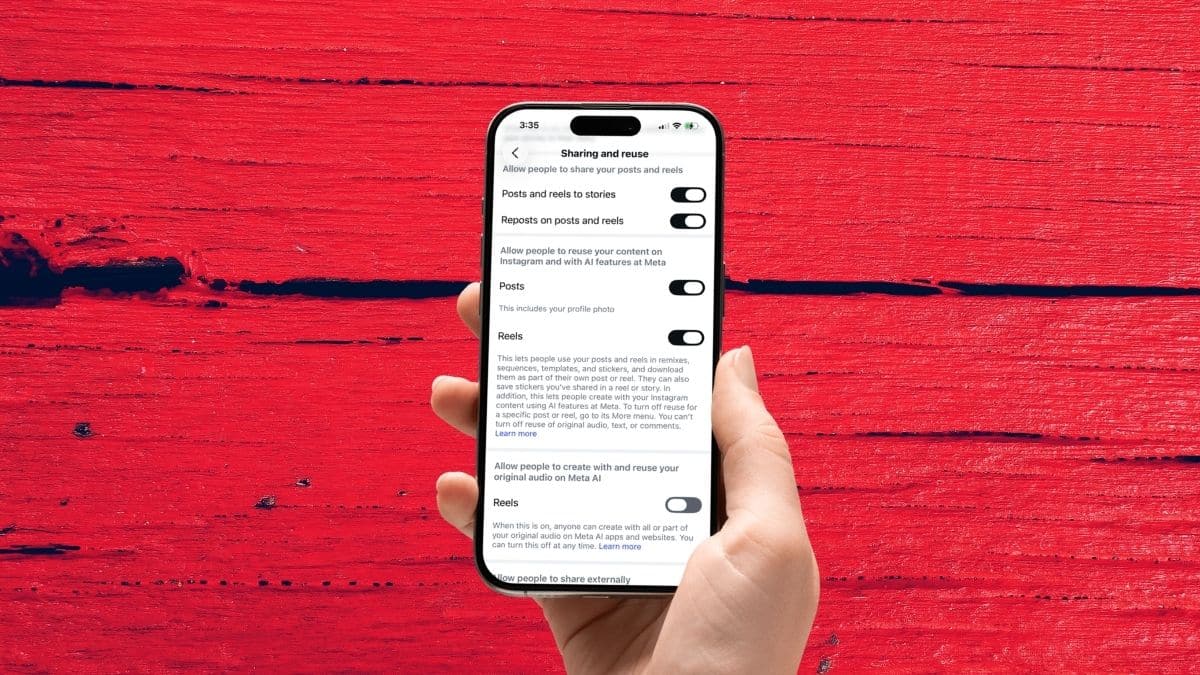
- Scroll down and tap Sharing and reuse (on some app versions it sits under a “How others can interact with you” heading).
- Find the option worded something like “Allow people to use your content on Instagram and with AI features on Meta.”
- Toggle it OFF for both Posts and Reels. Depending on your app version, you may also see a separate switch for original audio. Turn that off too.
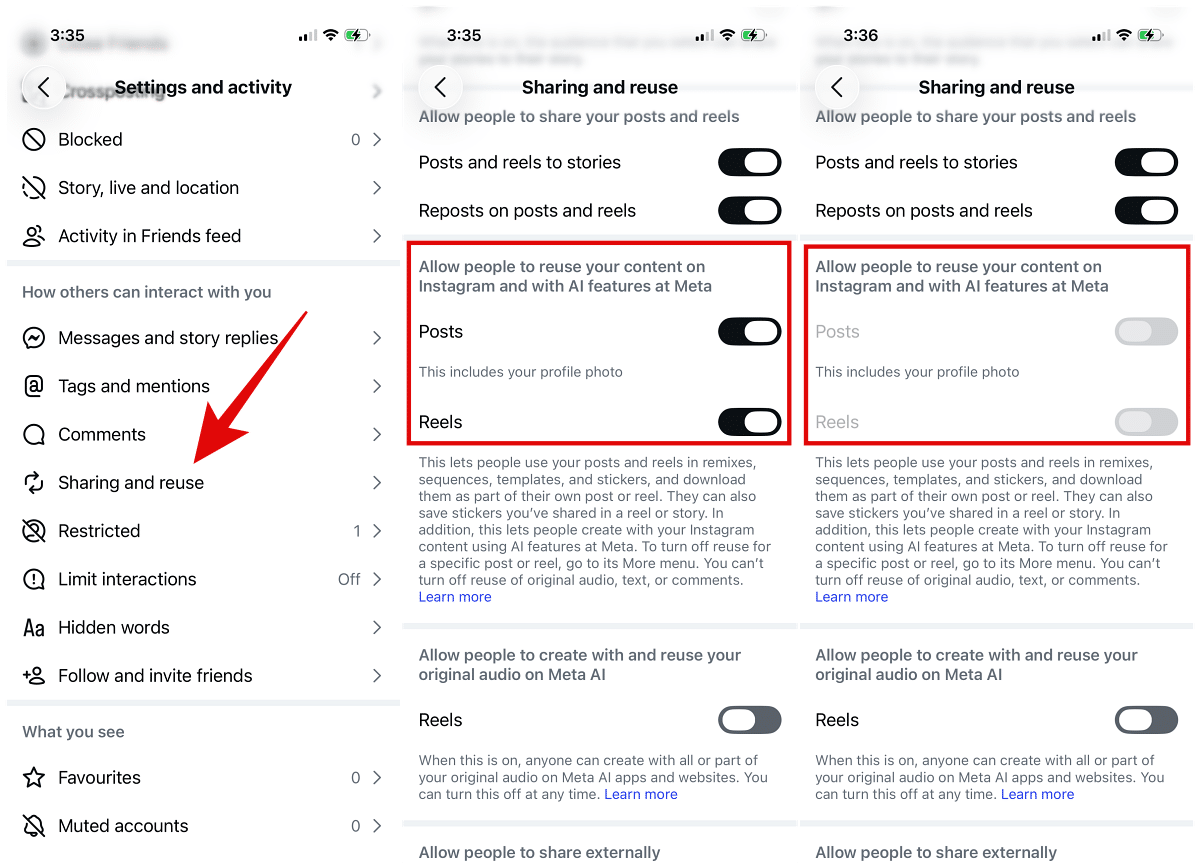
That’s it. From that point on, no one can pull your public posts and reels in as references for Meta’s AI creations.
One caveat: the feature is still rolling out. If you don’t see the setting yet, update the Instagram app and check again in a day or two. The wording also shifts slightly between versions (“use,” “reuse,” “on Meta,” “at Meta”), so match on the AI features language rather than the exact phrasing.
Extra Layers: Prevent Meta From Using Your Instagram Images
Turning off the reuse toggle handles the headline problem. If you want to lock things down further, here are three additional moves:
Go Private
This is the single strongest option Meta currently offers. A private account is automatically excluded from Muse Image and blocks most content reuse across the board. Head to Settings > Privacy > Account privacy and switch Private account on. Two things to know: Instagram limits how often you can flip between public and private, and going private won’t delete anything already generated.
Control It Per Post
You don’t have to make an all-or-nothing choice. You can manage reuse on individual photos and videos straight from each post’s options menu. That’s handy if you want most of your feed available but a few specific images off-limits.
Object to AI Training Separately
The reuse toggle governs whether other people can build with your content. It does not cover Meta training its own models on your data. That’s a different control entirely. Dig into Settings and activity > Privacy Center, look for the “AI at Meta” section or a “You have the right to object” form, and submit an objection with your email and reasoning. Whether it applies depends on your region and Meta’s policies, but it’s the right lever for the broader data-use question.
Know the Limits of the Opt-Out Toggle
Speed genuinely matters here, which is why the advice going around is to flip this setting before someone generates AI images of you. But be clear-eyed about what the switch does and doesn’t do:
- It only blocks the future. Any AI images already created from your photos stay in circulation. Opting out is a stop sign going forward, not an eraser for what’s behind you.
- There’s no way to see the damage. With no notifications, you can’t tell whether anyone already referenced your account before you flipped the setting.
- It’s not a total lock. You can’t fully switch off reuse of original audio, captions, or comments through this one toggle, and the setting mainly governs Meta’s built-in AI features. Third-party tools outside Meta’s walls can still grab public images. That’s a separate battle entirely.
While you’re tightening things up, turn on multi-factor authentication across your Meta accounts. It won’t stop Muse Image, but in an era where your public likeness is this easy to synthesize, keeping the account itself out of a stranger’s hands is table stakes.
The Watermark and the EU Wrinkle
There’s a wrinkle most quick how-to posts skip. Alongside Muse Image, Meta shipped Content Seal, an invisible watermark embedded in its AI outputs. Meta says it survives cropping, compression, resizing, and even screenshots. The company is also previewing a public web-based detector that checks whether an image carries the watermark. Useful, but note two limits: the watermark is machine-readable, not visible to a human scrolling past, and the detector isn’t built into the Meta AI app yet.
That collides with regulation on the horizon. Starting August 2, 2026, the EU AI Act requires visible labeling of AI-generated or AI-manipulated content shared in the EU. An invisible seal doesn’t clear that bar, and the obligation can land on whoever publishes the image. An EU user who @-mentions someone and posts the result could technically be on the hook for labeling it. Meta hasn’t said whether Content Seal will surface as a visible mark in Europe, which is one reason the feature’s rollout there is worth watching.
No. Muse Image can only reference public content. Photos and videos from private accounts, and any account belonging to a user under 18, are off the table.
Yes, if your account is public and the reuse setting is on. Other people can point Muse Image at your public posts and reels to generate new images. Flip the setting off under Settings and activity > Sharing and reuse and that door closes.
No. Your profile, posts, follower count, and every normal feature stay exactly as they are. All you’re switching off is other people’s ability to feed your eligible public content into Meta’s AI tools.
Not for this. Meta automatically excludes private accounts from Muse Image. It’s still worth a glance through your privacy and sharing settings if you want tighter control overall, but the opt-out toggle is really aimed at public accounts.
No. Meta hasn’t committed to notifying anyone when their public content appears in an AI creation. That silence is a big part of why people are upset.
Yes. Return to Settings and activity > Sharing and reuse and re-enable it any time, subject to whatever changes Meta makes to the feature down the line.
Not necessarily. This toggle governs whether other users can build with your public content. It doesn’t clearly cover Meta training its own models. That’s a separate matter with its own controls, which is why the AI-training objection form (above) exists as a distinct step.
Make the most of your Apple devices: