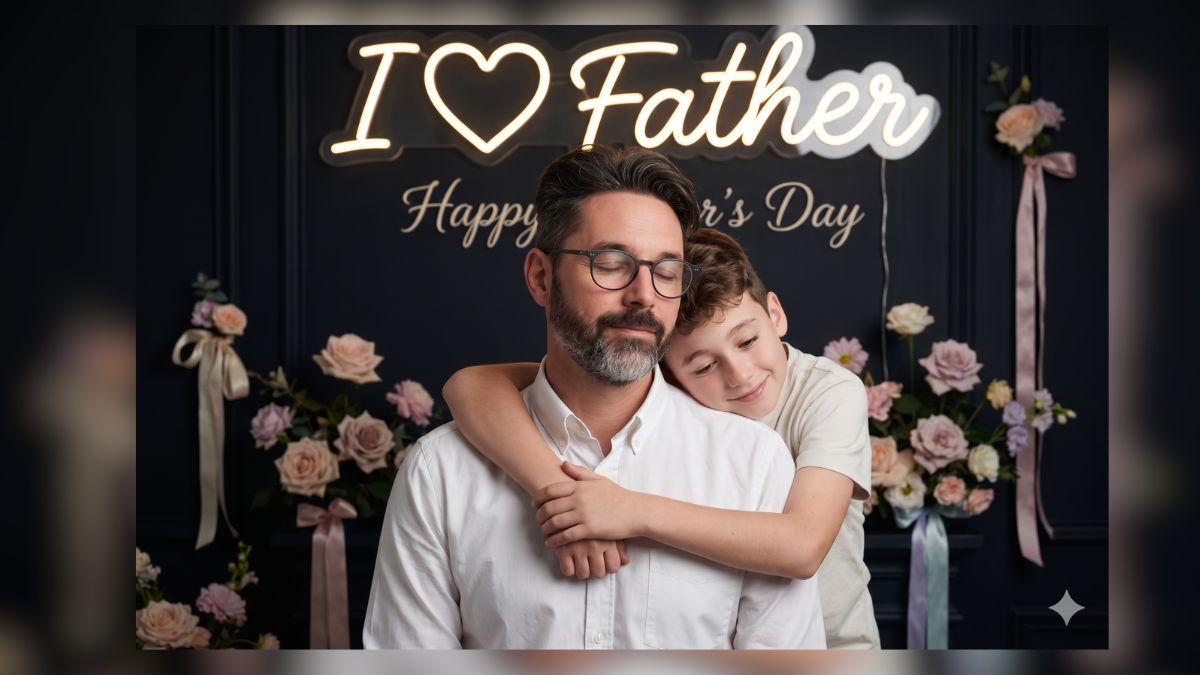
A dad rarely asks for credit. He shows up, fixes the things nobody else notices, and quietly carries more than he lets on. That’s exactly the kind of person Father’s Day exists for, and this year (June 21, 2026), a lot of people are skipping the generic store-bought card and turning an ordinary phone photo into something he’ll actually save.
That shift is being driven by Google Gemini and its image editing engine. If you’ve scrolled Instagram or Pinterest over the last couple of weeks, you’ve already seen the results: a faded photo of grandparents brought back to life, a cinematic shot of a son hugging his father from behind, warm Indian living-room scenes with kurtas and fairy lights, and even age-timeline grids that line up “then and now” in a single frame. These are the same edits powering the wave of viral Google Gemini AI photo editing prompts people are reposting right now.
The catch is that the photo is only ever as good as the prompt. Type “father and son” and you’ll get something stiff and generic. Below are five best Father’s Day AI photo editing prompts that actually work, written with the lighting, lens, and identity-lock language Gemini needs to produce a real, frame-worthy portrait. Copy one, upload a photo, and you’ve got a gift in under a minute.
Why Most Father’s Day AI Prompts Fail
Anyone can type “father and daughter.” Almost nobody types the words that decide whether the image looks like a real photograph or a plastic AI render: lighting, 85mm lens, shallow depth of field, rim light, face lock, RAW photo, true-to-life color.
That’s the whole game. Gemini doesn’t guess your intent; it follows direction. If you don’t tell it how the light should fall on your dad’s face, where the camera sits, and how much emotional weight the scene carries, it fills the gaps with its own averages, and averages look fake. A working prompt does three jobs at once:
- Locks the identity. Phrases like “100% identity match, no beautification, preserve real skin texture and pores” stop Gemini from smoothing your dad into a stranger. This is the single biggest reason edits flop because the face drifts.
- Directs the light and lens. “Soft studio lighting, gentle rim light, 85mm portrait lens, shallow depth of field” is what gives a shot that DSLR feel instead of a flat phone-flash look.
- Sets the emotion and the scene. Gemini renders mood when you name it. “Eyes gently closed, expressing peace” or “deeply emotional father-daughter moment” works far better than vague descriptions.
Keep that in mind as you read the prompts below. The structure isn’t decorative; every line is doing visual work.
1. Father & Son Hug Portrait (Emotional Studio Look)
This is the one people screenshot. A son hugging his father from behind, the dad’s eyes closed in quiet contentment. It lands because it captures the version of affection most fathers and sons rarely say out loud. Among the best father and son prompts for AI image generators, this is the most reliable starting point because the hugging pose is forgiving and the neon-text backdrop reads as deliberate, not accidental.
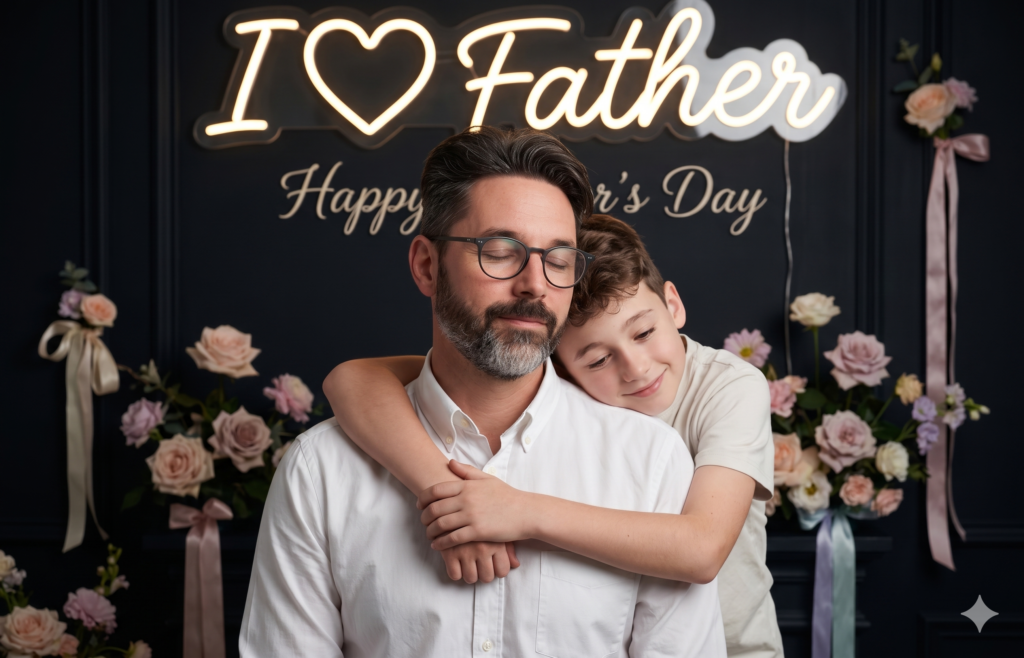
Use the uploaded images as face reference for both the son and his father (STRICT FACE LOCK, 100% identity match, no facial changes, no beautification, preserve real skin texture, pores, and natural imperfections).
Create a highly realistic Father's Day portrait inspired by a soft emotional hugging pose.
A mature father wearing a clean white shirt is standing calmly with eyes gently closed, expressing peace and love. A young son is standing behind him, hugging him warmly from the back with both arms around his chest, resting his head on his father's shoulder, showing deep emotional bonding.
Background: a dark elegant backdrop decorated with soft floral arrangements on both sides (roses and pastel flowers) and subtle ribbons. At the top, add a stylish neon light text:
"I ❤️ Father"
and below it in smaller elegant font:
"Happy Father's Day"
(use warm glowing light effect, clean, sharp, clearly readable, not distorted, no wrong spelling).
Lighting: soft studio lighting with warm highlights, gentle rim light, realistic shadows, no over-glow.
Camera: real DSLR photo look, 85mm portrait lens, shallow depth of field, focus on faces.
Style: ultra-realistic, RAW photo, 8K quality, sharp focus, true-to-life colors, no cartoon, no anime, no painting, no CGI look.
Avoid: cartoon, illustration, AI painting style; over-smooth or plastic skin; unrealistic lighting or colors.
Ensure: no extra people, no glitches, no distortions; faces match uploaded images exactly; natural hands, fingers, and body proportions; clean realistic textures (skin, fabric, flowers); text is 100% correct and clearly visible.
Quick tip: If the neon text comes out misspelled, regenerate with Nano Banana Pro. Its text rendering is noticeably cleaner than the standard model.
2. Father & Daughter: “Touching Feet” Blessing Scene
Touching an elder’s feet to seek blessings is one of the most quietly powerful gestures in many Indian households. This prompt turns it into a cinematic, dreamy night portrait, and it works just as well for a real photo on the wall as it does for a heartfelt Father’s Day AI photo editing prompt for Gemini social post.
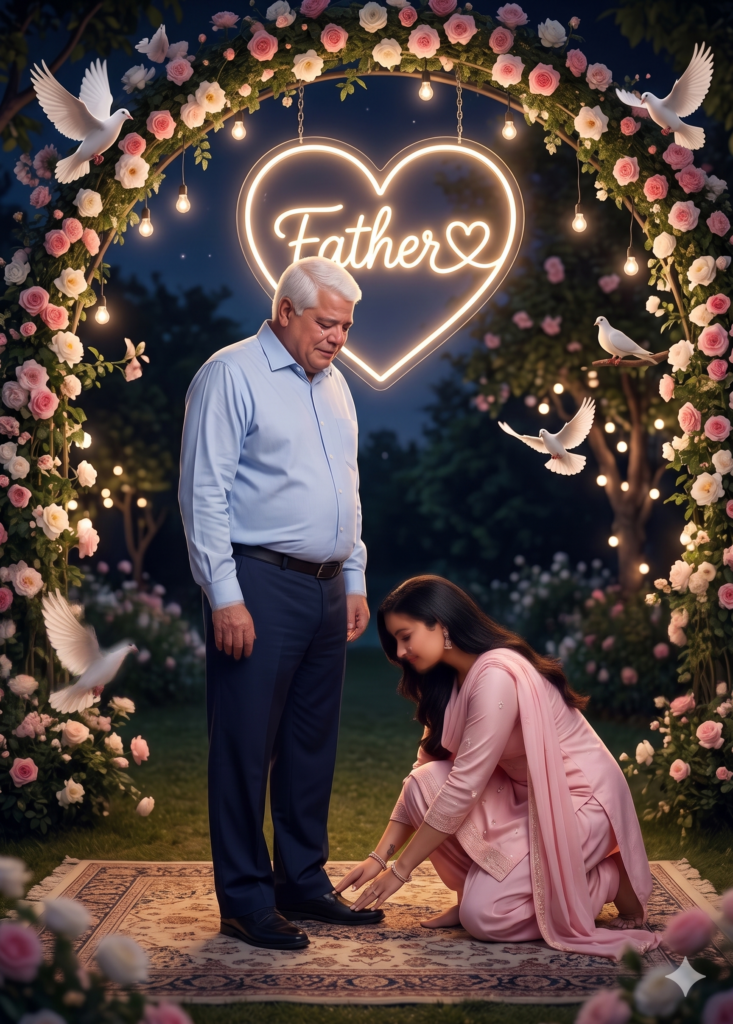
Create an ultra-realistic cinematic photo using the uploaded faces.
Use the first uploaded image as the daughter and the second uploaded image as the father.
Face must be 100% identical to the uploaded photos. Do not change facial structure, skin tone, eyes, nose, lips, hair, or expression. No beautification, no stylization, no AI-generated face, no cartoon or painting effect. Keep the exact real identity.
Scene: A deeply emotional father-daughter moment. The daughter is kneeling and respectfully touching her father's feet, showing love and gratitude. The father is standing calmly and looking down with a gentle emotional expression.
Background: A glowing neon heart with "Father ❤️" text inside, decorated with realistic flowers, soft glowing lights, birds, and a dreamy night atmosphere.
Style: Hyper-realistic DSLR photography, natural skin texture, realistic lighting, soft shadows, depth of field, 8K ultra HD quality.
Clothing:
Father: Simple light shirt and dark trousers
Daughter: Traditional or modern elegant outfit (salwar suit / dress)
The final image must look like a real photograph, not AI-generated.
STRICT: Faces must remain exactly the same as uploaded images with zero changes in identity.
3. Father & Son: “Touching Feet” Cinematic Portrait
Same gesture, tuned for a father and son. Keep the upload order in mind. Gemini maps “first image” to the son and “second image” to the father, and swapping them is the most common mistake people make here.
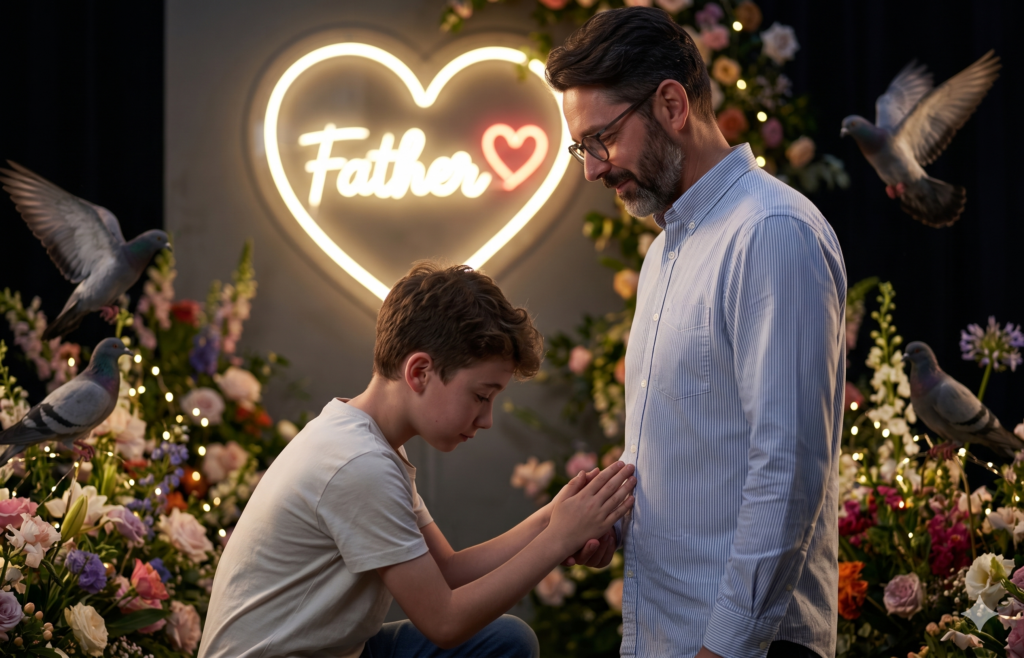
Create an ultra-realistic cinematic photo using the uploaded faces.
Use the first uploaded image as the son and the second uploaded image as the father.
Face must be 100% identical to the uploaded photos. Do not change face structure, skin tone, eyes, nose, lips, hair, or expression. No beautification, no stylization, no AI-generated face, no cartoon or painting effect. Keep the exact real identity.
Scene: The son is kneeling and touching his father's feet with respect. The father is standing calmly and looking down with a soft emotional expression.
Background: A glowing neon heart with "Father ❤️" text, decorated with flowers, soft lights, birds, and cinematic night atmosphere.
Style: Hyper-realistic DSLR photography, natural skin texture, realistic lighting, depth of field, 8K quality.
The final image must look like a real photograph, not AI-generated.
4. Vintage 1970s Father and Daughter Portrait Prompt
Recreate a timeless 1970s-style studio portrait featuring a father and daughter in authentic vintage attire. With warm sepia tones, soft lighting, subtle film grain, and a classic studio backdrop, this prompt captures a nostalgic family moment that feels like a treasured photograph passed down through generations.
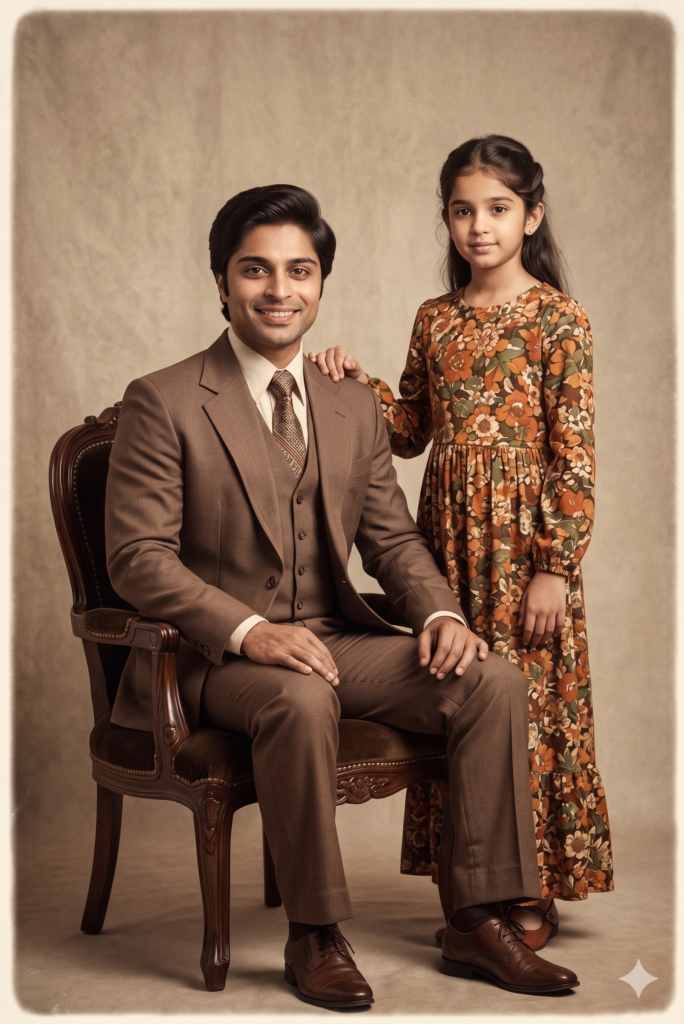
A timeless vintage studio portrait of a 40-year-old father and his 15-year-old daughter in a classic 1970s style. The father, wearing a brown suit and period-appropriate hairstyle, sits on a traditional portrait chair with a relaxed yet formal posture. His daughter stands beside him in a floral 1970s dress, gently resting one hand on his shoulder. Both face the camera with calm, composed expressions that reflect warmth and connection. The scene features a neutral beige textured studio backdrop, soft diffused lighting, subtle edge vignetting, light film grain, and a warm sepia-toned color palette. The overall mood is nostalgic, formal, and enduring, capturing a timeless father-daughter bond preserved across generations.5. Father’s Day Cake Celebration (Joyful & Bright)
Not every dad wants a soft, sentimental portrait; some just want a happy, well-lit family moment. This prompt builds a decorated celebration room with a cake, balloons, and a genuine grin. Note the explicit “plain red t-shirt, no text, no logo” instruction. That’s there because AI loves to hallucinate garbled branding onto clothing, and one clear line prevents it.
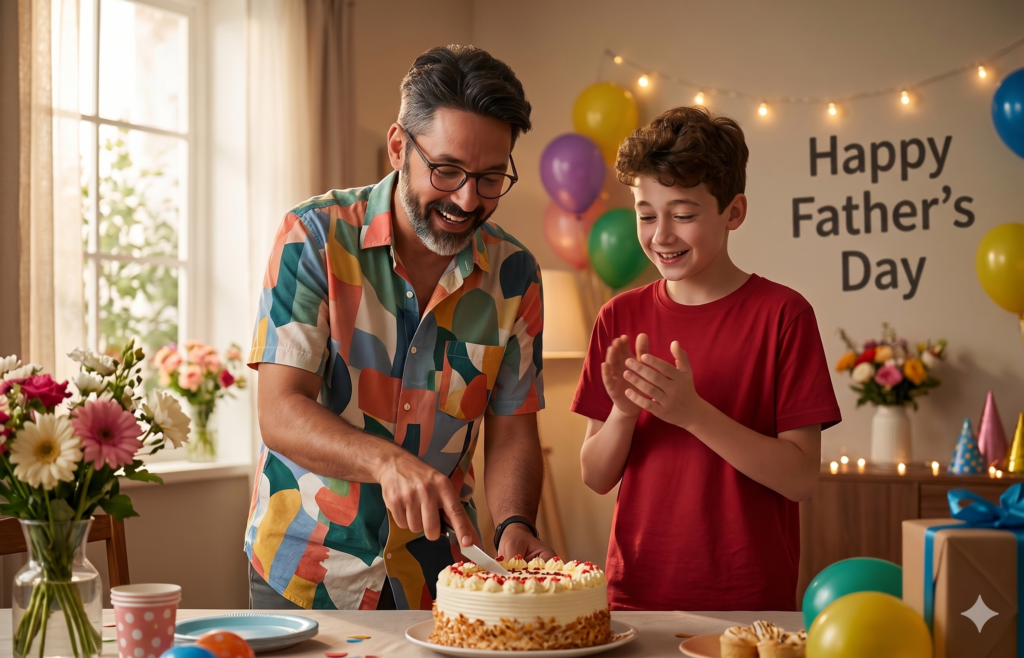
Use the uploaded images as face reference for both the boy and his father (STRICT FACE LOCK, 100% identity match, no facial changes, no beautification, no stylization).
Create an ultra-realistic, high-quality cinematic scene of an 18-year-old Indian boy celebrating Father's Day with his father inside a beautifully decorated room.
The father is happily cutting a cake with enthusiasm, smiling naturally. The boy is standing beside him, looking at the cake and clapping with a joyful expression.
The boy is wearing a stylish red t-shirt (no text, no logo, completely plain).
The father is wearing a colorful casual shirt, festive look.
Background: A fully decorated celebration room with flower decorations, balloons, warm lights, and party elements.
On the wall behind them, clearly write:
"Happy Father's Day" (correct spelling, clean typography, perfectly visible, not distorted)
Lighting: soft cinematic lighting, natural skin tones, realistic shadows, depth of field.
Style: hyper-realistic, DSLR-quality, 8K, sharp focus, natural textures, no AI artifacts, no blur, no distortion.
Composition: medium shot, both subjects clearly visible, emotional and warm family moment.
Ensure: no extra people, no extra limbs, no glitches; faces match uploaded images exactly; text is 100% accurate and readable; t-shirt has NO text or branding; hands, fingers, and proportions are realistic.
Which Gemini Model Should You Use?
This is the part most prompt lists skip, and it’s the difference between a sharp result and three frustrated regenerations.
Open the Gemini app, choose “Create images” from the tools menu, and you’ll see a model picker with Fast, Thinking, and Pro. Here’s how I’d choose between them for these particular edits:
- Fast – the original Nano Banana (Gemini 2.5 Flash Image). Great for quick, casual edits and the fastest iteration.
- Thinking – spends extra reasoning on the composition before rendering. Worth it when a prompt has a lot of moving parts, like the hug or foot-touching scenes.
- Pro – Nano Banana Pro (Gemini 3 Pro Image). Best when text must be spelled correctly, when you need high-resolution output for printing, or when identity-lock keeps slipping.
There’s also Nano Banana 2, which Google rolled out on February 26, 2026. It brings Pro-level subject consistency at Flash-like speed, so newer accounts may see noticeably better face retention out of the box.
One thing to know regardless of model: every image Gemini creates carries a visible watermark plus an invisible SynthID tag (and now C2PA Content Credentials), so the result is always identifiable as AI-edited.
Fixing the Three Things That Usually Go Wrong
Even with a strong prompt, Gemini occasionally stumbles. These are the three failures you’ll hit most, and the fastest fixes:
- The face doesn’t look like Dad. Upload a sharper, front-facing source photo. Then re-run on Thinking or Pro and add “preserve exact facial geometry, do not change face shape.”
- The wall text is misspelled or warped. Switch to Nano Banana Pro and keep the text short. If a word still garbles, regenerate rather than editing the prompt.
- Skin looks plastic or over-smoothed. Add stronger instructions such as “preserve real skin texture, pores, fine lines, no beautification, no skin smoothing, RAW unretouched look.”
If you’re working from an old, scratched, or faded photo of your dad or grandfather, run it through a cleanup pass first. Here’s a full walkthrough on how to restore old photos using Google Gemini AI before applying any Father’s Day edits.
How to Use These Father’s Day AI Photo Editing Prompts for Google Gemini
The whole process takes under a minute once you’ve picked a prompt:
- Copy the prompt for the scene you want.
- Open the Gemini app (or gemini.google.com) and select “Create images” from the tools menu.
- Upload your photo, or two photos, in the order the prompt specifies.
- Paste the prompt and send.
- Wait a few seconds, review the face and any on-image text carefully, then download. Regenerate if something’s off.
That’s it. No editing software, no design skills, and no subscription required for the basic edits.
Final Thought
The trick to a Father’s Day photo that actually moves him isn’t a fancier tool; it’s telling the AI exactly what you see in your head: the light, the emotion, the moment, and the face it must never change. Get those four right and Gemini does the rest. So pick a prompt, find a photo of your dad, and make him something worth keeping. He probably won’t say much about it, but he’ll keep it on his phone for a long time.