You’re mid-conversation with ChatGPT, finally getting somewhere on a problem, and the app cuts you off. “You’ve reached your limit. Try again later.” For most of ChatGPT’s history, that moment defined the free plan. In August 2026, that changed in a big way.
OpenAI expanded the Free tier with unlimited text chats using GPT-5.6 Luna, while keeping separate limits for tools such as file uploads, images, and other features. GPT-5.6 Luna also became the default model for Free and Go users, alongside a Think button that gives the model more time to work through harder questions.
That makes ChatGPT’s pricing structure more interesting than simply “free versus $20 a month.” There’s now Go for people who need more headroom, Plus for access to GPT-5.6 Sol and more advanced tools, two Pro tiers for heavy users, and Business, Enterprise, and Edu options for organizations.
Here’s what actually separates the ChatGPT plans in 2026, what you can still use for free, and where paying gets you something meaningfully better.
ChatGPT Plans and Pricing in 2026
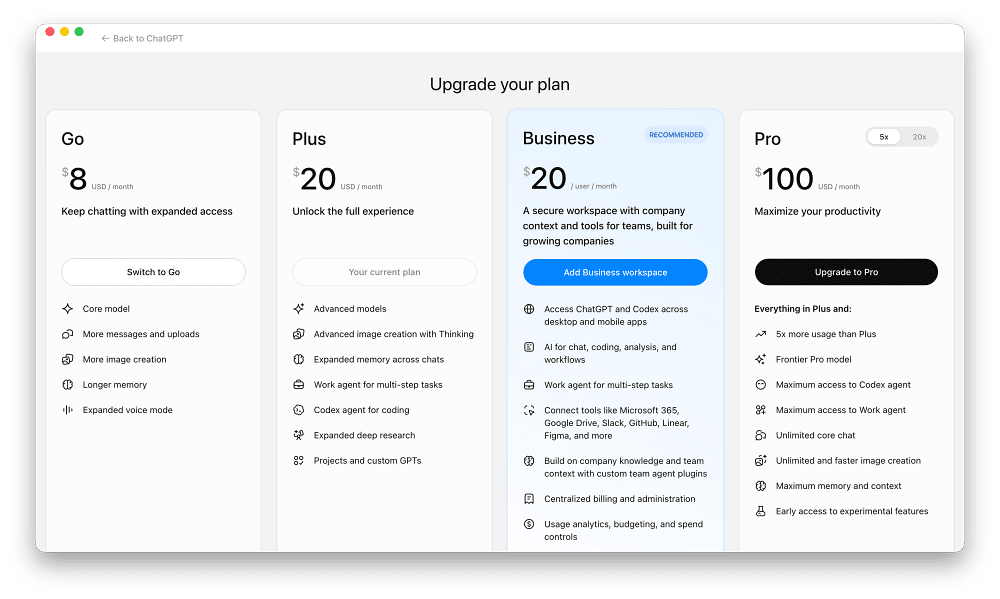
Here’s the basic hierarchy:
- Free: $0/month. Unlimited GPT-5.6 Luna text chats, with separate limits on tools such as file uploads and image generation. Ads may appear in eligible regions.
- Go: Lower-cost paid plan, with pricing varying by market. Higher usage limits than Free for chats, uploads, image generation, data analysis, and memory. Ads may appear.
- Plus: $20/month. Access to GPT-5.6 Sol, higher limits, and more advanced tools. Ad-free.
- Pro: $100 or $200/month. The same core Pro capabilities, with the $100 tier offering 5x Plus usage and the $200 tier offering 20x Plus usage. Ad-free.
- Business: Designed for teams, with organizational controls and business data protections.
- Enterprise / Edu: Organization-focused plans with pricing and deployment options depending on the agreement.
Exact limits can change over time, so it’s better to think of the plans as different levels of access rather than assume a fixed number of messages or generations will remain unchanged indefinitely.
What Do You Get With ChatGPT Free?
Unlimited text conversations are now the headline feature. Free users run on GPT-5.6 Luna, the fastest and lowest-cost model in the GPT-5.6 family. OpenAI made Luna the default for Free and Go accounts in August 2026 and removed the normal text-chat rate limit, subject to abuse guardrails.
You also get a Think button for questions that need more reasoning. Instead of switching you to GPT-5.6 Sol, Think gives Luna additional time to work through the problem.
That distinction matters. Free ChatGPT has become considerably more useful, but you’re still not getting the same model access as a Plus or Pro subscriber.
Free users can also search the web, upload files and images, analyze data, use GPTs, generate images, and use the Library. However, these tools can have their own limits separate from ordinary chat usage.
So “unlimited ChatGPT” doesn’t mean every feature is unlimited. You can keep a normal text conversation going, but you may still hit a limit when generating images, analyzing files, or using other resource-intensive tools.
You also get a Think button for tougher questions, ChatGPT’s shorthand for switching Luna into a slower, more deliberate reasoning mode.
Does Free ChatGPT Have Ads?
Potentially, yes, but not everyone will see them. OpenAI began testing ads in 2026, and ads may appear for users on the Free and Go plans in eligible regions. Plus, Pro, Business, Enterprise, and Edu remain ad-free.
The ads are separate from ChatGPT’s answers rather than being inserted into the response itself. OpenAI also says advertisers don’t receive your chats, memories, chat history, or personal details.
There’s another option worth knowing about. Eligible Free users can choose an Ads-Free Free experience. You don’t pay for it, but there’s a tradeoff: lower usage limits and reduced access to certain tools, potentially including image generation and Deep Research.
That effectively gives some users two versions of Free: more access with ads, or fewer features and lower limits without them.
ChatGPT Go: Is the Lower-Cost Plan Worth It?
ChatGPT Go sits between Free and Plus. It was initially introduced as a lower-cost option in select markets before expanding more broadly. The idea is straightforward: keep the core ChatGPT experience but give people more room before they hit tool and usage limits.
Compared with Free, Go provides higher limits for core chat, image generation, file uploads, and advanced data analysis. It also offers longer memory and access to Projects, tasks, custom GPTs, and Library, subject to feature availability and storage limits.
What it doesn’t do is turn your account into Plus. GPT-5.6 Luna remains the default model for Go, and some advanced products and higher-tier capabilities still require Plus or another eligible plan. Sora, for example, isn’t included with Go. Voice is available, but it uses limits similar to Free.
If you’ve run into ChatGPT’s slow response issues or regularly hit tool limits, Go can make sense if your main problem is capacity rather than needing OpenAI’s flagship model.
ChatGPT Plus: Where the Bigger Upgrade Starts
Plus remains the point where you start paying for more than additional headroom. The biggest difference is access to GPT-5.6 Sol in ChatGPT. Sol is the flagship model in the GPT-5.6 family, and Plus and Pro users can adjust how much reasoning effort it puts into a response.
That matters if you use ChatGPT for work that goes beyond everyday questions: research, coding, analysis, planning, long-form writing, or problems where a more capable reasoning model makes a noticeable difference.
Plus also increases access to tools and products that are more restricted or unavailable on the lower tiers. Depending on current availability, that includes products such as Sora and Codex, alongside higher overall usage limits.
And unlike Free and Go, Plus is ad-free. That makes Plus the most natural upgrade for someone whose complaint isn’t simply “I keep hitting limits,” but rather “I want access to the more capable models and tools.”
ChatGPT Pro: $100 vs. $200 Explained
Pro used to mean one thing: the $200-per-month power-user plan. OpenAI now offers two Pro tiers. The difference is easier to understand than it initially sounds.
Both Pro tiers include the same core capabilities. The $100 Pro plan provides 5x the usage allowance of Plus, while the $200 Pro plan provides 20x Plus usage. The $200 option remains the highest-usage individual tier.
So this isn’t really a “regular Pro versus completely different Super Pro” situation. It’s primarily about how heavily you use the same class of capabilities.
For most individual power users, $100 is the more approachable step up if Plus has become restrictive. The $200 tier makes more sense when ChatGPT, Codex, research, or other supported workloads are part of your daily professional workflow and you’re genuinely consuming enough capacity to justify the extra $100.
OpenAI has also introduced credits for certain supported features, allowing eligible users to purchase additional usage after consuming their included allowance rather than necessarily moving to a more expensive subscription. Currently, this applies only to specific features, so it isn’t a universal replacement for upgrading.
ChatGPT Business, Enterprise, and Edu: Plans for Organizations
Individual plans stop making sense once ChatGPT is being deployed across a company or institution. ChatGPT Business is designed for teams that need a shared workspace, administrative controls, and stronger organizational data protections rather than a collection of unrelated personal subscriptions.
Enterprise sits above Business for larger organizations that need more extensive identity management, security, administrative controls, deployment options, and support. ChatGPT Edu serves universities and educational institutions deploying ChatGPT across campuses rather than asking every student or staff member to maintain an individual subscription.
These plans also differ from individual accounts in an important area: how organizational data is handled. If you’re evaluating ChatGPT for company-wide use, that distinction can matter considerably more than whether one plan gives you a few extra messages.
Does ChatGPT Use Your Conversations for Training?
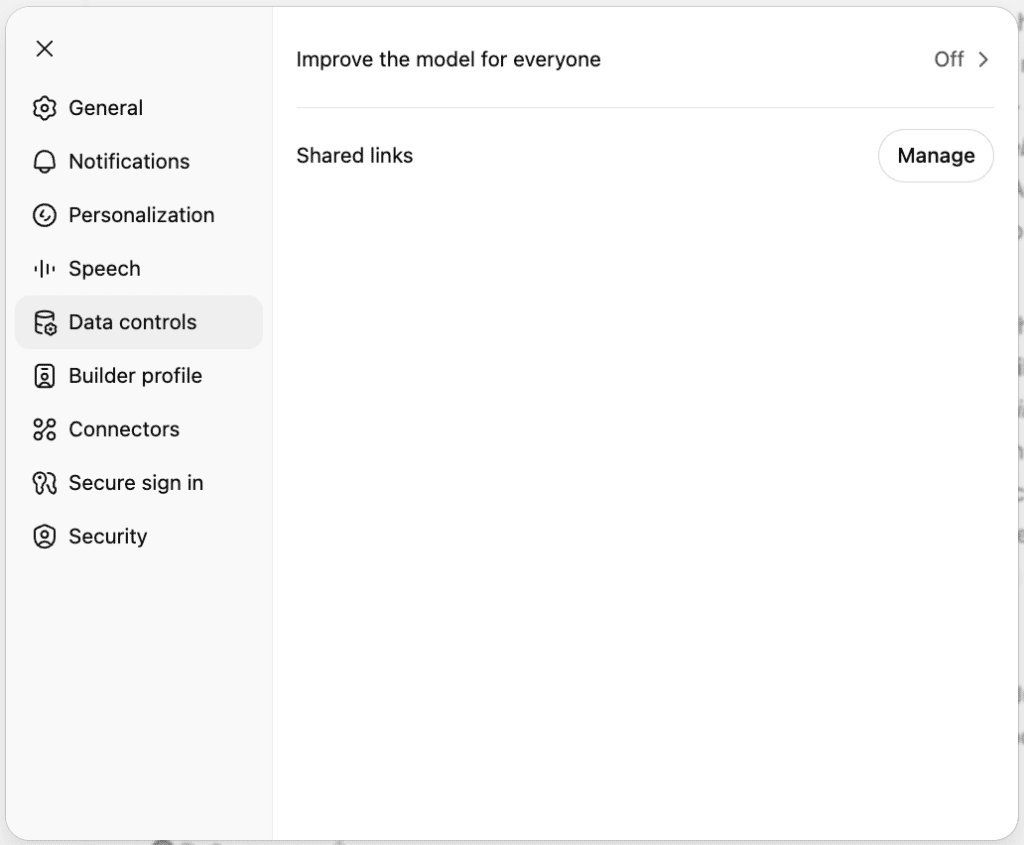
This is another area where the distinction between individual and organizational plans matters. On individual ChatGPT accounts, users have controls over whether their content is used to improve OpenAI’s models. If you don’t want your conversations used for model improvement, check Settings > Data Controls and review the available training options for your account.
That’s separate from advertising. OpenAI says advertisers do not get access to your chats, memories, chat history, or personal information. Ads are also separate from the assistant’s responses and don’t influence the answers ChatGPT gives you.
If privacy is the main reason you’re considering moving from an individual account to an organizational plan, look at the data controls and business protections rather than simply assuming “paid” automatically means every type of data handling changes.
Which ChatGPT Plan Should You Choose?
The easiest way to choose isn’t by comparing every feature in a giant pricing table. Start with whatever is currently limiting you.
If you mostly ask questions, brainstorm, write, summarize, or use ChatGPT casually, Free is far more capable than it used to be. Unlimited GPT-5.6 Luna text chats remove one of the biggest reasons casual users previously upgraded.
If Free gives you enough intelligence, but you regularly run into limits on uploads, images, data analysis, memory, or other features, Go is the logical next step.
If model quality and advanced capabilities matter more than simply getting additional usage, Plus is where the bigger upgrade starts. GPT-5.6 Sol is the main reason to make that jump.
If you’re already using ChatGPT heavily enough that Plus limits interfere with paid work, coding, research, or other professional workflows, Pro $100 becomes easier to justify. And if you actually burn through that level of capacity, Pro $200 exists for the highest individual usage.
Business, Enterprise, and Edu are different decisions entirely. Those plans are about deploying ChatGPT across an organization, not simply giving one person a better chatbot.
If you’re thinking about dropping a paid plan now that Free has improved, make sure you know how to cancel your ChatGPT subscription and when the downgrade takes effect.
Final Thoughts
Free ChatGPT is genuinely usable in a way it wasn’t a year ago. Unlimited text chats with GPT-5.6 Luna fundamentally change the value equation, especially for people who primarily use ChatGPT for everyday questions, writing, brainstorming, and research.
But unlimited text doesn’t mean unlimited everything. Images, uploads, data analysis, Deep Research, and other tools can still have their own limits. Free and Go users may also see ads in eligible regions, while Plus and higher tiers remain ad-free.
Go mainly buys you more headroom. Plus buys you access to more capable models and advanced features. Pro buys substantially more usage. Business, Enterprise, and Edu add the controls and protections organizations need.
So don’t pick a ChatGPT plan based purely on the monthly price. Pick it based on what’s actually holding you back: tool limits, model capability, or raw usage volume. Those are three different problems, and in 2026, OpenAI increasingly sells three different upgrades for them.