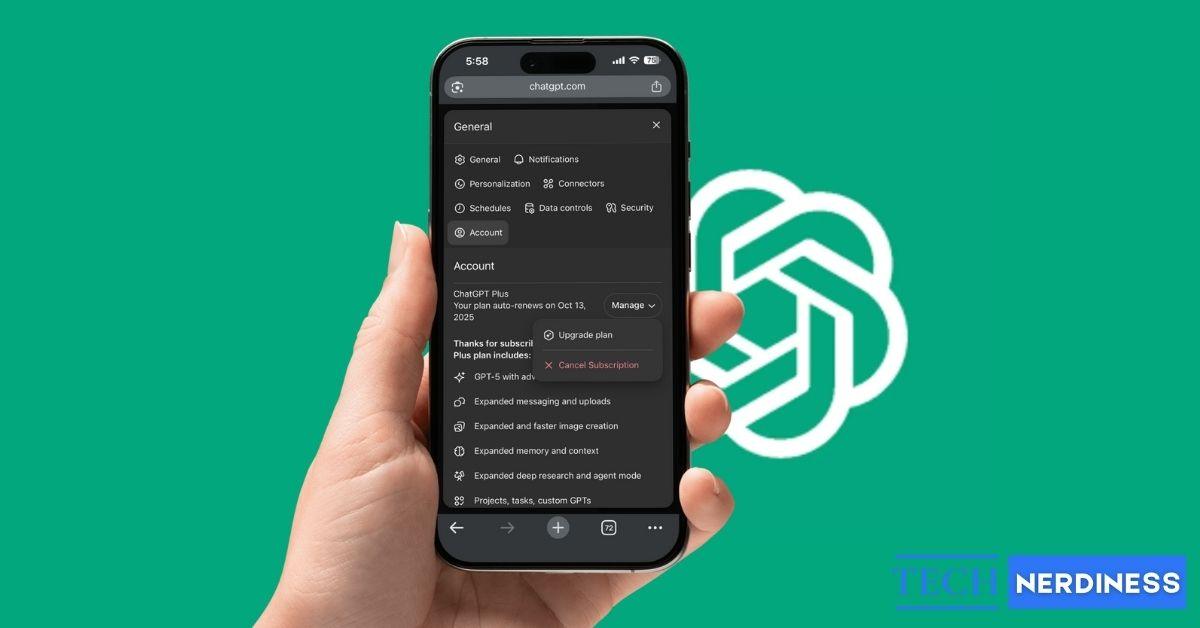
If you want to cancel your ChatGPT subscription, whether that is ChatGPT Plus, Pro, or Go, the process takes under two minutes, but only if you do it in the right place. The single most common mistake is trying to cancel on the wrong platform, because ChatGPT runs on three separate billing systems. Where you first subscribed, the web, the iOS App Store, or Google Play, is the only place that can stop the charge.
In this guide covers every method for each platform, plus exactly what happens to your account and data after you cancel.
Before You Cancel: What to Know
A few details up front can save you from a surprise charge or confusion later:
- Cancel at least 24 hours before your next billing date to avoid being charged for another cycle
- Subscription fees are generally non-refundable, so canceling does not refund unused time, though some regions (the EU, UK, and Turkey) allow a 14-day cooling-off refund on a first purchase
- Even after canceling, your paid features stay active until the end of the current billing cycle
- Canceling does not delete your account or your chat history. Those remain unless you delete them separately
- The process depends entirely on how you subscribed. A web subscription cancels on the web, an iPhone subscription cancels through Apple, and an Android subscription cancels through Google Play. Canceling on the wrong platform will not stop the billing
- That last point is the one that trips people up most. Deleting the ChatGPT app does not cancel anything, and neither does canceling in the wrong place.
How to Cancel Your ChatGPT Subscription
How to Cancel on the Web
If you signed up on the ChatGPT website, cancel through the web billing portal:
- Go to chat.openai.com and log in with your credentials.
- Tap the menu with two horizontal lines in the top-left corner on mobile.
- Tap the profile and go to Settings.
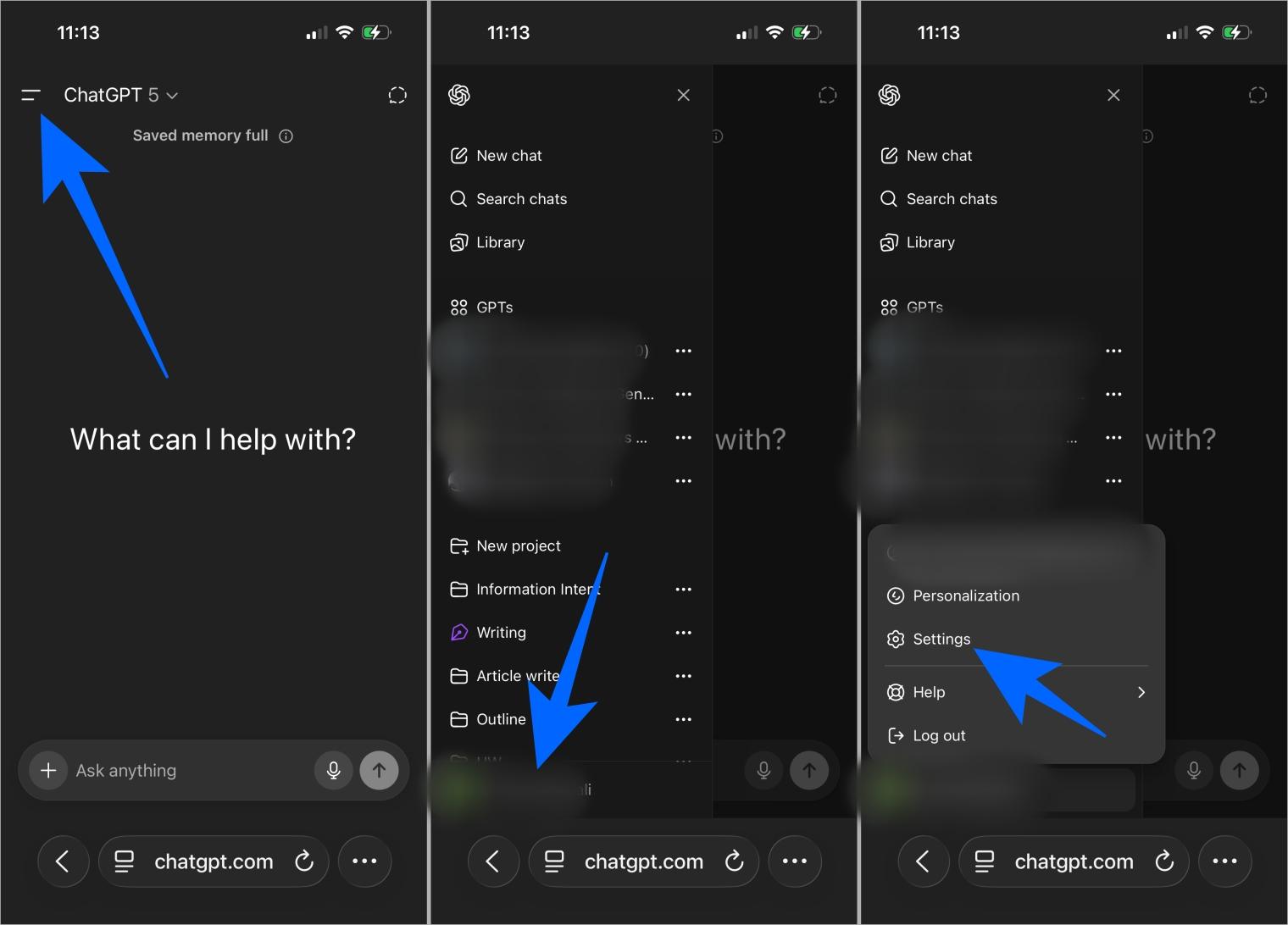
- Select Account from the menu.
- Choose Manage → Cancel Subscription.
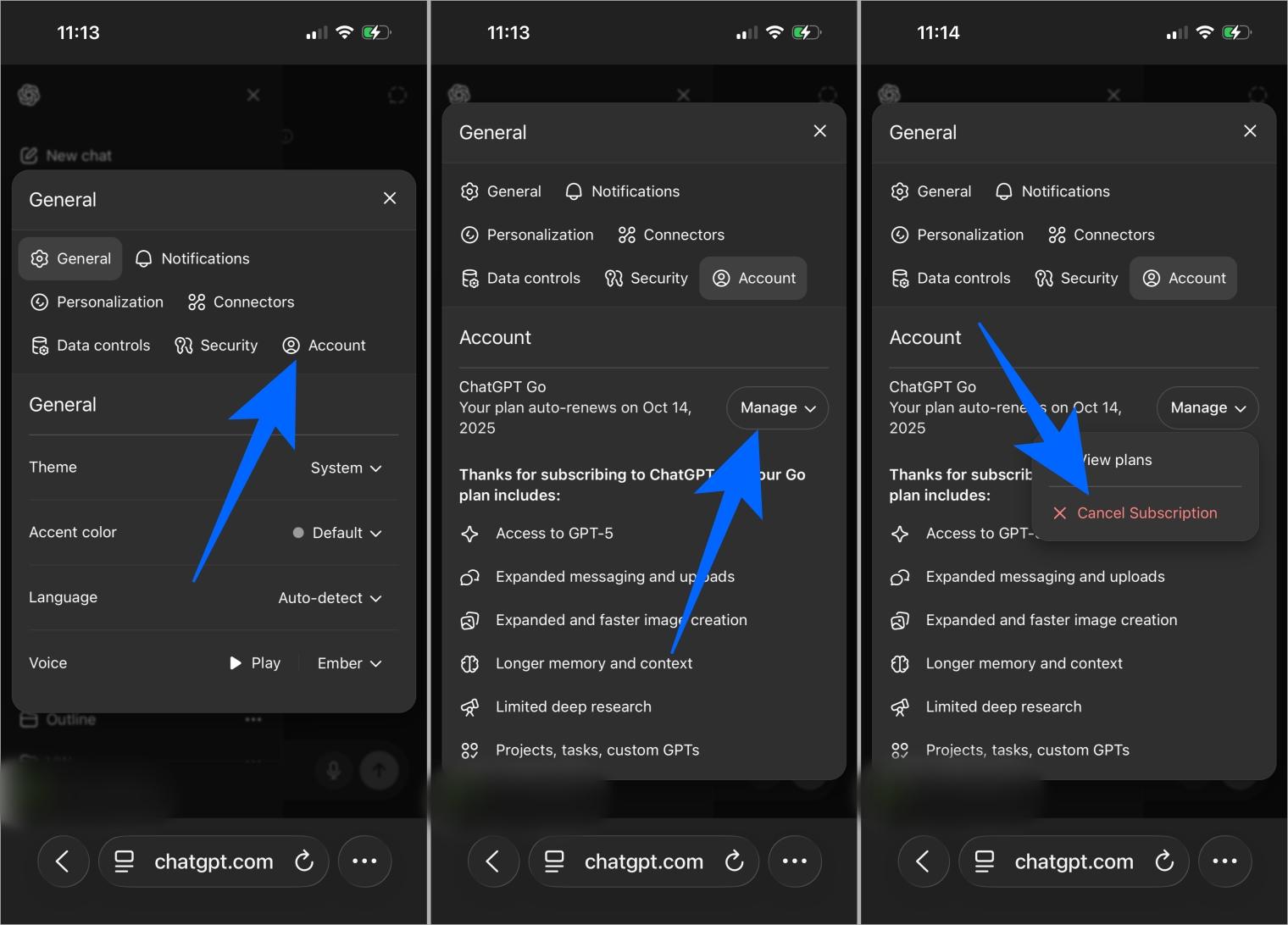
Only users with an active plan will see these options. After canceling, your Plus or Pro benefits stay until your billing period ends, and then your account reverts to the free plan.
How to Cancel on iPhone or iPad ( App Store )
If you subscribed through the ChatGPT iOS app, Apple handles the billing, not OpenAI, so you cancel through your Apple account settings. Deleting the app or your ChatGPT account will not stop the charge.
- Open the Settings app on your iPhone or iPad, not the ChatGPT app
- Tap your name at the top of the screen.
- Tap Subscriptions.
- Find and tap ChatGPT in the list
- Tap Cancel Subscription and confirm.
Apple keeps your paid features active until the end of the current period, and it may still charge you if you cancel within 24 hours of the renewal date.
How to Cancel on Android ( Google Play )
If you subscribed through Google Play, cancel there. Uninstalling the app will not stop payments.
- Open the Google Play Store on your device.
- Make sure you’re signed in with the account you used to subscribe.
- Go to Menu → Subscriptions.
- Tap ChatGPT.
- Select Cancel Subscription and follow the prompts.
You can also do this from the Google Play website on a computer. As with Apple, Google charges 24 hours before renewal, and you keep your benefits until the paid period ends.
Canceling ChatGPT Team and Enterprise Plans
Team and organization plans work differently, and only an Owner or Admin can cancel them:
- Go to your Account details → Manage subscription.
- Look for the Team Plan section.
- Click Cancel Plan and confirm through the email sent.
Enterprise plans usually do not have a self-serve cancel button. You will need to contact OpenAI’s account team, and depending on your contract, cancellation may involve notice periods or a formal request.
Must read: How to Fix the “Too Many Concurrent Requests” Error on ChatGPT
If You Lost Access to Your Email
If you can no longer access the email tied to your account, especially a work email, you can ask OpenAI support to cancel on your behalf. Be ready to provide:
- The email address on the account
- The last four digits of the payment card used
- The date of your most recent payment
Alternatively, you can request account deletion through OpenAI’s privacy request portal, which also cancels the subscription. Be aware this is permanent and cannot be undone.
How to Check If Your ChatGPT Subscription Is Canceled
To make sure your cancellation went through, always confirm it across the right platforms. Check your email for a confirmation from Apple, Google, or OpenAI depending on where you subscribed.
You can also revisit your subscription settings in the App Store, Google Play, or on the web to confirm. On the web, the “Manage Subscription” section should clearly show that you’re on the Free plan after canceling.
What Happens After You Cancel
Canceling does not cut off your access immediately. Here is what to expect:
- Subscription Duration: After canceling, your account stays on the paid tier until the end of your billing cycle. Plus features like GPT‑4, faster responses, and Advanced Data Analysis remain usable until that date.
- Downgrade to Free: Once the cycle ends, the account automatically switches back to the free plan with only GPT‑3.5 and basic features.
- Data and Chats: Your chat history, prompts, and settings are preserved. You can still view or export them anytime.
- Custom GPTs: Custom GPTs are not deleted but become inaccessible; you can’t use or edit them without resubscribing.
- Shared Links: Conversation links created with Plus expire, though your private chat history remains unless you delete it manually.
- Refund Policy: Payments are usually non‑refundable, though some regions (EU, UK, Turkey) allow a 14‑day refund window after the first purchase. Renewal fees generally can’t be refunded.
- Reactivation: Resubscribing restores your old settings and history instantly unless you’ve deleted the account entirely.
Common Issues When Canceling
Most cancellation issues come down to a handful of fixable causes:
Here are the most common problems and what to do:
- Sometimes users can’t find their subscription in the App Store or Play Store. This usually means the plan was purchased on the web instead, so you’ll need to cancel through chat.openai.com.
- Others notice the cancellation option is missing altogether. This can often be fixed by double‑checking the platform you used to subscribe, or by switching to a different browser or device.
- Errors like “Something Went Wrong” are fairly common. Clearing your browser cache and cookies, or disabling extensions like ad blockers, usually helps.
- If the cancel button still won’t appear, try logging in through an incognito or private window to bypass cached data or extension conflicts.
- A frequent issue is not receiving a confirmation email. Always check spam or promotions folders, and revisit the Subscription page to make sure the status shows “Canceled.”
- Some users get charged even after canceling. This happens if the cancellation was made after the billing date, since the subscription stays active until the next cycle ends.
- Temporary glitches may also cause failed attempts. Waiting an hour or so and trying again often fixes the problem.
- If none of these steps work, reach out to OpenAI support with your account details and screenshots. They can manually cancel the subscription for you.
Conclusion
Canceling a ChatGPT subscription is straightforward once you know the golden rule: cancel through the same platform that bills you, whether that is the web, the App Store, or Google Play. Double-check where you originally subscribed, cancel at least 24 hours before renewal, and remember that your access and data stick around until the cycle ends. Even after canceling, the free version of ChatGPT stays available with your saved chats intact, so you are never locked out entirely.
Did this guide help you cancel cleanly? Let us know in the comments below.
Because you most likely subscribed on the web, and the web subscription cannot be canceled from inside the mobile app. Cancel at chatgpt.com instead. If you subscribed through Apple or Google, cancel in their respective subscription settings.
Generally no. Fees are non-refundable, and you keep access until the cycle ends. Some regions, including the EU, UK, and Turkey, allow a 14-day cooling-off refund on a first purchase, but renewal fees usually cannot be refunded.
OpenAI now shows a pause option on the web during the cancellation flow, so you may be offered it as an alternative to canceling outright. Availability can vary by account and region.
Your chat history, prompts, memory, and settings are preserved. Custom GPTs are not deleted but become inaccessible until you resubscribe. Nothing is lost simply by canceling, only by deleting your account.
No. Deleting the app does nothing to your billing. You must cancel through the platform that charges you, whether that is the web, Apple, or Google Play.
No. Canceling only stops the paid subscription and drops you to the free tier. Deleting your account is a separate, permanent action under Settings and Data Controls.
Check for a confirmation email from OpenAI, Apple, or Google depending on where you subscribed, and revisit your subscription page. On the web, the Account section should show the free plan once the cycle ends.
You may like to read: