The Samsung Galaxy S26 series has officially launched, bringing Samsung’s latest innovations in performance, camera technology, and display upgrades. It introduced the industry’s first privacy display along with the Snapdragon chipset.
As with every new Galaxy flagship, Samsung has also introduced a fresh set of stunning stock wallpapers designed to complement the S26’s vibrant AMOLED screen. If you love premium, minimal, and high-resolution backgrounds, you can now download the Samsung Galaxy S26 wallpapers in 4K completely free and use them on any smartphone.
Download Samsung Galaxy S26 Wallpapers in 4K
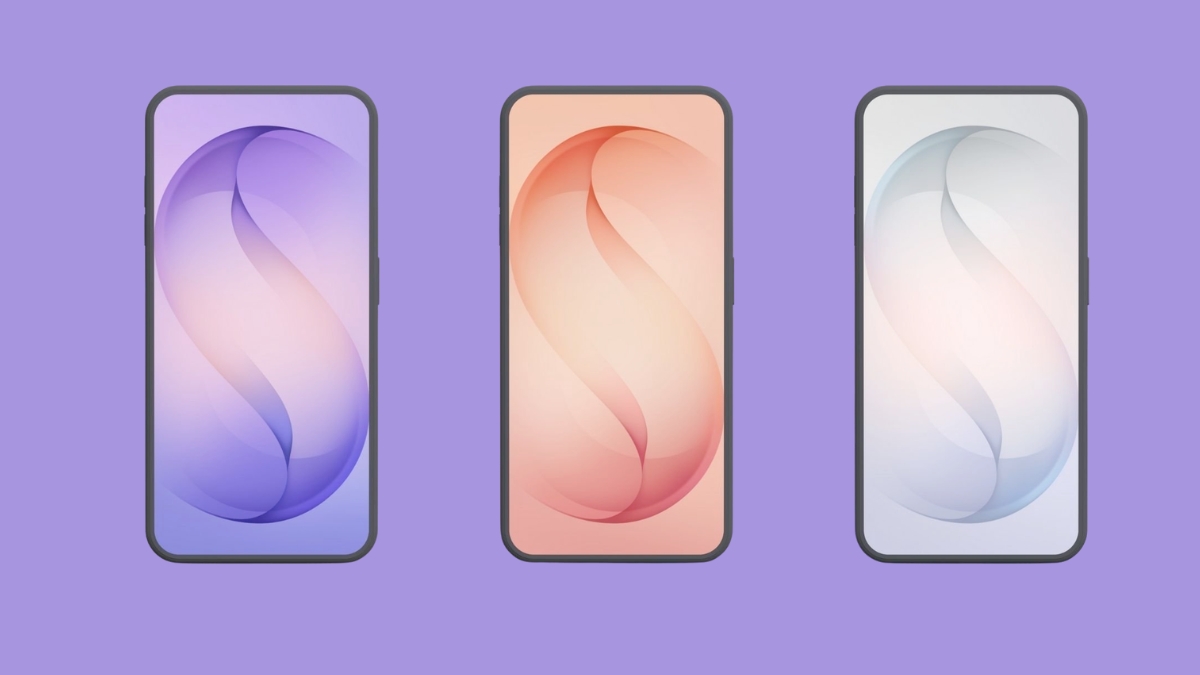
The new Galaxy S26 stock wallpapers feature a sleek, modern, minimalist design centered on an abstract “S” motif to signify the flagship S series.
Samsung has included wallpapers that correspond to popular phone finishes, including Cobalt Violet, Sky Blue, Black, White, Silver Shadow, and Pink Gold. Each wallpaper matches one of the device’s color options, so you can pick the look that best suits your style.
The preview versions shown below are optimized for web viewing and are compressed. So to get the true 4K experience, make sure to use the download links provided on the official source.






Why Download These Wallpapers?
Samsung S26 wallpapers work best on every device.
- 4K Ultra High Quality – Sharp and vibrant visuals suitable for modern displays.
- Official Samsung Design – Clean, minimal, and aesthetically in line with Samsung’s flagship look.
- Free to Use – No cost, no licensing. Ready to apply on any device.
- Works on Any Phone – Ideal for Android, iPhone, tablets, and even desktops.
How to Set the Galaxy S26 Wallpapers on Your Phone
After you download your favorite wallpaper, here’s how to apply it.
Set a wallpaper on Android
- Open Settings → Wallpaper & Style.
- Tap More wallpapers and select the downloaded Galaxy S26 wallpaper.
- Select whether you’d like to set the wallpaper on your Home screen, Lock screen, or both.
Set a wallpaper on iPhone:
- Save Galaxy S26 wallpaper to your Photos.
- Go to Settings → Wallpaper.
- Tap Add New Wallpaper, choose your image and set it as your background.
Pro Tip: Since the wallpapers are of high resolution (approx. 3120 x 3120 px), you can set them on any flagship phone.
Also Read: Samsung Galaxy S26 FAQ: 10 Most Asked Questions Answered
Final Thoughts
With their rich gradients, subtle branding, and modern abstract style, the Galaxy S26 wallpapers are a perfect way to personalize any device in 2026. They’re easy to download, free to use, and look fantastic on both Android and iPhone screens.
Download the Samsung Galaxy S26 stock wallpapers now from the provided link and give your screen a premium flagship look! If you’re looking for more options, we also have the Galaxy S25 FE wallpapers and Galaxy A07 wallpapers available, so you can enjoy stunning visuals no matter which Samsung device you own.
Yes. All the official wallpapers are completely free to use.
Absolutely! As long as your phone supports custom wallpapers, these 4K designs will work.
The wallpapers are roughly 3120×3120 pixels, which translates well to 4K-grade displays.