Snapchat Planets are a Snapchat+ feature that assigns one of eight planets to each of your closest friends, based on how often you interact with them. You are the Sun and the closer a friend’s planet is to you, the more you snap, chat, and engage with them on the app.
Each planet has its own distinct color and emoji design, making it easy to recognize your position at a glance. The order follows our real solar system – Mercury for your #1 best friend, all the way to Neptune for your #8.
Read on to learn what each Snapchat planet means, how the ranking works, and how to check your place in a friend’s solar system.
What is the Snapchat Friend Solar System?
If you’re a regular Snapchat user, you already know the app tracks your eight closest friends based on how often you interact with them. The Friend Solar System is a Snapchat+ feature that takes this one step further instead of a plain list, it turns your best friends into planets orbiting around you.
In this system, you are the Sun. Each of your top 8 friends is assigned a planet based on your interaction level – snaps, chats, story views, and general activity all count. The closer the planet is to the Sun, the more you interact with that friend.
- Mercury: Your #1 best friend (most interaction)
- Neptune: Your #8 best friend (least interaction among your top 8)
It’s Snapchat’s creative, space-themed way of visualizing your closest connections available exclusively to Snapchat+ subscribers.
Snapchat Planets Order and Meaning
Each planet in the Snapchat Solar System has a unique design and color scheme (like hearts, stars, or rings) so you can tell them apart visually. To help you understand and recognize each Snapchat planet, here’s a detailed breakdown of each one and its corresponding emoji:
| No | Planet | Mean | |
|---|---|---|---|
| 1 | Mercury | Your absolute best friend on Snapchat. You interact with them more than anyone else. | Reddish-orange colored planet with 5 ❤️ emojis |
| 2 | Venus | A super close friend, just slightly less active with you than your #1. | Light brown-colored planet with 💛💖💙 emojis |
| 3 | Earth | A strong and steady friendship; lots of interactions. | Blue-green colored planet with 🌙⭐❤️ emojis |
| 4 | Mars | Still close, but slightly less active than your top three. | Red colored planet with ⭐💜💙 emojis |
| 5 | Jupiter | A friendly, casual connection. Regular but not constant interaction. | Reddish-orange colored planet with dark orange stripes and ⭐ emojis |
| 6 | Saturn | Occasional chats and snaps, less frequent than the rest. | Orange colored planet with a ring and ⭐ emojis |
| 7 | Uranus | A lighter connection, on the edge of your top friends. | Green colored planet with ⭐ emojis |
| 8 | Neptune | The most distant of your top friends, but still close enough to make the list. | Blue colored planet with ⭐ emojis |
How Does Snapchat’s Friend Solar System Work?
To use the Friend Solar System, two conditions must be met:
- You must be a Snapchat+ subscriber. Without it, you’ll see the Best Friends badge on a friend’s profile, but tapping it won’t reveal your planet position.
- You and your friend must interact regularly snaps, chats, story views, and replies all count. Streaks alone are not enough.
Understanding the Badges
Once both conditions are met, you’ll see one of two badges on a friend’s profile:
| Badge | What It Means |
|---|---|
| Best Friends badge (plain) | You are both in each other’s top 8 friends |
| Best Friends badge (gold ring) | You both interact regularly, beyond just streaks |
| Friends badge | They are in your top 8, but you are not in theirs |
Tap the gold-ring Best Friends badge to see which planet you are in their solar system. Your position appears as a planet emoji not a number representing your closeness level.
Important: Your ranking in their solar system may differ from their ranking in yours. You could be their Mercury while they are your Jupiter – Both are correct, as rankings are calculated separately for each person.
Note: The Friend Solar System is off by default. You must enable it manually after subscribing to Snapchat+.
Related: How to Tell If Someone Has Snapchat Plus: 9 Clear Signs
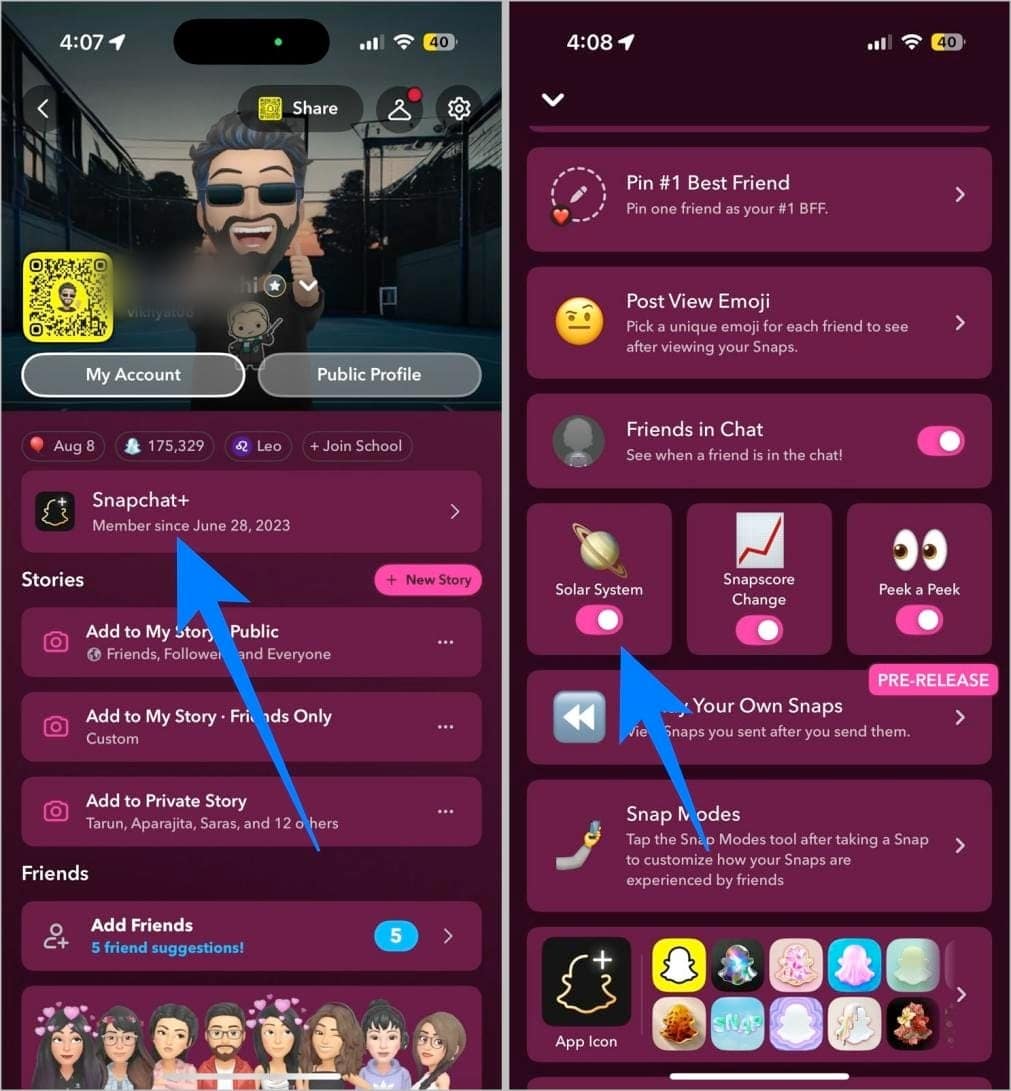
How to Turn ON Snapchat Solar System
- Subscribe to Snapchat Plus.
- Once done, head to your Snapchat profile.
- Here, tap the Snapchat+ tab.
- Now, scroll down and toggle on Solar System.
Check Your Position in a Friend’s Snapchat Solar System
Now that you know everything you need about Snapchat’s Friend Solar System, you can head to your best friend’s profile and see what your position is in their Snapchat Solar System.
Here’s how:
- Open Snapchat and head to your best friend’s profile.
- Here, check for the Best Friends badge with a golden ring around it.
- Tap the badge, and a pop-up window will reveal your position.
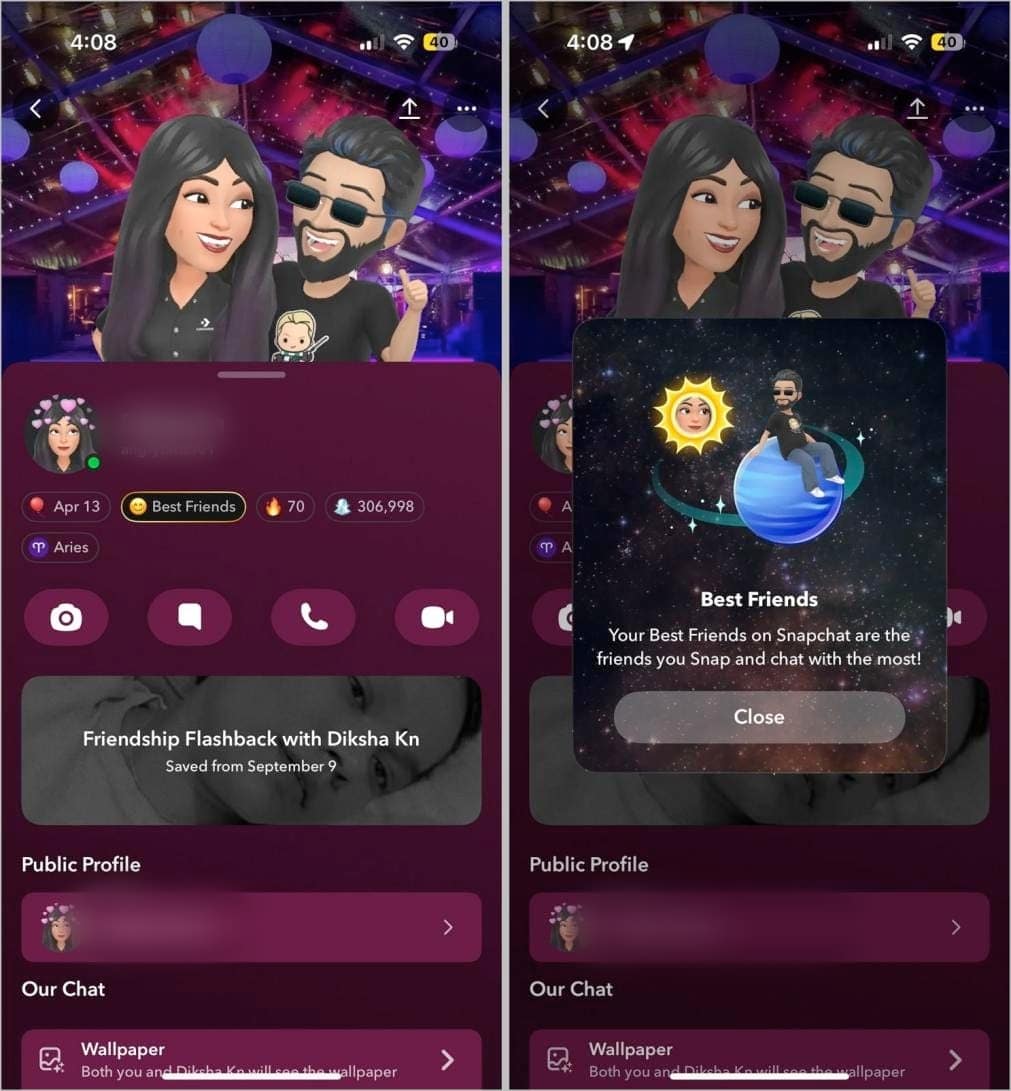
Remember, positions aren’t fixed, as the interaction level changes in real time. You might drop from Mercury to Mars and bounce back in the next few days. That’s part of the fun (and the drama). Late replies, trips, or a broken streak can quickly shift positions.
How to Move Closer in Someone’s Snapchat Solar System
You can’t be the Mercury in every friend’s Solar System, but you can do this to get closer to your favorite friends:
- Send them snaps every day
- Chat with them often and reply quickly
- View their stories regularly
- React or reply to their stories
- Use fun filters, Lenses, or games with them
- Share Spotlight videos or links with them in chat
- Be consistent over time, and don’t disappear for days
Solar Summary…
Snapchat Planets adds a fun way to see where you stand with your friends on the app. Instead of showing numbers, Snapchat uses planets to reflect how often you interact with someone.
These rankings change often. Missing replies, chatting less, or being inactive for a few days can shift your position quickly. While it can be interesting to check, planet rankings do not define real friendships. Your connection outside Snapchat always matters more.
Still curious about your place in someone’s Solar System? Snapchat Planets makes that answer just one tap away.
Snapchat’s Solar System is a Snapchat+ feature that shows your rank among a friend’s top eight. Each planet maps to a position: Mercury (1), Venus (2), Earth (3), Mars (4), Jupiter (5), Saturn (6), Uranus (7), Neptune (8). It is a ranking metaphor, not astrology.
Yes. Only Snapchat+ subscribers can see the Best Friends badge with the gold ring and the planet view. Non-subscribers will not see planets.
Only you. The Solar System view is private to your account when you look at a friend’s profile. What you see for them can differ from what they see for you.
Open Snapchat → Profile icon → Settings → Snapchat+ → Friend Solar System → toggle On or Off. If you do not see the option, update the app and confirm your Snapchat+ subscription is active.
Rankings are calculated separately for each person’s Best Friends list. You might be their Mercury while they are your Jupiter, and both can be correct.
Common reasons: you are not a Snapchat+ subscriber, the feature is toggled off, the app needs an update, you are not in their top eight, or temporary glitches.
Try: Update the app → confirm Snapchat+ → re-enable the toggle → force-quit and reopen → sign out and back in.
Snapchat does not publish an exact schedule or formula. Positions can change based on overall interaction patterns in chats and snaps over time, not just streaks. Frequency can vary and may shift day to day.
Don’t miss these related reads: