Update: Added new Roblox Music codes on Oct 06, 2026
Even though Roblox games already provide a tailored experience for most players, there are times when you might want to customize it further. For those cases, Roblox music codes come to the rescue. These handy little Song IDs allow you to play your favorite tunes in compatible experiences and keep things chill. So if you want to catch this train, keep reading for the latest working Roblox music codes and how to use them.
Best Roblox Music Codes
Let’s start with the best Roblox Song IDs for kicking back and relaxing. However, our list also contains some bangers if you want to amp up the adrenaline. So open up our Roblox Games codes list and begin blasting tunes.
- 1836009208: Classic Easter
- 5410086218: Noisestorm
- 1846088038: Morning Mood (Peer Gynt Suite)
- 1836272467: Horror Pantomime
- 71934965392436: MESMERIZER / メズマライザー (Clown Remix)
- 111560286322896: LIKE THE MOONLIGHT ‘FUNKY HOUSE MIX’
- 168208965: Whatcha Say
- 138855854: Get Hyper
- 146237847: Trumpets
- 1626996526: Windows XP
- 1665926924: God’s Plan
- 136209425: Stronger
- 142376088: Raining Tacos
- 1843436418: Running
- 1846368080: Stadium Rave
- 139235100: Black And Yellow
- 291895335: Moves Like Jagger
- 170103636: Jenny
- 1837021402: Deja Vu
- 628874064: May We All
- 1844397736: Wooden Bear
- 1837015626: Tokyo Drift
- 131603357: Intergalactic
- 138134680: Let’s Get It Started
- 1837485466: I’m Tickled Pink
- 139222895: Ooh Kill Em
- 1000123073: Money, Money, Money
- 433473612: Flash Bang
- 1841343148: A Christmas Fantasy
- 150269919: I Shot The Sheriff
- 477304028: Mainstreet
- 1837014514: Everything
- 1842155223: Kinderszenen, Op. 15
- 1845938478: Mongolian Throat Singing, No. 12
- 1841636346: Angel
- 148848475: Sorry Sorry
- 1840414827: You Must Be An Angel
- 147370160: The Generation
- 1840821490: Big Not Blues
- 1835337424: Insane Patients
- 1836797744: Golden Swagger
- 1835383046: Hurt
- 1841592252: Ghostly Night
- 1846820957: We Wish You A Merry Christmas
- 1843379539: Darkside
- 1845939536: Low Throat Singing, No. 1
- 1837006787: You Ain’t Hot Enough
- 1835719190: All I Want (Shortened)
- 1836795190: Young Forever
- 1842658587: Megamix
- 1837251940: Te Quiero
- 1843403987: Happy Song
- 1845491707: Hold Me Forever
- 1844280917: Goodbye Brother
- 1838880936: She Wolf (Falling to Pieces)
- 1840511219: Funky Fanfare
- ImproperlyTypedCode: Like most Roblox game codes, even Song IDs can refuse to work if you’ve typed them incorrectly. For a quick fix, ensure you’re copy-pasting the number as you see it for the best results.
- OlderRobloxVersion: Sometimes, Roblox can throw up errors if you’re using an older version not compatible with certain experiences. As such, head over to the official Roblox download page and update the platform promptly.
- SongIDwasRemoved: Roblox removes or privatizes audio. This is especially prevalent in unlicensed or copyrighted tracks. So if you have a code you love, better listen to it quickly!
- ExperienceBlockingMusicCodes: As mentioned above, not all Roblox experiences support Song IDs. In such cases, look for compatible experiences or the codes in the Boombox.
- ServerError: There are times when Roblox servers run into issues. In that case, there’s nothing to do but wait for a fix.
- TheGameBlocksMusicCodes: Some Roblox experiences restrict music playback to players who own a Boombox item or a specific Game Pass. If you don’t have the required access, valid Song IDs won’t play.
Best Funny and Meme Roblox Music Codes
While using the above Roblox music codes to dance away is fine, there are times when you just feel silly. So if you want to drop the hardest troll sounds, roasts and more into your game, we have you covered. Below are the best funny and meme Roblox Song IDs to use next time you’re in an experience.
As of now, there are no expired codes for Roblox Music.
How to Use Roblox Music Codes
Now that you have the entire list above, you must be wondering how to use them. However, an important thing to note is that you cannot use these Song IDs in any experience. Roblox music codes need to be entered into a Boombox to be played. Some experiences also lock this box behind a small fee you must pay. Thankfully, you can test these Roblox music codes for free using the steps below:
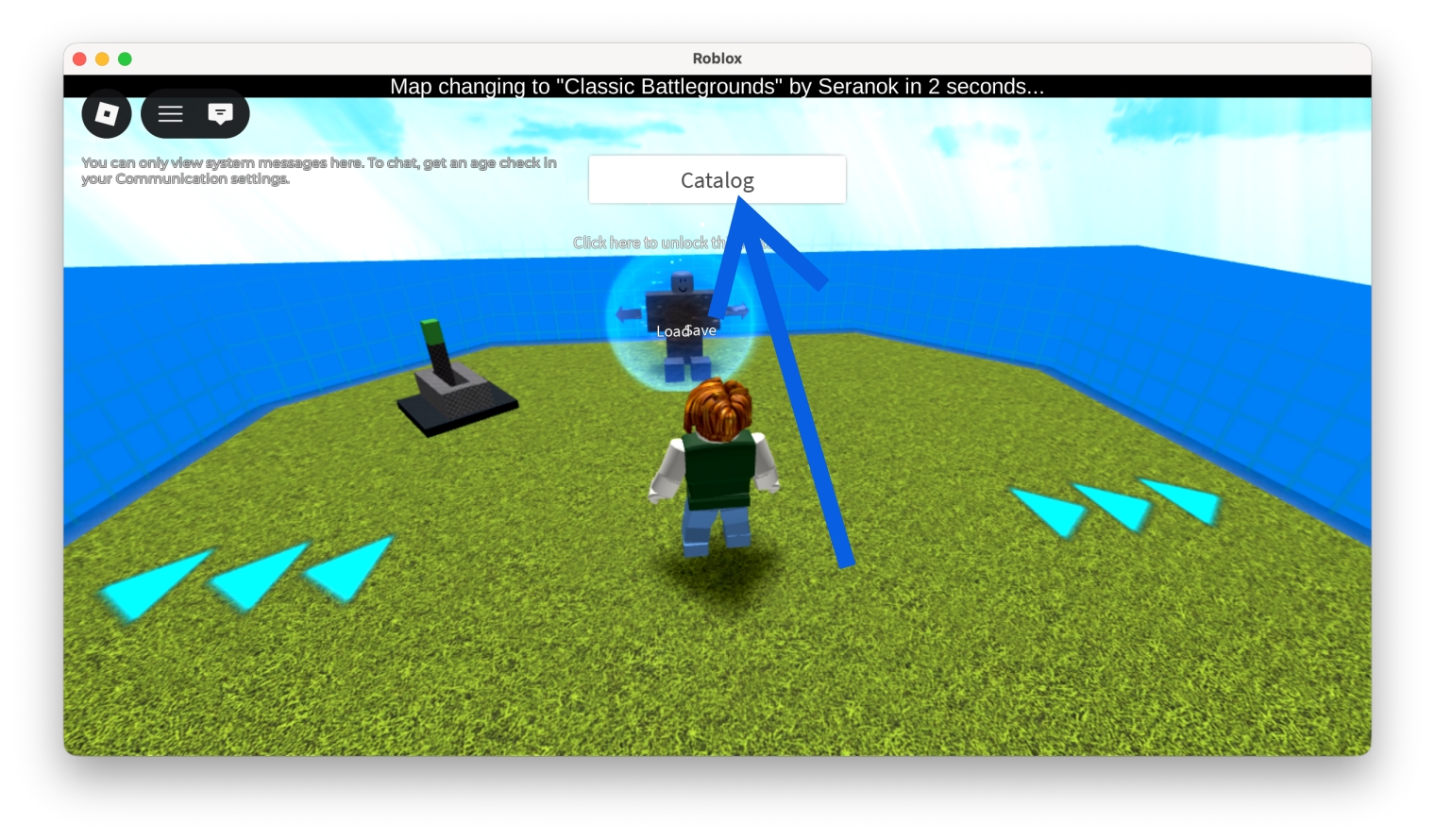
- Head over to Catalog Heaven on Roblox.
- Click the Catalog button at the top to open up the menu.
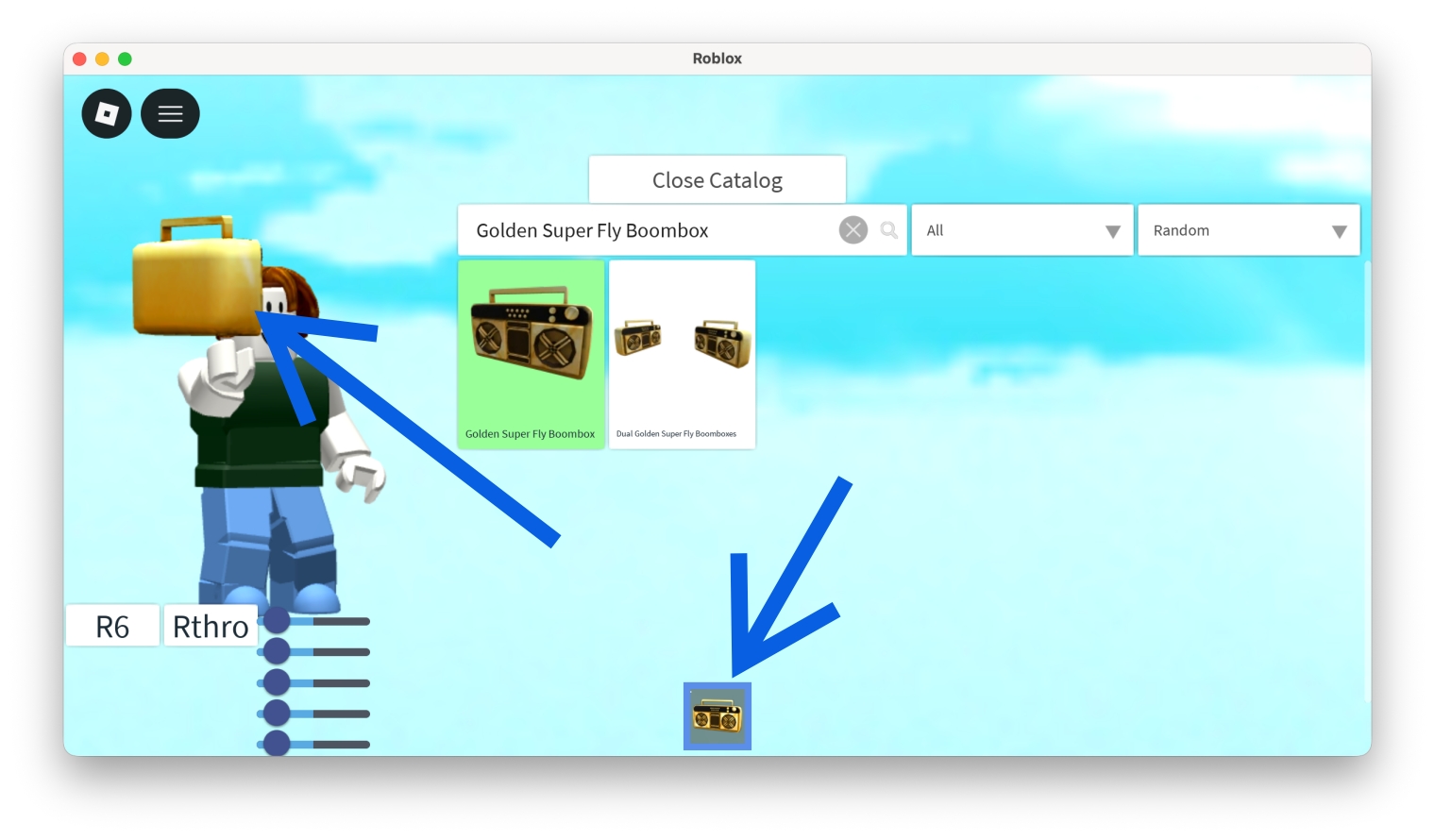
- In the search box, type “Golden Super Fly Boombox” and click it once to equip it. Once done, close the catalog.
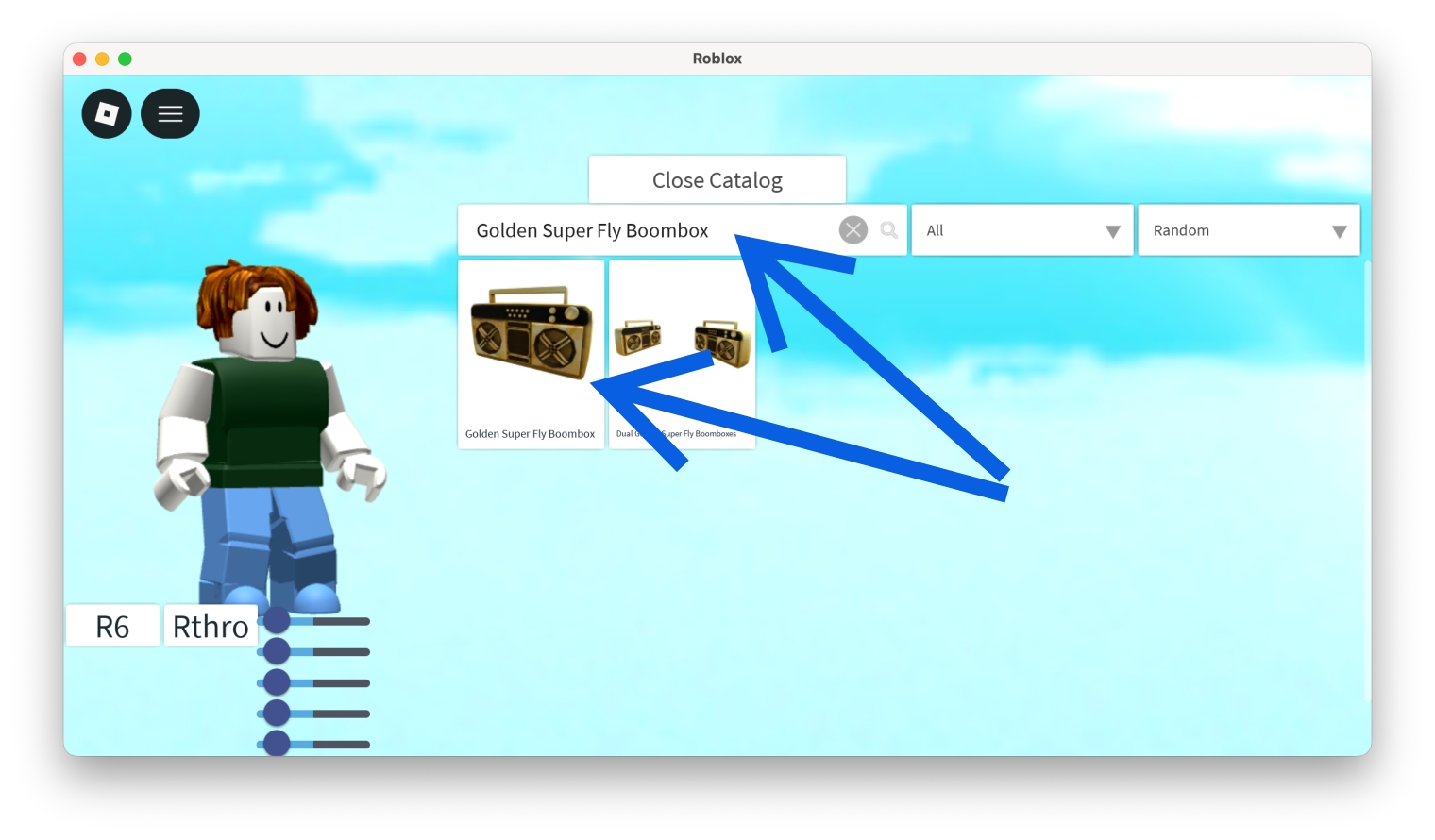
- Click the boombox in your inventory and then on it when your character is holding it.
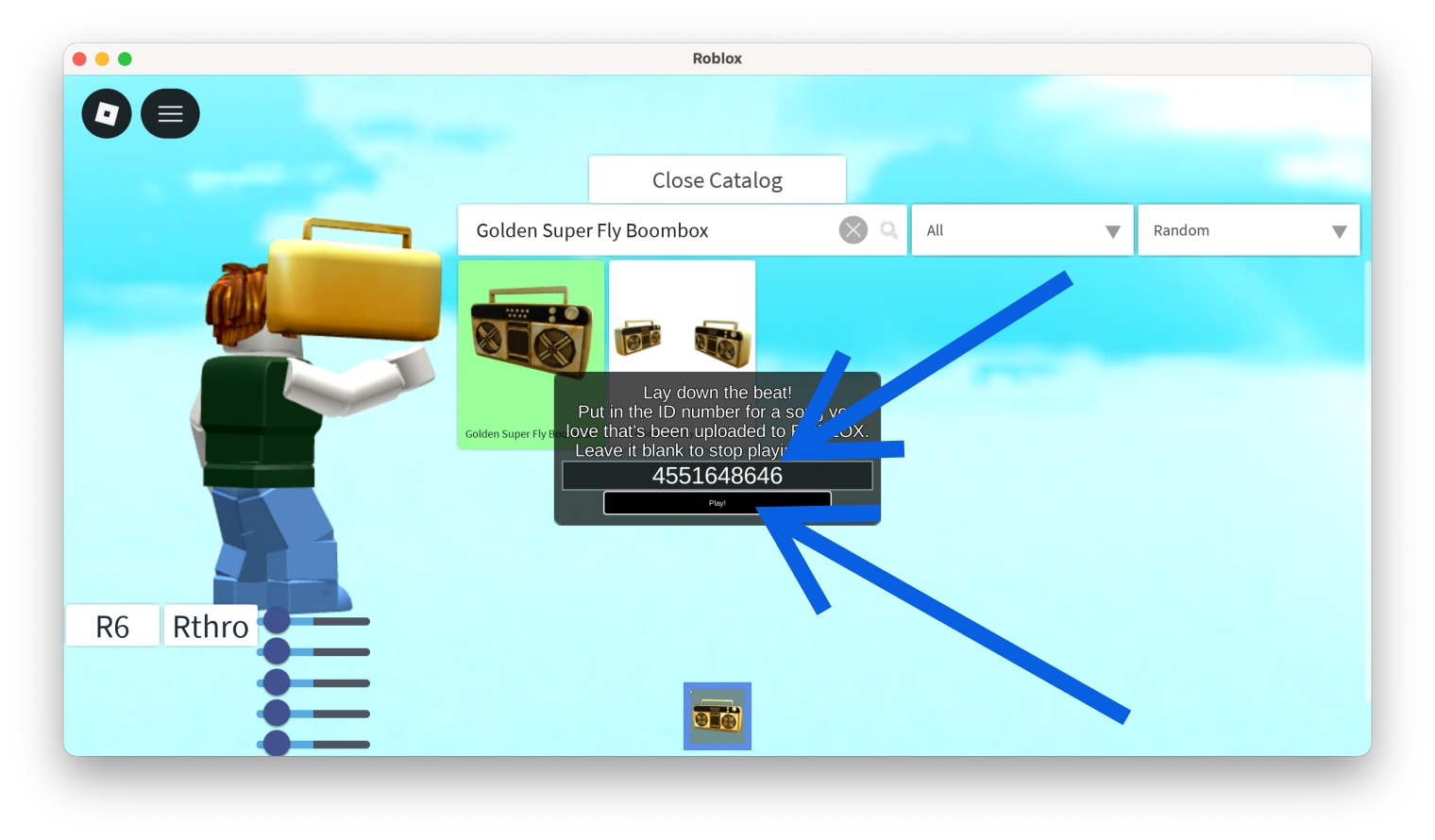
- Enter the Roblox music code in the pop-up box.
- Click the Play button to listen to the music.
Also Check: How to Get or Earn Free Robux
Roblox Music Codes Not Working (Reasons and Fixes)
While Roblox Song IDs are easy enough to get working, there are times when you might run into issues with using them. Some of the most common reasons this happens and how to fix them are:
- Improperly Typed Code: Like most Roblox game codes, even Song IDs can refuse to work if you’ve typed them incorrectly. For a quick fix, ensure you’re copy-pasting the number as you see it for the best results.
- Older Roblox Version: Sometimes, Roblox can throw up errors if you’re using an older version not compatible with certain experiences. As such, head over to the official Roblox download page and update the platform promptly.
- Song ID was Removed: Roblox removes or privatizes audio. This is especially prevalent in unlicensed or copyrighted tracks. So if you have a code you love, better listen to it quickly!
- Experience Blocking Music Codes: As mentioned above, not all Roblox experiences support Song IDs. In such cases, look for compatible experiences or the codes in the Boombox.
- Server Error: There are times when Roblox servers run into issues. In that case, there’s nothing to do but wait for a fix.
- The Game Blocks Music Codes: Some Roblox experiences restrict music playback to players who own a Boombox item or a specific Game Pass. If you don’t have the required access, valid Song IDs won’t play.
Related: Roblox Error Code 267: Causes and How to Fix It
Final Thoughts
The above Roblox music codes will ensure you’re entertained for hours with the latest tunes. If you’re having any trouble playing the music, drop your questions in the comments below.
Roblox music codes can stop working if the audio is removed or set to private. They can even be taken down due to copyright issues.
Your Roblox song ID might not be working if it’s typed incorrectly, has been removed from the Roblox library or has expired. In that case, it’s better to check out the other IDs.
No. Roblox Song IDs can only be used in certain experiences. Some games require a gamepass or don’t let them play altogether.
Roblox music codes are free to use. However, some experiences may require a paid Game Pass.
The best way to find the latest Song IDs is to bookmark our page and keep checking back here.