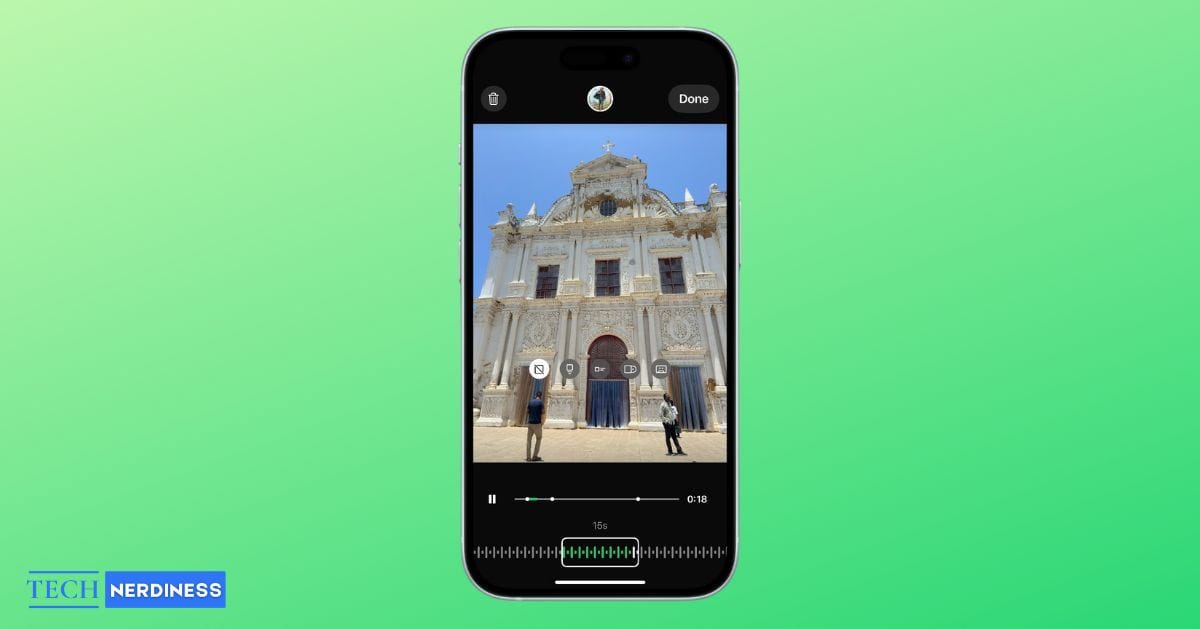
WhatsApp Status has long been a simple way to share quick updates, but adding music used to require clumsy workarounds. That changed in January, when Meta introduced native music support for Status updates.
You can now choose songs directly from WhatsApp’s built-in music library and add them to your photo or video statuses in just a few taps. Here’s how to add music to your WhatsApp Status.
How to Add Music to Your WhatsApp Status
Before you start, update WhatsApp to the latest version and confirm the feature is available in your region.
Note: This works only on personal accounts, not WhatsApp Business.
On iPhone
- Open WhatsApp and go to Updates.
- Tap the + icon next to My Status to choose or capture a photo/video.
- Tap the music note icon to access the music browser.

- Browse or search for a song, preview it, then select.
- Trim the desired portion using the progress bar.
- Tap Done, move, resize or remove the music sticker, and post.

On Android
- Open WhatsApp and tap Updates.
- Tap the camera icon to select or capture a photo/video.
- Tap the music note icon in the editor to open the music browser.
- Search or browse for a song, then preview and select it.
- Use the progress bar to trim the track.
- Tap Done, then adjust the music sticker before posting.
For an image status, only 15 seconds of music will play. For a video status, the song can continue for up to 60 seconds, which is the maximum video length allowed on WhatsApp Status.
That’s it, you only get a small slice of the track, so make sure to pick the catchiest or most meaningful part. Once added, the song shows up as a sticker on your status. You can drag it around or resize it, and anyone who sees your status will also see the song’s name, handy if they want to check it out themselves.
If you’re curious about taking your WhatsApp experience even further, you can also check out how to use ChatGPT on WhatsApp to make your chats smarter and more fun.
Limitations You Should Know
Currently, music on Status is available on Android and iOS, but not on WhatsApp Web. The rollout started with beta versions like Android 2.25.2.5 before reaching stable builds, so if you don’t see the option yet, you may need to wait for the update. WhatsApp also notes that the feature isn’t available in all countries yet, including Brazil.
For WhatsApp Business accounts, access to licensed music is restricted since the library is only for personal, non-commercial use. That means businesses may have a more limited selection.
Workarounds If You Don’t Have the Feature Yet
If music on Status hasn’t reached your account yet, you still have options:
- Background method: Play music on your phone through an app like Spotify or Apple Music and record your status video. WhatsApp will capture both the video and the sound.
- Third-party apps: Tools like InShot or WhatsCut Pro let you edit music into a photo or video before uploading it as a status.
- High-quality uploads: Apps such as PureStatus can help reduce compression and keep your videos looking sharp when you add your own audio.
Why Music on WhatsApp Status Matters
Adding soundtracks makes your statuses more expressive, whether it’s pairing a sunset photo with a chill track or flexing your playlist. With this feature, WhatsApp catches up to Instagram and TikTok, where music is already central to self-expression.