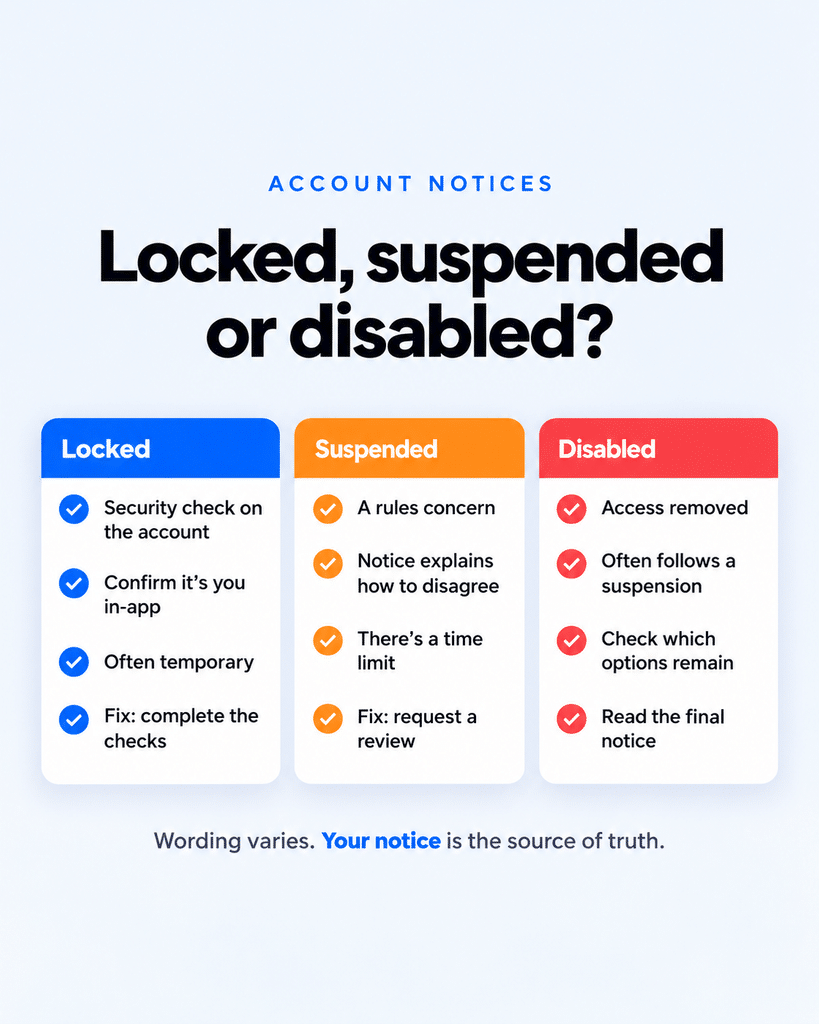
You open Facebook and a full-screen notice replaces your feed. One word on that screen decides how much trouble you’re in. “Locked” usually means a few minutes of identity checks. “Suspended” starts a countdown. “Disabled” can mean the account is already gone.
Meta uses all three terms on Facebook in 2026, and they aren’t interchangeable, even though the screens look almost identical. A lock is a security measure. A suspension and a disable are enforcement actions, and they follow a specific order with a hard deadline in between.
Here’s how to tell which one you’re facing and what to do next.
Facebook Account Locked, Suspended, or Disabled: The Quick Answer
| Locked | Suspended | Disabled | |
|---|---|---|---|
| Why it happens | Facebook spots activity that doesn’t look like you, such as an unfamiliar login | Facebook believes the account broke its Community Standards or rules | An appeal failed, the appeal window closed, or the violation was severe |
| Punishment? | No, it’s protection | Yes, but temporary | Yes, permanent |
| Profile visible to others? | Usually yes | No | No |
| Deadline | None | Appeal within 180 days (varies by region) | No further review |
| How you fix it | Complete the security check | File an appeal from the notice | Usually you can’t |
The table covers the basics. The details below cover what the notice won’t tell you.
What a Locked Facebook Account Means
A lock is Facebook protecting the account from someone who isn’t you. Meta triggers it when it detects unusual activity, such as a login attempt from an unfamiliar device or location. Meta doesn’t publish a full list of triggers.
Because a lock isn’t a penalty, there’s nothing to appeal and no clock running. Your friends can usually still see your profile while you work through it.
To unlock it:
- Update the Facebook app, or log in from a browser you’ve used before. A familiar device helps Facebook recognize you.
- Screenshot the lock screen, then tap Get started.
- Follow the prompts. Facebook may send a code to your email or phone, ask for your date of birth (it must match the one you signed up with), or request a video selfie.
- If Facebook shows a login or change you don’t recognize, report that it wasn’t you.
- Set a new password you don’t use anywhere else.
Worth knowing: after you pass the check, Facebook may make you wait 24 hours before you can log in again. Retrying won’t shorten it. Codes can also arrive late, so check spam folders and wait before requesting another one.
If you can’t log in at all because someone changed your email or password, you’re dealing with a hacked account, which runs through Facebook’s separate hacked-account recovery flow.
What “We Suspended Your Account” Message on Facebook Means
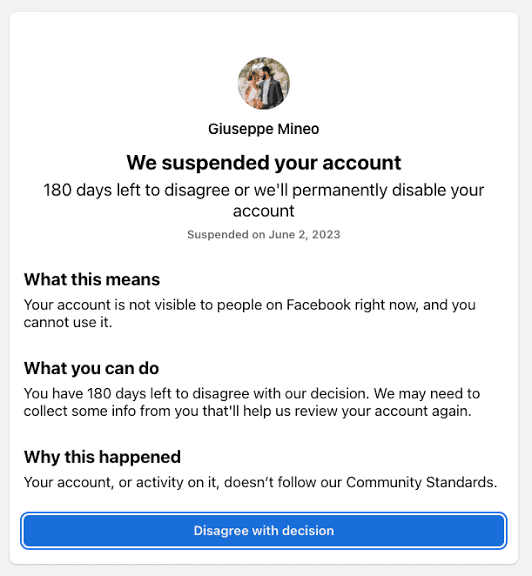
Suspension is where enforcement begins. Facebook believes the account, not just a single post, violated its rules, and it freezes the account while giving you a chance to disagree.
While suspended, your profile disappears for everyone and you can’t use it. Messenger goes dark too, since it signs in with your Facebook account.
Look closely at the notice. It shows a number of days or a date, and that’s your appeal deadline. Meta’s help page says you get 180 days, but the window varies by region, so trust the date on your own screen over any article (this one included). The notice may also name a policy, often Account Integrity, or ask you to confirm your age.
To appeal, log in, read the full notice, screenshot every screen, and tap the appeal option. Meta may ask for a code, a photo of government ID, or a video selfie. Submit once. Resubmitting doesn’t speed anything up, and Meta publishes no fixed review time.
The detail most people miss: there’s no email, form, or paid service that lifts a suspension from outside the app. The appeal starts from the notice inside Facebook, and only Meta decides.
When Facebook Disables Your Account Permanently
A disabled account is the end of the line. Per Meta’s help page, it happens when you miss the appeal deadline, when Meta rejects your appeal, or when the violation is severe or time-sensitive enough that Facebook skips suspension altogether. After that, Meta says you can’t request another review, and the profile stays hidden from everyone.
That last case catches people off guard. They never see a “suspended” screen at all. The account goes from normal to disabled overnight, with no countdown and no warning.
If you think the decision was wrong anyway, our guide on how to recover a disabled Facebook account covers the remaining options, including Meta Verified support and downloading your data.
Don’t Make a New Account After a Suspension
The obvious workaround backfires. Meta’s Account Integrity policy covers accounts owned by the same person as a disabled account and accounts created to evade enforcement. A fresh profile made during a suspension, or after a disable, can get flagged under the same policy, and it can hurt your appeal on the original account.
This is also why the suspension notice so often cites Account Integrity. The policy targets the account and its owner, not one specific post, and Meta doesn’t say which signal it used in your case.
Restricted Is a Fourth State Facebook Doesn’t Explain Well
Between “fine” and “suspended” sits a milder penalty: a restriction, often called “Facebook jail.” Your account still works and people can still see it, but certain features are switched off for a set period.
Restrictions follow Meta’s strike system. According to Meta’s Transparency Center, for most violations on personal Facebook accounts:
- 1 strike: a warning
- 2 to 6 strikes: limits on specific features, such as posting in groups
- 7 strikes: 1-day restriction from creating content (posting, commenting, creating a Page)
- 8 strikes: 3 days
- 9 strikes: 7 days
- 10 or more strikes: 30 days
If your notice mentions a strike or a feature you can’t use for a few days, you’re restricted, not suspended. Since late 2024, many first-time violators can also complete a short educational course to remove their first strike. Meta doesn’t offer it for serious violations.
How to Tell Which One You Have
The notice itself gives it away if you know what to look for:
- “Your account has been locked” or “We saw unusual activity,” plus a “Get started” button: locked. Complete the security check.
- “We suspended your account,” plus a day count or date: suspended. Appeal before that date.
- “We disabled your account,” with no appeal option: disabled.
- A strike notice or a “you can’t post for X days” message: restricted. Wait it out.
Scammers know these screens cause panic. Facebook doesn’t ask for your password by email or message, and any “recovery service” that wants your login or codes is a scam.
Don’t Confuse These With Profile Lock or Deactivation
Two Facebook features sound similar but have nothing to do with enforcement.
Locking your Facebook profile is a privacy setting you turn on yourself. It hides your posts and photos from people who aren’t your friends, and you can switch it off anytime.
Deactivation is also your choice. It hides your profile until you log back in, while deletion removes it after a grace period. Our guide on how to deactivate or delete your Facebook account explains both.
If you did either of these, Facebook didn’t take action against you.
Final Thoughts
The word on the notice matters more than anything else on the screen. A lock is Facebook guarding your account, and you can usually clear it today. A suspension is a deadline, so read the date and appeal while it’s still open. A disable is mostly final. Screenshot whatever you see, act inside the window you’re given, and keep every step inside the Facebook app.
There’s no fixed period. The lock lasts until you complete the security check, plus a possible 24-hour wait afterward.
Yes, if Meta accepts your appeal. Meta makes the final call, and some suspended accounts don’t return.
Facebook permanently disables the account once the appeal window closes, and you can’t request another review.
No. Suspended and disabled accounts aren’t visible to anyone. A locked account usually stays visible.