Few things are more frustrating than opening Facebook and discovering your account has been disabled, especially when you’ve spent years building connections, managing groups, running a business page, or simply using the platform without issues. In many cases, users aren’t given a detailed explanation beyond a generic notice about Community Standards or suspicious activity, leaving them with more questions than answers.
Over the years, I’ve seen Facebook disable accounts for a wide range of reasons, from genuine policy violations to mistaken identity checks, automated spam detections, hacked accounts, and even brand-new profiles that never had a chance to establish a history on the platform. The reality is that Meta’s enforcement systems handle billions of accounts, and while they’re effective at stopping abuse, they don’t always get every decision right.
The good news is that a disabled account isn’t always a lost account. Depending on the reason for the restriction and how quickly you act, there may be multiple ways to appeal the decision, verify your identity, and regain access. In this guide, I’ll walk through the recovery methods that actually matter in 2026, including what to do if your account was disabled by mistake, how to navigate Meta’s appeal process, and the options that remain available even after the standard review window has expired.
First, Understand What Kind of Disable You’re Actually Dealing With
Not all Facebook account disables are the same, and the path forward depends entirely on which type you’re facing. Before you do anything else, figure out where you stand.
- Temporary suspension: This is the most recoverable situation. You’ll typically see a message when you try to log in, and you’ll have up to 180 days to submit an appeal (though this window can vary depending on your region). During this period, your account is essentially frozen: invisible to others, inaccessible to you, but not gone.
- Permanent disablement: This kicks in if you miss the 180-day appeal window, if your appeal is denied, or if Meta’s systems flagged your account for something it considers a serious or immediate violation, such as impersonation, harassment campaigns, or significant Community Standards breaches. At this stage, Meta rarely offers another avenue for review. That doesn’t mean you’re completely out of options, but it does mean the path is much narrower.
- Account you deactivated yourself: This one’s easy. Just log back in and reactivate. Nothing is lost.
- One thing worth knowing: Meta doesn’t always follow the suspension-first sequence. For time-sensitive or severe violations, the platform can skip straight to permanent disablement with no warning. If that’s what happened to you, the standard appeal process may not be available, but there are still a few things worth trying.
Common reasons accounts get flagged include posting content that violates Facebook’s rules, impersonating someone else, sending messages that trigger spam filters, or running into age-related legal restrictions in certain regions. For brand-new accounts like Richard’s, the algorithm sometimes flags profiles that lack behavioral history as suspicious, a frustrating quirk that Meta has not fully resolved.
How to Recover a Disabled Facebook Account: Steps That Actually Work
If you believe the disable was a mistake, move through these steps in order. The earlier steps tend to get faster results.
1. Start at the Login Screen
Go directly to facebook.com and attempt to log in. If your account is suspended rather than permanently disabled, you’ll see a prompt to appeal right there. Look for any button or link that says “Request Review,” “Appeal,” or “Your Account Has Been Disabled.”
This is the most direct route. Don’t go hunting for forms or email addresses before you check whether a built-in appeal option is already waiting for you.
If Meta sends you a disablement notification email, check it for a direct appeal link and verify it’s a facebook.com URL before clicking. Scammers send convincing fake versions of these emails.
2. Get Meta Verified
If you’re serious about recovering your account and willing to spend a little money, Meta Verified is one of the most effective tools available in 2026. The subscription gives you access to live human support via chat, not a form, not an automated response queue, but an actual person who can look at your account and escalate your case.
The difference in response quality is significant. Standard help forms often return generic auto-replies or no reply at all. A Meta Verified support chat gets you someone who can actually do something.
If you have access to this option, use it early and pair it with the steps below to give your case the strongest possible foundation.
3. Download Your Account Data Before It’s Gone
If you still have any access to your account, even limited access, download your data immediately. Once a permanent disable takes full effect, this window closes.
Here’s how to do it from the Facebook app:
- Tap the three horizontal lines (menu icon) in the top-right corner.
- Go to Settings & Privacy, then Settings.
- Tap Meta Account Center.
- Select Your information and permissions, then Download your information.
- Check Profile Information, Account Activity, and Security and Login Info.
- Set the date range to All time, choose HTML format, and click Create File.
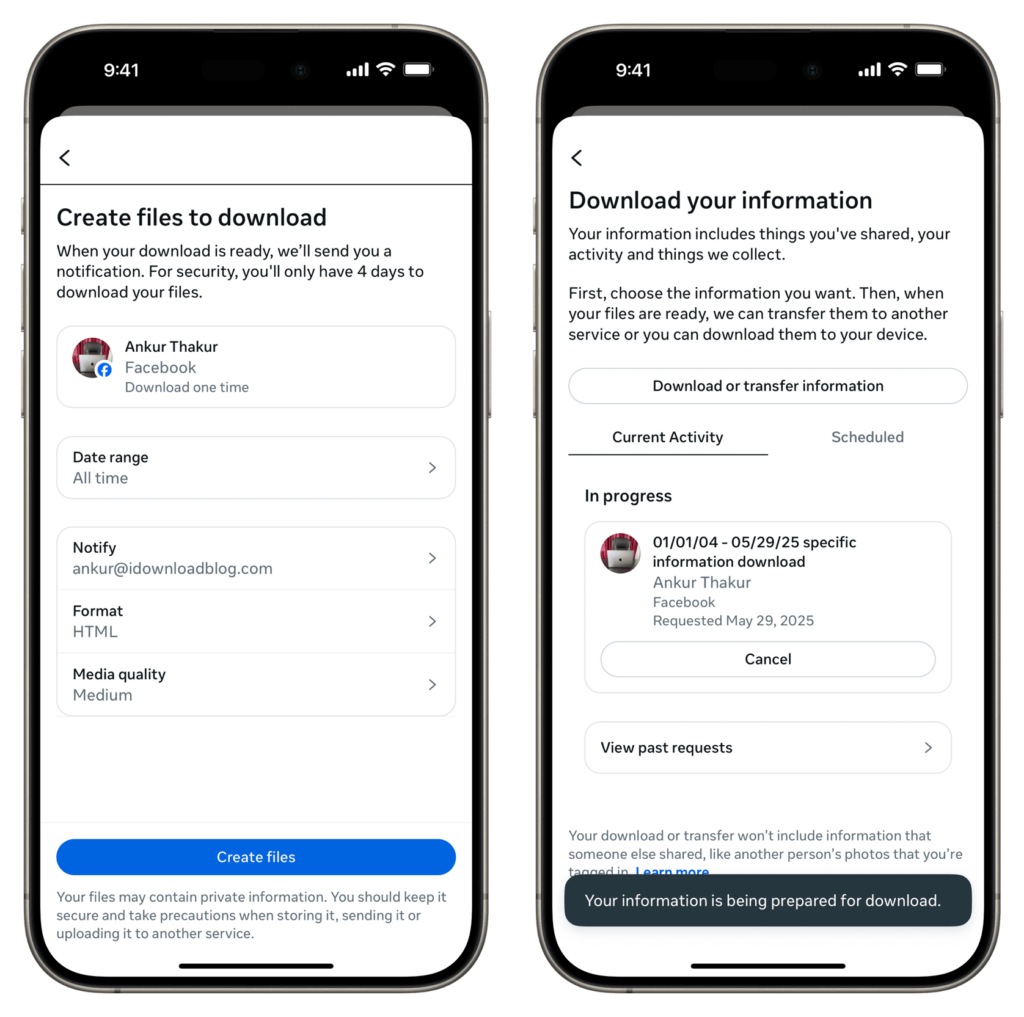
Facebook will notify you when the file is ready. Inside, you’ll find your profile link, username, login history, and other details that can strengthen your appeal.
4. Build Your Case Before You Contact Anyone
Before submitting anything, write a clear, factual summary of your situation. Keep it brief but specific. If you suspect your account was hacked or flagged incorrectly, note exactly what happened: unexpected password reset emails, login alerts from unfamiliar devices or locations, or any other unusual activity with timestamps if you have them.
This matters more than people realize. Support agents and review systems look for organized, credible accounts of what happened. Vague explanations or emotionally charged messages get deprioritized. A calm, factual timeline of events signals that you’re a real person with a legitimate grievance, not someone trying to game the system.
5. Submit the Official Disabled Account Appeal Form
Whether or not you have Meta Verified, this is the official channel and it’s worth submitting.
- Go to facebook.com/help and search for “appeal” or “account disabled”.
- Look for the link titled “My account is disabled or suspended” under Login, Recovery and Support.
- Find the Facebook Disabled Account Appeal Form within that section and fill it out.
You’ll need:
- Your full name exactly as it appears on your profile.
- The email address or phone number linked to the account.
- Your date of birth (if requested).
- A clear, polite explanation of why you believe the disable was an error.
In the additional information section, stick to facts. Avoid emotional language. If you were hacked, say so plainly and mention any suspicious activity you noticed. Meta may ask for a government-issued ID. A passport or driver’s license works. Make sure it’s legible, matches the name on your profile, and is in an accepted format (JPG, PNG, or PDF).
After submitting, expect a confirmation email. Reviews typically take a few days, but delays of a week or more are common. Check your spam folder regularly.
One important note: Don’t submit multiple appeals or contact support repeatedly in a short window. It doesn’t speed things up. It can actually flag your case as spam and slow the process down.
6. Try Email as a Last Resort
Meta’s email support is inconsistent, but some users have reported success reaching out directly. Try:
Keep your message short: your full name, the email or phone number tied to the account, and a brief, polite explanation that you believe the disable was an error. Don’t attach ID documents unless Meta explicitly requests them through a secure official channel.
Expect a low response rate here. This is a fallback, not a primary strategy.
What to Do If Every Appeal Fails
This is the part most guides don’t address honestly: if your account is permanently disabled and the appeal window has closed, Meta does not typically offer further reviews. That’s a hard reality.
What you can still do:
- File a complaint with your state Attorney General or the FTC if you believe the disable was clearly erroneous. This occasionally prompts a second look.
- Create a new account, but take the time to understand what triggered the original flag so history doesn’t repeat itself.
- Avoid any third-party “account recovery” services. They are almost universally scams.
If you’re going through a similar situation on another platform, the same logic applies. The process to recover a disabled Instagram account follows a parallel structure, and some of the same documentation and appeal strategies translate directly.
Prevention Is the Real Long Game
Once you’ve been through the stress of a disabled account, the last thing you want is a repeat. A few habits make a real difference:
- Use a strong, unique password or a passkey.
- Enable two-factor authentication. This is non-negotiable in 2026.
- Keep your recovery email and phone number current.
- Don’t share access to your account with third-party apps you don’t fully trust.
- Stay familiar with Facebook’s Community Standards, especially if you manage pages or run ads.
Meta’s enforcement is automated and imperfect. Keeping your account in good standing with verified contact info and 2FA gives you both fewer reasons to be flagged and a much stronger position if you ever do need to appeal.
A Final Word on Realistic Expectations
Recovering a disabled Facebook account is genuinely difficult, and there’s no method that works every time. What you can control is the quality of your appeal: clear documentation, a factual explanation, the right official channels, and patience with the process.
If you’re in Richard’s situation, a brand-new account flagged before you ever posted anything, your strongest argument is that there’s no actual violation to point to. Lead with that, submit the official form, and if you have the option, use Meta Verified support to get a human set of eyes on your case.
The platform’s processes can and do change. Always start with the official Help Center at facebook.com/help/103873106370583 for the most current guidance, and if your situation has specific details (an error message, a known reason for the flag, or signs of a compromise), those specifics will sharpen every step in this process.
Don’t miss these related reads: