Choosing between WhatsApp Status and Instagram Stories is something most people do on autopilot. We usually post to whichever app we happen to open first, without realizing that the two features are built around completely different audience models, privacy principles, and social experiences.
On the surface, they look almost identical. Both let you share photos, videos, and text updates that disappear after 24 hours. That’s exactly why many people assume they’re interchangeable. In reality, they’re designed for very different purposes. Who can see your content, what happens to it after it expires, and how much control you have over your audience vary dramatically between the two.
In this guide, we’ll break down exactly how WhatsApp Status and Instagram Stories work, compare their features side by side, and help you decide which one makes the most sense for the kind of content you want to share.
What Is WhatsApp Status?
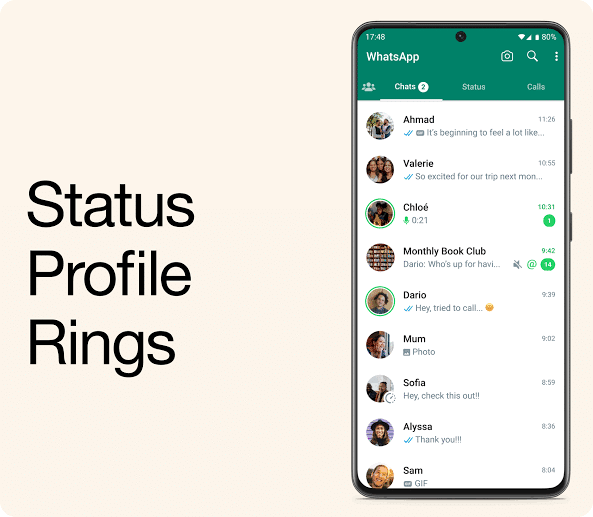
WhatsApp Status is a privacy-first sharing feature that adapts the disappearing-content format for a messaging app rather than a traditional social network.
Instead of posting to followers, you share updates with people in your phone’s contact list. Every Status update, whether it’s a photo, video, or text, disappears after 24 hours. Because Status is protected by WhatsApp’s end-to-end encryption, neither WhatsApp nor anyone outside your selected audience can read or view what you’ve shared.
The audience model is where WhatsApp Status differs the most from Instagram Stories.
Rather than relying on followers, WhatsApp uses your saved contacts. You can choose from three privacy settings:
- My Contacts: Share with everyone in your contact list.
- My Contacts Except…: Exclude specific contacts from seeing your Status.
- Only Share With…: Create a custom list of people who can view your updates.
Every option works as either an allowlist or a blocklist based on individual contacts. There are no public profiles, hashtags, Explore pages, or discovery features. If someone doesn’t have access to your Status, they can’t stumble across it by accident.
WhatsApp Status supports several types of content, including:
- Text updates with colorful backgrounds
- Photos with captions, drawings, and stickers
- Videos up to approximately one minute long
Anyone who has permission to view your Status can reply directly. Unlike Instagram, those replies arrive as regular WhatsApp messages inside your existing chat thread instead of appearing in a separate notification feed.
You can also see exactly who viewed each Status update and in what order unless the viewer has disabled read receipts. The viewer list remains available throughout the 24-hour lifespan of the Status.
What Are Instagram Stories?
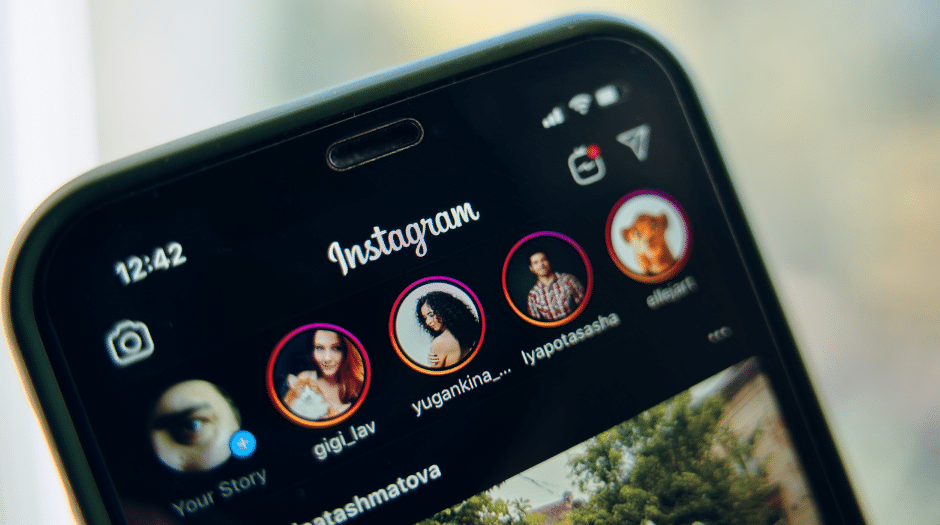
Instagram Stories follow a completely different model.
Rather than sharing with your phone contacts, Stories are designed around your follower list. By default, everyone who follows your account can see your Stories at the top of their Instagram feed. If your account is public, anyone visiting your profile can also view your active Stories, even if they don’t follow you.
Like WhatsApp Status, Instagram Stories disappear after 24 hours. The difference is that they don’t disappear completely.
Instagram automatically saves every Story to your private Stories Archive, allowing you to revisit them at any time. You can also move your favorite Stories into Highlights, which remain permanently displayed on your profile until you remove them.
Instagram gives you three primary ways to control who sees your Stories:
- Share with all followers.
- Share only with your Close Friends list.
- Hide Stories from selected followers using the Hide Story From setting.
Instagram also offers a much richer creative toolkit.
Stories support:
- Music from Instagram’s licensed music library
- Polls
- Quizzes
- Question stickers
- Countdown timers
- Location stickers
- Mention tags
- Link stickers
- GIFs
- “Add Yours” prompts
- Interactive stickers designed to encourage engagement
These interactive features are built to generate replies, reactions, and conversations that flow directly into your Instagram DMs.
Like WhatsApp, Instagram lets you see who viewed your Story but only during its active 24-hour window. After that, individual viewer information disappears, leaving only total view counts inside your archive.
WhatsApp Status vs Instagram Stories: Side-by-Side Comparison
While both features use the same 24-hour disappearing format, almost everything else about them is different.
| Feature | WhatsApp Status | Instagram Stories |
|---|---|---|
| Duration | 24 hours | 24 hours |
| Default audience | Saved WhatsApp contacts | Followers (plus profile visitors on public accounts) |
| Audience model | Contact-based | Follower-based |
| End-to-end encryption | Yes | No |
| Private audience option | Only Share With | Close Friends |
| Exclude specific people | My Contacts Except | Hide Story From |
| Discoverability outside your audience | None | Available on public accounts through profile visits, mentions, and other discovery features |
| Automatic archive | No | Yes |
| Permanent profile option | No | Yes, through Highlights |
| Maximum video length per Story/Status | Up to 60 seconds | Up to 60 seconds |
| Music support | No | Yes |
| Polls, quizzes, and interactive stickers | No | Yes |
| Link stickers | No | Yes |
| Viewer list availability | 24 hours | 24 hours (aggregate analytics remain afterward) |
| Replies appear as | Regular WhatsApp chat | Instagram DM |
At a glance, both features appear similar because they disappear after 24 hours. In practice, however, they’re built for entirely different audiences and serve very different goals. WhatsApp Status focuses on private sharing with people you already know, while Instagram Stories are designed for broader engagement, discovery, and audience building.
When Should You Use WhatsApp Status?

WhatsApp Status is the better choice when you’re sharing updates with people who already know you, and you want that content to stay within that circle.
The biggest advantage is privacy. Since Status uses the same end-to-end encryption as your WhatsApp chats, it’s the better option for sharing family photos, personal milestones, travel updates, or anything you wouldn’t want broadly discoverable. Your content isn’t designed to be surfaced to strangers or promoted through Instagram’s discovery features—it stays within the audience you’ve chosen.
It’s also a better fit when your goal is to start conversations instead of broadcasting to a wider audience.
For example, posting a Status that says, “Anyone free for coffee tomorrow?” naturally turns into a one-on-one WhatsApp conversation with anyone who replies. That’s a much more personal interaction than using an Instagram Story sticker that could generate dozens of replies from people you may never respond to.
WhatsApp Status also has a practical advantage in markets where WhatsApp is the dominant communication platform. In countries like India, much of Southeast Asia, and large parts of Latin America, your WhatsApp contact list is often far larger—and more relevant—than your Instagram follower count. In those cases, Status simply reaches more of the people you actually know.
When Should You Use Instagram Stories?

Instagram Stories are designed for a broader audience and for content that’s meant to generate engagement rather than simply keep friends updated.
If you’re building a personal brand, managing a business account, promoting products, or growing an online community, Stories offer tools that WhatsApp Status simply doesn’t have.
Interactive features such as polls, quizzes, question stickers, countdowns, and link stickers encourage viewers to participate instead of just watching. Those interactions create conversations, increase engagement, and can even drive traffic to websites or other content.
Instagram’s Stories Archive is another major advantage.
Unlike WhatsApp Status, which disappears completely after 24 hours, every Instagram Story is automatically archived for future reference. You can also organize your best Stories into Highlights, giving new profile visitors a curated collection of important moments long after the original Story has expired.
Stories also offer significantly greater reach.
On public accounts, mentions, location tags, and other discovery features make it possible for people outside your existing follower list to find your content. That potential for discovery is exactly why creators, businesses, influencers, and brands rely so heavily on Instagram Stories.
Should You Cross-Post to Both?
For many people, the best answer isn’t choosing one platform over the other; it’s using both strategically.
A vacation photo, concert clip, or birthday celebration can easily work on both WhatsApp Status and Instagram Stories because the audiences overlap without being identical.
Some of the people you message every day on WhatsApp may not follow you on Instagram. Likewise, many of your Instagram followers may only know you through a Reel or a shared post and aren’t part of your personal contact list.
The important part is deciding which updates should stay private.
Family announcements, personal milestones, and updates intended for close friends usually belong on WhatsApp Status, where your audience is defined by real relationships rather than follower counts.
Content that’s designed to reach new people, encourage interaction, build your profile, or support a business is generally better suited to Instagram Stories.
Rather than thinking of the two features as competitors, it’s often more useful to see them as serving different audiences with different goals.
Final Thoughts
Although WhatsApp Status and Instagram Stories share the same disappearing 24-hour format, they’re built for very different purposes.
WhatsApp Status is centered on privacy, personal relationships, and controlled sharing. It gives you complete control over who sees your updates, protects them with end-to-end encryption, and encourages conversations with people you already know.
Instagram Stories, on the other hand, focus on reach, creativity, and engagement. Features like interactive stickers, Highlights, archives, and discovery tools make them a much stronger choice for creators, businesses, and anyone trying to grow an audience.
The right platform ultimately depends on one simple question: Who do you want to see your content, and what do you want them to do after they’ve seen it?
If the answer is close friends, family, or trusted contacts, WhatsApp Status is usually the better fit. If your goal is visibility, engagement, or long-term content value, Instagram Stories are hard to beat.
Related articles worth reading: