Mojang released the Wilderness Bound drop on September 15, 2026 as Java Edition 26.3 and Bedrock Edition 26.50, followed by the Bedrock 26.52 hotfix on September 25, 2026. Cheats in Minecraft are simply commands you type into chat with a slash, and they work the same way you change your Minecraft game mode with /gamemode.
The catch is that many cheat lists online are out of date. Java 1.21.11 (December 9, 2025) renamed every game rule to snake_case, so /gamerule keepInventory true no longer works on Java. Mojang’s official Java 26.3 changelog also added new commands and changed several others. Every command below uses current syntax for Java 26.3 and Bedrock 26.52, with edition differences called out.
How to enable cheats in Minecraft
Commands only run in worlds with cheats switched on. The toggle sits in a different place on each edition.
Java Edition (new world):
- Click Singleplayer, then Create New World.
- Open the Game tab and set Allow Commands to ON.
Java Edition (existing world):
- Press Esc and click World Options…
- Set Allow Commands to ON and click Done.
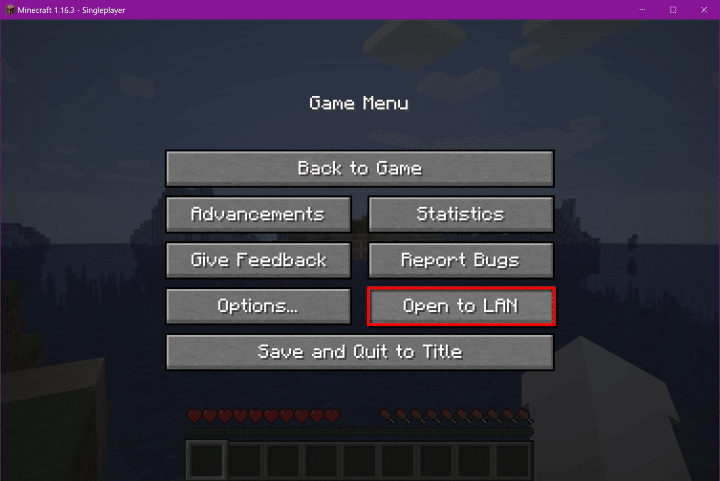
Java 26.3 replaced the old Open to LAN route with this World Options screen, so guides telling you to “open to LAN and allow cheats” are outdated.
Bedrock Edition (any non-Hardcore world):
- Pause the game and select Settings.
- Open the Game tab and turn on Activate Cheats.
Importantly, turning on cheats in Bedrock permanently disables achievements for that world, even if you switch them off later. Java advancements keep working. On multiplayer servers, most cheat commands need operator permission level 2.
Essential Minecraft cheat commands for Java and Bedrock
Press T (PC), tap the chat icon (mobile) or press right on the D-pad (console) to open chat. These are the commands players use most.
| Cheat | Java 26.3 | Bedrock 26.52 |
|---|---|---|
| Switch to Creative | /gamemode creative | /gamemode c |
| Make it daytime | /time set day | /time set day |
| Clear the weather | /weather clear | /weather clear |
| Teleport to coordinates | /tp @s 0 100 0 | /tp @s 0 100 0 |
| Teleport to a player | /tp @s Steve | /tp @s Steve |
| Give 64 diamonds | /give @s diamond 64 | /give @s diamond 64 |
| Sharpness V sword | /give @s diamond_sword[enchantments={sharpness:5}] | /enchant @s sharpness 5 (hold the sword) |
| Add 30 XP levels | /xp add @s 30 levels | /xp 30L @s |
| Permanent night vision | /effect give @s night_vision infinite 0 true | /effect @s night_vision 1000000 0 true |
| Remove all effects | /effect clear @s | /effect @s clear |
| Find a structure | /locate structure ancient_city | /locate structure ancient_city |
| Find a biome | /locate biome cherry_grove | /locate biome cherry_grove |
| Spawn a mob | /summon warden | /summon warden |
| Delete dropped items | /kill @e[type=item] | /kill @e[type=item] |
| Set your respawn point | /spawnpoint | /spawnpoint |
| Show the world seed | /seed | Not available (check World Settings) |
| Freeze the game | /tick freeze | Not available |
Java dropped number and letter shortcuts for game modes in 1.13, so /gamemode 1 only works on Bedrock. Bedrock also lacks the infinite effect keyword, so 1000000 seconds (about 277 hours) is its maximum duration.
Game rule cheats that change how your world plays
Game rules toggle world behavior, from keeping items on death to stopping phantoms. Java uses snake_case names since 1.21.11, while Bedrock keeps single lowercase words.
| Cheat | Java 26.3 | Bedrock 26.52 |
|---|---|---|
| Keep items on death | /gamerule keep_inventory true | /gamerule keepinventory true |
| Stop the day/night cycle | /gamerule advance_time false | /gamerule dodaylightcycle false |
| Stop weather changes | /gamerule advance_weather false | /gamerule doweathercycle false |
| No phantoms | /gamerule spawn_phantoms false | /gamerule doinsomnia false |
| Stop fire spreading | /gamerule fire_spread_radius_around_player 0 | /gamerule dofiretick false |
| Stop creepers breaking blocks | /gamerule mob_griefing false | /gamerule mobgriefing false |
| Skip the death screen | /gamerule immediate_respawn true | /gamerule doimmediaterespawn true |
| One player skips the night | /gamerule players_sleeping_percentage 1 | /gamerule playerssleepingpercentage 1 |
| Faster crop growth | /gamerule random_tick_speed 30 | /gamerule randomtickspeed 10 |
| Show coordinates on screen | Not a game rule (press F3) | /gamerule showcoordinates true |
Notably, Java removed doFireTick entirely rather than renaming it, and fire spread now works by radius around players. The default random tick speed is 3 on Java and 1 on Bedrock, so very high values can lag your world. The sleep value of 1 works on any server with 100 players or fewer.
To check a rule’s current value, type it without a value, such as /gamerule keep_inventory.
Target selectors to aim your commands
Selectors decide who or what a command hits. They work on both editions unless noted.
- @s: you
- @p: the nearest player
- @a: all players
- @r: a random player
- @e: all entities, including mobs and dropped items
- @n: the nearest entity (Java 1.21+, Bedrock 1.21.100+)
Filters narrow the target. On Java, @e[type=zombie,distance=..10] hits zombies within 10 blocks. Bedrock uses @e[type=zombie,r=10] for the same result.
New and changed commands in Java 26.2 and 26.3
Most of the 2026 command changes target map makers and data pack creators rather than survival players. Here are the changes that matter:
- /posteffect (26.3): applies post-processing shaders to players, with add, remove, clear and list options.
- /compute (26.3): evaluates number providers, useful for random values in data packs.
- /item fill and /item override (26.3): fill or replace inventory slots in one go.
- /execute if slots (26.3): counts filled slots on a block or entity.
- /swing (26.3): gains whack, stab and none animations plus a duration setting.
- /give (26.3): now throws an error when you request more than the item limit, instead of just printing a message.
- /publish and /unpublish (26.2): 26.2 added /unpublish to close a LAN world, and 26.3 removed the game mode argument from /publish.
If you copy older command block builds, note that items have used components such as [enchantments={sharpness:5}] since 1.20.5. The old curly-bracket NBT format no longer works on Java.
Signing off
The biggest trap for Minecraft cheats in 2026 is the Java game rule rename. If a command from an older guide returns an error, switching to the snake_case name usually fixes it. Bedrock syntax has barely changed, but its permanent achievement lock still makes it worth enabling cheats in a separate test world.
The next drop is already in testing through Java 26.4 snapshots and Bedrock Preview, headlined by the Ice Caves biome and Brittle Ice. Mojang plans a Q4 2026 release but hasn’t confirmed a date, so command changes in those snapshots may still shift before launch.
On Java 26.3, type /gamerule keep_inventory true. On Bedrock, type /gamerule keepinventory true. Both need cheats enabled.
Java 1.21.11 renamed all game rules to snake_case on December 9, 2025. The old camelCase names only work on Java 1.21.10 and earlier.
On Bedrock, yes. Activating cheats locks achievements in that world permanently. Java advancements are unaffected.
No. Bedrock shows the seed in the world’s Settings menu instead, while Java prints it with /seed.
Commands such as /tick, /seed and /posteffect only exist on Java. Bedrock has its own extras, such as the showcoordinates game rule.