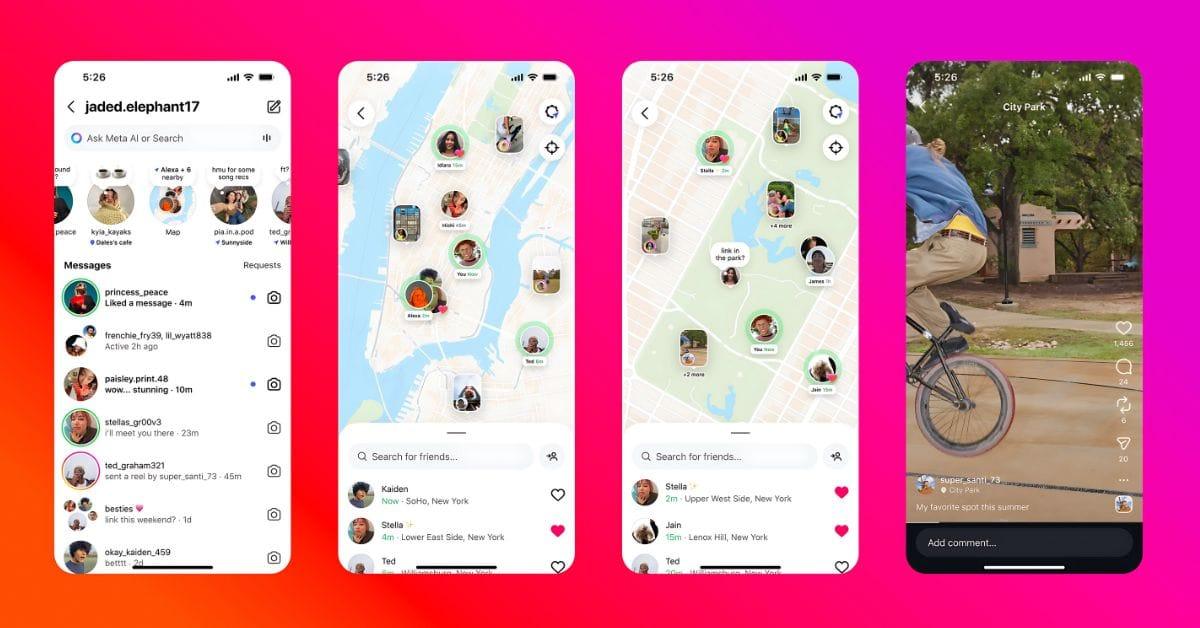
Instagram’s latest update adds a new Map feature inside your DMs that lets you share your live or last active location with selected friends. Unlike location tags in posts or stories, this tool can update your location as you use the app, making it more personal and, for some, more concerning.
Instagram says the feature only shares your last active location and needs your approval to turn on. Still, it is worth knowing how it works and what it shares. Below is a clear explanation of the Instagram Map feature and the exact steps to turn it off if you prefer to keep your location private.
What Is the Instagram Map Feature?
Traditionally, Instagram allowed users to tag locations on posts, reels, and stories. But the new Map feature takes it a step further. It lets you share your last active location with friends you choose.
If you enable it, the feature updates your location whenever you open the app or come back to it in the background, even if you are not actively posting. Your friends (or the audience you have chosen) can see where you are in near real time.
You can also check location-tagged content from people you follow, including photos, videos, stories, and even notes that include a location. This includes tagged content from people who are not sharing their location with you. In short, it is like a map where you can see where your friends have been and also find popular places they have shared.
Why the Feature Is Controversial?
While some might find this feature useful for meeting up with friends or checking out local events, privacy experts and even some U.S. senators have raised concerns.
The main issues include:
- Safety risks for vulnerable users: Real-time location sharing could make it easier for stalkers or abusers to track someone’s movements.
- Data collection for advertising: Even with Location Services disabled, Instagram can estimate your location through posts, connections, and device signals.
- Teen privacy worries: Although teens’ accounts are given extra controls, many parents worry about location exposure.
Some people have claimed that Instagram shared their location even though they never turned the feature on.
On August 7, Instagram head Adam Mosseri posted on the platform to deny these claims and explain that location sharing is not automatic.
Here is what he wrote in the post: Quick Friend Map clarification: your location will only be shared if you decide to share it, and if you do, it can only shared with a limited group of people you choose. To start, location sharing is completely off.
Take a look at the post below
How to Check If Instagram Map Is On?
The Instagram Map is only available on the iOS or Android app.
Here is how to check your current settings to identify if the feature is on:
- Open Instagram and go to your Messages (top-right corner of your Feed).
- Tap Map at the top of your inbox. (If you’re using the Map feature for the first time, close the “Introducing Instagram Map” pop-up by tapping Not Now, then tap Map at the top of your inbox.)
- Select Settings in the top right.
- Under Who can see your location, choose:
- No One – Completely disable location sharing.
- Friends, Close Friends, or Selected Friends – Limit visibility to trusted people.
- Tap Update to save your choice.
Note: You can only share your location with accounts you follow.
How to Turn Your Instagram Location Off
If you want to stop location sharing entirely, just follow these steps:
- Go to Messages → Map → Settings
- Select No One.
- Tap Update to confirm.
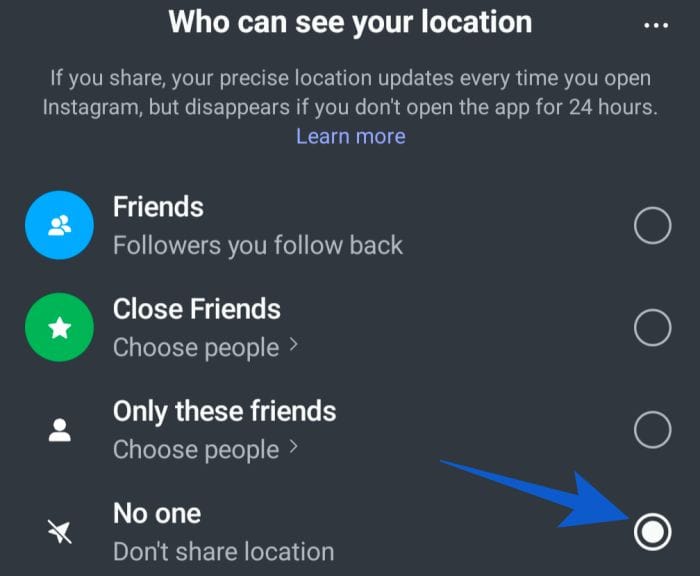
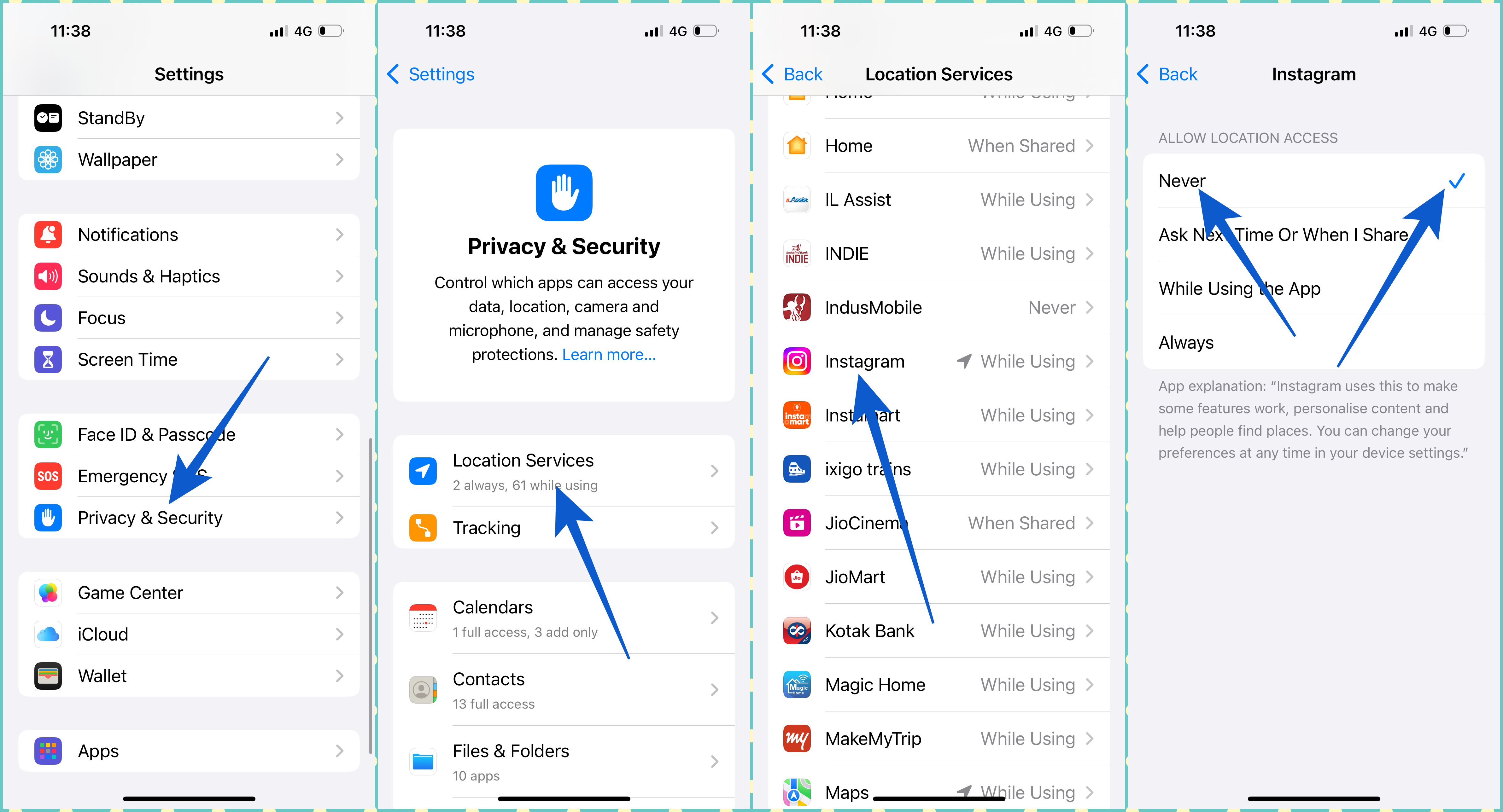
Here are some additional steps you can take to protect your privacy. Simply change your smartphone settings to disable location sharing on Instagram.
- iPhone: Go to Settings → Privacy & Security → Location Services → Instagram → Select Never.
- Android: Go to Settings → Location → App Permissions → Instagram → Select Don’t Allow.
Important note for parents: If you have a Teen Account set up, Meta will notify you if location sharing is enabled. You can control whether a teen can use this feature and see who they are sharing it with.
Extra Instagram Privacy Controls You Should Know
It is always a good idea to take extra measures for privacy control.
And guess what? Instagram lets you fine-tune your Map sharing.
Here are the things you can do:
Hide your location from specific accounts
- Messages → Map → Settings → Three dots (top right) → Hide from…
- Select accounts you want to block from seeing your location
- Tap Done to save
Hide certain places: You can set up to three places as “hidden,” meaning your location will not update if you are there.
Declining requests: Friends who share their location with you can request that you do the same. If you decline, they will not be notified.
What Else Shows on the Map
Even if you do not share your own location, you can still see the following things:
- Reels, posts, and stories from people you follow with a location tag (visible for 24 hours)
- Notes from people you mutually follow that include a location (visible for 24 hours)
How Long Does Instagram Keep Your Location?
If you stop using the app for 24 hours, your location will disappear from the Map. Once you return, it updates again unless you have turned it off.
My Take on Instagram’s Map Feature
As someone who has covered social media updates for years, I see Instagram’s Map as a double-edged sword.
- For event meetups, traveling with friends, or discovering new spots, it is fantastic.
- But if you value your privacy (or you are the type who does not want unexpected “Hey, I am nearby!” messages), turning it off is probably the safest move.
Much like sharing your location on Snapchat or WhatsApp, the key is knowing who you are sharing with and reviewing your settings regularly.
No. Instagram’s Map feature is off by default. You must turn it on and choose who can see your location, and it requires you to confirm twice before it is active.
When you open the Map, you can swipe up to see a list of friends who are sharing their location.
You might be seeing location-tagged posts, Reels, stories, or Notes, not their live location.
Meta adds extra controls for teen accounts, including parental notifications if location sharing is enabled. Still, it is best for parents to review settings regularly.
Yes, you can hide your location from specific accounts in the Map’s privacy settings.
Yes. Even without Location Services enabled, Instagram can estimate your location from your activity and connections to serve targeted ads.