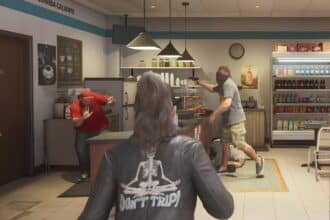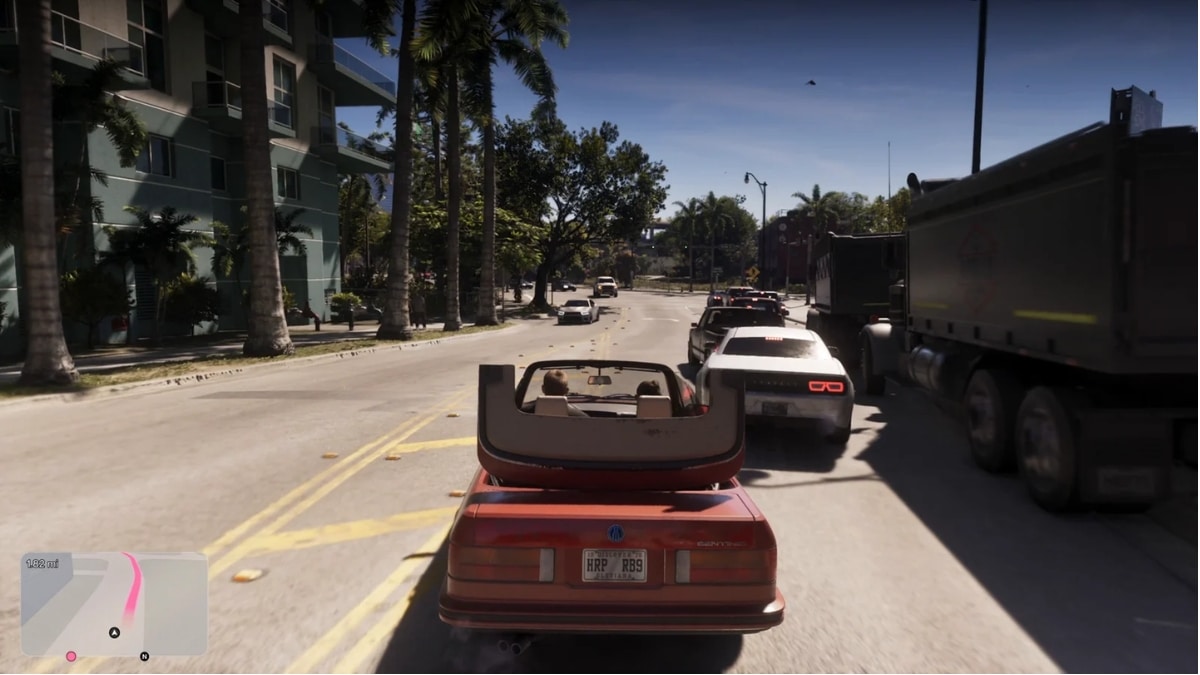
Rockstar gave fans their first proper look at the GTA 6 HUD on August 27, 2026, when Grand Theft Auto VI: An Extended Look premiered on Netflix and YouTube. The 27-minute video was captured on PS5. Alongside it, hands-on previews at Rockstar North explained how most of the meters and icons work.
The HUD matters more in GTA 6 than in GTA 5, because police no longer show up on the minimap. Instead, you work out what the cops know from the star states, the evidence icons and Focus. Below, you’ll find what every meter, star and icon means, along with how to respond to each one before the game launches on November 19, 2026.
GTA 6 HUD layout at a glance
The GTA 6 HUD is contextual. Meters, stars and prompts appear when they’re relevant and fade out when they’re not. During normal driving, you mostly see just the minimap and the distance to your destination.
| Screen area | What appears there |
|---|---|
| Top-left | Health, Stamina and Focus bars, plus Oxygen while you’re underwater |
| Top-right | Weapon icon, ammo count (loaded/reserve, such as 17/80), wanted stars, evidence icons |
| Bottom-left | Minimap drawn like a real GPS, with the route and distance |
| Bottom-center/right | Button prompts and contextual actions (for example, Scold, Pet and Study when you meet a dog) |
Notably, the status bars sit at the top-left instead of under the minimap, as they did in GTA 5. That keeps the minimap clear for navigation.
GTA 6 status meters explained
There are four status meters in the top-left corner. Each one has its own color and icon, so you can read them at a glance.
1. Health
- Icon: Pink bar with a heart
- What it does: Shows how much damage you can take before you go down
- What affects it: Gunfire, crashes and falls. Previews say gym workouts raise your health over time.
2. Stamina
- Icon: Cyan bar with a lightning bolt
- What it does: Powers sprinting, swimming, cycling and other physical activity
- What affects it: It drains during exertion and refills when you rest. Previews say cardio training improves it.
3. Focus
- Icon: Purple bar with an eye
- What it does: Slows time and highlights enemy weak points. Red markers mean a lethal shot, while yellow markers incapacitate the target. Focus also lets you target a vehicle’s engine block, fuel tank or tires, spot valuables during robberies, and see police through walls.
- What affects it: Using the ability drains the bar. Rockstar hasn’t confirmed how it refills.
Focus is the standout addition. It works much like Dead Eye in Red Dead Redemption 2. However, it’s also your main way of finding cops now that they’re missing from the minimap.
4. Oxygen
- Icon: Green gauge with a lungs icon, or an O2 label when you’re using scuba gear
- What it does: Tracks how long you can stay underwater
- What affects it: It drains while you’re submerged and refills when you surface.
Importantly, your daily habits affect these meters. GTA 6 co-studio head Rob Nelson said the game tracks sleep, and characters who aren’t well rested regenerate “certain attributes” more slowly. Rockstar hasn’t said exactly which meters this affects.
GTA 6 wanted stars: What each state means
The six-star wanted level returns, which means the military can get involved at the top end. Beyond the number of stars, their style tells you how much the police know.
| Star style | What it means |
|---|---|
| Solid white | Police can see you right now |
| Flashing | Police have lost sight of you |
| Solid red | You’re near the crime scene, but police don’t know your exact position |
| Hollow | Police have no description of you yet |
The footage also seems to show icons under the stars for the police units chasing you, such as officers, cars and helicopters. During a manhunt, the minimap appears to turn red to mark the search area. Police also respond only when an NPC reports a crime or an alarm goes off, so a quiet job may never trigger stars at all.
GTA 6 evidence icons and how to clear them
Evidence icons sit under the wanted stars, inside red circles. Each one shows a piece of evidence the police have on you. Unlike in GTA 5, simply breaking line of sight doesn’t clear them.
| Icon | What police know | How to counter it |
|---|---|---|
| CCTV camera | Security cameras recorded you | Destroy the footage or leave the area |
| Face | Your facial features | Wear a mask or change your facial hair |
| Two characters | Jason and Lucia were seen together | Split up |
| Clothes hanger | Your outfit | Change clothes |
| Gun | The weapon you used | Swap weapons or get rid of it |
| Car | Your getaway vehicle | Switch vehicles |
Every icon you clear makes you harder to identify. If you’re mid-chase and short on time, check things in this order:
- Star style first. Hollow or red stars mean police don’t have your position yet, so you have time to change your look.
- Vehicle icon next. A flagged car gives you away at every checkpoint, so swap it before anything else.
- Hanger and face icons last. Changing clothes or putting on a mask works best once you’re out of sight.
Money, Criminal Profile, and character icons
GTA 6 has three kinds of money, and the HUD tracks each one differently:
- Bank (BuckMe): Money in your BuckMe account is safe.
- Cash: Anything you carry is lost if you die or get arrested, so deposit it at an ATM.
- Stolen goods: Loot in duffel bags and stolen valuables have to be sold through a fence before you can spend them.
The equipment screen in the footage shows two dollar amounts stacked on top of each other ($15,150 and $700). These most likely show your bank balance and the cash you’re carrying.
The Criminal Profile tracks what kind of criminal you are, not whether you’re good or bad. Its states are Professional, Aggressive, Violent and Psycho. A fifth state, Shattered, cracks the meter so it can never change again. Jason and Lucia each have their own profile, and a small devil icon in the footage appears to show it on screen. You can also turn off Criminal Profile notifications.
Finally, a square showing portraits of Jason and Lucia appears when you switch characters. Their relationship moves through different states rather than a visible romance meter, and how it develops shapes the story and the ending.
How the GTA 6 HUD compares to GTA 5 and RDR2
GTA 6 borrows ideas from both of Rockstar’s previous games but works differently from each. Here’s how the key elements stack up:
| Element | GTA 5 | Red Dead Redemption 2 | GTA 6 |
|---|---|---|---|
| Health and stamina | Bars under the minimap | Cores around the minimap | Bars at the top-left |
| Special ability | Yellow bar, different for each character | Dead Eye | Focus (purple bar) |
| Police on the minimap | Yes, with vision cones | No stars; bounty system | No; you find them with Focus |
| Maximum wanted level | 5 stars | Bounty amount | 6 stars |
| Evidence tracking | None | Witnesses, masks | Six evidence icons |
| Reputation | None | Honor meter | Criminal Profile, one per character |
| Money | One wallet | One wallet | Bank, cash and stolen goods |
Overall, GTA 6 hides more information than GTA 5 did and makes you work for it, much like RDR2.
Wrapping up
The GTA 6 HUD is one of the cleanest Rockstar has made, but it also tells you less unless you go looking. Focus, the different star styles and the evidence icons replace the old minimap blips, so knowing them before launch should make your first chases easier. Positions and labels could still change before November 19, 2026, so check the final release before relying on every detail. In the meantime, the full GTA 6 weapons list and the Extended Look soundtrack are good places to keep exploring.